1. Pengenalan
Terima kasih kerana membeliasing the XO F41 Mirror Bluetooth Speaker. This device combines a digital clock display with a portable Bluetooth speaker, offering multiple playback options including Bluetooth, TF card, and FM radio. Please read this manual carefully before use to ensure proper operation and to maximize your experience with the product.

Image 1.1: The XO F41 Mirror Bluetooth Speaker in use, showing its digital clock display.
2. Ciri-ciri Produk
- Kesambungan Bluetooth 5.3: For stable and efficient wireless audio streaming.
- Mirror Display: Clear digital time display with adjustable brightness.
- Berbilang Mod Main Semula: Supports Bluetooth, TF card, and FM radio.
- Mikrofon Bersepadu: Untuk panggilan bebas tangan.
- Masa Main Semula Lama: Up to 8 hours at 50% volume, 5 hours at 100% volume.
- Reka bentuk padat dan mudah alih: Easy to carry and place anywhere.
- Pengecasan USB-C: Port pengecasan moden dan mudah.
3. Kandungan Pakej
Sila semak pakej untuk item berikut:
- XO F41 Mirror Bluetooth Speaker
- Kabel Pengecas USB-C
- Manual Pengguna

Image 3.1: The XO F41 Mirror Bluetooth Speaker packaging.
4. Reka Letak Peranti dan Kawalan
Biasakan diri anda dengan butang dan port pembesar suara:
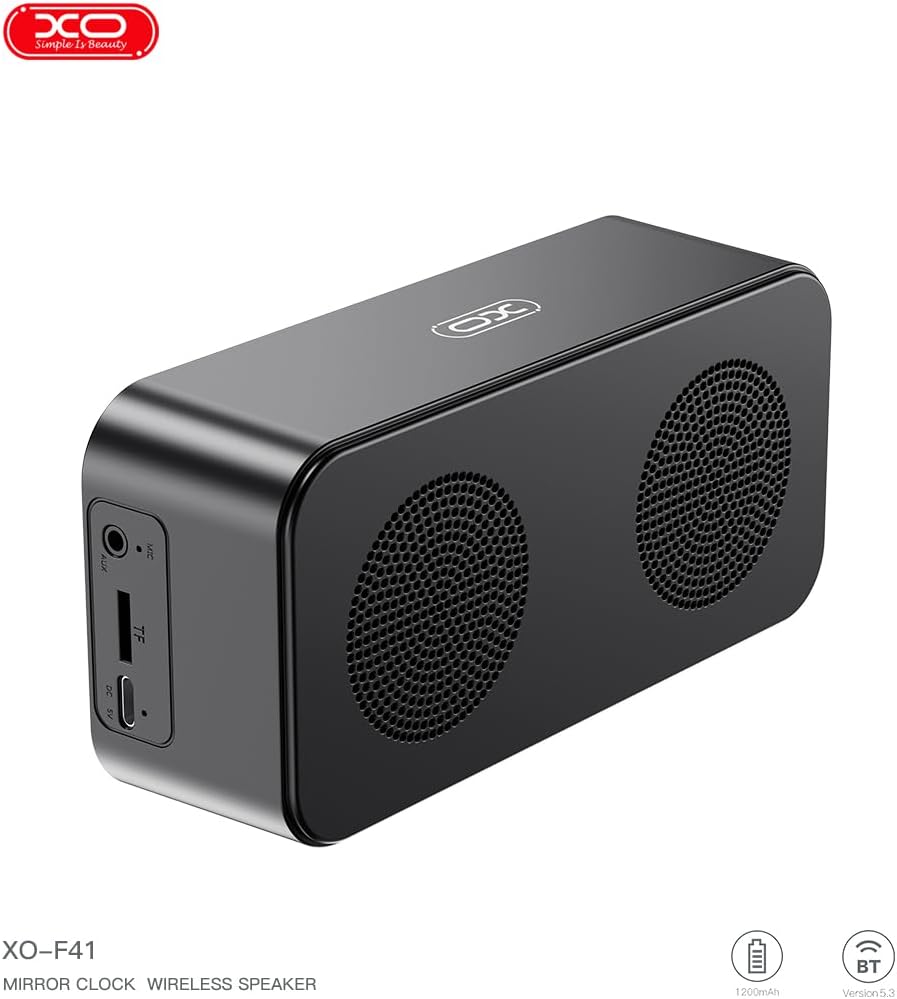
Imej 4.1: Sisi view of the XO F41 with ports labeled.
- Butang Kuasa: Tekan dan tahan untuk hidup/mati. Tekan sebentar untuk menukar mod.
- Butang Main/Jeda: Mainkan atau jeda audio. Jawab/tamatkan panggilan.
- Jilid Naik / Laluan Seterusnya: Tekan pendek untuk kelantangan, tekan lama untuk trek seterusnya.
- Turunkan Volume / Lagu Sebelumnya: Tekan pendek untuk kelantangan turun, tekan lama untuk trek sebelumnya.
- Port USB-C: Untuk mengecas peranti.
- Slot Kad TF: Insert a TF (MicroSD) card for local music playback.
- Pelabuhan AUX: Untuk input audio berwayar.
5. Persediaan
5.1 Mengecas Speaker
- Sambungkan kabel USB-C yang disediakan ke port pengecasan pada pembesar suara.
- Sambungkan hujung kabel yang satu lagi ke penyesuai kuasa USB (tidak disertakan) atau port USB komputer.
- The charging indicator will illuminate. It takes approximately 3 hours for a full charge.
- The indicator will turn off or change color once fully charged.
5.2 Hidupkan/Mati Kuasa
- Untuk Menghidupkan: Press and hold the Power button for approximately 3 seconds. You will hear an audible prompt.
- Untuk Mematikan: Press and hold the Power button for approximately 3 seconds. You will hear an audible prompt.
6. Arahan Operasi
6.1 Berpasangan Bluetooth
- Ensure the speaker is powered on and in Bluetooth mode. If not, short press the Power button to cycle through modes until "BT" or a Bluetooth icon appears on the display.
- Pada peranti mudah alih anda, dayakan Bluetooth dan cari peranti yang tersedia.
- Select "XO-F41" from the list of devices.
- Setelah dipasangkan, pembesar suara akan menunjukkan sambungan yang berjaya dan anda boleh mula memainkan audio daripada peranti anda.
6.2 Mod Kad TF
- Masukkan kad TF (MicroSD) dengan audio MP3 files ke dalam slot kad TF.
- The speaker will automatically switch to TF card mode and begin playing music. If not, short press the Power button to cycle to TF card mode.
- Use the Volume Up/Down buttons for track navigation and the Play/Pause button for playback control.
Mod Radio 6.3 FM
- Short press the Power button to switch to FM radio mode. The display will show the FM frequency.
- Long press the Play/Pause button to automatically scan and save available FM stations.
- Short press the Volume Up/Down buttons to switch between saved stations.
6.4 Clock and Alarm Settings
The XO F41 features a digital clock display. Specific instructions for setting the time and alarm are typically found in the detailed manual included with the product. Generally, a dedicated 'M' (Mode) or 'Set' button is used to enter time/alarm setting mode, and volume buttons are used to adjust values.

Image 6.1: The XO F41 speaker functioning as a bedside clock.
6.5 Melaraskan Kecerahan Paparan
The display brightness is adjustable. Look for a dedicated button (often labeled with a sun icon or similar) or a combination of button presses (e.g., double-pressing the Power button) to cycle through brightness levels. Refer to the included quick start guide for exact steps.
7. Penyelenggaraan
- Pembersihan: Gunakan kain lembut dan kering untuk membersihkan permukaan pembesar suara. Jangan gunakan pembersih atau pelarut yang melelas.
- Storan: Simpan pembesar suara di tempat yang sejuk dan kering jauh dari cahaya matahari langsung dan suhu yang melampau apabila tidak digunakan untuk tempoh yang lama.
- Tahan Air: Peranti ini tidak kalis air. Elakkan pendedahan kepada air atau kelembapan berlebihan.
- Penjagaan Bateri: Untuk memanjangkan hayat bateri, elakkan daripada menyahcas sepenuhnya bateri dengan kerap. Cas peranti dengan kerap, walaupun tidak digunakan secara berterusan.
8. Penyelesaian masalah
| Masalah | Kemungkinan Punca | Penyelesaian |
|---|---|---|
| Speaker tidak dihidupkan. | Bateri lemah. | Cas pembesar suara selama sekurang-kurangnya 30 minit. |
| Tidak boleh berpasangan melalui Bluetooth. | Speaker not in pairing mode; Bluetooth disabled on device; too far from device. | Ensure speaker is in Bluetooth mode. Enable Bluetooth on your device. Move speaker closer to your device (within 10 meters). |
| Tiada bunyi daripada kad TF. | TF card not inserted correctly; unsupported file format; no audio files on card. | Masukkan semula kad TF. Pastikan files are in MP3 format. Verify audio files are present on the card. |
| Penerimaan radio FM yang lemah. | Isyarat lemah; gangguan persekitaran. | Move the speaker to a different location. Re-scan for stations. |
9. Spesifikasi
| Ciri | Perincian |
|---|---|
| Nombor Model | XO-F41 |
| Versi Bluetooth | Bluetooth V5.3 |
| Kekerapan Bluetooth | 2.402GHz-2.480GHz |
| Kapasiti Bateri | 1200mAh |
| Input Pengecasan | USB-C, DC5V/0.5A |
| Masa Mengecas | Lebih kurang 3 jam |
| Masa Main | 8H (50% volume); 5H (100% volume) |
| Jarak Berkesan | Kurang daripada 10 meter |
| Kuasa Maksimum | 5W |
| Unit Pembesar Suara | 52mm |
| Nisbah Isyarat-ke-Bunyi | >80dB |
| Dimensi Produk | 15 x 3.81 x 11 sm (lebih kurang 150 x 45 x 72 mm) |
| Berat Produk | 320 g (approx. 0.28 kg) |
| bahan | plastik |
| Ciri Khas | Kecerahan Boleh Laras |

Image 9.1: Detailed product parameters.
10. Maklumat Waranti
The XO F41 Mirror Bluetooth Speaker comes with a standard manufacturer's warranty. Please refer to the warranty card included in your package for specific terms, conditions, and duration. Keep your purchase receipt as proof of purchase for any warranty claims.
11. Sokongan Pelanggan
For further assistance, technical support, or inquiries regarding your XO F41 Mirror Bluetooth Speaker, please contact the retailer or manufacturer's customer service department. Contact details are typically provided on the product packaging or the official brand webtapak.