pengenalan
This manual provides detailed instructions for the 4smarts Magnetic M.2 2230 NVMe SSD Enclosure 3C. This device is designed to expand storage and enhance connectivity for various devices, including smartphones, tablets, and laptops. It features a magnetic attachment, integrated kickstand, multiple USB-C ports for data transfer and power delivery, and compatibility with M.2 2230 NVMe SSDs.
Kandungan Pakej
Sahkan bahawa semua item yang disenaraikan di bawah disertakan dalam pakej anda:
- 1x Magnetic SSD enclosure
- 1x Magnetic ring (for non-MagSafe devices)
- 2x Screwdrivers (Torx and Slotted)
- 1x USB-C ribbon cable (13 cm)
- 1x Cable ring holder
- 2x Thermal pads
- 1x Beg pelindung
- 1x Manual pengguna

Rajah 1: Package Contents. This image displays all components included with the 4smarts Magnetic M.2 2230 NVMe SSD Enclosure, laid out clearly for identification.
Arahan Persediaan
1. SSD Installation
- Unscrew the Backplate: Use the included Torx screwdriver to remove the single screw on the back of the enclosure. Carefully remove the backplate.
- Insert M.2 2230 SSD: Locate the M.2 socket inside the enclosure. Gently insert your M.2 2230 NVMe SSD (B+M Key or M-Key) into the socket at an angle. Ensure it is fully seated.
- Selamatkan SSD: Use the included slotted screwdriver to remove the post, then place it over the end of the SSD and screw it back into place to secure the SSD.
- Sapukan Pad Terma: Place one of the thermal pads onto the top surface of the installed SSD. This aids in heat dissipation.
- Tutup Kandang: Reattach the backplate and secure it with the Torx screw.

Rajah 2: SSD Installation Steps. This diagram illustrates the process of installing an M.2 2230 NVMe SSD into the 4smarts enclosure, from opening to securing the drive.
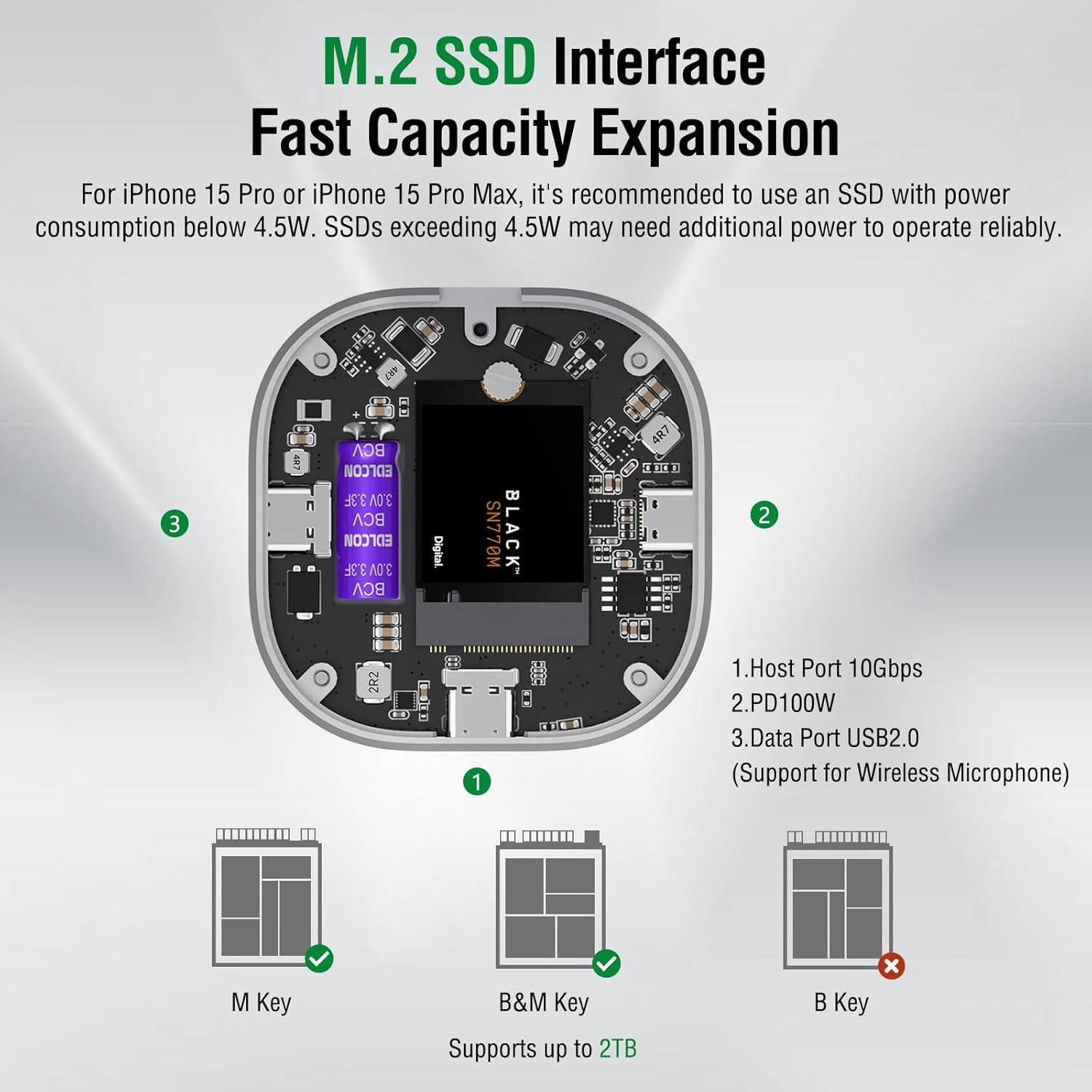
Rajah 3: M.2 SSD Interface and Port Layout. This image provides an internal view of the enclosure, highlighting the M.2 SSD slot and the functions of the three USB-C ports, along with compatible M.2 key types (M Key, B+M Key).
2. SSD Formatting
Before first use, the newly installed SSD must be formatted. For optimal performance and cross-platform compatibility (especially with iOS, Android, Windows, macOS, iPadOS, and ChromeOS), it is recommended to format the SSD as exFAT.
- Connect the enclosure to a computer using the provided USB-C cable.
- Access your operating system's disk management utility (e.g., Disk Management on Windows, Disk Utility on macOS).
- Initialize the drive if prompted.
- Create a new partition and format it using the exFAT file sistem.
3. Attaching to Devices
The enclosure features a strong magnetic attachment for MagSafe-compatible devices. For non-MagSafe devices, use the included magnetic ring by adhering it to the back of your device or case.
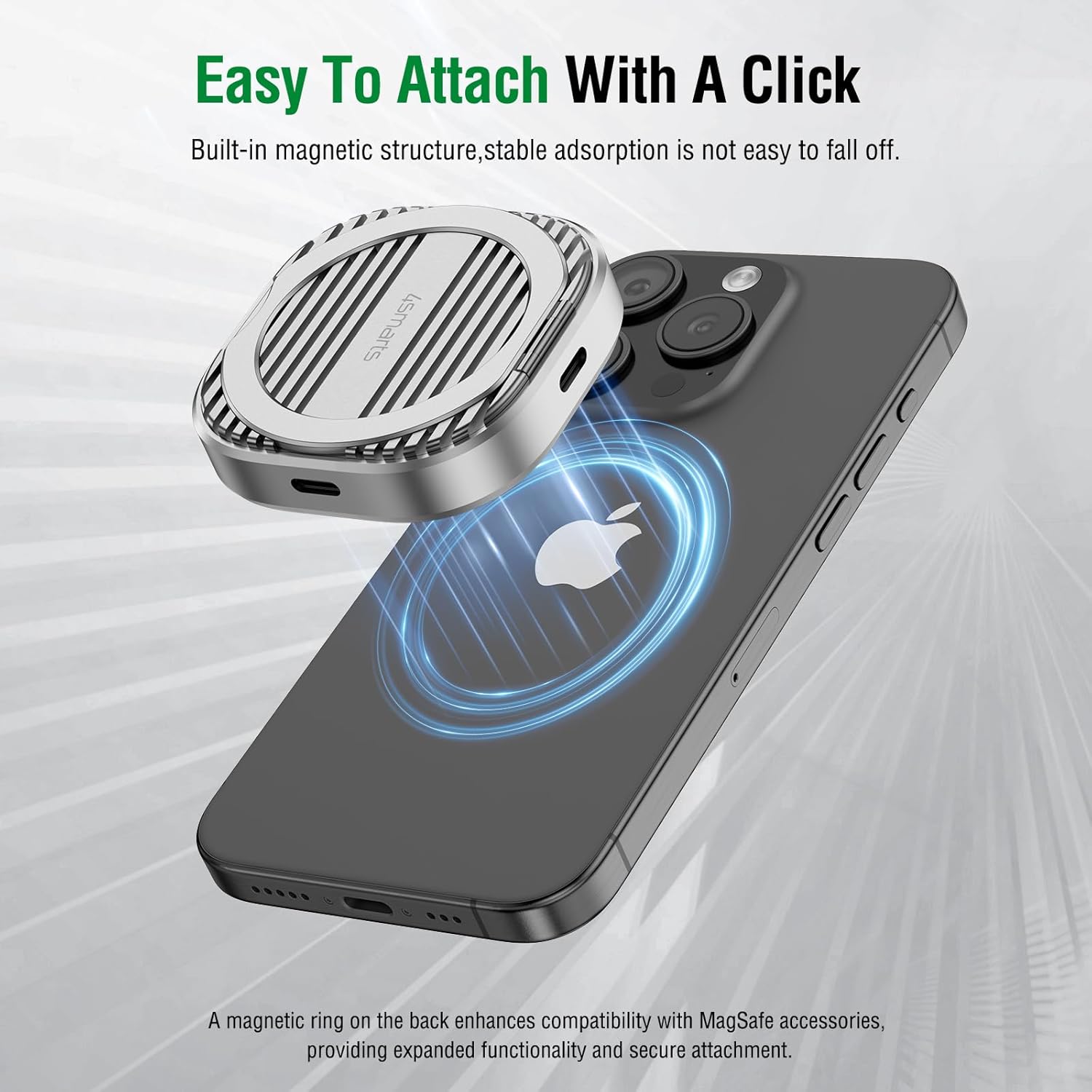
Rajah 4: Magnetic Attachment. This image demonstrates how the enclosure magnetically attaches to a compatible smartphone, highlighting its MagSafe compatibility.
Operasi
1. Data Transfer and PD Charging
The enclosure is equipped with three USB-C ports:
- C1 Port (Host Port): Supports USB-C 3.2 Gen 2 for high-speed data transfer up to 10Gbps. Connect this port to your host device (smartphone, tablet, laptop) for primary data access.
- C2 Port (Data Port): Provides USB-C 2.0 connectivity, suitable for lower-bandwidth peripherals such as wireless microphones.
- C3 Port (PD Port): Dedicated to 100W Power Delivery (PD) charging. Connect a PD charger to this port to provide power to the enclosure and connected devices, ensuring stable operation, especially with high-capacity SSDs or power-intensive tasks.

Rajah 5: High-Speed Data Transfer and Power Delivery. This image illustrates the enclosure connected to a laptop, demonstrating its capability for 10Gbps data transfer and 100W Power Delivery.
2. ProRes Video Recording (for iPhones)
For iPhone 15 Pro/Pro Max and newer models, the enclosure allows direct recording of 4K ProRes videos to the external SSD, bypassing internal storage limitations. This is ideal for professional videography.

Rajah 6: ProRes Video Recording. This image depicts an iPhone recording high-quality ProRes video directly to the external SSD enclosure, showcasing its utility for content creators.
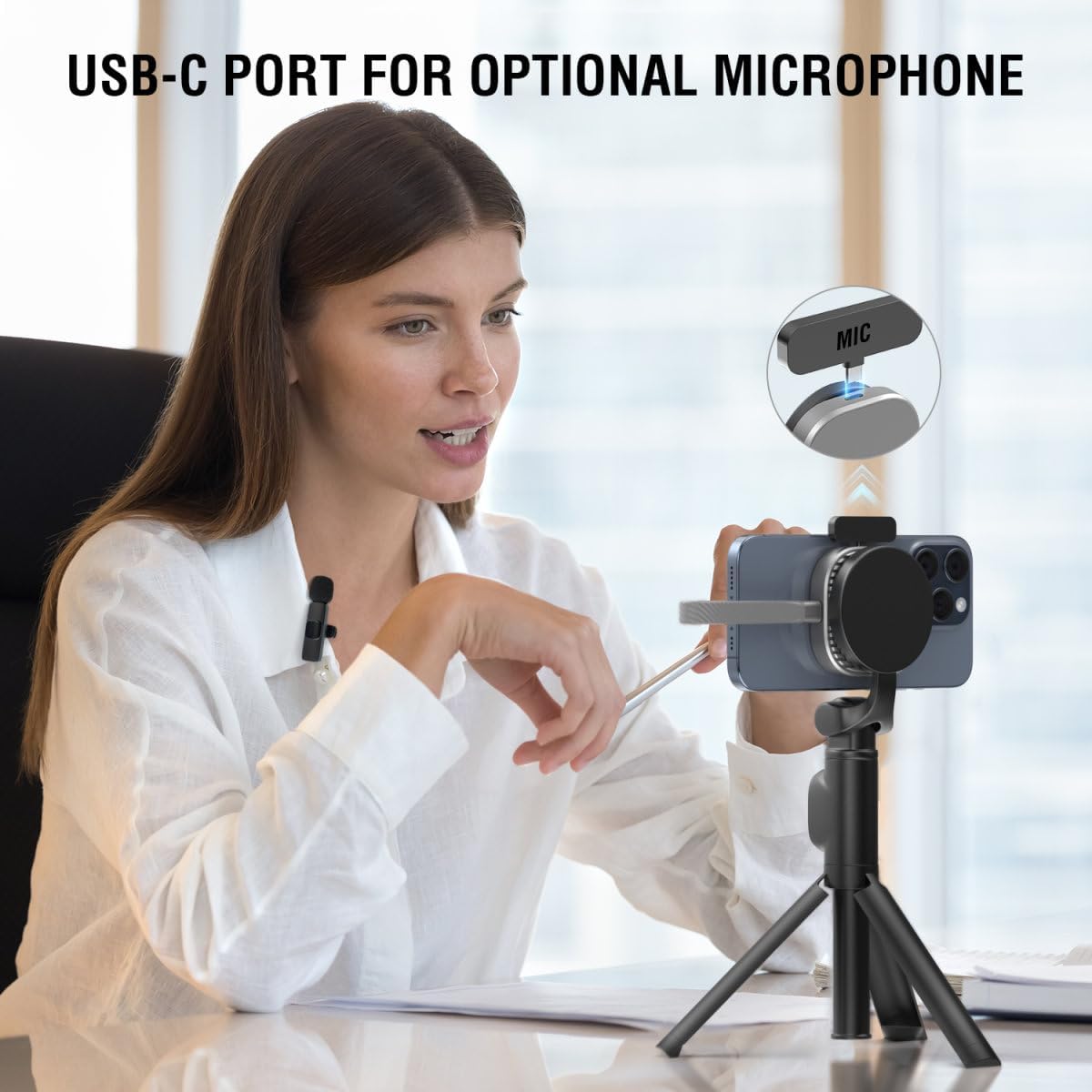
Rajah 7: USB-C 2.0 Port for Peripherals. This image illustrates the use of the USB-C 2.0 port for connecting an external microphone, enhancing audio recording capabilities.
3. Integrated Kickstand
The built-in kickstand provides adjustable viewing angles for various activities such as media consumption, video calls, or presentations. It can be used in both portrait and landscape orientations.

Rajah 8: Integrated Kickstand Functionality. This image displays the enclosure's kickstand in use, providing stable support for a smartphone during video calls, media viewing, and gaming.
4. Keserasian Sejagat
The 4smarts SSD Enclosure is compatible with a wide range of operating systems and devices, including:
- Sistem Operasi: Android, iOS, Windows, macOS, iPadOS, ChromeOS.
- Peranti: Smartphones (e.g., iPhone 15/16 Pro/Pro Max), tablets (e.g., iPad), laptops (e.g., MacBook), desktop computers, Steam Deck, ROG Ally.

Rajah 9: Versatile Connectivity. This image shows the enclosure connected to an iPhone, illustrating its magnetic attachment and multiple port usage for various accessories.
Penyelenggaraan
- Pembersihan: Use a soft, dry cloth to clean the exterior of the enclosure. Avoid liquid cleaners or abrasive materials.
- Pelesapan Haba: Aluminium casing is designed for efficient heat dissipation. Ensure proper airflow around the device during extended use, especially when performing high-speed data transfers or charging.
- Storan: When not in use, store the enclosure in the provided protective pouch to prevent scratches and damage.
Menyelesaikan masalah
- SSD Tidak Dikesan:
- Ensure the M.2 2230 NVMe SSD is correctly installed and secured within the enclosure.
- Verify that the SSD is properly formatted (recommended exFAT).
- Try connecting the enclosure to a different USB-C port or device.
- Unstable Performance / Disconnects (especially with iPhones):
- For iPhone 15 Pro/Pro Max or similar models, SSDs with power consumption exceeding 4.5W may require additional power. Connect a PD charger (up to 100W) to the dedicated C3 PD port to ensure stable operation, particularly with 1TB or 2TB SSDs.
- Ensure the USB-C cable is securely connected at both ends.
- Kelajuan Pemindahan Data Perlahan:
- Ensure you are using the C1 Host Port for data transfer, which supports USB 3.2 Gen 2 (10Gbps). The C2 port is USB 2.0 (480Mbps) and is not intended for high-speed data.
- Verify that your host device's USB-C port supports USB 3.2 Gen 2 speeds.
- The actual speed may vary depending on the SSD's performance and the host device's capabilities.
- Isu-isu Pelekatan Magnetik:
- Ensure your device is MagSafe compatible. If not, use the included magnetic ring for secure attachment.
- Check for any obstructions or thick cases that might interfere with the magnetic connection.
Spesifikasi
| Nombor Model | 4S541311 |
| bahan | aluminium |
| Compatible SSD Type | M.2 2230 NVMe SSD (B+M Key / M-Key) |
| Kapasiti Storan Maks | Sehingga 2TB |
| Data Transfer Rate (C1 Port) | USB 3.2 Gen 2, 10Gbps |
| Data Port (C2 Port) | USB 2.0 |
| Power Delivery (C3 Port) | Up to 100W PD |
| Peranti Serasi | Smartphones, Tablets, Laptops, Desktop, Steam Deck, ROG Ally (Android, iOS, Windows, macOS, iPadOS, ChromeOS) |
| Dimensi | 1.9"L x 0.67"W x 2"H (approx. 48.3mm x 17mm x 50.8mm) |
| Berat Barang | 3.17 auns (lebih kurang 90 gram) |
Waranti dan Sokongan
For warranty information and technical support, please refer to the official 4smarts webtapak atau hubungi perkhidmatan pelanggan mereka secara langsung. Simpan resit pembelian anda untuk tuntutan waranti.


