1. Pengenalan
The LOFREE Flow Lite 84 Keys Low Profile Mechanical Keyboard is a versatile and compact keyboard designed for enhanced typing comfort and productivity. Featuring multi-mode connectivity (2.4G wireless, Bluetooth, and wired USB-C), hot-swappable switches, and PBT double-shot keycaps, it offers a premium typing experience for both Windows and Mac users. This manual provides detailed instructions for setup, operation, maintenance, and troubleshooting to help you get the most out of your new keyboard.
2. Ciri-ciri Utama
- Affordable Low-Profile Papan Kekunci Mekanikal: The Flow Lite is engineered for cost-efficiency while maintaining a premium feel. Its ABS body with a textured surface ensures a comfortable touch.
- Rendah-Profile Design for Wrist Comfort: Designed with a lower front height than previous models, the Flow Lite84 promotes a more natural wrist position, reducing strain during extended typing sessions.
- Suis Linear POM Penuh Spectre: Equipped with new Lofree and Kailh low-profile full POM switches, these linear switches feature a reduced operating force of 40gf (from 50gf), minimizing finger joint fatigue and providing a softer touch.
- PBT Double Shot Keycaps: For durable and sharp characters, the keyboard features PBT keycaps with a comfortable matte texture. The two-tone design incorporates PC for backlighting, ensuring optimal typing and visibility.
- Gasket Design for Soft & Cushioned Feel: The upgraded Gasket Mount includes a sound-dampening layer, enhancing each keystroke with a richer, more satisfying tone and accommodating various typing styles.
- Flexible 3-Mode Connectivity: Seamlessly switch between 2.4GHz WiFi, Bluetooth, and wired (Type-C) connections. Compatible with iOS and Windows, laptops, and desktops.
- Kadar Undian 1000Hz: Experience fast and responsive performance, both wired and wirelessly, ideal for high-performance tasks.
- Konfigurator Lofree: Customize every key function to your preference using the new Lofree Key Mapper software (Windows only).
- Kelantangan Kickstand dan Roller Boleh Laras Terbina dalam: The integrated kickstand offers convenience without extra accessories. The aluminum volume wheel provides intuitive audio control.
- Hayat Bateri yang Luar Biasa: A built-in 2000mAh lithium battery provides up to 80 hours of working time (with all lights off) on a single charge, fully charging in approximately 3 hours via USB-C.
3. Panduan Persediaan
3.1 Menyahkotak dan Komponen
Upon opening your LOFREE Flow Lite keyboard package, you will find the following components:
- LOFREE Flow Lite 84 Keys Mechanical Keyboard
- Kabel USB-C ke USB-A
- Penerima USB 2.4GHz (disimpan dalam petak belakang papan kekunci)
- Manual Pengguna dan Kad Waranti
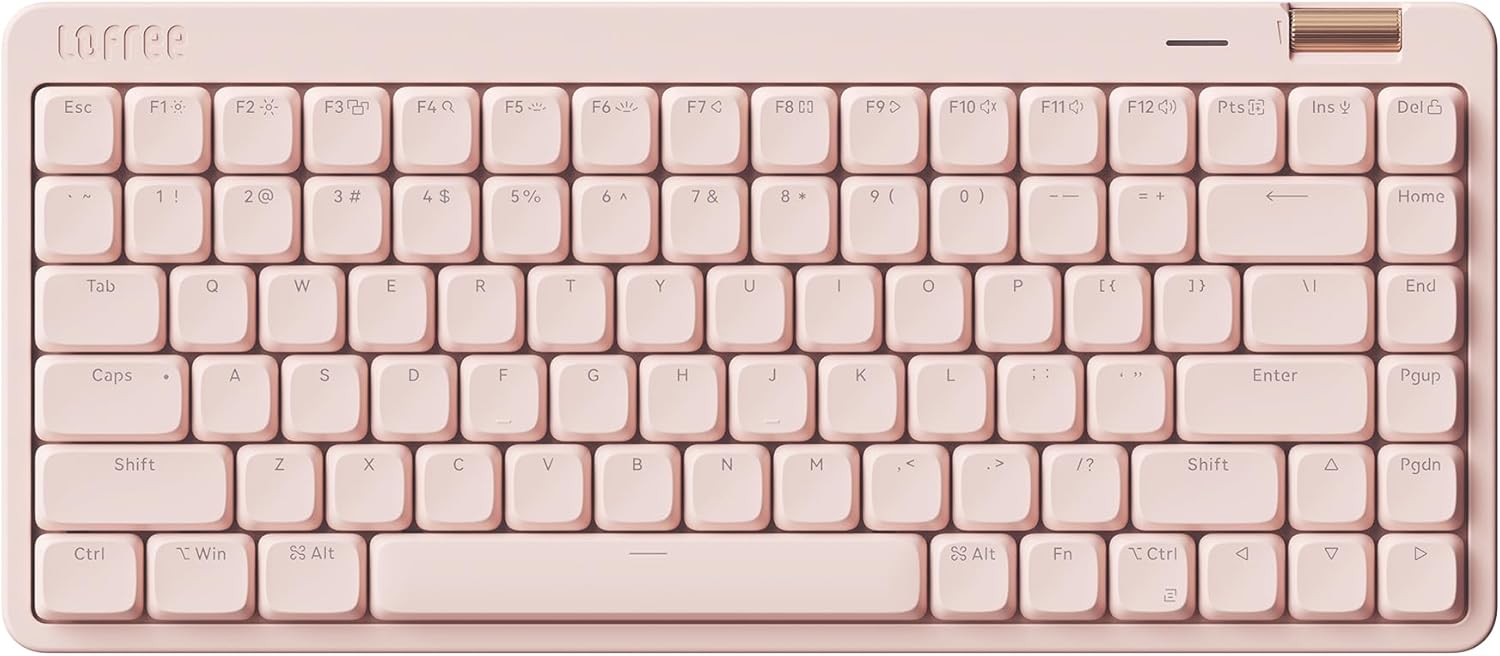
Image: The LOFREE Flow Lite 84 Keys Low Profile Mechanical Keyboard in Flamingo color.

Image: Visual representation of the keyboard's three connection modes: Bluetooth, 2.4G Wireless, and USB-C Wired.
3.2 Sambungan Berwayar
To connect your keyboard via USB-C cable:
- Cari port USB-C pada papan kekunci (biasanya di tepi atas).
- Sambungkan satu hujung kabel USB-C yang disediakan pada papan kekunci.
- Sambungkan hujung kabel yang lain ke port USB-A yang tersedia pada komputer anda.
- The keyboard will automatically be recognized and powered.
3.3 Sambungan Wayarles 2.4GHz
For a stable and fast wireless connection:
- Retrieve the 2.4GHz USB receiver from its magnetic storage slot on the back of the keyboard.
- Pasangkan penerima USB ke port USB-A yang tersedia pada komputer anda.
- Locate the toggle switch on the side of the keyboard. Slide it to the '2.4G' position (indicated by a wireless icon).
- Papan kekunci harus bersambung secara automatik ke penerima.
3.4 Sambungan Bluetooth
Untuk menyambung melalui Bluetooth:
- Locate the toggle switch on the side of the keyboard. Slide it to the 'Bluetooth' position (indicated by a Bluetooth icon).
- Pada komputer atau peranti anda, buka tetapan Bluetooth.
- The keyboard should appear as 'Flow Lite' or similar in the list of available devices. Select it to pair.
- If prompted, enter the pairing code displayed on your screen using the keyboard.
Video: Tamatview of the LOFREE FLOW LITE Mechanical Keyboard, demonstrating unboxing, features, and connectivity options.
4. Arahan Operasi
4.1 Penaipan Asas
The LOFREE Flow Lite keyboard functions as a standard QWERTY keyboard. Simply begin typing after successful connection.
4.2 Kawalan Kelantangan
The keyboard features a convenient roller wheel for volume adjustment:
- Roll the wheel forward to increase volume.
- Roll the wheel backward to decrease volume.
- Press the wheel down to mute/unmute audio.

Imej: Dari dekat view of the integrated volume roller wheel on the keyboard.
4.3 Kickstand Boleh Laras
The built-in kickstand allows you to adjust the keyboard's typing angle for ergonomic comfort:
- Flip out the kickstand on the back of the keyboard for a 6° angle.
- Fold the kickstand back in for a flatter 3° angle.

Image: A diagram illustrating the two available typing angles (3° and 6°) provided by the adjustable kickstand.
4.4 Key Remapping (Windows Only)
Utilize the Lofree Key Mapper software to customize key functions:
- Download the Lofree Key Mapper from the official LOFREE webtapak.
- Install and launch the software on your Windows computer.
- Connect the keyboard via wired USB-C connection to ensure proper software detection.
- Follow the on-screen instructions within the software to remap keys and configure settings.

Image: A screenshot of the Lofree Key Mapper software interface, used for customizing keyboard functions.
4.5 Suis Boleh Tukar Panas
The Flow Lite keyboard supports hot-swappable switches, allowing you to easily change them without soldering:
- Tarik penutup kekunci dari suis dengan lembut menggunakan penarik penutup kekunci.
- Use a switch puller to carefully remove the switch from the PCB.
- Sejajarkan pin suis baharu dengan lubang pada PCB.
- Tekan suis baharu pada tempatnya sehingga ia berbunyi klik.
- Gantikan penutup kekunci.

Imej: Gambar rajah menunjukkanasing the Specter Full POM Linear Switches, highlighting their lighter 40gf actuation force and hot-swappable design.
5. Penyelenggaraan
5.1 Pembersihan
- Bersihkan papan kekunci secara berkala dengan kain lembut dan kering.
- Untuk pembersihan yang lebih mendalam, tanggalkan penutup kekunci dan gunakan udara termampat untuk membersihkan serpihan dari antara suis.
- Elakkan menggunakan bahan kimia yang keras atau bahan yang melelas.
5.2 Penjagaan Bateri
The keyboard is equipped with a 2000mAh lithium battery. To prolong battery life:
- Charge the keyboard fully before first use (approx. 3 hours).
- Elakkan daripada mengalirkan bateri sepenuhnya dengan kerap.
- Simpan papan kekunci di tempat yang sejuk dan kering apabila tidak digunakan untuk tempoh yang lama.
6. Penyelesaian masalah
6.1 Isu Ketersambungan
- Keyboard not connecting (2.4GHz/Bluetooth): Ensure the toggle switch on the side of the keyboard is in the correct position. For Bluetooth, ensure your device's Bluetooth is enabled and the keyboard is in pairing mode.
- Sambungan terputus-putus: Check for interference from other wireless devices. Ensure the keyboard is within range of your device/receiver.
6.2 Key Responsiveness
- Kunci tidak bertindak balas: Check if the keyboard is powered on and connected. If using wireless, ensure sufficient battery charge. Try a wired connection to rule out wireless issues.
- Double typing or missed inputs: This could indicate a switch issue. As the keyboard is hot-swappable, consider replacing the affected switch.
6.3 Isu Lampu Latar
- Lampu latar tidak berfungsi: Ensure the keyboard is powered on. Check the battery level. Some backlight modes might consume more power.
- Pencahayaan yang tidak konsisten: This might be due to software settings. Use the Lofree Key Mapper (Windows) to adjust backlight effects and brightness.
7. Spesifikasi
| Ciri | Perincian |
|---|---|
| Dimensi Produk | 12.45 x 5.43 x 0.93 inci |
| Berat Barang | 1.83 paun |
| Pengeluar | LOFREE |
| Negara Asal | China |
| Nombor Model | OE921 |
| Bateri | 1 bateri Lithium Polimer diperlukan (termasuk) |
| Peranti Serasi | Komputer riba, PC |
| Teknologi Ketersambungan | Bluetooth, Wi-Fi (2.4GHz), USB-C |
| Penerangan Papan Kekunci | mekanikal |
| Ciri Khas | Kekunci Panas dan Kekunci Media, Penggelek Kelantangan, Lampu Belakang, Rendah-Profile Kunci, Boleh Tukar Panas |
| warna | Flamingo |
| Bilangan Kunci | 84 |
| Warna Pencahayaan Belakang | Warna Tunggal |
| Gaya | Lite |
| Apa yang ada dalam Kotak | Kabel USB |
8. Waranti & Sokongan
Your LOFREE Flow Lite keyboard is verified by Transparency, ensuring product authenticity. For any warranty claims, technical support, or further inquiries, please contact LOFREE Direct, the manufacturer. Refer to the warranty card included in your package for specific warranty terms and conditions.


