1. Pengenalan
Terima kasih kerana membeliasing the LONPOO LP-816 Compact Micro HiFi System. This manual provides essential information for the safe and efficient operation of your new audio system. Please read this manual thoroughly before use and retain it for future reference.
2. Arahan Keselamatan
- Sumber Kuasa: Pastikan bekalan kuasa voltage sepadan dengan penilaian yang ditunjukkan pada unit.
- Pengudaraan: Jangan sekat sebarang bukaan pengudaraan. Benarkan ruang yang mencukupi di sekeliling unit untuk aliran udara yang betul.
- Air dan Kelembapan: Jangan dedahkan unit kepada hujan, lembapan atau cecair menitis/percikan. Jangan letakkan objek yang diisi dengan cecair, seperti pasu, pada unit.
- haba: Jauhkan unit daripada sumber haba seperti radiator, daftar haba, dapur, atau radas lain (termasuk amppenghidup) yang menghasilkan haba.
- Pembersihan: Cabut plag unit daripada soket dinding sebelum membersihkan. Gunakan kain lembut dan kering sahaja. Jangan gunakan pembersih cecair atau pembersih aerosol.
- Servis: Jangan cuba servis produk ini sendiri. Rujuk semua perkhidmatan kepada pegawai perkhidmatan yang berkelayakan.
- penempatan: Letakkan unit pada permukaan yang stabil dan rata untuk mengelakkannya daripada jatuh.
3. Kandungan Pakej
Sahkan bahawa semua item yang disenaraikan di bawah disertakan dalam pakej anda:
- LONPOO LP-816 Micro HiFi System Unit
- Alat Kawalan Jauh
- Penyesuai Kuasa
- Antena FM
- Manual Pengguna (dokumen ini)
4. Produk Lebihview
4.1 Front and Rear Panel Controls
Familiarize yourself with the various buttons, ports, and indicators on your LP-816 system.
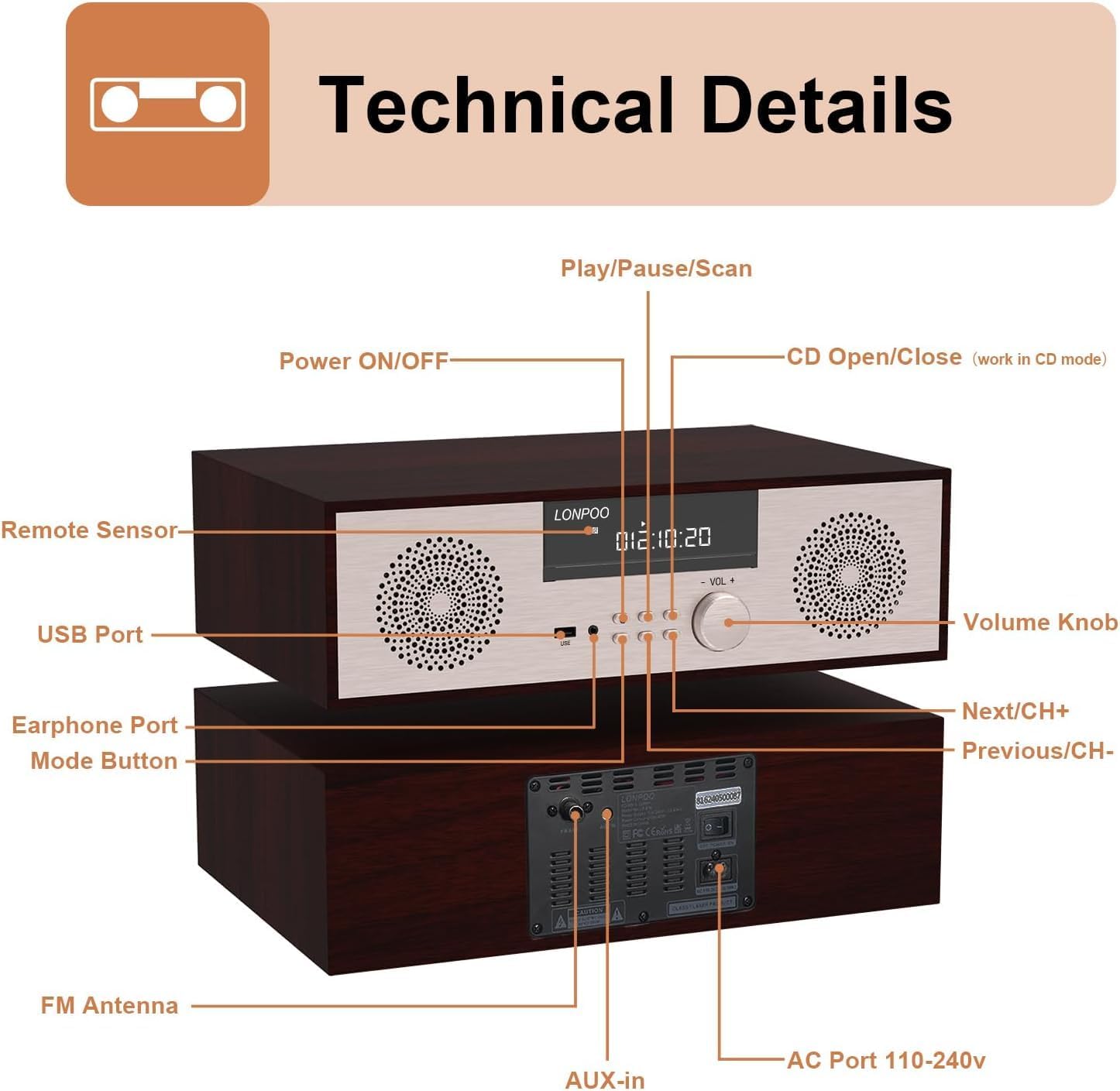
Imej: Depan dan belakang view of the LONPOO LP-816 system, highlighting the LCD display, control buttons, volume knob, USB port, earphone port, mode button, remote sensor, CD compartment, AUX-in, FM antenna port, and AC power port.
- HIDUP/MATI Kuasa: Menghidupkan atau mematikan unit.
- Paparan LCD: Shows current mode, track information, frequency, and time.
- Ruang CD: Untuk memasukkan CD audio.
- Port USB: Connect USB flash drives for audio playback.
- Pelabuhan fon telinga: Bicu 3.5mm untuk menyambungkan fon kepala.
- Butang Mod: Switches between CD, FM, Bluetooth, AUX, and USB modes.
- Play/Pause/Scan Button: Controls playback and initiates FM scan.
- Next/CH+ Button: Melangkau ke trek seterusnya atau pratetap FM.
- Previous/CH- Button: Melangkau ke trek sebelumnya atau pratetap FM.
- Tombol Kelantangan: Melaraskan kelantangan audio.
- Sensor Jauh: Menerima isyarat dari alat kawalan jauh.
- AUX masuk: Bicu 3.5mm untuk menyambungkan peranti audio luaran.
- Antena FM: Connects the included FM antenna for radio reception.
- AC Port 110-240V: Menyambungkan penyesuai kuasa.
4.2 Alat Kawalan Jauh
The remote control provides convenient access to all functions of the LP-816 system.

Image: Close-up of the LONPOO LP-816 remote control, showing various buttons for power, mode selection, volume, track control, EQ, and numeric input.
Insert two AAA batteries (not included) into the remote control, observing the correct polarity.
5. Persediaan
5.1 Penempatan
Place the LP-816 system on a flat, stable surface. Ensure there is adequate space around the unit for proper ventilation. Avoid placing it near strong magnetic fields or direct sunlight.
5.2 Menyambungkan Antena FM
Connect the supplied FM antenna to the 'FM Antenna' port on the rear of the unit. Extend the antenna fully for optimal FM reception.
5.3 Sambungan Kuasa
Connect the power adapter to the 'AC Port 110-240V' on the rear of the unit, then plug the adapter into a wall outlet.
6. Arahan Operasi
6.1 Hidupkan/Mati Kuasa
Press the 'Power ON/OFF' button on the front panel or the remote control to turn the unit on or off.
6.2 Main Semula CD
To play an audio CD:
- Press the 'Mode' button until 'CD' mode is selected on the display.
- Press the 'CD Open/Close' button (if available on the unit or remote) or gently insert the CD into the slot. The unit will automatically load the CD.
- The CD will begin playing automatically. If not, press the 'Play/Pause' button.
- Use the 'Next/CH+' and 'Previous/CH-' buttons to skip tracks.
- Press 'Play/Pause' to pause or resume playback.

Image: The LONPOO LP-816 system with its CD player compartment open, ready to accept a disc.
6.3 Radio FM
Untuk mendengar radio FM:
- Press the 'Mode' button until 'FM' mode is selected.
- Imbasan Automatik: Press and hold the 'Play/Pause/Scan' button to automatically scan and save available FM stations.
- Penalaan Manual: Use the 'Next/CH+' and 'Previous/CH-' buttons to manually tune to a specific frequency.
- Memilih Pratetap: Use the 'Next/CH+' and 'Previous/CH-' buttons (short press) to cycle through saved preset stations.

Image: The LONPOO LP-816 system displaying an FM radio frequency (87.50 MHz) on its screen, with a visual representation of the FM band.
6.4 Sambungan Bluetooth
Untuk menyambungkan peranti Bluetooth:
- Press the 'Mode' button until 'BT' (Bluetooth) mode is selected. The display will show 'BT' and the unit will enter pairing mode.
- Pada peranti berdaya Bluetooth anda (cth, telefon pintar), dayakan Bluetooth dan cari peranti yang tersedia.
- Select 'LP-816' from the list of devices.
- Once paired, the unit will indicate a successful connection, and you can play audio from your device through the LP-816.

Image: The LONPOO LP-816 system displaying 'BT' on its screen, with a smartphone nearby showing a successful Bluetooth connection to 'LP-816'.
6.5 AUX-in Connection
To play audio from an external device via AUX-in:
- Connect a 3.5mm audio cable (not included) from the headphone jack or line-out of your external device to the 'AUX-in' port on the rear of the LP-816.
- Tekan butang 'Mod' sehingga mod 'AUX' dipilih.
- Play audio from your external device. The sound will be output through the LP-816 speakers.
6.6 Main Semula USB
Untuk memainkan audio files from a USB flash drive:
- Insert a USB flash drive into the 'USB Port' on the front panel.
- Press the 'Mode' button until 'USB' mode is selected.
- Unit akan secara automatik mengesan dan mula memainkan audio yang serasi files daripada pemacu USB.
- Use the 'Next/CH+' and 'Previous/CH-' buttons to skip tracks.

Image: A close-up of the LONPOO LP-816 system's front panel, showing a USB flash drive inserted into the USB port.
6.7 Output Fon Kepala
Connect standard 3.5mm headphones to the 'Earphone Port' on the front panel for private listening. When headphones are connected, sound will no longer be output from the main speakers.
7. Penyelenggaraan
7.1 Pembersihan
To clean the unit, first unplug it from the power outlet. Use a soft, dry, lint-free cloth to wipe the exterior surfaces. Do not use abrasive cleaners, waxes, or solvents as they may damage the finish.
7.2 Penjagaan Pemain CD
Handle CDs by their edges to avoid fingerprints and scratches. If a CD is dirty, wipe it gently with a soft, dry cloth from the center outwards. Do not use solvents or abrasive cleaners on CDs.
8. Penyelesaian masalah
| Masalah | Kemungkinan Punca | Penyelesaian |
|---|---|---|
| Tiada kuasa | Kabel kuasa tidak disambungkan; Salur keluar kuasa tidak aktif | Pastikan kabel kuasa disambungkan dengan selamat. Cuba salur keluar kuasa yang berbeza. |
| Tiada bunyi | Volume too low; Mute function active; Incorrect mode selected; Headphones connected | Increase volume. Deactivate mute. Select correct input mode. Disconnect headphones. |
| CD tidak dimainkan | CD inserted incorrectly; CD is dirty or scratched; CD format not supported | Reinsert CD correctly. Clean or replace CD. Ensure CD is an audio CD. |
| Bluetooth tidak bersambung | Bluetooth not in pairing mode; Device too far; Device already connected to another unit | Ensure unit is in BT pairing mode. Move device closer. Disconnect from other devices. |
| Penerimaan FM yang lemah | Antenna not extended; Weak signal; Interference | Extend and adjust FM antenna. Relocate unit for better signal. |
9. Spesifikasi
- model: LP-816
- Dimensi Produk (L x W x H): 15.8 x 10.5 x 4.5 inci
- Berat Barang: 11.57 paun
- Teknologi Ketersambungan: Tambahan, Bluetooth, USB
- Jenis pembesar suara: Stereo
- Output Audio: 40 Watt RMS
- ciri-ciri: CD Player, FM Radio, Bluetooth, AUX-in, Headphone Output, DSP Technology
10. Waranti dan Sokongan
LONPOO products are designed and manufactured to the highest quality standards. For warranty information and technical support, please refer to the warranty card included with your product or visit the official LONPOO webtapak. Simpan resit pembelian anda sebagai bukti pembelian.


