pengenalan
This manual provides instructions for the assembly, operation, and maintenance of your FLEXISPOT MT137 32-inch Height Adjustable Standing Desk Converter. This product is designed to transform your existing desk into an ergonomic sit-to-stand workstation, promoting a healthier work routine.
Maklumat Keselamatan
- Sentiasa ikut arahan pemasangan dengan teliti.
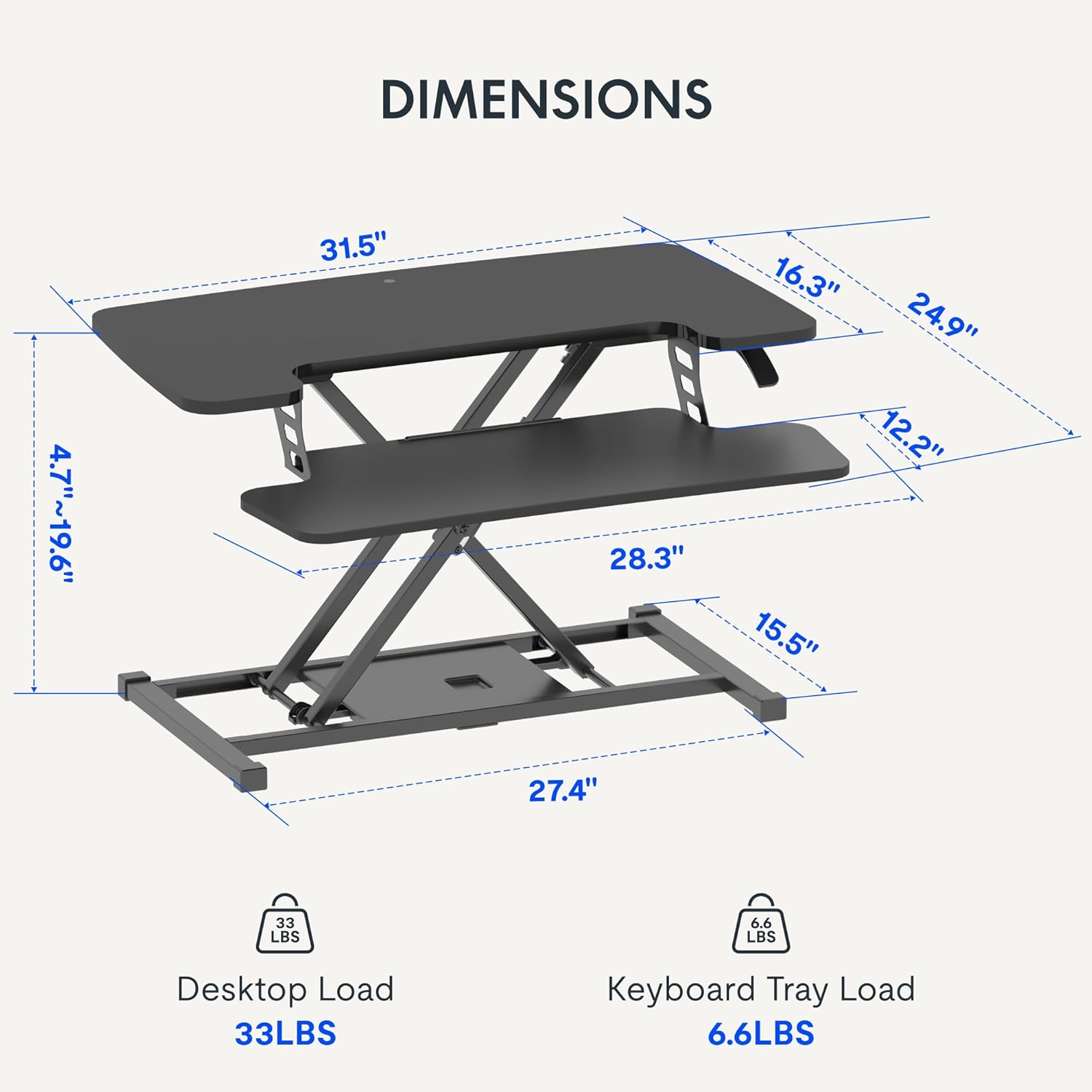
- Do not exceed the weight limit of 33 lbs (15 kg) on the upper desktop.
- Do not exceed the weight limit of 6.6 lbs (3 kg) on the keyboard tray.
- Ensure the desk converter is placed on a stable, flat surface.
- Pastikan tangan dan jari bebas daripada bahagian yang bergerak semasa melaraskan ketinggian.
Kandungan Pakej
- Pre-assembled Desk Converter Unit
- Dulang Papan Kekunci
- Mounting Screws for Keyboard Tray
- Manual Arahan (dokumen ini)
Persediaan dan Perhimpunan
- Membongkar: Keluarkan semua komponen dari pembungkusan dengan berhati-hati.
- Keyboard Tray Attachment: Position the keyboard tray beneath the main desktop. Align the pre-drilled holes on the keyboard tray with the mounting points on the converter's frame. Secure the keyboard tray using the provided screws.
- penempatan: Place the assembled desk converter on a stable, flat desk surface.

The desk converter is largely pre-assembled, requiring only the attachment of the keyboard tray for immediate use.
Arahan Operasi
- Menyelaraskan Tinggi: To adjust the height, locate the adjustment lever on the side of the upper desktop.
- Menaikkan Meja: Squeeze the lever and gently lift the desktop to your desired standing height. Release the lever to lock it in place. The gas spring mechanism assists in smooth elevation.
- Menurunkan Meja: Squeeze the lever and apply gentle downward pressure to lower the desktop to your desired sitting height. Release the lever to lock it in place.
- Kapasiti Berat: The upper desktop supports up to 33 pounds (15 kg). The keyboard tray supports up to 6.6 pounds (3 kg). Do not exceed these limits.


Ciri-ciri
- Reka bentuk ergonomik: Seamlessly transition between sitting and standing positions to promote a healthy work posture. The streamlined edges are designed to reduce wrist discomfort.
- Spacious Two-Tier Workstation: The upper desktop provides ample space for monitors or laptops, while the lower keyboard tray accommodates your keyboard and mouse. A U-shaped cutout on the upper deck allows for laptop placement directly on the tray, optimizing space.
- Sturdy X-Frame Construction: Built with a robust X-frame, ensuring stability and smooth, effortless height adjustments.
- Versatile Height Range: Offers a height adjustment range from 4.7 inches (12 cm) to 19.6 inches (50 cm), accommodating various user heights and work preferences.


Penyelenggaraan
- Pembersihan: Lap permukaan dengan lembut, damp kain. Elakkan pembersih yang kasar.
- Pemeriksaan: Periksa semua skru dan sambungan secara berkala untuk memastikan ia selamat.
Menyelesaikan masalah
- Kesukaran Melaraskan Ketinggian: Ensure no objects are obstructing the lifting mechanism. Verify that the weight on the desk does not exceed the specified limits.
- Bergoyang-goyang: Confirm the desk converter is placed on a flat, stable surface. Check all assembly screws for tightness.
Spesifikasi
| Jenama | FLEXISPOT |
| Nama Model | MT137 |
| Dimensi Produk | 24"D x 32"W x 19.7"H (61cm D x 81cm W x 50cm H) |
| warna | Hitam |
| Bahan Asas | logam |
| Jenis Bahan Atas | kayu |
| Berat Barang | 24 paun (10.9 kg) |
| Maximum Upper Desktop Load | 33 paun (15 kg) |
| Maximum Keyboard Tray Load | 6.6 paun (3 kg) |
| Julat Pelarasan Tinggi | 4.7 inches (12 cm) to 19.6 inches (50 cm) |
| Perhimpunan Diperlukan | Ya (Minimum) |
| Alat Disyorkan Untuk Pemasangan | Pemutar skru |
| UPC | 810072862501 |
Waranti dan Sokongan
Jenis Waranti: This product comes with a Full Warranty.
For further assistance, warranty claims, or technical support, please contact FLEXISPOT customer service. Refer to the official FLEXISPOT webtapak untuk butiran hubungan semasa.


