1. Pengenalan
This manual provides essential instructions for the safe and efficient operation, setup, and maintenance of your Displays2go Pedestal Display with Digital Sign (Model DF037NLB). Please read this manual thoroughly before using the product and retain it for future reference.
The DF037NLB is a versatile pedestal display featuring a 37-inch stretch LCD advertising screen, designed for indoor use. It includes a rear locking storage compartment for added functionality.
2. Maklumat Keselamatan
- Produk ini bertujuan untuk kegunaan dalaman sahaja. Do not expose to moisture, rain, or extreme temperatures.
- Pastikan unit diletakkan di atas permukaan yang stabil dan rata untuk mengelakkannya daripada terbalik.
- Jangan menyekat bukaan pengudaraan.
- Gunakan hanya penyesuai kuasa yang disediakan.
- Putuskan sambungan kuasa sebelum membersihkan atau melakukan sebarang penyelenggaraan.
- Produk ini mungkin mengandungi bahan kimia yang diketahui oleh Negeri California untuk menyebabkan kanser dan kecacatan kelahiran atau bahaya pembiakan lain (amaran Proposisi 65).
3. Kandungan Pakej
Sahkan bahawa semua komponen terdapat dalam pembungkusan:
- Pedestal Display Unit (DF037NLB)
- Kabel Kuasa
- Alat Kawalan Jauh
- Set of Keys (for storage compartment)
- Manual Pengguna (dokumen ini)
4. Persediaan
4.1 Membongkar dan Meletakkan
- Carefully remove the pedestal display from its packaging.
- Place the unit on a flat, stable surface in your desired indoor location. Ensure adequate space around the unit for ventilation.
4.2 Sambungan Kuasa
- Locate the power input port on the rear of the unit.
- Connect the provided power cable to the unit and then to a standard electrical outlet.
- The unit is now ready for initial power-on.
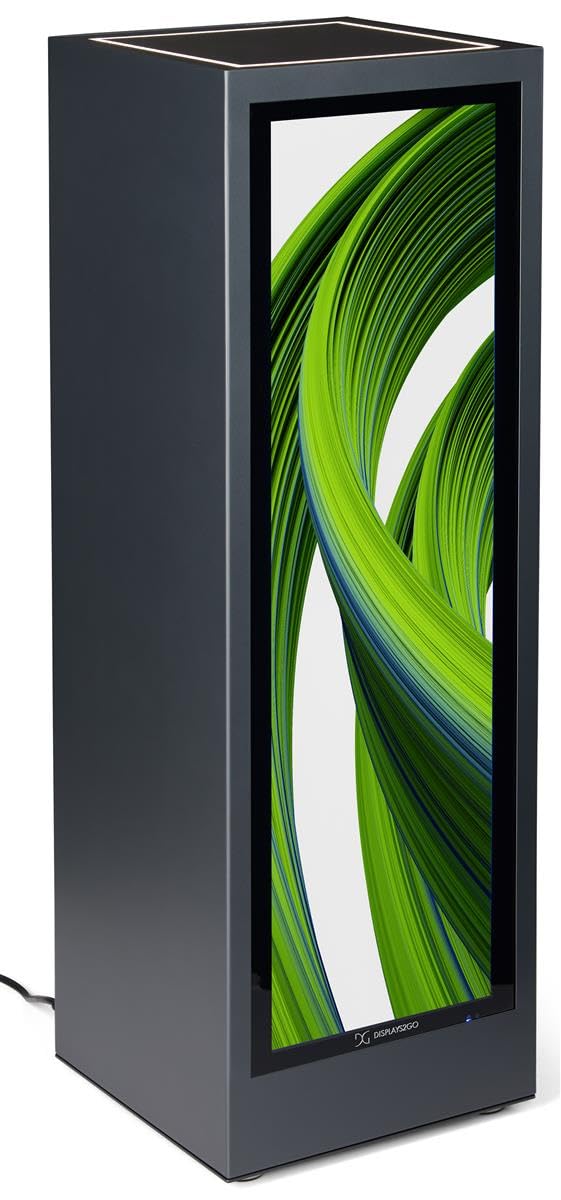
Imej 4.1: Depan view of the Displays2go Pedestal Display with Digital Sign.
5. Arahan Operasi
5.1 Digital Signage Operation
The pedestal display features a 37-inch stretch LCD screen for displaying various media content.
- Content Formatting: For optimal display, format your marketing materials to a resolution of 720 piksel lebar x 2520 piksel tinggi.
- USB Content Transfer: Use the USB ports located on the rear of the unit to transfer images, videos, and other content to the display's internal storage.
- Ketersambungan: The unit supports WiFi and Bluetooth connectivity. This allows for network access, content updates, and connection to external Bluetooth speakers or peripherals like a mouse and keyboard.
- Google Play Access: Access the Google Play app store to download and install business applications directly onto the display.
- Audio: The display includes two built-in speakers for audio playback.

Image 5.1: The digital display showcasing product advertisements for watches.

Image 5.2: The digital display showcasing product advertisements for headphones.

Image 5.3: The 37-inch diagonal measurement of the stretch LCD screen.
5.2 Rear Locking Storage Compartment
The unit features a rear-accessible storage compartment for securing personal items or product backstock.
- To open the compartment, insert one of the provided keys into the lock and turn.
- To lock, close the door, insert the key, and turn to secure. Remove the key to prevent unauthorized access.
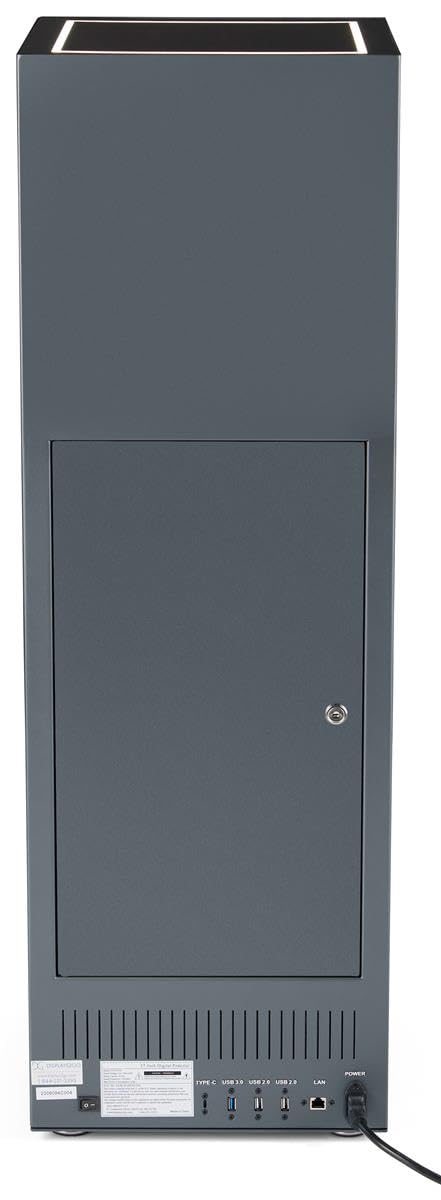
Imej 5.4: Belakang view of the pedestal display showing the closed locking storage compartment and connectivity ports.

Imej 5.5: Belakang view of the pedestal display with the locking storage compartment open, revealing interior space.
5.3 Pencahayaan LED
The mirrored top surface of the pedestal features LED illumination to highlight products placed on top. This feature is integrated with the main power supply and activates when the unit is powered on.
6. Penyelenggaraan
6.1 Pembersihan
- Sentiasa cabut kabel kuasa sebelum membersihkan.
- Use a soft, dry, lint-free cloth to clean the exterior surfaces of the pedestal.
- For the screen, use a screen-specific cleaning solution and a microfiber cloth. Do not spray liquid directly onto the screen.
- Elakkan pembersih atau pelarut yang kasar, kerana ia boleh merosakkan kemasan.
6.2 Kemas Kini Perisian
Periodically check for software updates through the unit's operating system settings to ensure optimal performance and access to the latest features. Refer to the on-screen instructions for update procedures.
7. Penyelesaian masalah
If you encounter issues with your pedestal display, refer to the following common problems and solutions:
| Masalah | Kemungkinan Punca | Penyelesaian |
|---|---|---|
| Paparan tidak dihidupkan | Tiada sambungan kuasa | Ensure power cable is securely connected to the unit and a working outlet. |
| Tiada gambar di skrin | Incorrect input source or no content loaded | Check display settings for input source. Ensure content is properly loaded via USB or network. |
| Tiada suara dari pembesar suara | Kelantangan terlalu rendah atau diredamkan | Adjust volume using the remote control or on-screen settings. Check if external Bluetooth speakers are connected and overriding internal speakers. |
| Tidak dapat menyambung ke Wi-Fi/Bluetooth | Network issues or incorrect settings | Verify Wi-Fi network is active and password is correct. Ensure Bluetooth device is in pairing mode and within range. |
8. Spesifikasi
| Ciri | Perincian |
|---|---|
| Nombor Model | DF037NLB |
| Dimensi Produk (W x D x H) | 14 x 14 x 43 inci |
| Saiz Skrin | 37 inci (pepenjuru) |
| Recommended Content Resolution | 720px (width) x 2520px (height) |
| Ketersambungan | WiFi, Bluetooth, USB ports (Type-C, USB 3.0, USB 2.0), LAN |
| Audio | Pembesar suara terbina dalam |
| Penyimpanan | Rear locking compartment |
| Sistem Operasi | Access to Google Play App Store |
| Persekitaran Penggunaan | Penggunaan Dalaman Sahaja |
9. Waranti dan Sokongan
For warranty information, technical support, or service inquiries, please contact Displays2go customer service. Refer to your purchase documentation or the Displays2go official weblaman web untuk maklumat hubungan.