1. Arahan Keselamatan Penting
Sila baca dan fahami semua arahan keselamatan sebelum menggunakan produk ini. Simpan arahan ini untuk rujukan masa hadapan.
- Sumber Kuasa: Gunakan hanya penyesuai kuasa atau bateri yang dinyatakan. Pastikan volumtage sepadan dengan keperluan unit.
- Air dan Kelembapan: Do not expose the unit to rain, moisture, or dripping water. Do not place objects filled with liquids on the unit.
- Pengudaraan: Pastikan pengudaraan yang betul. Jangan sekat sebarang bukaan pengudaraan.
- haba: Jauhkan unit daripada sumber haba seperti radiator, daftar haba, dapur, atau radas lain yang menghasilkan haba.
- Pembersihan: Bersihkan hanya dengan kain kering. Jangan gunakan pembersih cecair atau pembersih aerosol.
- Servis: Jangan cuba servis produk ini sendiri. Rujuk semua perkhidmatan kepada pegawai perkhidmatan yang berkelayakan.
- Keselamatan Laser: This unit contains a laser component. Do not open the CD compartment while a disc is playing. Avoid direct exposure to the laser beam.
2. Kandungan Pakej
Sahkan bahawa semua item terdapat dalam pakej:
- G Keni Portable CD and Cassette Player Boombox Combo
- Kord Kuasa AC
- Alat Kawalan Jauh
- Manual Pengguna (dokumen ini)
3. Produk Lebihview
The G Keni BT-9224MU is a versatile audio system combining a CD player, cassette player/recorder, AM/FM radio, Bluetooth speaker, and USB playback. It features dual 3W speakers for stereo sound and can be powered by AC or batteries for portability.
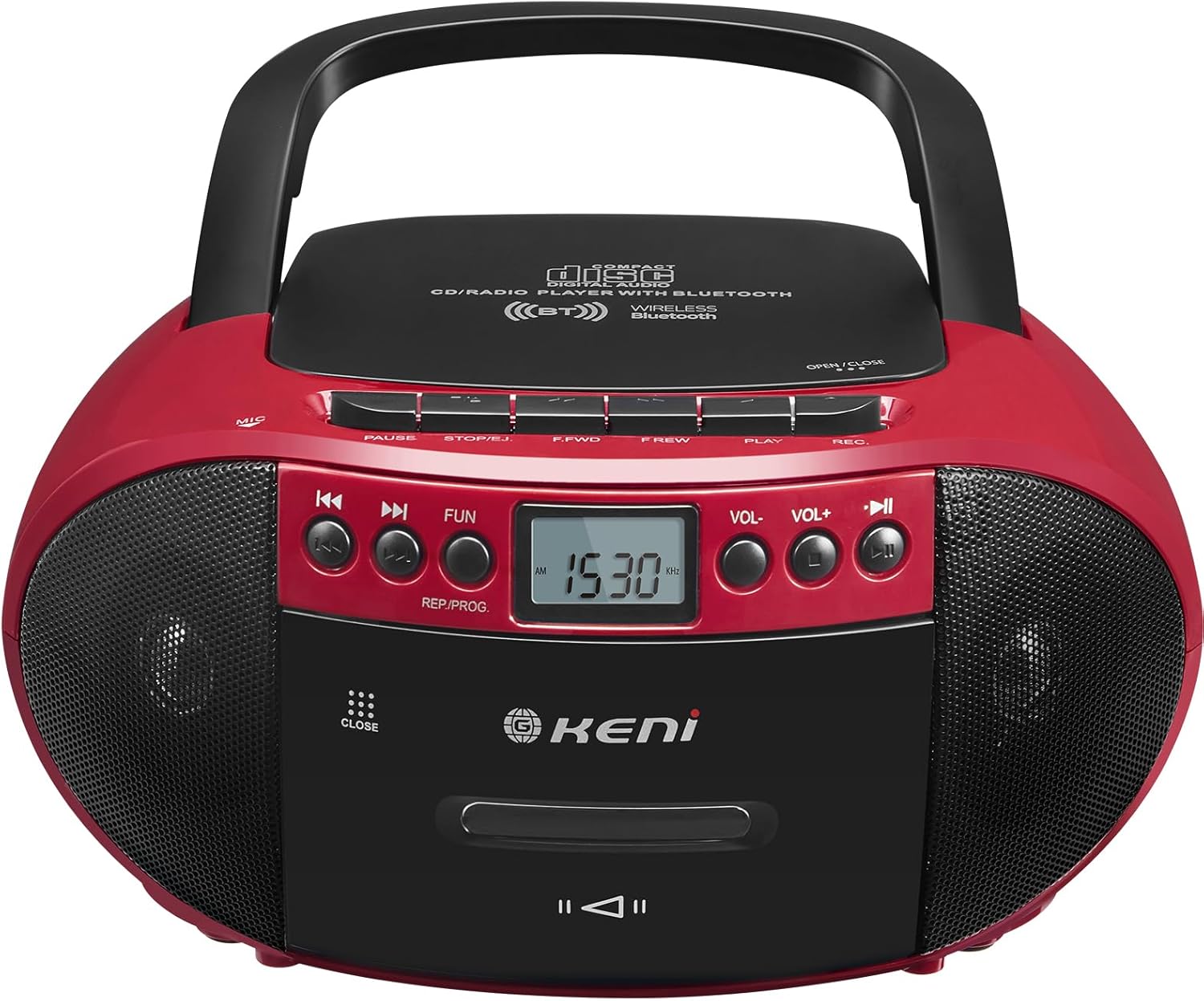
Rajah 3.1: Depan view of the G Keni BT-9224MU Boombox.

Figure 3.2: The boombox highlighting its five playback modes: CD Player, Cassette Player, FM/AM Radio, USB Input, and Bluetooth.
4. Persediaan
4.1 Mengkuasakan Unit
Boombox boleh dikuasakan sama ada dengan kuasa AC atau bateri.
Sambungan Kuasa 4.1.1 AC
- Locate the AC power input jack on the back of the unit.
- Connect the supplied AC power cord to the jack.
- Plug the other end of the AC power cord into a standard wall outlet (100-240V, 50/60Hz).
4.1.2 Pemasangan Bateri
Untuk kegunaan mudah alih, unit ini memerlukan 6 bateri bersaiz 'C' (tidak disertakan).
- Buka penutup petak bateri yang terletak di bahagian bawah unit.
- Insert 6 'C' size batteries, ensuring correct polarity (+/-) as indicated inside the compartment.
- Tutup penutup petak bateri dengan selamat.

Figure 4.1: Illustrations of AC power connection and battery installation.
4.2 Pelarasan Antena
For optimal FM radio reception, extend the telescopic antenna. For AM reception, the unit has a built-in ferrite bar antenna, so repositioning the unit may improve reception.
5. Arahan Operasi
5.1 Kawalan Am
- Butang kuasa: HIDUPKAN atau MATI unit.
- FUNCTION/MODE Button: Switches between CD/USB/Bluetooth, Cassette, and AM/FM Radio modes.
- VOLUME +/- Butang: Melaraskan tahap output audio.
- Butang PLAY/PAUSE: Starts or pauses playback in CD, USB, or Bluetooth modes.
- Butang BERHENTI/KELUAR: Stops playback and opens the CD lid or cassette door.
- Butang LANGKAU/CARI (◀◀ / ▶▶): Melangkau trek/files atau ke hadapan/putar pantas.
5.2 Operasi Pemain CD
The unit supports CD, CD-R, CD-RW, and MP3 discs.
- Penting: Before first use, remove the laser lens protector paper plate from the CD compartment.
- Tekan ke FUNGSI/MOD butang untuk memilih mod CD.
- Tekan ke BERHENTI/EJECT button to open the CD compartment lid.
- Letakkan CD dengan bahagian label menghadap ke atas pada gelendong.
- Close the CD compartment lid. The unit will read the disc.
- Tekan ke MAIN/JEDA butang untuk memulakan main balik.
- guna Langkau / CARI butang untuk menavigasi trek.

Figure 5.1: Inserting a CD into the boombox, with the remote control visible.
5.3 Cassette Player & Recorder Operation
The unit allows playback and recording of standard audio cassettes.
5.3.1 Main Semula Kaset
- Tekan ke FUNGSI/MOD butang untuk memilih mod Kaset.
- Tekan ke BERHENTI/EJECT butang untuk membuka pintu kaset.
- Masukkan pita kaset dengan tepi terbuka menghadap ke atas.
- Tutup pintu kaset.
- Tekan ke BERMAIN button (usually indicated by a triangle) to start playback.
- guna FAST FORWARD (F.FWD) dan REWIND (F.REW) butang untuk menavigasi pita.
- Tekan ke BERHENTI/EJECT button to stop playback and open the door.

Figure 5.2: A cassette tape being inserted into the boombox.
5.3.2 Rakaman Kaset
The unit can record from the radio, CD, or via its built-in microphone.
- Masukkan pita kaset kosong ke dalam petak kaset.
- Select the desired source for recording (CD, Radio, or ensure no other source is playing for voice recording).
- Tekan ke REKOD (REKAM) button (usually red) to begin recording. The PLAY button will also engage automatically.
- Untuk berhenti merakam, tekan BERHENTI/EJECT butang.
5.4 AM/FM Operasi Radio
Enjoy local radio broadcasts with the built-in tuner.
- Tekan ke FUNGSI/MOD butang untuk memilih mod radio AM atau FM.
- Extend the telescopic antenna for FM reception. Adjust its position for best signal.
- Gunakan MENALA knob or buttons (if available) to scan for stations. The LCD screen will display the frequency.
- Laraskan JILID ke tahap yang anda inginkan.

Figure 5.3: The boombox being used to listen to AM/FM radio outdoors.
5.5 Operasi Bluetooth
Connect your Bluetooth-enabled devices to stream audio wirelessly.
- Tekan ke FUNGSI/MOD button to select Bluetooth mode. The unit will enter pairing mode, indicated by a flashing Bluetooth icon or audible prompt.
- Pada peranti mudah alih anda, dayakan Bluetooth dan cari peranti yang tersedia.
- Select "G Keni BT-9224MU" (or similar name) from the list to pair.
- Once paired, you can play audio from your device through the boombox.

Figure 5.4: A smartphone streaming music to the boombox via Bluetooth 5.1.
5.6 Main Semula USB
Play MP3/WMA audio files terus daripada pemacu denyar USB.
- Masukkan pemacu kilat USB ke dalam port USB pada unit.
- Tekan ke FUNGSI/MOD button to select USB mode. The unit will automatically detect and begin playing compatible audio files.
- guna MAIN/JEDA dan Langkau / CARI butang untuk mengawal main balik.
5.7 Menggunakan Alat Kawalan Jauh
The included remote control provides convenient operation for certain functions.
- The remote control can operate functions for CD, Bluetooth, and USB playback.
- It cannot control cassette and radio playback.
- Ensure the remote control has working batteries and is pointed towards the front of the boombox.
5.8 Penggunaan Fon Kepala
Connect headphones to the 3.5mm headphone jack for private listening. When headphones are connected, the main speakers will be muted.
6. Penyelenggaraan
6.1 Membersihkan Unit
- Lap bahagian luar unit dengan kain lembut dan kering.
- Jangan gunakan pembersih, lilin atau pelarut yang melelas kerana ia boleh merosakkan kemasan.
6.2 Penjagaan Kanta CD
- A dirty CD lens can cause skipping or playback errors. Use a specialized CD lens cleaning kit if necessary.
- Avoid touching the lens directly.
6.3 Pembersihan Kepala Kaset
- Over time, cassette heads can accumulate dust and oxide, affecting sound quality. Use a cassette head cleaning tape or a cotton swab with isopropyl alcohol to gently clean the heads and pinch rollers.
7. Penyelesaian masalah
If you encounter issues with your G Keni BT-9224MU, refer to the following common problems and solutions:
| Masalah | Kemungkinan Punca | Penyelesaian |
|---|---|---|
| Tiada kuasa | Kord AC tidak disambungkan; Bateri habis atau salah dimasukkan. | Periksa sambungan kord AC; Gantikan bateri atau pastikan polariti yang betul. |
| CD tidak dimainkan / Melangkau | Disc is dirty or scratched; Laser lens is dirty; Disc inserted incorrectly. | Clean the disc; Clean the laser lens; Re-insert disc with label side up. Ensure laser lens protector was removed. |
| Cassette not playing / Poor sound | Tape is tangled or damaged; Cassette heads are dirty. | Check tape condition; Clean cassette heads and pinch rollers. |
| Penerimaan radio yang lemah | Antena tidak dipanjangkan/dilaraskan; Isyarat lemah. | Extend and adjust FM antenna; Reposition the unit for AM reception. |
| Bluetooth tidak bersambung | Unit not in Bluetooth mode; Device not in pairing mode; Too far from unit. | Ensure unit is in Bluetooth mode; Put device in pairing mode; Move device closer to the unit. |
| Alat kawalan jauh tidak berfungsi | Bateri habis; Halangan antara alat kawalan jauh dan unit. | Replace remote batteries; Remove any obstructions. Note: Remote does not control cassette or radio. |
8. Spesifikasi
| Ciri | Spesifikasi |
|---|---|
| Nombor Model | BT-9224MU |
| Sumber Kuasa | AC 100-240V ~ 50/60Hz / 6 x 'C' size batteries (DC 9V) |
| Kuasa Keluaran Pembesar Suara | 3 Watts (per speaker, total 6W) |
| Ketersambungan | Bluetooth 5.1, USB, Auxiliary, AM/FM Radio |
| Jenis Cakera yang Serasi | CD, CD-R, CD-RW, MP3 |
| Mod Keluaran Audio | Stereo |
| Dimensi Produk | 10 x 8.8 x 5 inci (25.4 x 22.35 x 12.7 cm) |
| Berat Barang | 2.64 paun (1.2 kg) |
| bahan | plastik |
| Komponen yang Disertakan | AC Cord, Remote Control |
9. Waranti dan Sokongan
9.1 Maklumat Waranti
This G Keni product is covered by a Perkhidmatan waranti 12 bulan dari tarikh pembelian. Waranti ini meliputi kecacatan pembuatan dan mutu kerja di bawah penggunaan biasa.
9.2 Sokongan Pelanggan
For any questions, technical assistance, or warranty claims, please contact G Keni customer service. We are committed to providing support and ensuring customer satisfaction.
Please refer to the detailed user manual included in your package or visit the official G Keni webtapak untuk mendapatkan maklumat sokongan yang paling terkini.


