1. Pengenalan
Thank you for choosing the Sharkoon AK6 RGB ATX PC Case. This manual provides essential information for the proper installation, operation, and maintenance of your new PC case. Please read this guide thoroughly before beginning the assembly process to ensure optimal performance and longevity of your components.
2. Maklumat Keselamatan
- Sentiasa putuskan sambungan bekalan kuasa dari soket dinding sebelum memasang atau menanggalkan sebarang komponen di dalam bekas PC.
- Handle tempered glass panels with care. They are fragile and can break if dropped or subjected to impact.
- Avoid exposing the case to extreme temperatures, humidity, or direct sunlight.
- Keep small parts and screws out of reach of children.
- Ensure proper grounding to prevent electrostatic discharge (ESD) damage to sensitive electronic components.
3. Kandungan Pakej
Sila sahkan bahawa semua item terdapat dalam pakej anda:
- Sarung PC Sharkoon AK6 RGB ATX
- Accessory box (containing screws, cable ties, and other small parts)
- Manual Pengguna (dokumen ini)
4. Produk Lebihview
The Sharkoon AK6 RGB ATX PC Case is designed with a modern glass aesthetic, featuring seamless integration of tempered glass on the front and side panels. It includes four pre-installed 120mm addressable RGB PWM fans for optimal airflow and visual appeal. The case supports a wide range of components, including BTF motherboards, and offers ample space for high-performance hardware.

Figure 4.1: Front interior view of the Sharkoon AK6 RGB PC case, showcasing the pre-installed addressable RGB fans and the spacious main chamber.

Rajah 4.2: Bersudut view of the Sharkoon AK6 RGB PC case, highlighting the tempered glass side panel and the top mesh for ventilation.

Rajah 4.3: Belakang view of the Sharkoon AK6 RGB PC case, showing the I/O shield cutout, rear exhaust fan mount, and expansion slots.
Panel I/O Hadapan
The front I/O panel is located on the side of the case and includes:
- Butang Kuasa
- Butang Tetapkan Semula
- 2 x USB Ports (Type-A)
- 1 x Port USB Jenis-C
- Audio Jacks (TRRS)
5. Persediaan dan Pemasangan
Follow these steps to install your components into the Sharkoon AK6 RGB PC Case.
5.1 Menyediakan Kes
- Letakkan bekas di atas permukaan yang rata dan stabil.
- Carefully remove the tempered glass side panel by unscrewing the thumb screws at the rear and gently pulling the panel away.
- Remove the rear metal side panel by unscrewing the thumb screws.
5.2 Pemasangan Motherboard
The AK6 RGB supports Mini-ITX, Micro-ATX, ATX, and BTF motherboards.
- Install the I/O shield into the cutout at the rear of the case (if not pre-installed on your motherboard).
- Align your motherboard with the standoffs inside the case. Ensure all standoffs match the motherboard's mounting holes.
- Selamatkan papan induk dengan skru yang sesuai dari kotak aksesori.
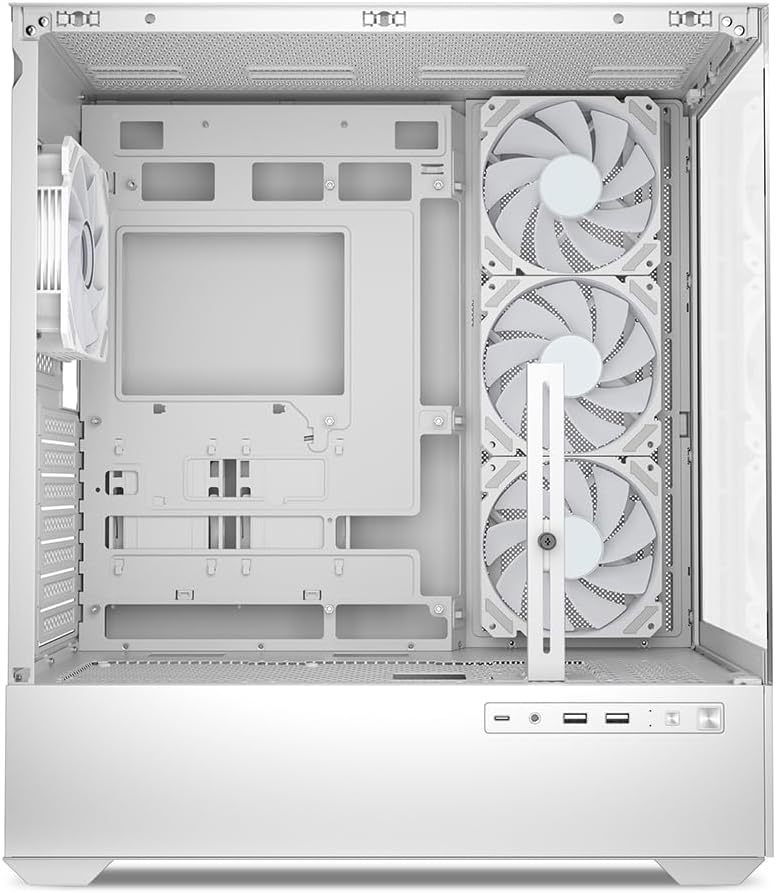
Rajah 5.1: Dalaman view of the Sharkoon AK6 RGB PC case, illustrating the motherboard tray, cable management cutouts, and front fan mounting points.
5.3 Pemasangan Bekalan Kuasa
The case features a bottom-mount power supply design.
- Luncurkan unit bekalan kuasa (PSU) ke dalam petak khusus di bahagian bawah belakang bekas.
- Jajarkan PSU dengan lubang skru di bahagian belakang kes itu.
- Secure the PSU with the provided screws.
5.4 Pemasangan Peranti Storan
The AK6 RGB supports up to two 3.5" HDDs or four 2.5" SSDs.
- Untuk HDD 3.5": Locate the drive cages beneath the PSU shroud. Slide the HDD into a drive tray and secure it with screws.
- Untuk SSD 2.5": SSDs can be mounted on the dedicated brackets behind the motherboard tray or on the 3.5" drive trays using adapter screws.
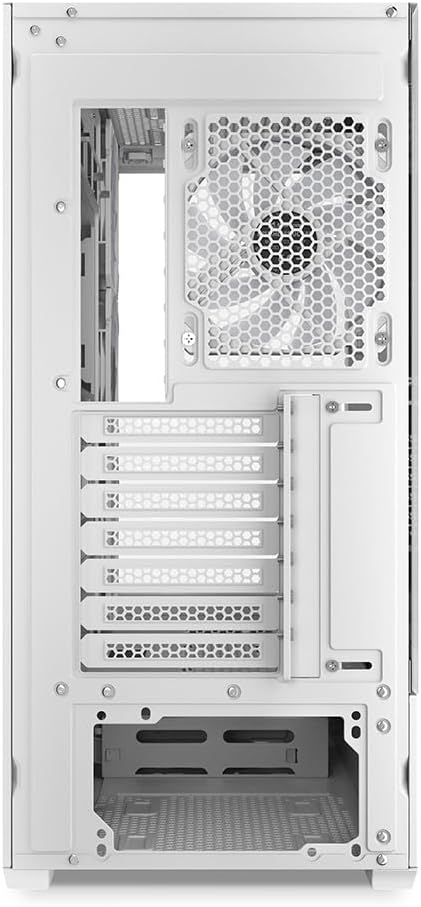
Rajah 5.2: Bahagian dalam belakang view of the Sharkoon AK6 RGB PC case, detailing the drive cages for 3.5-inch HDDs and 2.5-inch SSDs, and the power supply shroud area.
5.5 Pemasangan Kad Grafik dan Kad Pengembangan
- Tanggalkan penutup slot pengembangan yang diperlukan di bahagian belakang sarung.
- Insert your graphics card or other expansion cards into the appropriate PCIe slots on your motherboard.
- Secure the cards with screws. The case includes a rubberized graphics card support for larger cards.
5.6 CPU Cooler and Radiator Installation
The case supports CPU coolers up to 17 cm in height and allows for extensive liquid cooling setups.
- Pasang penyejuk CPU anda mengikut arahan pengeluarnya.
- For liquid cooling, the case can accommodate a 360mm radiator at the top and an additional 280mm radiator.
5.7 Pengurusan Kabel
Gunakan potongan pengurusan kabel dan titik pengikat di belakang dulang papan induk untuk menghalakan dan mengikat kabel. Ini meningkatkan aliran udara dan estetika.
6. Arahan Operasi
6.1 Menghidupkan
After all components are installed and cables are connected, replace the side panels. Connect the power cable to your PSU and a wall outlet, then press the power button on the front I/O panel to start your system.
6.2 RGB Fan Control
The AK6 RGB comes with four pre-installed addressable RGB PWM fans. These fans are connected to an RGB controller which also provides connections for up to four LED elements and four PWM fans. The RGB lighting can typically be controlled via your motherboard's RGB software (if compatible) or through a dedicated button on the case (if present and connected).
6.3 Pengoptimuman Aliran Udara
The case is designed for ideal airflow, with three inverted fans drawing air from the side into the case. The top and rear fan mounts allow for additional exhaust fans. Ensure proper fan orientation for optimal cooling performance.

Gambar 6.1: Cthample of a fully assembled system within the Sharkoon AK6 RGB PC case, featuring various components and active RGB lighting.
7. Penyelenggaraan
Penyelenggaraan berkala membantu memastikan ketahanan dan prestasi komponen PC anda.
- Penapis Habuk: Periodically clean the removable dust filters (e.g., on the top and bottom) to maintain optimal airflow and prevent dust buildup inside the case. Use compressed air or a soft brush.
- Panel Kaca: Clean tempered glass panels with a soft, lint-free cloth and a glass cleaner. Avoid abrasive materials that could scratch the surface.
- Pembersihan Dalaman: Gunakan udara termampat untuk menghilangkan habuk daripada komponen dalaman dan kipas. Pastikan sistem dimatikan dan dicabut plagnya sebelum membersihkan.
8. Penyelesaian masalah
If you encounter issues with your PC case, refer to the following common troubleshooting steps:
- Tiada Kuasa: Ensure the power supply is properly connected to the wall outlet and the motherboard. Check all internal power cables (24-pin ATX, 8-pin CPU, PCIe power).
- Kipas Tidak Berputar/RGB Tidak Berfungsi: Verify that all fan and RGB cables are correctly connected to the motherboard or the included RGB controller. Check your motherboard's BIOS/UEFI settings or RGB software for fan speed and lighting control.
- Front I/O Ports Not Functioning: Confirm that the front panel connectors (USB, audio, power/reset switches) are correctly plugged into the corresponding headers on your motherboard.
- Terlalu panas: Ensure all fans are spinning correctly and oriented for proper airflow. Clean dust filters and internal components. Verify CPU cooler installation.
For further assistance, please contact Sharkoon support.
9. Spesifikasi
| Ciri | Spesifikasi |
|---|---|
| Jenama | Sharkoon |
| Nama Model | AK6 RGB |
| Nombor Model | C-AK6W |
| Jenis Kes | Menara ATX |
| warna | putih |
| bahan | Kaca Terbaja |
| Keserasian Papan Induk | Mini ITX, Micro ATX, ATX, BTF |
| Jenis Pemasangan Bekalan Kuasa | Pelekap Bawah |
| Kaedah Penyejukan | Udara |
| Peminat prapasang | 4 x 120mm Addressable RGB PWM Fans |
| Ketinggian Penyejuk CPU Maks | 17 sm |
| Panjang Kad Grafik Maks | 41 cm (with rubberized support) |
| Panjang PSU Maks | 23.5 sm |
| Sokongan Radiator | Top: up to 360mm, Additional: up to 280mm |
| Drive Bays | 2 x 3.5" HDD or 4 x 2.5" SSD |
| Pelabuhan I / O Depan | 2 x USB Type-A, 1 x USB Type-C, Audio (TRRS) |
| Berat Barang | 6.1 Kilogram |
| Ciri Khas | RGB Lighting, Unique Glass Appearance, BTF Motherboard Support |
10. Waranti
Sharkoon products are manufactured to high quality standards. For detailed warranty information, please refer to the warranty card included with your product or visit the official Sharkoon webtapak. Waranti biasanya meliputi kecacatan pada bahan dan mutu kerja di bawah penggunaan biasa.
11. Sokongan
If you require technical assistance or have questions regarding your Sharkoon AK6 RGB ATX PC Case, please visit the official Sharkoon website for support resources, FAQs, and contact information. You may also find updated drivers or software for the RGB controller there.
Webtapak: www.sharkoon.com


