1. Pengenalan
Selamat datang ke manual pengguna untuk Hitam andaview BV4800 Pro 4G Rugged Smartphone. This guide provides essential information to help you set up, operate, maintain, and troubleshoot your device. Please read this manual carefully to ensure optimal performance and longevity of your smartphone.

Si Hitamview BV4800 Pro smartphone, showcasing its robust design and key features on the display.
2. Produk Lebihview
Si Hitamview BV4800 Pro is a rugged smartphone designed for durability and performance. It features a powerful processor, ample memory, a high-capacity battery, and advanced camera capabilities, all within a robust, protective casing.
Ciri-ciri Utama:
- Prestasi: Experience enhanced speed and performance with the T606 chipset. The Blackview BV4800 Pro Android phone features 4GB fixed RAM and 128GB ROM. Through RAM expansion technology, an additional 8GB of virtual RAM can be accessed via settings, totaling up to 12GB of RAM.
- Ketahanan: The BV4800 Pro outdoor smartphone offers 360° total protection and IP68 waterproofing, inspired by a sophisticated space capsule structure. Its 27 integrated construction upgrades enhance resistance to water immersion, drops, and shocks. This military-grade mobile phone withstands extreme temperatures from -22°F (-30°C) to 122°F (50°C).
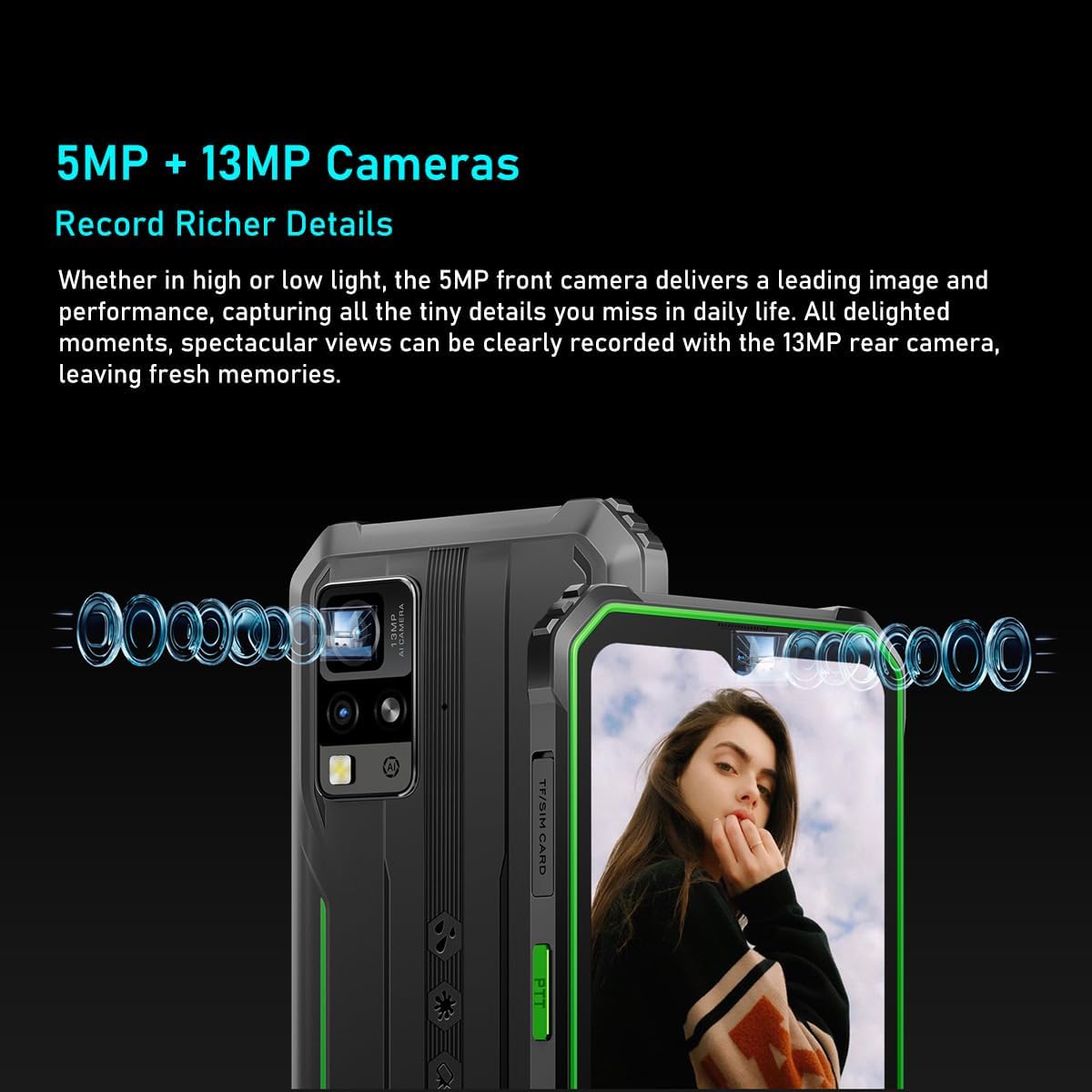
- Sistem Kamera: Si Hitamview BV4800 Pro features a 16MP rear camera for capturing moments and an 8MP front camera for quick face unlock and selfies. Utilize the latest facial recognition features for faster and more secure phone unlocking.
- Hayat Bateri: The BV4800 Pro rugged outdoor mobile phone boasts a 5180mAh long-lasting battery, providing extended usage for work or study without frequent recharging.
- Ketersambungan: Si Hitamview BV4800 Pro unlocked mobile phone supports dual 4G global networks and is compatible with most GSM, WCDMA, and LTE carriers. It includes GPS, NFC, and comes with a 24-month warranty.

The BV4800 Pro features 4GB of physical RAM, expandable with an additional 8GB of virtual RAM, providing a total of 12GB for smooth multitasking and faster application performance.

Equipped with a 16MP rear camera and an 8MP front camera, the BV4800 Pro allows for clear photo capture and video calls.
3. Persediaan
3.1. Pemasangan Kad SIM dan Kad TF
- Locate the SIM/TF card slot on the side of your Blackview BV4800 Pro.
- Carefully open the protective cover of the SIM tray.
- Insert your Nano-SIM card(s) and/or TF (microSD) card into the designated slots on the tray. Ensure the cards are correctly oriented.
- Gently push the tray back into the slot until it is fully seated and close the protective cover securely to maintain water and dust resistance.

Bahagian belakang view of the BV4800 Pro, indicating the location of the SIM/TF card slot for installation.
3.2. Kuasa Awal Hidup
- Press and hold the Power button (usually on the right side of the device) until the Blackview logo muncul.
- Ikut gesaan pada skrin untuk melengkapkan persediaan awal, termasuk pemilihan bahasa, sambungan Wi-Fi dan persediaan akaun Google.
4. Arahan Operasi
4.1. Navigasi Asas
Hitam Andaview BV4800 Pro runs on Android 14. Navigate using gestures or the traditional three-button navigation bar (configurable in Settings).
- Skrin Utama: Leret ke kiri atau kanan untuk mengakses skrin utama yang berbeza.
- Laci Apl: Leret ke atas dari bawah skrin ke view semua aplikasi yang dipasang.
- Pemberitahuan & Tetapan Pantas: Leret ke bawah dari bahagian atas skrin untuk mengakses pemberitahuan dan togol tetapan pantas.
4.2. Penggunaan Kamera
To open the camera, tap the Camera icon on your home screen or app drawer. The BV4800 Pro features a 16MP rear camera and an 8MP front camera.
- Tukar Kamera: Ketik ikon suis kamera untuk menogol antara kamera hadapan dan belakang.
- Tangkap Foto: Tap the Shutter button to take a picture.
- Rakam Video: Switch to video mode and tap the Record button to start/stop recording.
- Buka Kunci Wajah: Configure face unlock in Security settings for quick and secure access.
4.3. Ciri Paparan
The 6.56-inch HD+ IPS display offers clear visuals.
- Kecerahan: Adjust screen brightness in Quick Settings or Display settings.
- Kadar Segar Semula: The display operates at a 60Hz refresh rate for smooth visuals.
- Sentuh SampKadar ling: A 120Hz touch sampling rate ensures responsive touch input.

The device features a 6.56-inch HD+ IPS display protected by Corning Gorilla Glass 5, offering a 60Hz refresh rate and a responsive 120Hz touch sampling rate for clear visuals and smooth interaction.
4.4. Pengurusan Bateri
Bateri 5180mAh menyediakan penggunaan yang lebih lama. Untuk mengoptimumkan hayat bateri:
- Kurangkan kecerahan skrin.
- Tutup apl yang tidak digunakan yang berjalan di latar belakang.
- Dayakan mod Penjimat Bateri apabila diperlukan.
- Elakkan suhu yang melampau.

The BV4800 Pro's 5180mAh battery provides extended usage, offering up to 7.5 hours of gaming, 8 hours of video playback, 11 hours of web browsing, 28.5 hours of calls, 30 hours of music, and 924 hours of standby time.
4.5. Ciri-ciri Khas
- NFC: Use Near Field Communication for contactless payments and quick data transfer. Enable NFC in Settings > Connected devices.
- GPS: The integrated GPS provides accurate location services for navigation and location-based apps.
- OTG: USB On-The-Go allows you to connect USB devices like flash drives or keyboards directly to your phone.
- Radio FM: Enjoy FM radio broadcasts using wired headphones as an antenna.
- Smart-K BOX Speaker: Experience enhanced audio quality from the device's speaker.
The Smart-K BOX speaker system on the BV4800 Pro delivers powerful audio, enhancing your listening experience.
5. Penyelenggaraan
5.1. Ketahanan dan Perlindungan
Si Hitamview BV4800 Pro is built to be rugged, featuring IP68 water and dust resistance and MIL-STD-810H military standard compliance for shock protection.
- Tahan Air: Ensure all port covers (USB-C, SIM tray) are securely closed to maintain water resistance. Avoid prolonged submersion or exposure to high-pressure water.
- Rintangan Suhu: The device is designed to operate in extreme temperatures from -22°F (-30°C) to 122°F (50°C).
- Perlindungan jatuh: While rugged, avoid unnecessary drops. The device is tested to survive drops from up to 1.5 meters.

The BV4800 Pro is designed to withstand harsh conditions, including water immersion, dirt exposure, and impacts, as illustrated by these durability tests.

Built to MIL-STD-810H military standards, the BV4800 Pro is engineered for extreme environments, capable of surviving drops from up to 1.5 meters.
5.2. Pembersihan
Untuk membersihkan peranti anda, gunakan kain lembutamp cloth. Avoid harsh chemicals or abrasive materials that could damage the screen or casing.
6. Penyelesaian masalah
Jika anda menghadapi masalah dengan Hitam andaview BV4800 Pro, try the following steps:
- Peranti Tidak Membalas: Tekan dan tahan butang Kuasa selama kira-kira 10-15 saat untuk memaksa mulakan semula.
- Bateri Habis Cepat: Check for background apps, reduce screen brightness, and ensure Wi-Fi/Bluetooth are off when not in use.
- Isu Rangkaian: Ensure your SIM card is correctly inserted. Try restarting the device or toggling Airplane Mode on/off.
- Apl Ranap: Kosongkan cache apl yang bermasalah (Tetapan > Apl > [Nama Apl] > Storan > Kosongkan cache). Jika isu berterusan, cuba pasang semula apl.
- Prestasi Perlahan: Close unnecessary background apps, clear cache, or consider a factory reset as a last resort (back up your data first).
For more complex issues, please contact Blackview sokongan pelanggan.
7. Spesifikasi
| Ciri | Spesifikasi |
|---|---|
| Jenama | Hitamview |
| Nama Model | Hitamview BV4800 PRO |
| warna | Hitam |
| Jenis Produk | Telefon Bar |
| Sistem Operasi | Android 14 |
| Saiz Skrin | 6.56 Inci |
| Resolusi Paparan | 1080 x 2340 |
| Kadar Segar Semula | 60 Hz |
| Pemproses | T606 Chipset |
| Saiz RAM yang Dipasang | 12 GB (4GB fizikal + 8GB maya) |
| Kapasiti Penyimpanan Memori | 128 GB (Boleh dikembangkan sehingga 1TB melalui kad TF) |
| Resolusi Kamera Belakang | 16 MP |
| Resolusi Kamera Depan | 8 MP |
| Kapasiti Bateri | 5180 mAh |
| Komposisi Bateri | Litium-ion |
| Sambungan | Bluetooth |
| Port Pengecasan | USB Jenis C |
| Ciri Khas | Rugged Body, Dual SIM, Expandable Memory, Water Resistant, USB OTG Support, NFC, GPS, FM |
| Pembawa Tanpa Wayar | Dibuka kunci |
| Tarikh Mula-mula Tersedia | 23 Oktober 2024 |
8. Waranti dan Sokongan
8.1. Waranti Pengeluar
Si Hitamview BV4800 Pro comes with a Waranti pengilang 2 tahun. Sila simpan bukti pembelian anda untuk tuntutan waranti.
8.2. Sokongan Pelanggan
For technical assistance, warranty inquiries, or any other questions regarding your Blackview BV4800 Pro, please visit the official Blackview webtapak atau hubungi sokongan pelanggan mereka secara langsung.
Spare parts availability and guaranteed software updates information are currently unavailable.


