pengenalan
This manual provides detailed instructions for the operation and maintenance of your WIITHINK WTB-795S Portable Cassette Player Recorder. This device combines classic audio playback with modern features, including AM/FM/SW radio, Bluetooth connectivity, USB/SD card playback, and MP3 conversion capabilities. Please read this manual thoroughly before using the product to ensure proper function and longevity.
Maklumat Keselamatan
- Jangan dedahkan unit kepada hujan atau lembapan untuk mengelakkan kebakaran atau kejutan elektrik.
- Jangan buka casing. Rujuk perkhidmatan kepada kakitangan yang berkelayakan sahaja.
- Elakkan meletakkan unit berhampiran sumber haba atau di bawah cahaya matahari langsung.
- Pastikan pengudaraan yang betul; jangan sekat bukaan pengudaraan.
- Gunakan hanya penyesuai kuasa atau bateri yang ditentukan.
- Jauhkan daripada kanak-kanak.
Kandungan Pakej
Sahkan bahawa semua item terdapat dalam pakej:
- WIITHINK WTB-795S Portable Cassette Player Recorder
- Kabel Kuasa AC
- Manual Pengguna (dokumen ini)
Produk Selesaiview
The WIITHINK WTB-795S is a versatile audio device designed for both classic and modern listening experiences. It features a cassette player and recorder, AM/FM/SW radio, Bluetooth connectivity, and USB/SD card playback with MP3 conversion capabilities.

Imej: Depan view of the WIITHINK WTB-795S Portable Cassette Player Recorder, showing the cassette deck, radio tuner, and speakers.
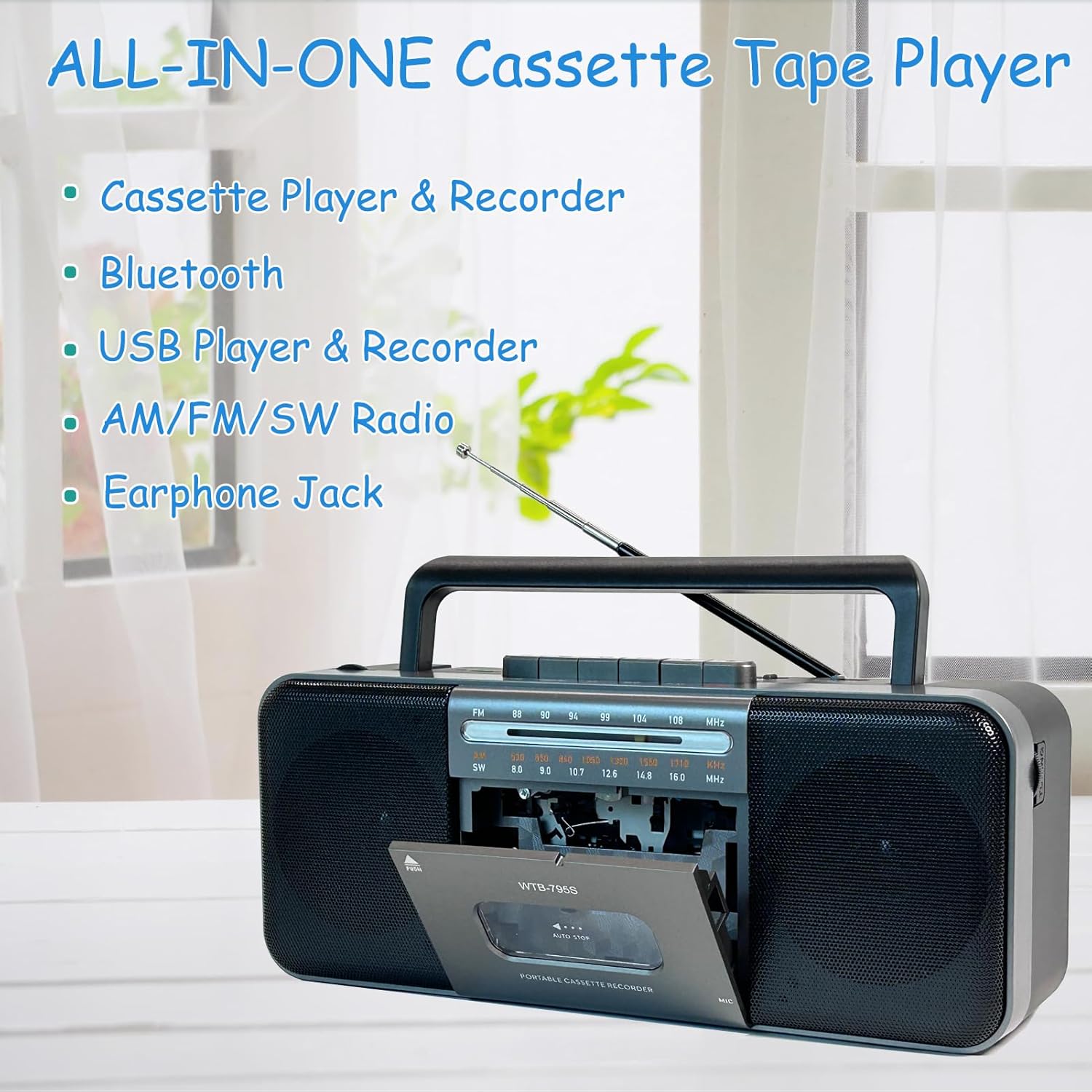
Image: Diagram highlighting the all-in-one features of the WTB-795S, including Cassette Player & Recorder, Bluetooth, USB Player & Recorder, AM/FM/SW Radio, and Earphone Jack.
Ciri-ciri Utama:
- Cassette Player & Recorder: Play and record audio to cassette tapes.
- AM/FM/SW Radio: Built-in tuner for receiving various radio bands.
- Kesambungan Bluetooth: Penstriman audio tanpa wayar daripada peranti yang serasi.
- USB/SD Card Playback & Recording: Mainkan audio files from USB drives and SD cards, and record to them.
- MP3 Converter: Convert cassette audio to MP3 format on USB/SD.
- Mikrofon terbina dalam: For direct voice recording.
- 10W Dual Speakers: Provides clear and powerful stereo sound (radio is mono).
- Jack fon telinga: Untuk mendengar secara peribadi.
- Dikuasakan AC/DC: Operates with AC power cable or batteries for portability.
Persediaan
Mengkuasakan Peranti:
The WTB-795S can be powered by either AC electricity or batteries.
Kuasa AC:
- Pastikan unit dimatikan.
- Connect the supplied AC power cable to the AC input jack on the back of the unit.
- Palamkan hujung kabel kuasa AC yang lain ke soket dinding standard.
Kuasa Bateri:
For portable use, the unit requires 4 x D-size batteries (not included) or 2 x 18650 button-top rechargeable batteries (not included).

Imej: Belakang view of the WTB-795S showing the battery compartments for 4 D-size batteries and 2 18650 button-top rechargeable batteries, along with the AC power input. Note: Only button-top 18650 batteries are compatible.
- Buka penutup petak bateri di bahagian belakang unit.
- Insert 4 D-size batteries or 2 18650 button-top rechargeable batteries, observing the correct polarity (+/-) as indicated inside the compartment.
- Tutup penutup petak bateri dengan selamat.
- Nota: The 18650 battery compartment only accommodates button-top battery models. Flat-top battery models cannot be used.
Antena:
Extend the telescopic antenna for optimal FM and SW radio reception. For AM reception, rotate the unit for best signal.
Arahan Operasi
1. Cassette Playback and Recording

Image: A person holding a cassette tape, with the WTB-795S in the foreground showing the open cassette deck, illustrating its cassette playback and recording function.
Memainkan Kaset:
- Tekan ke BERHENTI/EJECT butang untuk membuka pintu kaset.
- Masukkan pita kaset dengan tepi terbuka menghadap ke atas.
- Tutup pintu kaset.
- Tekan ke BERMAIN butang untuk memulakan main balik.
- Laraskan JILID knob to your desired level.
- guna FAST FORWARD (FF) or REWIND (REW) butang untuk menavigasi pita.
- Tekan BERHENTI/EJECT untuk menghentikan main balik.
Rakaman ke Kaset:
You can record from the built-in microphone, radio, or external sources (via Bluetooth/USB/SD).
- Masukkan pita kaset kosong atau boleh rakam.
- Select the desired source (e.g., Radio, Bluetooth, USB/SD).
- Tekan ke REKOD butang (biasanya merah) serentak dengan BERMAIN button. The recording will begin.
- For microphone recording, ensure the microphone is unobstructed.
- Tekan BERHENTI/EJECT untuk menamatkan rakaman.
2. Operasi Radio (AM/FM/SW)

Image: An elderly man smiling while listening to the WTB-795S, which has its telescopic antenna extended, demonstrating its radio function.
- Tetapkan suis fungsi ke RADIO.
- Select the desired band: AM, FM, atau SW using the band selector switch.
- Extend the telescopic antenna for FM and SW reception. Rotate the unit for optimal AM reception.
- Putar MENALA knob to find your desired station.
- Laraskan JILID tombol.
3. Mod Bluetooth

Image: A hand holding a smartphone displaying a music app, with the WTB-795S on a table in the background, indicating Bluetooth connectivity.
- Tetapkan suis fungsi ke Bluetooth. The unit will enter pairing mode, indicated by an audible prompt or flashing indicator.
- On your Bluetooth-enabled device (smartphone, tablet, etc.), search for available devices.
- Select "WTB-795S" from the list to pair.
- Once paired, you can stream audio from your device to the WTB-795S.
- Adjust volume on both the unit and your connected device.
4. USB/SD Card Playback and Recording

Image: The WTB-795S with a red USB flash drive inserted into its USB port, demonstrating its USB playback and recording capabilities.
Playing from USB/SD:
- Masukkan pemacu kilat USB ke dalam port USB atau kad SD ke dalam slot kad SD.
- Tetapkan suis fungsi ke USB/SD.
- Unit akan secara automatik mengesan dan mula memainkan audio yang serasi files (MP3 format).
- Use the playback control buttons (Play/Pause, Next, Previous) to manage your audio.
- Nota: Compatible with FAT32 file systems only. NTFS is not supported.
Recording to USB/SD (MP3 Conversion):
You can convert audio from cassette tapes to MP3 format on a USB drive or SD card.
- Insert a USB flash drive or SD card.
- Masukkan pita kaset yang ingin anda tukar.
- Tekan ke BERMAIN button on the cassette deck.
- Tekan ke REKOD button (often labeled 'USB/SD Record' or similar, refer to unit markings) to start converting the cassette audio to MP3 on the inserted USB/SD media.
- Tekan BERHENTI to end the conversion.
5. Jack fon telinga

Image: A woman wearing headphones and listening to the WTB-795S, illustrating the use of the earphone jack for private listening.
Plug standard 3.5mm headphones into the earphone jack for private listening. The main speakers will be muted when headphones are connected.
Penyelenggaraan
Membersihkan Unit:
- Lap bahagian luar dengan kain lembut dan kering.
- Jangan gunakan pembersih atau pelarut yang melelas.
- For the cassette head and pinch roller, use a cotton swab lightly dampened with isopropyl alcohol. Clean gently to remove tape residue.
Cassette Tape Care:
- Store tapes away from direct sunlight and extreme temperatures.
- Avoid touching the tape surface.
- Periodically fast forward and rewind tapes to prevent sticking.
Menyelesaikan masalah
| Masalah | Kemungkinan Punca | Penyelesaian |
|---|---|---|
| Tiada kuasa | AC cable not connected; Batteries depleted or incorrectly inserted. | Check AC cable connection; Replace or correctly insert batteries. |
| Tiada bunyi | Kelantangan terlalu rendah; Fon kepala disambungkan; Mod salah dipilih. | Increase volume; Disconnect headphones; Select correct function mode. |
| Penerimaan radio yang lemah | Antena tidak dilanjutkan; Isyarat lemah. | Extend telescopic antenna; Rotate unit for better signal. |
| Cassette playback distorted/slow | Tape head dirty; Tape worn out; Batteries low. | Clean tape head; Try a different tape; Replace batteries. |
| USB/SD tidak dimainkan | tak betul file format; Incompatible file system (NTFS); Media not inserted correctly. | pastikan files are MP3; Format media to FAT32; Reinsert USB/SD card. |
| Bluetooth tidak bersambung | Unit not in pairing mode; Device too far; Bluetooth off on source device. | Ensure unit is in Bluetooth mode; Bring devices closer; Enable Bluetooth on source device. |
Spesifikasi
| Ciri | Perincian |
|---|---|
| Model | WTB-795S |
| Dimensi Produk (L x W x H) | 11 x 5 x 2 inci (27.9 x 12.7 x 5.1 cm) |
| Berat Barang | 3.41 paun (1.55 kg) |
| Teknologi Ketersambungan | Bluetooth, USB |
| Jenis Pembesar Suara | Stereo (2 x 5W) |
| Sumber Kuasa | AC Power (included adapter) or DC Battery (4 x D-size or 2 x 18650 button-top, not included) |
| Frekuensi Radio | AM: 530-1710kHz, FM: 88-108MHz, SW: 8.0-16.0MHz |
| USB/SD Compatibility | FAT32 file system, MP3 format |
Waranti dan Sokongan
WIITHINK is committed to customer satisfaction. This product comes with an 18-month replacement policy and lifetime technical support.
Menghubungi Sokongan:
For any inquiries or issues, please contact WIITHINK customer support through your purchase platform (e.g., Amazon Buyer-Seller Message) or refer to the contact information provided with your product packaging.
Pelan Perlindungan Pilihan:
Pelan perlindungan lanjutan mungkin tersedia untuk pembelian secara berasingan:
- Pelan Perlindungan 2 Tahun
- Pelan Perlindungan 3 Tahun
- Complete Protect (pelan bulanan meliputi pembelian yang layak)
Please refer to the specific terms and conditions of these plans at the time of purchase.


