pengenalan
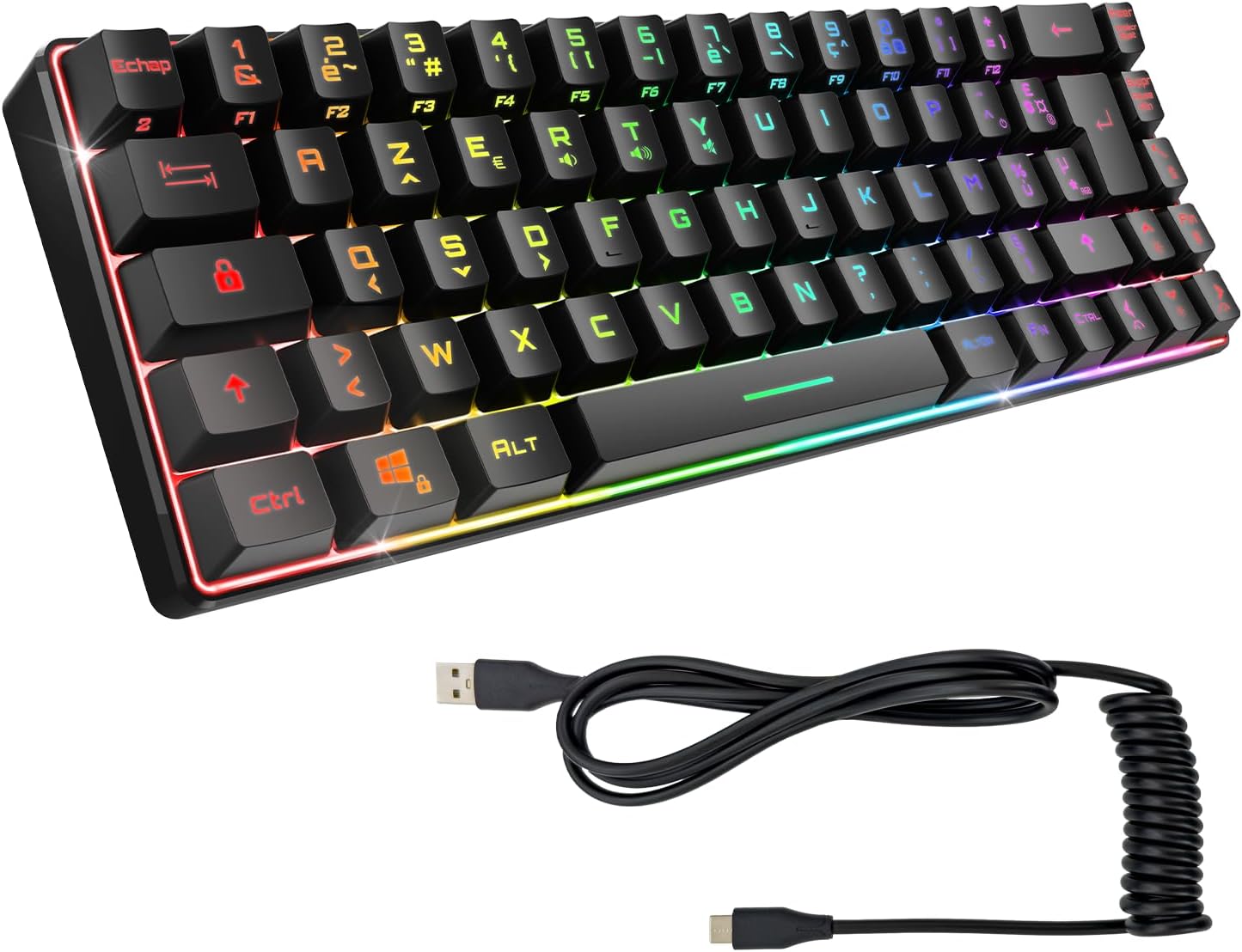
This manual provides essential information for the setup, operation, maintenance, and troubleshooting of your EMPIRE GAMING K208 TKL Compact Wired RGB Gaming Keyboard. Designed for gamers, this ultra-compact keyboard features 69 keys, 23 anti-ghosting keys, and dynamic RGB backlighting. It offers broad compatibility across multiple platforms, including PC, PS4, PS5, and Xbox, with a convenient plug-and-play USB Type-C connection.
Kandungan Pakej
- EMPIRE GAMING K208 TKL Compact Wired RGB Gaming Keyboard
- Detachable USB Type-C Coiled Cable
- Manual Pengguna (dokumen ini)
Persediaan
The EMPIRE GAMING K208 keyboard is designed for immediate use with its plug-and-play functionality, requiring no driver installation.
- Sambungkan Kabel USB: Locate the USB Type-C port on the keyboard. Connect the smaller end of the provided coiled USB Type-C cable to the keyboard.
- Sambung ke Peranti: Plug the standard USB-A end of the cable into an available USB port on your PC, PS4, PS5, or Xbox console.
- Hidupkan kuasa: The keyboard will automatically be recognized by your system and the RGB lighting will illuminate, indicating it is ready for use.
Arahan Operasi
Keyboard Layout and Anti-Ghosting
The K208 features a compact TKL (Tenkeyless) layout with 69 keys, including 23 keys with anti-ghosting technology. Anti-ghosting ensures that multiple key presses are registered simultaneously, which is crucial for gaming performance.
Kawalan Pencahayaan RGB
The keyboard is equipped with dynamic RGB backlighting offering 11 integrated lighting effects. You can cycle through these effects and adjust settings directly from the keyboard.
- Menukar Kesan Pencahayaan: Use the dedicated function key combinations (refer to the keyboard's keycaps for specific symbols, often involving the 'Fn' key) to cycle through the 11 available RGB lighting effects.
- Adjusting Brightness/Speed: Specific key combinations (e.g., Fn + Arrow keys) may be used to adjust the brightness level or the speed of dynamic lighting effects.

Kombinasi Kunci Fungsi
The keyboard utilizes an 'Fn' (Function) key to access secondary functions printed on various keycaps. For example, multimedia controls or specific system functions may be activated by holding down the 'Fn' key and pressing the corresponding key.
Penyelenggaraan
Penyelenggaraan yang betul memastikan jangka hayat dan prestasi optimum papan kekunci anda.
- Pembersihan: Use a soft, dry cloth to wipe the surface of the keyboard. For dust and debris between keycaps, use compressed air. Avoid using liquid cleaners directly on the keyboard.
- Penjagaan Kabel: The coiled USB Type-C cable is designed for durability. Avoid sharp bends or excessive pulling to prevent damage.
- Storan: Apabila tidak digunakan, simpan papan kekunci dalam persekitaran yang bersih dan kering dari suhu yang melampau dan cahaya matahari langsung.
Menyelesaikan masalah
If you encounter issues with your EMPIRE GAMING K208 keyboard, refer to the following common solutions:
- Papan Kekunci Tidak Membalas:
- Ensure the USB Type-C cable is securely connected to both the keyboard and your device.
- Cuba sambungkan papan kekunci ke port USB lain pada peranti anda.
- Test the keyboard on another compatible device (PC, PS4, PS5, Xbox) to rule out device-specific issues.
- RGB Lighting Not Working or Changing:
- Sahkan bahawa papan kekunci dikuasakan dengan betul.
- Ensure you are using the correct 'Fn' key combinations to cycle through the 11 integrated lighting effects. Note that this keyboard offers predefined effects and colors, not individual key customization.
- If the lighting is completely off, check for any 'Fn' key combinations that might toggle the lighting on/off.
- Kunci Khusus Tidak Berfungsi:
- Clean the affected key area with compressed air to remove any debris.
- Jika masalah berterusan, hubungi sokongan pelanggan.
Spesifikasi
| Ciri | Perincian |
|---|---|
| Jenama | EMPIRE GAMING |
| Nombor Model | OE-KB-K208 |
| warna | Hitam |
| Teknologi Ketersambungan | USB Jenis-C (Boleh Ditanggalkan) |
| Ciri Khas | Mudah alih |
| Peranti Serasi | PC, PS4, PS5, Xbox |
| Penerangan Papan Kekunci | TKL (69 keys, 23 anti-ghosting), RGB lighting (11 effects) |
| Penggunaan yang Disyorkan | Gaming, Personal, Daily Use |
| Backlight Color Management | RGB |
| Dimensi Produk (L x W x H) | 30.5 cm x 10.1 cm x 3.3 cm |
| bahan | plastik |

Waranti dan Sokongan
For warranty information and customer support, please refer to the official EMPIRE GAMING website or contact your retailer. Specific details regarding warranty duration and terms are typically provided with your purchase documentation.


