1. Pengenalan
This manual provides comprehensive instructions for the installation, operation, and maintenance of your ZWNAV 14.4-inch Android Car Radio. This multimedia player features a touchscreen, GPS navigation, Bluetooth, and wireless CarPlay/Android Auto capabilities, designed to enhance your driving experience.
2. Keserasian Kenderaan
This car stereo head unit is specifically designed for the following vehicle models:
- Chevrolet Silverado 2014-2019
- GMC 2014-2019
- Note: Some 2019 models are compatible. If unsure, contact support with a picture of your car's central control.

Figure 2.1: ZWNAV unit installed in a compatible vehicle dashboard.
3. Persediaan dan Pemasangan
3.1 Kandungan Pakej
Sebelum memulakan pemasangan, sahkan bahawa semua komponen terdapat dalam pakej:
- Main Unit (14.4-inch display)
- 4G+WiFi Antenna
- Manual AC Frame
- Kabel GPS
- Dekoder CANBUS
- Kabel Kuasa
- Kabel Kad SIM
- AV kabel
- Mikrofon Luaran
- Buzzer
- Kabel USB
- Pendakap Pemasangan
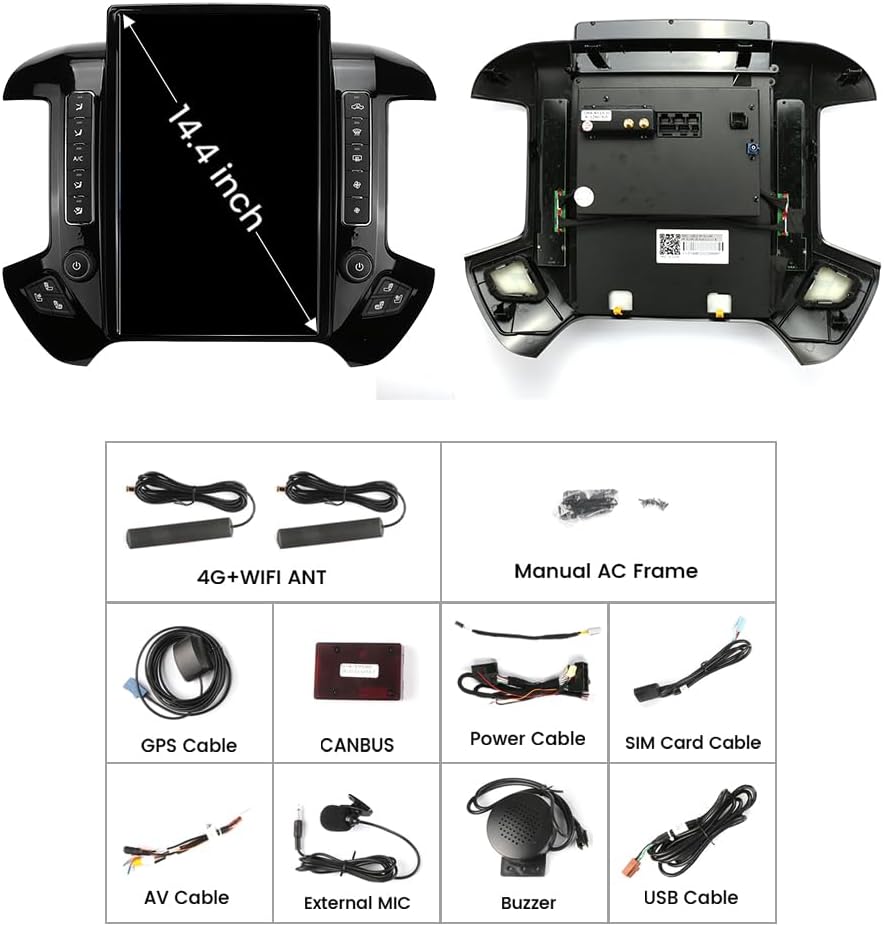
Figure 3.1: Included components for the ZWNAV car radio installation.
3.2 Pemasangan Lebihview
The ZWNAV car radio is designed for a seamless integration into your vehicle's dashboard. Professional installation is recommended. The following image illustrates the visual difference before and after installation.
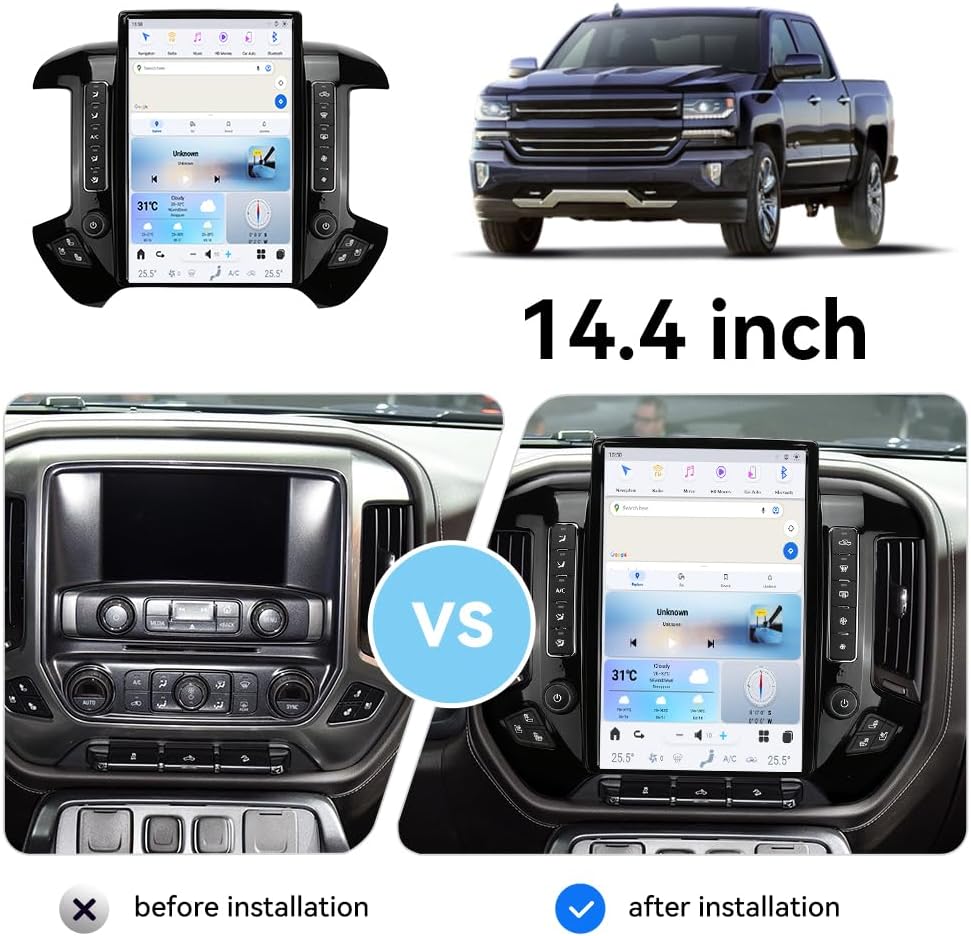
Figure 3.2: Visual comparison of the dashboard before and after the 14.4-inch display installation.
For detailed wiring diagrams and specific vehicle panel removal instructions, please refer to the supplementary installation guide provided with your unit or contact ZWNAV technical support.
4. Arahan Operasi
4.1 Sistem Selesaiview
The ZWNAV car radio operates on an Android 13.0 system, providing a familiar and intuitive user interface. The 14.4-inch 1920*1080 IPS touchscreen offers a full HD 1080P experience.

Figure 4.1: Main user interface of the ZWNAV car radio.
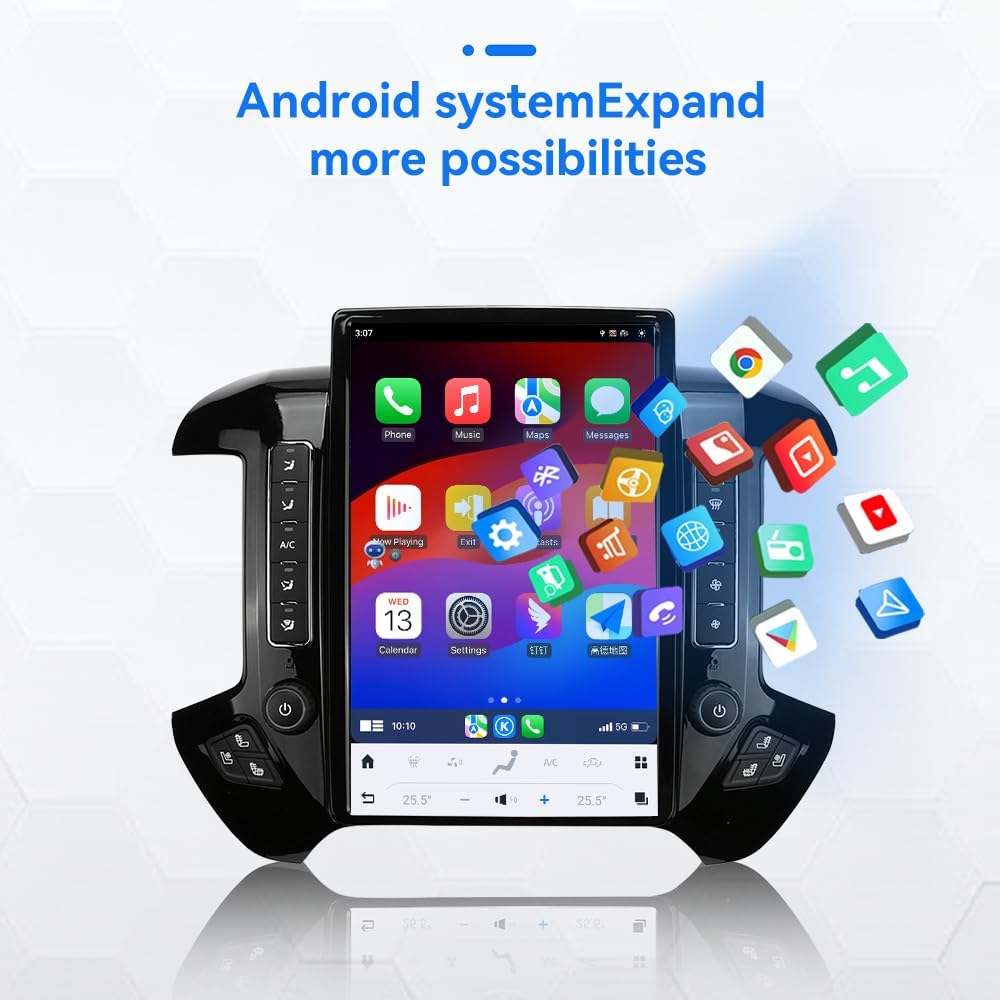
Figure 4.2: Introduction to interface functions and controls.
4.2 CarPlay Wayarles & Android Auto
Connect your smartphone wirelessly or via a wired connection to access CarPlay or Android Auto functionalities. This allows for seamless integration of phone features such as navigation, music, calls, and messages directly on the car stereo display.
- Sambungan Wayarles: For wireless CarPlay/Android Auto, ensure your phone's Bluetooth and Wi-Fi are enabled. Follow the on-screen prompts to pair your device.
- Sambungan Berwayar: Use a compatible USB cable to connect your phone to the USB port on the car stereo.
- Once connected, tap the "Car Link" icon on the stereo's home screen to launch CarPlay or Android Auto.
- Supports Siri (CarPlay) and Google Assistant (Android Auto) for voice commands.

Figure 4.3: CarPlay and Android Auto interface on the ZWNAV display.
4.3 Navigasi GPS
The unit comes with built-in GPS navigation. You can use pre-installed map applications or download your preferred navigation apps from the Google Play Store. The system supports North America map types.

Figure 4.4: GPS Navigation feature.
4.4 Kesambungan Bluetooth
The unit features Dual Bluetooth for hands-free calling and audio streaming. Pair your phone to make and receive calls directly from the car stereo, and stream music from your device.

Figure 4.5: Bluetooth 5.0 connectivity.
4.5 Radio (AM/FM RDS)
Access your favorite AM/FM radio stations. The RDS (Radio Data System) feature provides additional information such as station name and song title where available.

Figure 4.6: Radio function.
4.6 Kefungsian Skrin Pisah
Ciri skrin belah membolehkan anda menjalankan dua aplikasi serentak pada paparan 14.4 inci. Untuk example, you can have navigation open on one side and music playback on the other.

Figure 4.7: Split Screen feature.
4.7 Kawalan Roda Stereng
The unit supports steering wheel controls, allowing you to manage audio, calls, and other functions without taking your hands off the wheel. This enhances safety and convenience.

Figure 4.8: Steering Wheel Controls.
4.8 Belakang View Sokongan Kamera
Sistem ini menyokong bahagian belakang view camera input, automatically displaying the camera feed when the vehicle is in reverse. This aids in parking and maneuvering.

Figure 4.9: Reversing camera support.
4.9 Ciri-ciri Lain
- Kawalan Suara: Utilize voice commands for various functions, allowing you to focus on driving.
- 4G LTE Network: Supports 4G connectivity for online features and app downloads (SIM card required).
- Pemprosesan Isyarat Digital (DSP): Enhances audio output for a high-quality sound experience.
- Gedung Google Play: Download thousands of applications to customize your car stereo experience.
5. Penyelenggaraan
To ensure the longevity and optimal performance of your ZWNAV car radio, follow these maintenance guidelines:
- Pembersihan: Use a soft, dry, lint-free cloth to clean the touchscreen and surrounding surfaces. Avoid abrasive cleaners, solvents, or aerosol sprays, which can damage the display or finish.
- Suhu: Elakkan daripada mendedahkan unit kepada suhu yang melampau, panas dan sejuk, untuk tempoh yang lama.
- Kemas Kini Perisian: Semak dan pasang kemas kini perisian secara berkala untuk memastikan sistem berjalan dengan cekap dan mempunyai ciri terkini serta tampung keselamatan.
- Berbasikal Kuasa: If the unit becomes unresponsive, try turning off your vehicle's ignition and restarting it after a few minutes.
6. Penyelesaian masalah
This section addresses common issues you might encounter with your ZWNAV car radio. If you experience problems not listed here, please contact technical support.
| Masalah | Kemungkinan Punca | Penyelesaian |
|---|---|---|
| Unit tidak dihidupkan. | Sambungan kuasa longgar; Fius yang ditiup; Masalah bateri kenderaan. | Check power cables and connections. Inspect vehicle fuses. Ensure vehicle battery is charged. |
| Tiada bunyi dari pembesar suara. | Kelantangan terlalu rendah; Bisu diaktifkan; Isu pendawaian pembesar suara; Sumber audio salah. | Increase volume. Check if mute is active. Verify speaker connections. Select correct audio input. |
| Isyarat GPS hilang atau tidak tepat. | Poor satellite reception; GPS antenna not properly connected. | Move to an open area. Ensure GPS antenna is securely connected and positioned correctly. |
| CarPlay/Android Auto tidak bersambung. | Bluetooth/Wi-Fi off on phone; Incorrect cable; Software glitch. | Ensure phone's Bluetooth/Wi-Fi is on. Use a certified USB cable. Restart both phone and car stereo. |
| Skrin sentuh tidak bertindak balas. | System freeze; Dirt on screen. | Restart the unit. Clean the screen with a soft cloth. |
7. Spesifikasi
| Ciri | Perincian |
|---|---|
| Nombor Model | 8+128GB |
| Sistem Operasi | Android 13.0 |
| Pemproses | Teras Octa |
| RAM | 8GB |
| Storan Dalaman (ROM) | 128GB |
| Saiz Paparan | 14.4 inci |
| Resolusi Paparan | 1920 * 1080 IPS |
| Ketersambungan | USB, WiFi, Bluetooth 5.0, 4G LTE |
| Navigasi | GPS, North America Map Type |
| Mod Keluaran Audio | Stereo |
| Ciri Khas | Touchscreen, Wireless CarPlay, Wireless Android Auto, AM/FM RDS Radio, Split Screen, Steering Wheel Control, Rear View Camera Support, Voice Command, DSP |
| Jenis Pemasangan | Pemasangan Papan Pemuka |
| Pengeluar | ZWNAV |
| Negara Asal | China |
8. Maklumat Waranti
The ZWNAV 14.4'' Android Car Radio comes with a Waranti 2 Tahun from the date of purchase. This warranty covers manufacturing defects and malfunctions under normal use. Please retain your proof of purchase for warranty claims. The warranty does not cover damage caused by improper installation, misuse, accidents, or unauthorized modifications.
9. Sokongan Teknikal
For technical assistance, installation queries, or any other support needs, please contact ZWNAVGPS Offical Store directly:
- e-mel: zwnavgps@hotmail.com
- WhatsApp: +86 15778786860
- Halaman Penjual Amazon: Click "ZWNAVGPS Offical Store" then "ask a question" on the product page.
When contacting support, please provide your product model number (8+128GB) and a detailed description of the issue.


