1. Pengenalan
Terima kasih kerana membeliasing the MISTRAL Horizon Twilight MHV7123DR-TL 7-inch DC High Velocity Fan. This manual provides essential information for the safe operation, installation, and maintenance of your fan. Please read it thoroughly before use and retain it for future reference.

Imej 1.1: Depan view of the MISTRAL Horizon Twilight MHV7123DR-TL fan, showcasing its compact design and the fan head with the Mistral logo. A remote control is visible to the right of the fan.
2. Arahan Keselamatan
Untuk mengurangkan risiko kebakaran, kejutan elektrik atau kecederaan, sentiasa ikuti langkah berjaga-jaga keselamatan asas ini:
- Pastikan bekalan kuasa voltage sepadan dengan label penarafan pada kipas.
- Jangan kendalikan kipas dengan kord atau palam yang rosak. Jika rosak, hubungi kakitangan servis yang berkelayakan.
- Keep fingers and other objects away from the fan blades and moving parts during operation.
- Jangan gunakan kipas dalam keadaan basah atau damp lokasi, seperti bilik mandi atau kawasan dobi.
- Cabut plag kipas daripada soket kuasa sebelum membersihkan atau melakukan sebarang penyelenggaraan.
- Perkakas ini tidak dimaksudkan untuk digunakan oleh orang (termasuk kanak-kanak) yang kurang keupayaan fizikal, deria atau mental, atau kurang pengalaman dan pengetahuan, melainkan mereka telah diberi pengawasan atau arahan mengenai penggunaan perkakas oleh orang yang bertanggungjawab untuk keselamatan mereka.
- Kanak-kanak harus diawasi untuk memastikan bahawa mereka tidak bermain dengan perkakas.
3. Kandungan Pakej
Sahkan bahawa semua item terdapat dalam pakej:
- MISTRAL Horizon Twilight MHV7123DR-TL Fan Unit
- Alat Kawalan Jauh
- Manual Pengguna (dokumen ini)
4. Produk Lebihview
Familiarize yourself with the components of your fan:
4.1 Fan Unit
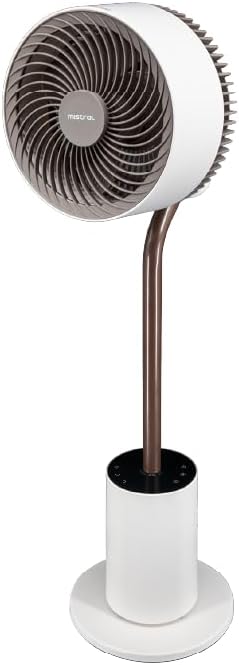
Imej 4.1: Bahagian hadapan terperinci view of the fan, highlighting the fan head, stand, and control base. This image provides a clear perspective of the fan's overall structure.
- Ketua Kipas: Mengandungi bilah kipas dan motor.
- Front Guard: Penutup pelindung untuk bilah kipas.
- Rear Guard: Back cover of the fan head, housing the atmosphere light.
- Berdiri: Connects the fan head to the base.
- Control Base: Houses the control panel and power input.
- Kord Kuasa: Untuk menyambung ke salur keluar elektrik.
4.2 Alat Kawalan Jauh
The remote control allows convenient operation of all fan functions from a distance. (Refer to Image 1.1 for a visual of the remote control.)
- Butang Kuasa: Menghidupkan/Mematikan kipas.
- Butang Kelajuan: Adjusts fan speed (1-12 speeds + Booster).
- Butang Mod: Cycles through Normal, Natural, Sleeping, and ECO modes.
- Butang ayunan: Activates/deactivates 3D oscillation (horizontal and vertical).
- Butang Pemasa: Sets the operating timer (up to 12 hours).
- Butang Cahaya: Controls the atmosphere light (On/Off, brightness adjustment).
- Indicating Lights Off Button: Turns off the control panel's indicator lights.
5. Persediaan
The MISTRAL Horizon Twilight fan typically comes pre-assembled. Follow these steps for initial setup:
- Membongkar: Tanggalkan kipas dan semua aksesori daripada pembungkusan dengan berhati-hati.
- penempatan: Place the fan on a stable, flat surface. Ensure there is adequate space around the fan for proper air circulation and oscillation.
- Sambungan Kuasa: Masukkan palam kuasa ke dalam salur keluar elektrik yang sesuai.
- Bateri Kawalan Jauh: Open the battery compartment on the remote control and insert the required batteries (not included, typically AAA). Ensure correct polarity.
6. Arahan Operasi
Operate your fan using either the control panel on the base or the remote control.
6.1 Hidupkan/Mati Kuasa
- Tekan ke kuasa button on the control panel or remote control to turn the fan On or Off.
6.2 Kawalan Kelajuan
- Tekan ke Kelajuan button to cycle through 12 fan speed settings.
- A Booster Speed setting is also available for maximum airflow.
6.3 Mod
Tekan ke Mod butang untuk memilih daripada mod operasi berikut:
- Mod Biasa: Memberikan aliran udara yang malar pada kelajuan yang dipilih.
- Mod Semula Jadi: Mensimulasikan angin semula jadi dengan mengubah kelajuan kipas secara berselang-seli.
- Mod Tidur: Beroperasi pada kelajuan yang lebih rendah dan lebih senyap, secara beransur-ansur berkuranganasing over time for comfortable sleep.
- Mod ECO: Adjusts fan speed automatically based on ambient temperature to optimize energy consumption.
6.4 3D Oscillation
The fan features 3D oscillation for wider air distribution.
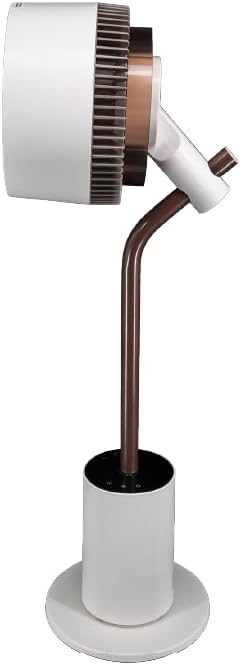
Imej 6.4: sebelah view of the fan, illustrating its ability to tilt vertically, which is part of its 3D oscillation feature. The fan head is angled upwards.
- Tekan ke Oscillation button to activate or deactivate the oscillation function.
- Ayunan Mendatar: Left and Right movement at 30°, 60°, 90°, or 120° angles.
- Ayunan Menegak: Up and Down movement at 50° or 90° angles.
- The fan can oscillate both horizontally and vertically simultaneously for 3D airflow.
6.5 Fungsi Pemasa
- Tekan ke Pemasa button to set the fan to automatically turn off after a specified period.
- The timer can be set for up to 12 hours. Each press typically increases the timer by 1 hour.
6.6 Penyebar Aroma
The fan includes an aroma diffuser feature for a pleasant environment.
- Locate the aroma diffuser compartment (usually at the back of the fan head or base).
- Open the compartment and add a few drops of your preferred essential oil onto the provided pad (if applicable).
- Close the compartment. The fan's airflow will gently diffuse the aroma.
6.7 Inner Mood Lighting
The fan features an atmosphere light on the back of the rear guard.

Imej 6.7: The MISTRAL fan with its inner mood lighting activated, casting a warm glow from behind the fan head. This demonstrates the adjustable atmosphere light feature.
- Tekan ke Cahaya button on the remote control to turn the mood light On/Off.
- Tekan ke Cahaya button repeatedly to cycle through 3 adjustable brightness levels.
6.8 Indicating Lights Off Function
- Tekan ke Indicating Lights Off button on the remote control to turn off the control panel's indicator lights, which can be useful in dark environments like a bedroom.
7. Penyelenggaraan
Pembersihan dan penyelenggaraan yang kerap akan memastikan prestasi optimum dan memanjangkan jangka hayat kipas anda.
- Membersihkan Bahagian Luar: Lap permukaan luar kipas dengan lembut, damp kain. Jangan gunakan pembersih atau pelarut yang melelas.
- Cleaning Fan Blades: Unplug the fan before attempting to clean the blades. If accessible, gently wipe the blades with a soft cloth to remove dust. Do not immerse the fan in water.
- Aroma Diffuser Pad: If using an aroma diffuser, regularly clean or replace the aroma pad to prevent residue buildup.
- Storan: When not in use for extended periods, unplug the fan, clean it, and store it in a cool, dry place, preferably in its original packaging.
8. Penyelesaian masalah
Jika anda menghadapi masalah dengan kipas anda, rujuk masalah dan penyelesaian biasa berikut:
| Masalah | Kemungkinan Punca | Penyelesaian |
|---|---|---|
| Kipas tidak dihidupkan. | Tiada bekalan kuasa; Butang kuasa tidak ditekan; Bateri alat kawalan jauh kehabisan kuasa. | Check power cord connection and wall outlet; Press the Power button; Replace remote control batteries. |
| Aliran udara yang lemah. | Low speed setting; Fan blades are dirty. | Increase fan speed; Clean fan blades (refer to Maintenance section). |
| Kipas membuat bunyi yang luar biasa. | Obstruction near blades; Fan not on a stable surface. | Unplug and check for obstructions; Place fan on a flat, stable surface. |
| Alat kawalan jauh tidak berfungsi. | Batteries depleted or incorrectly inserted; Obstruction between remote and fan. | Replace batteries, ensuring correct polarity; Ensure clear line of sight to the fan's receiver. |
9. Spesifikasi
| Ciri | Perincian |
|---|---|
| Model | MHV7123DR-TL |
| Jenis Kipas | 7-inch DC High Velocity Fan |
| Jenis Motor | Motor DC tanpa berus |
| Kelajuan | 12 Speeds + Booster Speed |
| Mod | Normal, Natural, Sleeping, ECO |
| Oscillation | 3D Oscillation (Left/Right: 30°, 60°, 90°, 120°; Up/Down: 50°, 90°) |
| Pemasa | 12 Jam |
| Ciri Khas | Aroma Diffuser, Inner Mood Lighting (3 adjustable brightness), Indicating Lights Off Function, Remote Control |
| Sumber Kuasa | Elektrik Bertali |
| Dimensi Produk | 25D x 25W x 90H sentimeter |
| Faktor Bentuk | Stand / Floor Fan |
10. Waranti dan Sokongan
MISTRAL products are manufactured to high-quality standards. For warranty information, please refer to the warranty card included with your purchase or visit the official MISTRAL website. For technical support or service inquiries, please contact MISTRAL customer service.
Sila simpan bukti pembelian anda untuk tuntutan waranti.