1. Pengenalan
The virtavo VistaFlask 2K Security Camera is a wireless, battery-powered outdoor camera designed to enhance your home security. Featuring 2K QHD imaging, AI motion detection, starlight lens for colorful night vision, and weatherproof construction, it provides reliable surveillance in various conditions. This manual provides detailed instructions for setting up, operating, maintaining, and troubleshooting your camera.

Image: Two virtavo VistaFlask 2K security cameras, designed for outdoor use.
2. Maklumat Keselamatan
- Pastikan kamera dipasang dengan kukuh untuk mengelakkan daripada terjatuh.
- Use only the specified charging cable and power adapter to charge the battery.
- Jangan dedahkan kamera kepada suhu ekstrem di luar julat operasinya.
- Avoid disassembling or modifying the camera, as this will void the warranty and may cause damage.
- Jauhkan kamera dan aksesorinya daripada capaian kanak-kanak.
3. Kandungan Pakej
- virtavo VistaFlask 2K Security Camera(s)
- Pendakap Pelekap
- Kabel Pengecas USB
- Manual Pengguna
- Skru dan Penambat Pemasangan
4. Produk Lebihview
The virtavo VistaFlask camera features a compact design with essential components for optimal performance. Key elements include the lens, IR LEDs for night vision, a microphone for audio input, a speaker for two-way communication, and a motion sensor. The power switch, sync button, and charging port are located at the bottom of the camera, alongside the microSD card slot for local storage.

Imej: Dalaman view highlighting the battery and electronic components.

Imej: Bawah view of the camera with power switch, charging port, sync button, and microSD card slot.
5. Panduan Persediaan
5.1 Persediaan Awal
- Cas Kamera: Before first use, fully charge the camera using the provided USB cable. The battery lasts 1-3 months per charge depending on usage.
- Muat turun Apl: Cari untuk 'HOME V' in your smartphone's app store (iOS or Android) and download the application.
- Buat Akaun: Open the 'HOME V' app and follow the on-screen instructions to register a new account or log in if you already have one.
5.2 Camera Pairing and Connection
Follow these steps to pair your virtavo VistaFlask camera with the 'HOME V' app. For a visual guide, please refer to the official installation video below.
Video: Official virtavo VistaFlask Installation Guide Setup. This video demonstrates the step-by-step process of binding the camera to the 'HOME V' app using QR codes, including powering on the camera, confirming the red light flashing, connecting to the camera's hotspot, and connecting to your home Wi-Fi network.
- Tambah Peranti: In the 'HOME V' app, tap the '+' icon to add a new device.
- Imbas Kod QR: Grant camera access to the app. Scan the QR code located on the back of your virtavo VistaFlask camera.
- Hidupkan kuasa: Ensure the camera is powered on. The power switch is located at the bottom.
- Confirm Flashing Light: Confirm that the camera's red indicator light is flashing rapidly. If not, press and hold the 'Sync' button for 5-10 seconds until you hear a 'Du' sound or see rapid flashing.
- Connect to Camera Hotspot: The app will prompt you to connect to the camera's Wi-Fi hotspot (e.g., 'IPC365_AP-XXXX'). Confirm and join this network.
- Pilih Wi-Fi Rumah: Choose your home 2.4GHz Wi-Fi network from the list and enter the correct password. Note: This device only supports 2.4GHz Wi-Fi.
- Namakan Kamera Anda: Once connected, name your camera for easy identification (e.g., 'Front Door', 'Living Room').
5.3 Pemasangan Fizikal
The virtavo VistaFlask camera is designed for easy installation, both indoors and outdoors. Its weatherproof design ensures durability.

Image: Easy installation on smooth surfaces like glass or tiles, no drilling required.

Image: Wireless connection for remote access.
- Pilih Lokasi: Select a location with good Wi-Fi signal strength and a clear view kawasan yang anda ingin pantau.
- Pemasangan: Use the provided mounting bracket, screws, and anchors to securely attach the camera to a wall or other suitable surface. Ensure the camera is positioned to capture the desired field of view.
- tahan cuaca: The camera is designed to withstand various weather conditions, making it suitable for outdoor use.
6. Arahan Operasi
6.1 Langsung View dan Audio Dua Hala
Access real-time video feed and communicate through the camera using the 'HOME V' app.
- Langsung View: Buka aplikasi dan pilih kamera anda untuk view suapan langsung.
- Audio Dua hala: Ketik ikon mikrofon dalam siaran langsung view to speak through the camera's speaker, and listen through its microphone.
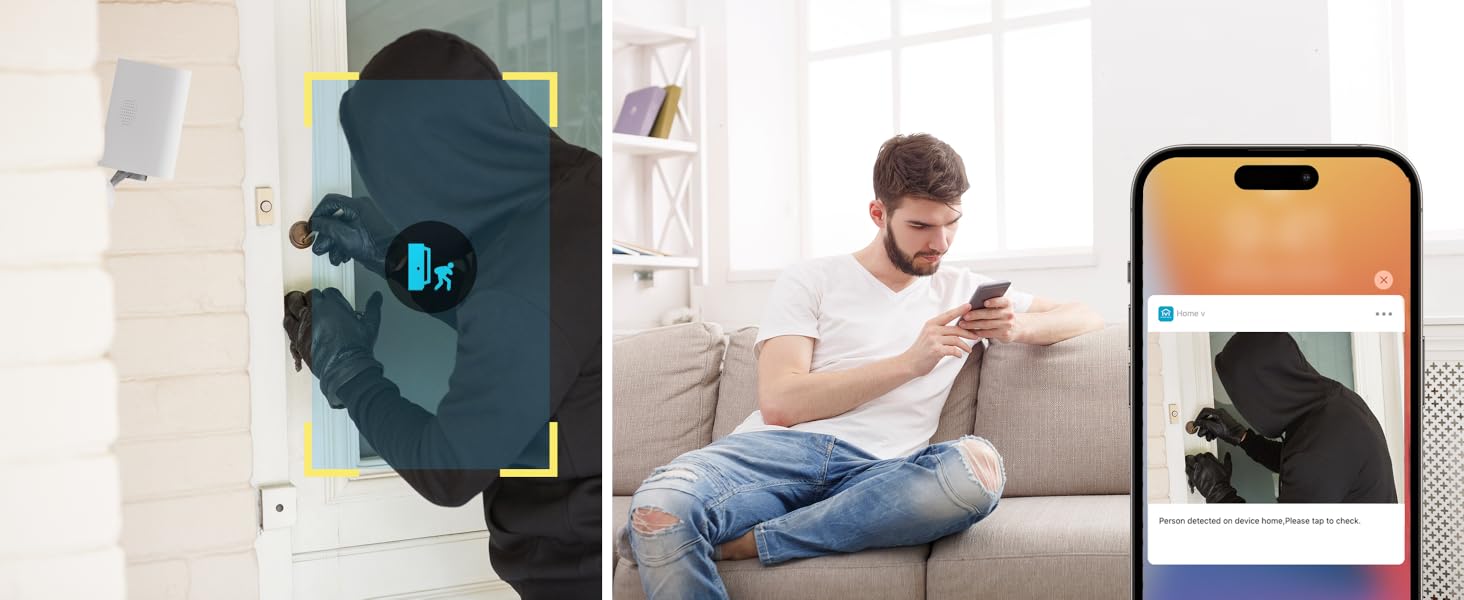
Image: Two-way audio feature for communication.
6.2 Pengesanan Gerakan dan Makluman
The camera features advanced PIR motion detection and AI capabilities to minimize false alarms.
- Pengesanan Gerakan PIR: Detects motion up to 30 feet.
- Makluman Pintar: Terima pemberitahuan segera pada telefon pintar anda apabila gerakan dikesan.
- AI Detection (Cloud Subscription): With an optional cloud subscription, the camera can differentiate between humans, vehicles, and animals, reducing irrelevant alerts.
- Zon Pengesanan Boleh Disesuaikan: Set specific areas for motion detection to focus on critical zones and ignore others.
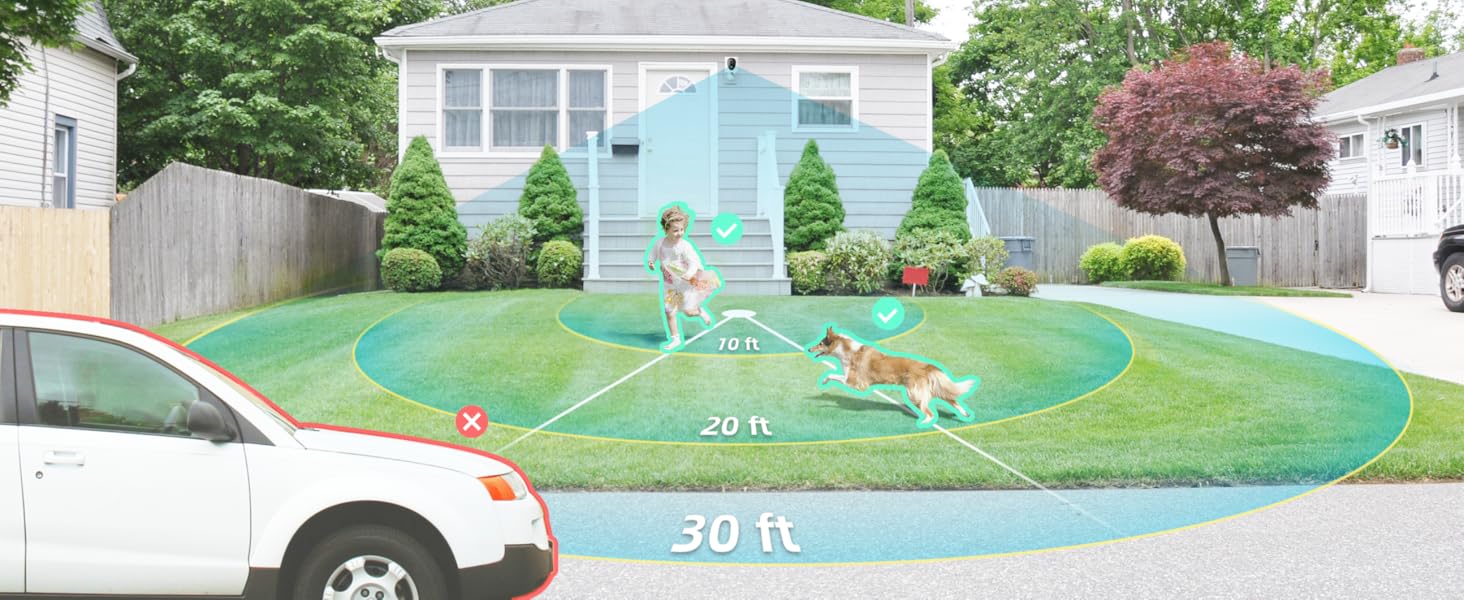
Image: Smart detection distinguishing between people, vehicles, and animals.
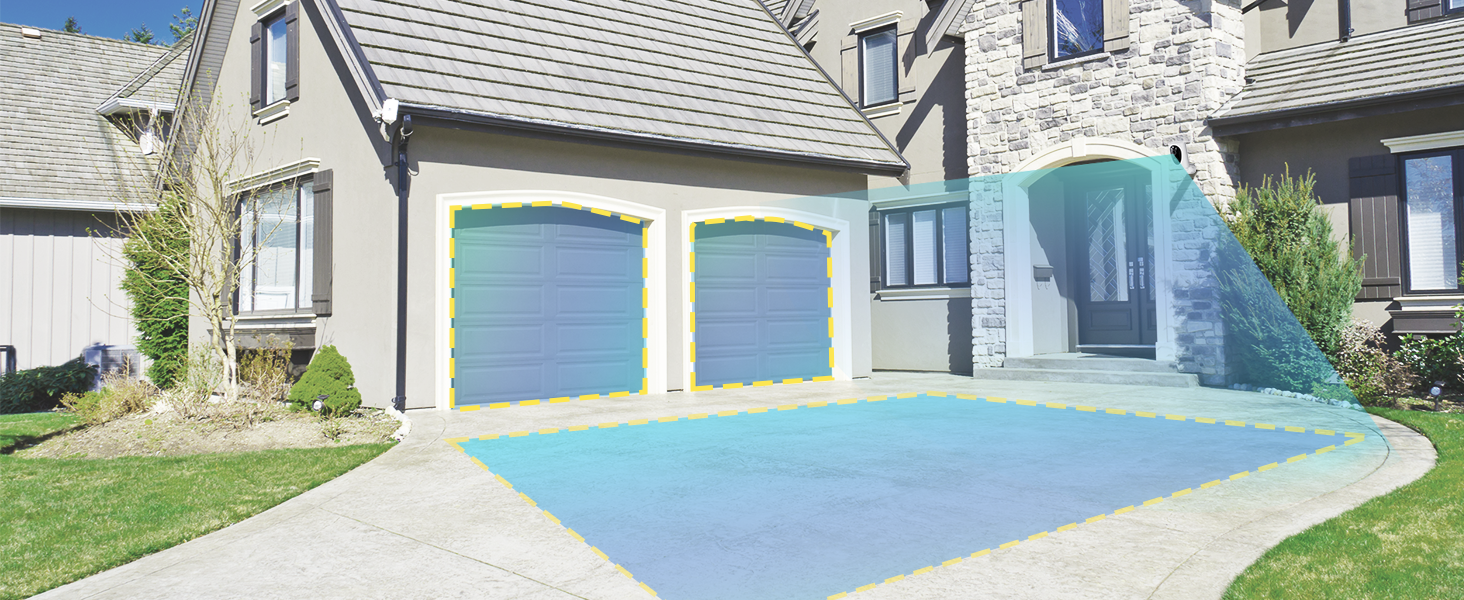
Image: Customizable motion detection zones.

Image: Instant alerts with image previews.
6.3 Penglihatan Malam
The camera provides clear vision even in low-light conditions.
- Penglihatan Malam Warna: Utilizes Starlight technology and a wide F1.6 aperture for vivid, color-rich images in low light.
- Penglihatan Malam IR: Equipped with 2 high-intensity IR LEDs for clear black-and-white viewing in complete darkness.

Image: Superior 2K QHD imaging and color-rich night vision.
6.4 Rakaman dan Penyimpanan
Your data is secured with flexible storage options.
- Storan Setempat: Supports microSD cards from 32GB to 256GB for continuous recording, even without network access. (MicroSD card not included).
- Storan Awan: Optional cloud storage plans offer additional features like snapshot alerts and advanced AI capabilities. Video encryption ensures privacy.

Image: Comparison of no-fee basic storage (SD card) and cloud storage options.
6.5 App Features and Remote Access
Manage and control your security remotely via the 'HOME V' app.
- Pemantauan Jauh: Monitor your home from anywhere with an internet connection.
- Akses Berbilang Pengguna: Kongsi akses kamera dengan ahli keluarga.
- Penjadualan: Set schedules for recording or alerts.

Image: Remote access and multi-user monitoring via the 'HOME V' app.
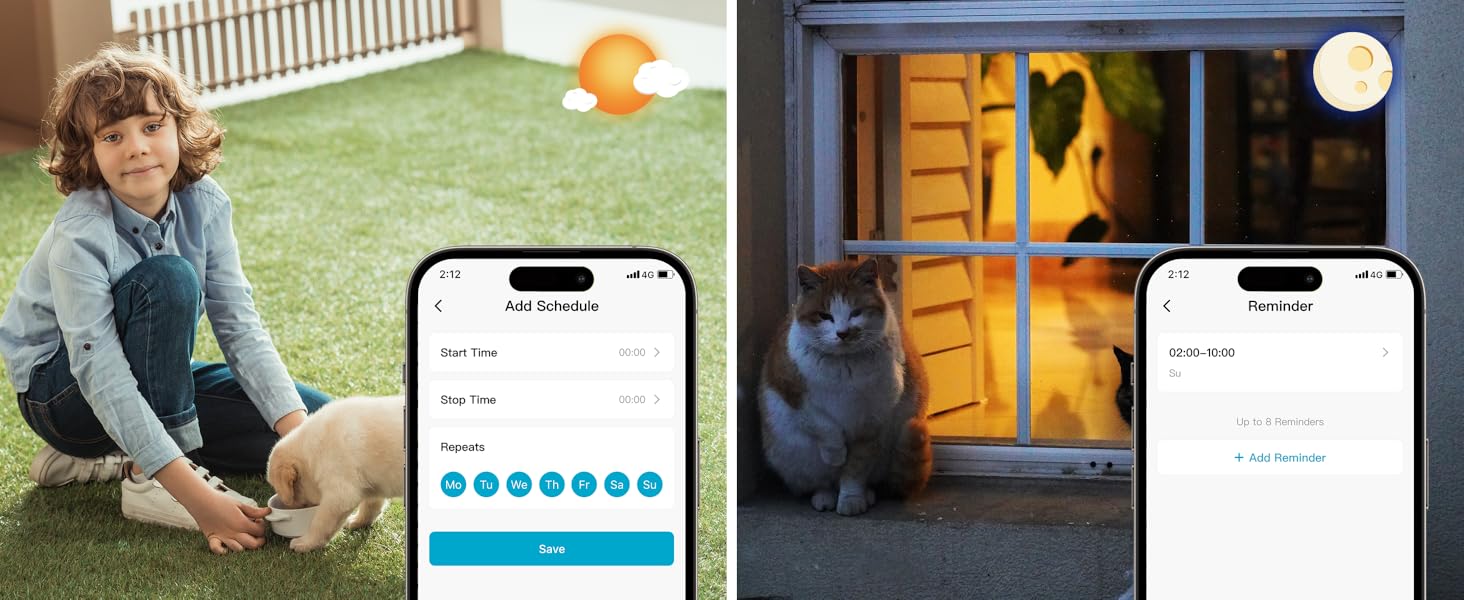
Image: App features including scheduling and reminders.
7. Penyelenggaraan
- Pengecasan Bateri: Recharge the camera battery when prompted by the app. A full charge can last 1-3 months depending on activity.
- Pembersihan: Lap kanta dan badan kamera dengan lembut,amp kain. Elakkan pembersih yang kasar.
- Kemas kini Firmware: Regularly check the 'HOME V' app for firmware updates to ensure optimal performance and security.
8. Penyelesaian masalah
| Isu | Kemungkinan Punca | Penyelesaian |
|---|---|---|
| Kamera tidak dapat dihidupkan | Battery depleted; Power switch off | Charge the camera fully; Ensure power switch is in the 'ON' position. |
| Tidak dapat menyambung ke Wi-Fi | Incorrect Wi-Fi password; 5GHz Wi-Fi network; Weak Wi-Fi signal | Sahkan kata laluan; Pastikan anda bersambung ke rangkaian 2.4GHz; Alihkan kamera lebih dekat ke penghala atau gunakan pemanjang Wi-Fi. |
| Penggera palsu yang kerap | High motion sensitivity; Unfiltered motion sources (e.g., trees, animals) | Adjust motion sensitivity in app; Set up detection zones to exclude irrelevant areas; Consider cloud subscription for AI detection. |
| Poor night vision clarity | Dirty lens; Obstruction in front of camera; Insufficient ambient light for color night vision | Clean the lens; Remove obstructions; Ensure adequate ambient light for color mode or switch to IR night vision. |
| Bateri cepat habis | High activity/recordings; Frequent live view access; Weak Wi-Fi signal | Reduce motion detection sensitivity; Limit live view sessions; Improve Wi-Fi signal strength. |
9. Spesifikasi
| Ciri | Perincian |
|---|---|
| Nama Model | LJH10 |
| Penggunaan Dalaman/Luar | Dalaman, Luaran |
| Sumber Kuasa | Battery Powered (4400mAh rechargeable Lithium battery) |
| Protokol Ketersambungan | Wi-Fi (2.4GHz sahaja) |
| Jenis Pengawal | HOME V App |
| Jenis Pemasangan | Lekap di dinding |
| Resolusi Tangkapan Video | 2K QHD |
| Viewsudut | 120 Darjah (Bidang View: 130 Darjah) |
| Julat Penglihatan Malam | 30 Kaki |
| Teknologi Cahaya Rendah | Starlight (F1.6 aperture, 3.0mm focal length) |
| Bilangan LED IR | 2 |
| Tahap Ketahanan Air | Kalis air |
| Dimensi (L x W x H) | 2.7 x 1.3 x 3.2 inci |
| Berat Barang | 1.41 paun |
| Pilihan Storan | MicroSD (32GB-256GB), Cloud Storage |
| Ciri Khas | 2-Way Audio, Battery Powered, Local Recording, Motion Sensor, Night Vision, AI Motion Detection |
10. Waranti dan Sokongan
virtavo products are designed for reliability and performance. For information regarding product warranty, please refer to the warranty card included in your product packaging or visit the official virtavo website. If you encounter any issues or have questions not covered in this manual, please contact virtavo customer support through the 'HOME V' app or their official support channels for assistance.


