pengenalan
This manual provides detailed instructions for the Fantech Tamago WHG01 Wireless Headphones. It covers product features, setup, operation, maintenance, and troubleshooting to ensure optimal performance and user experience. The WHG01 offers tri-mode connectivity (StrikeSpeed 2.4GHz wireless, Bluetooth 5.2, and wired Type-C) and a detachable microphone, designed for versatile audio needs.
Apa yang ada dalam Kotak
Sahkan bahawa semua item yang disenaraikan di bawah disertakan dalam pakej anda:
- Fantech Tamago WHG01 Headset
- USB Receiver (for StrikeSpeed 2.4GHz wireless)
- Kabel Pengecasan Jenis-C
- Mikrofon Omnidirectional Boleh Tanggal
- Manual Pengguna

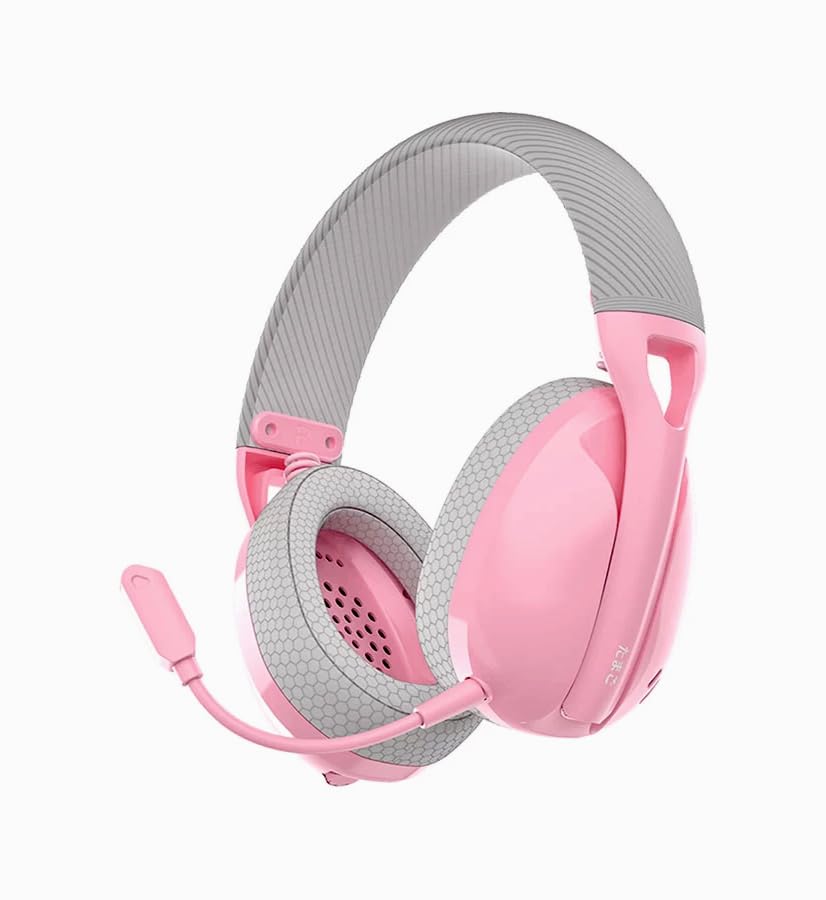
Produk Selesaiview
The Fantech Tamago WHG01 headphones are designed for comfort and versatility. Key features include:
- Reka Bentuk Ultra Ringan: Weighing approximately 168g (172g with microphone), ensuring comfort during extended use.
- Kusyen Telinga Bernafas: Fabric-covered ear cushions for enhanced comfort and airflow.
- Mikrofon boleh tanggal: A flexible omnidirectional microphone for clear communication, which can be removed when not needed.
- Kawalan Pada Telinga: Integrated buttons for power, volume adjustment, and microphone mute.

Persediaan
1. Mengecas Alat Dengar
Before first use, fully charge the headset. A built-in 400mAh battery provides up to 18 hours of playtime.
- Connect the supplied Type-C charging cable to the charging port on the headset.
- Sambungkan hujung kabel yang satu lagi ke sumber kuasa USB (cth, port USB komputer, penyesuai dinding USB).
- The LED indicator on the headset will show charging status (refer to LED indicator section for details).
- Setelah dicas sepenuhnya, cabut kabel pengecasan.

2. Memasang Mikrofon
The WHG01 features a detachable omnidirectional microphone.
- Locate the microphone port on the left ear cup.
- Align the microphone's connector with the port and gently push it in until it clicks into place.
- To detach, gently pull the microphone out of the port.
3. Mod Kesambungan
The headset supports three connectivity modes: StrikeSpeed 2.4GHz Wireless, Bluetooth 5.2, and Wired Type-C.

StrikeSpeed 2.4GHz Wireless Connection
This mode provides low-latency wireless audio, ideal for gaming.
- Insert the USB receiver into an available USB port on your device (PC, laptop, compatible console).
- Power on the headset. The headset will automatically attempt to connect to the USB receiver.
- The LED indicator will confirm successful connection (refer to LED indicator section).
- Ensure the headset is selected as the audio output/input device in your system settings.
Sambungan Bluetooth 5.2
For wireless connection to Bluetooth-enabled devices like smartphones, tablets, or laptops.
- Hidupkan alat dengar.
- Press and hold the mode button (or power button, depending on model specifics - refer to physical controls diagram if available) to enter Bluetooth pairing mode. The LED indicator will flash, indicating it's discoverable.
- On your device, go to Bluetooth settings and search for "Fantech Tamago WHG01" (or similar).
- Select the headset to pair. The LED indicator will change to a solid light upon successful pairing.
Sambungan Jenis-C Berwayar
For a direct, stable connection and simultaneous charging.
- Connect the Type-C charging cable to the headset's Type-C port.
- Connect the other end of the cable to a compatible Type-C port on your device.
- Fon kepala akan berfungsi sebagai peranti audio berwayar.
Arahan Operasi
Hidupkan/Mati Kuasa
- Untuk Menghidupkan: Press and hold the Power button (usually located on the ear cup) for approximately 3 seconds until the LED indicator lights up.
- Untuk Mematikan: Tekan dan tahan butang Kuasa selama lebih kurang 5 saat sehingga penunjuk LED dimatikan.
Kawalan Kelantangan
- Tingkatkan Kelantangan: Press the '+' button on the ear cup.
- Kurangkan Kelantangan: Press the '-' button on the ear cup.
Bisu / Tidak Bersuara Mikrofon
- Redam Mikrofon: Press the dedicated microphone mute button (or a specific combination, refer to product diagram) on the ear cup.
- Nyahbisukan Mikrofon: Press the microphone mute button again.
Switching Connectivity Modes
The headset allows seamless switching between its tri-modes.
- Press the Mode button (if available) to cycle through StrikeSpeed Wireless, Bluetooth, and Wired modes.
- The LED indicator will change to reflect the active mode.
Penyelenggaraan
Pembersihan
- Gunakan kain lembut dan kering untuk mengelap permukaan alat dengar.
- Untuk kusyen telinga, lap perlahan-lahan dengan sedikitamp kain dan biarkan kering sepenuhnya.
- Jangan gunakan bahan kimia, pelarut atau pembersih yang kasar.
Penyimpanan
- Simpan alat dengar di tempat yang sejuk dan kering jauh dari cahaya matahari langsung dan suhu yang melampau.
- Elakkan meletakkan objek berat pada alat dengar.
- Jika menyimpan untuk tempoh yang lama, pastikan bateri dicas separa (sekitar 50%) untuk memanjangkan jangka hayatnya.
Menyelesaikan masalah
- Tiada Kuasa: Ensure the headset is charged. Connect the Type-C cable and check if the charging indicator lights up.
- Tiada Bunyi (Tanpa Wayar):
- Check if the headset is powered on and connected to the correct device.
- For StrikeSpeed, ensure the USB receiver is properly inserted and recognized by your device.
- For Bluetooth, ensure the headset is paired and selected as the audio output in your device's settings.
- Tingkatkan kelantangan pada kedua-dua set kepala dan peranti anda yang disambungkan.
- Mikrofon Tidak Berfungsi:
- Pastikan mikrofon dipasang dengan kukuh pada alat dengar.
- Check if the microphone is muted using the headset's controls.
- Verify that the correct microphone input device is selected in your computer's or device's sound settings.
- Isu Sambungan:
- Cuba mulakan semula kedua-dua alat dengar dan peranti yang disambungkan.
- For Bluetooth, try unpairing and re-pairing the headset.
- Ensure there are no significant obstructions or interference sources between the headset and the wireless receiver/device.
Spesifikasi
| Model | WHG01 |
| Ketersambungan | Tri-mode (StrikeSpeed 2.4GHz Wireless, Bluetooth 5.2, Wired Type-C) |
| Berat badan | 168g (172g with microphone) |
| Pemandu Penceramah | 40mm |
| Sensitiviti Pembesar Suara | 106dB±3dB |
| Jenis Mikrofon | Detachable Omnidirectional |
| Dimensi Mikrofon | ø6mm*2.7mm |
| Kepekaan Mikrofon | -42±3 dB |
| Kapasiti Bateri | 400mAh |
| Masa bermain | Sehingga 18 jam |
| Port Pengecasan | USB Jenis-C |
| Core Construction | ABS |
| Peranti Serasi | PC, Laptop, Mobile devices |
Waranti dan Sokongan
For warranty information and technical support, please refer to the official Fantech webtapak atau hubungi pengedar tempatan anda. Simpan bukti pembelian anda untuk tuntutan jaminan.
Pengeluar: Fantech
Pengimport/Pembungkus: MRJ Electronics Ahmedabad Gujarat. electronicsmrj@gmail.com. Contact: 9023265213
Tarikh Mula-mula Tersedia: 25 September 2024


