1. Pengenalan
Thank you for choosing the OHAYO Portable Bluetooth Speaker. This manual provides essential information for setting up, operating, and maintaining your speaker to ensure optimal performance. Designed for both indoor and outdoor use, this speaker delivers exceptional audio quality with its 15W loud stereo sound, IPX7 waterproof rating, and versatile connectivity options.
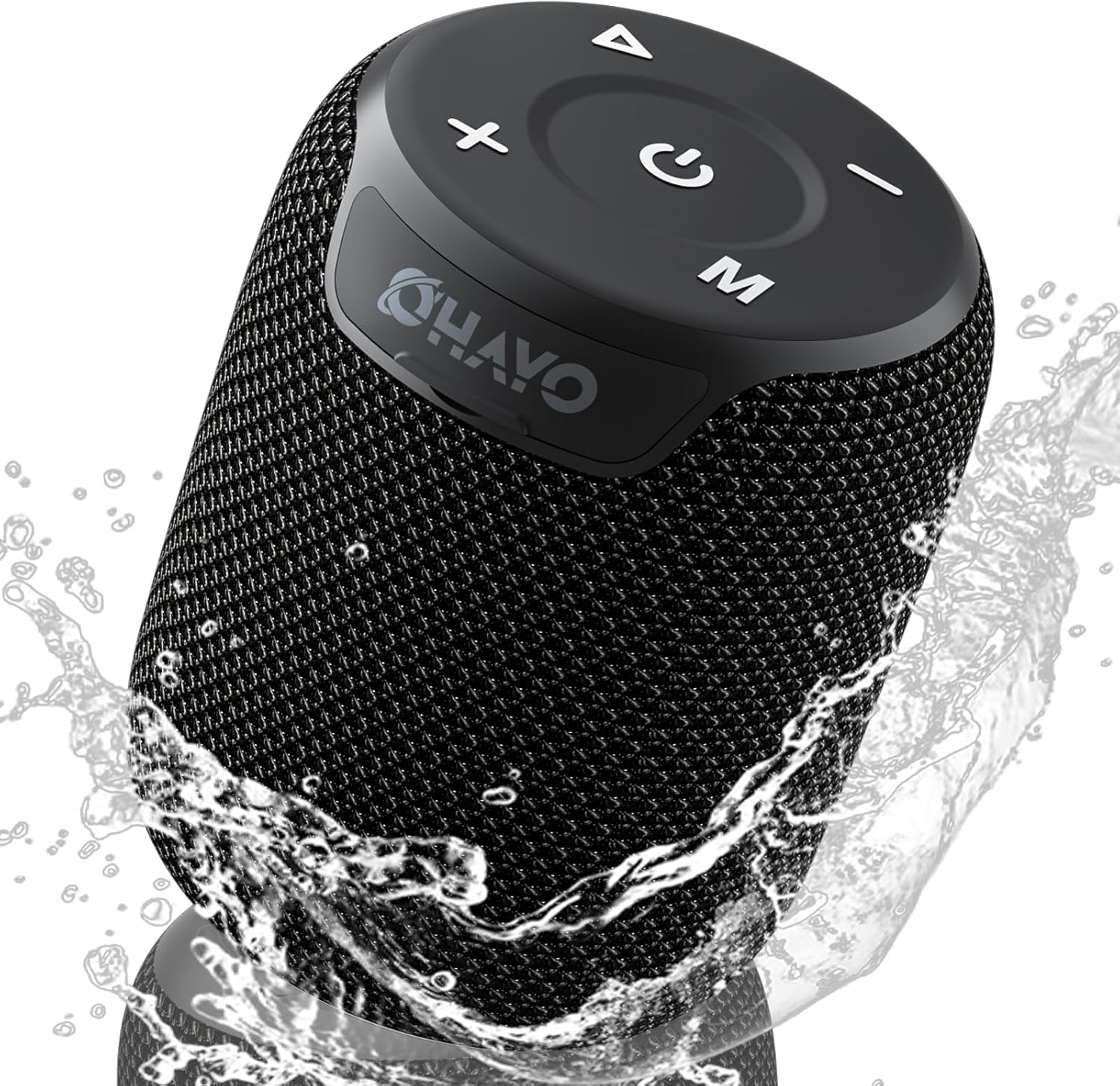
Image: The OHAYO Portable Bluetooth Speaker, showcasing its compact design and IPX7 waterproof capability with water splashing around it.
2. Produk Lebihview
2.1 Ciri-ciri Utama
- Exceptional Audio Performance: Features a 60mm mid-high speaker and a 65mm bass diaphragm for clear treble and rich bass.
- Kalis Air IPX7: Fully submersible up to 3 feet for 30 minutes, resistant to rain, dust, snow, and spills.
- Bluetooth V5.3: Ensures quick pairing and stable connection with automatic re-connection.
- Pasangan TWS: Connect two speakers for synchronized, immersive stereo sound.
- Main semula serba boleh: Supports Bluetooth, TF cards, and 3.5mm AUX input.
- Masa Main Lama: Up to 18 hours of music playback on a single charge.
- Mikrofon terbina dalam: For high-quality, hands-free calls.
- Reka Bentuk Mudah Alih: Compact, lightweight, and includes a handy lanyard for easy carrying.

Imej: Meletup view of the speaker's internal components highlighting the 60mm mid-high speaker and 65mm bass diaphragm, alongside icons representing key features like Aux-in, HD Mic, Hand-free Call, IPX7 Waterproof, Bluetooth 5.3, Micro SD support, and 16 hours of playtime.
2.2 Kawalan dan Pelabuhan
The OHAYO speaker features intuitive controls located on the top panel and essential ports for connectivity.

Imej: A terperinci view of the speaker's top panel, showcasing the sleek black design with bold white buttons for power, volume control, mode selection, and track navigation.
- Butang Kuasa: Tekan dan tahan untuk menghidupkan/mematikan kuasa.
- Kelantangan Naik (+): Tingkatkan kelantangan.
- Perlahankan suara (-): Kurangkan volum.
- Butang Main/Jeda: Mainkan atau jeda audio.
- Butang Mod (M): Switch between Bluetooth, AUX, and TF Card modes.
- Port Pengecasan USB-C: Untuk mengecas pembesar suara.
- Port AUX-masuk: Untuk sambungan audio berwayar.
- Slot Kad TF: Untuk memainkan muzik terus dari kad SD Mikro.
3. Bermula
3.1 Mengecas Speaker
Before first use, fully charge the speaker. Use the provided Type-C charging cable.
- Connect the Type-C end of the cable to the speaker's charging port.
- Sambungkan hujung USB-A kepada penyesuai kuasa USB yang serasi (tidak disertakan) atau port USB komputer.
- The charging indicator light will illuminate. It takes approximately 3 hours for a full charge.
- Lampu penunjuk akan bertukar atau mati setelah pengecasan selesai.

Image: The OHAYO speaker connected to a USB-C charging cable, illustrating its fast charging capability and long battery life.
3.2 Menghidupkan/Mematikan
- Untuk Menghidupkan: Press and hold the Power button for 2-3 seconds until you hear an audible prompt and the indicator light turns on.
- Untuk Mematikan: Press and hold the Power button for 2-3 seconds until you hear an audible prompt and the indicator light turns off.
4. Ketersambungan
4.1 Berpasangan Bluetooth
Pembesar suara akan memasuki mod pasangan Bluetooth secara automatik apabila dihidupkan buat kali pertama atau jika tiada peranti disambungkan.
- Ensure the speaker is powered on and in Bluetooth mode (blue indicator light blinking).
- Pada peranti anda (telefon pintar, tablet, komputer riba), dayakan Bluetooth dan cari peranti yang tersedia.
- Select "OHAYO X2" from the list of devices.
- Once connected, the speaker will emit a confirmation sound, and the blue indicator light will remain solid.
- Pembesar suara akan menyambung semula secara automatik ke peranti gandingan terakhir apabila dihidupkan, jika Bluetooth peranti aktif dan dalam julat.
4.2 Penggandingan Stereo Tanpa Wayar Sebenar (TWS)
You can pair two OHAYO X2 speakers together for a true stereo sound experience.
- Ensure both OHAYO X2 speakers are powered on and not connected to any Bluetooth device.
- On one speaker (this will be the primary speaker), double-press the Power button. You will hear a prompt indicating TWS pairing mode.
- The two speakers will automatically search for and connect to each other. Once connected, you will hear a confirmation sound.
- Now, connect your device to the primary speaker via Bluetooth as described in Section 4.1. The audio will play through both speakers in stereo.

Image: Two OHAYO Portable Bluetooth Speakers wirelessly connected to a laptop, demonstrating the True Wireless Stereo (TWS) pairing feature for an immersive audio experience.
4.3 Mod AUX-masuk
Use the 3.5mm AUX input for wired connection to devices without Bluetooth.
- Connect one end of a 3.5mm audio cable (not included) to the speaker's AUX-in port.
- Sambungkan hujung satu lagi ke bicu output audio peranti anda.
- The speaker will automatically switch to AUX mode. If not, press the 'M' (Mode) button to select AUX mode.
4.4 Mod Kad TF
Play music directly from a Micro SD (TF) card.
- Insert a Micro SD (TF) card with MP3 audio files ke dalam slot kad TF.
- The speaker will automatically switch to TF Card mode and begin playing music. If not, press the 'M' (Mode) button to select TF Card mode.
5. Mengendalikan Pembesar Suara Anda
5.1 Main balik Muzik
- Main/Jeda: Tekan butang Main/Jeda sekali.
- Lagu Seterusnya: Tekan dan tahan butang Naik Kelantangan (+).
- Trek Sebelumnya: Tekan dan tahan butang Turun Kelantangan (-).
- Kawalan Kelantangan: Tekan sebentar butang Kelantangan Naik (+) atau Kelantangan Turun (-).
5.2 Panggilan Bebas Tangan
When connected via Bluetooth, you can use the speaker for hands-free calls.
- Jawab Panggilan: Tekan butang Main/Jeda sekali.
- Tamatkan Panggilan: Tekan butang Main/Jeda sekali semasa panggilan.
- Tolak Panggilan: Tekan dan tahan butang Main/Jeda selama 2 saat.
- Dail Semula Nombor Terakhir: Tekan dua kali butang Main/Jeda.
6. Penjagaan dan Penyelenggaraan
Proper care ensures the longevity of your OHAYO Portable Bluetooth Speaker.
6.1 Kalis air (IPX7)
The speaker is IPX7 waterproof, meaning it can be submerged in water up to 1 meter (3 feet) for up to 30 minutes. Ensure the charging port cover is securely closed before exposing the speaker to water.

Image: A person submerged in water, holding the OHAYO speaker, demonstrating its fully IPX7 waterproof capability and seamless, enclosed design.
6.2 Pembersihan
- Lap pembesar suara dengan lembut, damp kain.
- Jangan gunakan pembersih yang melelas, alkohol atau pelarut kimia.
- Pastikan pembesar suara kering sebelum mengecas.
6.3 Penyimpanan
- Simpan pembesar suara di tempat yang sejuk dan kering jauh dari suhu yang melampau.
- Elakkan pendedahan berpanjangan kepada cahaya matahari langsung.
7. Penyelesaian masalah
If you encounter issues with your speaker, please refer to the following common problems and solutions.
| Masalah | Kemungkinan Punca | Penyelesaian |
|---|---|---|
| Pembesar suara tidak akan dihidupkan. | Bateri lemah; Butang kuasa tidak ditekan cukup lama. | Cas pembesar suara sepenuhnya. Tekan dan tahan butang Kuasa selama 2-3 saat. |
| Tidak boleh berpasangan melalui Bluetooth. | Pembesar suara tidak dalam mod berpasangan; Bluetooth peranti dimatikan; Terlalu jauh dari pembesar suara. | Ensure speaker is in Bluetooth pairing mode (blinking blue light). Turn on Bluetooth on your device. Move device closer to speaker (within 33 feet/10 meters). |
| Tiada bunyi. | Kelantangan terlalu rendah; Mod salah dipilih; Peranti tidak memainkan audio. | Increase speaker and device volume. Press 'M' button to select correct mode (Bluetooth, AUX, TF Card). Ensure audio is playing on your device. |
| Gandingan TWS gagal. | Speakers already connected to another device; Incorrect pairing steps. | Disconnect both speakers from any Bluetooth devices. Follow TWS pairing steps carefully (Section 4.2). |
| Kualiti bunyi yang buruk. | Low battery; Obstructions between speaker and device; Source audio quality. | Charge the speaker. Reduce distance or remove obstructions. Try a different audio source. |
8. Spesifikasi
Detailed technical specifications for the OHAYO Portable Bluetooth Speaker.
| Ciri | Perincian |
|---|---|
| Nama Model | X2 |
| Jenama | OHAYO |
| Jenis Pembesar Suara | Luar |
| Teknologi Ketersambungan | Bluetooth |
| Teknologi Komunikasi Tanpa Wayar | Bluetooth V5.3 |
| Kuasa Output Maksimum Pembesar Suara | 15 Watt |
| Jenis Pemacu Audio | Dynamic Driver (60mm mid-high, 65mm bass diaphragm) |
| Respons Kekerapan | 20 KHz (typical range for portable speakers) |
| Mod Keluaran Audio | Stereo (with TWS pairing) |
| Penilaian Kalis Air | IPX7 |
| Hayat Bateri | Sehingga 16-18 Jam |
| Kapasiti Bateri | 3300 mAh |
| Masa Mengecas | lebih kurang 3 Jam |
| Sumber Kuasa | Dikuasakan Bateri |
| Dimensi Produk | 3.97"D x 3.97"W x 4.8"H |
| Berat Barang | 14.9 auns |
| Kaedah Kawalan | Touch (buttons on top) |
| Peranti Serasi | Komputer riba, Telefon Pintar, Tablet, Televisyen |
| bahan | Other (durable mesh and plastic) |
9. Waranti dan Sokongan
9.1 Maklumat Waranti
The OHAYO Portable Bluetooth Speaker comes with a Waranti Terhad. Please retain your proof of purchase for warranty claims. For specific terms and conditions, refer to the warranty card included in your product packaging or contact customer support.
9.2 Sokongan Pelanggan
For any questions, technical assistance, or warranty inquiries, please contact OHAYO customer support. We offer 24-hour customer support and easy, hassle-free returns & replacements. Support Extended Term of Service is also available.
Maklumat Hubungan: Please refer to the contact details provided on the product packaging or the official OHAYO webtapak.


