1. Pengenalan
The SONICAKE Wireless Guitar System QWS-10 provides a reliable and high-fidelity 2.4G wireless audio connection for high-impedance instruments such as electric guitars, bass guitars, and other electric instruments. This system offers freedom of movement without compromising sound quality, featuring low latency and a robust transmission range.

Image 1.1: The SONICAKE Wireless Guitar System QWS-10, showing both the transmitter and receiver units.
2. Produk Lebihview
The QWS-10 system is designed for ease of use and performance. Key features include:
- 2.4G Wireless Audio System: Optimized for high-impedance instruments.
- Latensi Rendah: Less than 5 milliseconds (5ms) for real-time performance.
- High Fidelity: Flat frequency response curve ensures accurate sound reproduction.
- Jarak penghantaran: Reliable operation up to 30 meters (approximately 98 feet).
- Berbilang Saluran: Features 6 distinct channels, allowing up to 6 sets of devices to operate simultaneously in the same environment.
- Multi-Receiver Support: One transmitter can connect to up to six receivers simultaneously.
- Durable Rotating Plug: The 220-degree rotatable plug incorporates metal damping components, maintaining a consistent feel even after over 5000 rotations.
- Pengecasan USB Jenis-C: Dual Type-C head cable supports simultaneous charging of both units.
- Penutupan Automatik: Units will automatically power off after 15 minutes of no volume output to conserve battery.

Image 2.1: Visual representation of the system's low latency, indicated as less than 5ms.

Image 2.2: The system in use, demonstrating the wireless connection between an instrument and an amplifier, highlighting the transmission distance.

Image 2.3: Illustration of the system's capability to support one transmitter with up to six receivers simultaneously.
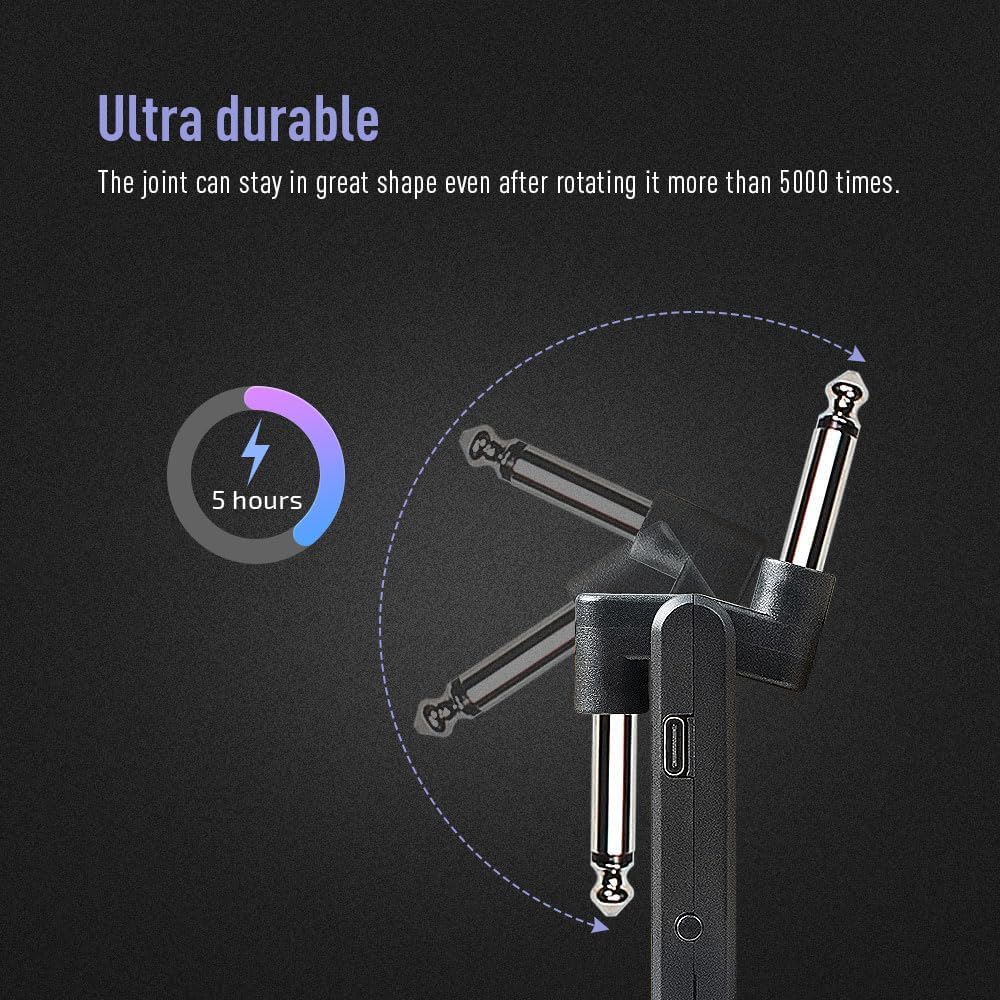
Image 2.4: Detail of the ultra-durable rotating plug, designed for longevity and flexibility.
3. Persediaan
- Caj Permulaan: Before first use, fully charge both the transmitter (TX) and receiver (RX) units using the provided USB Type-C charging cable. The charging indicator will show status.
- Sambungkan Pemancar: Plug the transmitter unit into your instrument's output jack (e.g., electric guitar, bass). Ensure it is securely seated.
- Sambungkan Penerima: Plug the receiver unit into your amplifier's input, a pedal, or an audio interface. Ensure it is securely seated.

Image 3.1: The transmitter unit connected to an electric guitar.
4. Arahan Operasi
- Hidupkan kuasa: Press and hold the power button on both the transmitter and receiver units until the indicator lights illuminate.
- Automatic Channel Selection: Upon powering on, the transmitter will automatically select the optimal channel. The receiver will then automatically follow and connect to the transmitter.
- Penunjuk LED: Observe the blue LED lights on both units. A solid blue light indicates a successful connection.
- Matikan: Press and hold the power button on each unit until the indicator lights turn off.
5. Arahan Berpasangan
The QWS-10 system is designed for automatic pairing. Follow these steps if re-pairing is necessary or for initial setup:
- Ensure both the transmitter and receiver units are powered off.
- Simultaneously press and hold the pairing button (often the same as the power button) on both the transmitter and receiver for more than 2 seconds.
- Observe the blue indicator lights. If they turn on and remain solid, pairing is successful. The transmitter will select the best available channel, and the receiver will automatically synchronize.

Image 5.1: Diagram showing the smart connection process where the transmitter selects the best channel.
6. Mengecas
The SONICAKE Wireless Guitar System features built-in rechargeable batteries. To charge the units:
- Use the provided USB dual Type-C charging cable.
- Connect both the transmitter and receiver to the dual Type-C cable.
- Palamkan hujung kabel USB-A ke dalam penyesuai kuasa USB standard (tidak disertakan) atau port USB komputer.
- The indicator lights will show charging status. A full charge provides approximately 5 hours of continuous use.
7. Penyelenggaraan
To ensure the longevity and optimal performance of your QWS-10 Wireless Guitar System, follow these maintenance guidelines:
- Pembersihan: Wipe the units with a soft, dry cloth. Avoid using abrasive cleaners, solvents, or harsh chemicals.
- Storan: Store the units in a cool, dry place away from direct sunlight, extreme temperatures, and high humidity.
- Penjagaan Bateri: For extended storage, charge the units to approximately 50% every few months to maintain battery health. Avoid fully discharging the batteries for long periods.
- Tangani dengan Berhati-hati: While the rotating plug is durable, avoid excessive force or twisting beyond its intended range of motion.
8. Penyelesaian masalah
If you encounter issues with your SONICAKE Wireless Guitar System, refer to the following common problems and solutions:
| Masalah | Kemungkinan Punca | Penyelesaian |
|---|---|---|
| Tiada keluaran bunyi | Units not powered on; Not paired; Low battery; Incorrect connection | Ensure both units are powered on. Re-pair the units (Section 5). Charge both units fully. Verify transmitter is in instrument and receiver is in amplifier/pedal. |
| Intermittent signal or dropouts | Out of range; Interference from other 2.4G devices; Obstructions | Reduce distance between transmitter and receiver. Move away from Wi-Fi routers, microwaves, or other 2.4G wireless devices. Ensure clear line of sight. |
| Bunyi yang berlebihan atau statik | Interference; Faulty instrument/amp cable; Proximity of units | Move away from sources of interference. Ensure instrument and amplifier are functioning correctly. Avoid placing transmitter and receiver too close to each other. |
| Units shut down unexpectedly | Low battery; Automatic shutdown activated | Charge units fully. If no volume output for 15 minutes, the system will automatically shut down. This is normal operation. |
| Units do not charge | Faulty cable; Faulty power adapter; Dirty USB port | Try a different USB Type-C cable and power adapter. Clean the USB ports on the units gently. |
9. Spesifikasi
Detailed technical specifications for the SONICAKE Wireless Guitar System QWS-10:
| Spesifikasi | Nilai |
|---|---|
| Nombor Model Item | QWS-10 |
| Berat Barang | 4.2 auns |
| Dimensi Pakej | 4.61 x 3.62 x 1.77 inci |
| Kekerapan Wayarles | 2.4G |
| Latensi | < 5ms |
| Jarak Penghantaran | ≥ 30m |
| Bilangan Saluran | 6 |
| Putaran Palam | 220 darjah |
| Port Pengecasan | USB Jenis-C |
| Hayat Bateri | Lebih kurang 5 jam |
10. Waranti dan Sokongan
For warranty information, technical support, or service inquiries regarding your SONICAKE Wireless Guitar System QWS-10, please refer to the product packaging or contact the seller/manufacturer directly. Keep your proof of purchase for warranty claims.


