pengenalan
The SINGMOOD S-68 Portable Karaoke Machine is an all-in-one entertainment system designed for immersive karaoke experiences. Featuring a 16-inch touchscreen display, two wireless UHF microphones, and powerful audio output, this system provides a comprehensive solution for home, outdoor, and party use. Its integrated tablet functionality allows for seamless access to various applications and content, ensuring a versatile and enjoyable user experience.

Figure 1: The SINGMOOD S-68 Portable Karaoke Machine, showcasing its main unit with integrated touchscreen and two wireless microphones.
Apa yang Termasuk
Sila semak kandungan pakej untuk memastikan semua item ada dan dalam keadaan baik:
- S-68 Karaoke Machine (Main Unit with 16" Touchscreen)
- 2 x Mikrofon UHF Tanpa Wayar
- Alat Kawalan Jauh
- Penyesuai Kuasa
- Manual Pengguna

Figure 2: Illustration of the items included in the product package.
Panduan Persediaan
- Membuka kotak dan Meletakkan: Carefully remove all components from the packaging. Place the karaoke machine on a stable, flat surface. Ensure adequate ventilation around the unit.
- Charging the Main Unit: Connect the provided Power Adapter to the DC 12V input port on the back of the karaoke machine. Plug the adapter into a standard electrical outlet. The unit will begin charging. A full charge is recommended before first use.
- Charging Microphones: The wireless microphones are rechargeable via Type-C ports. Connect the microphones to a suitable Type-C charging cable (not included, but commonly available) and power source.
- Menghidupkan: Locate the Power button on the control panel. Press and hold it for a few seconds until the screen illuminates and the unit powers on.
- Initial Network Setup (Wi-Fi): Upon first power-on, the system may prompt you to connect to a Wi-Fi network. Follow the on-screen instructions to select your network and enter the password. This is essential for accessing online content like YouTube and other streaming services.
- Penggandingan Mikrofon: The wireless UHF microphones are typically pre-paired with the main unit. If they do not connect automatically, ensure the microphones are powered on and within range. Refer to the microphone section for manual pairing instructions if needed.
Arahan Operasi
1. Navigasi skrin sentuh
The 16-inch full touchscreen display serves as the primary interface for the karaoke machine. Navigate through menus, select songs, adjust settings, and access applications by tapping on the screen icons. The interface is designed to be intuitive, similar to a standard tablet.

Figure 3: The 16-inch touchscreen display, providing easy access to various applications and settings.
2. Penggunaan Mikrofon
The system includes two true UHF wireless microphones for clear and stable audio transmission. Ensure microphones are charged and powered on. Hold the microphone approximately 2-6 inches from your mouth for optimal sound pickup. Adjust microphone volume using the dedicated controls on the main unit's control panel.

Figure 4: The two wireless UHF microphones, designed for high-fidelity audio.
3. Sound Adjustments and Control Panel
The top control panel features various knobs and buttons for fine-tuning your audio experience:
- MIC.BASS+ / MIC.TREBLE+: Adjust the bass and treble levels for the microphones.
- ECHO+ / MIC.DELAY+: Control the echo and delay effects for vocal enhancement.
- BASS+ / TREBLE+: Adjust the overall bass and treble of the speaker output.
- JILID+: Master volume control for the entire system.
- KARAOKE MODE Button: Press this button to reduce or remove vocals from songs, converting them into instrumental tracks for karaoke.
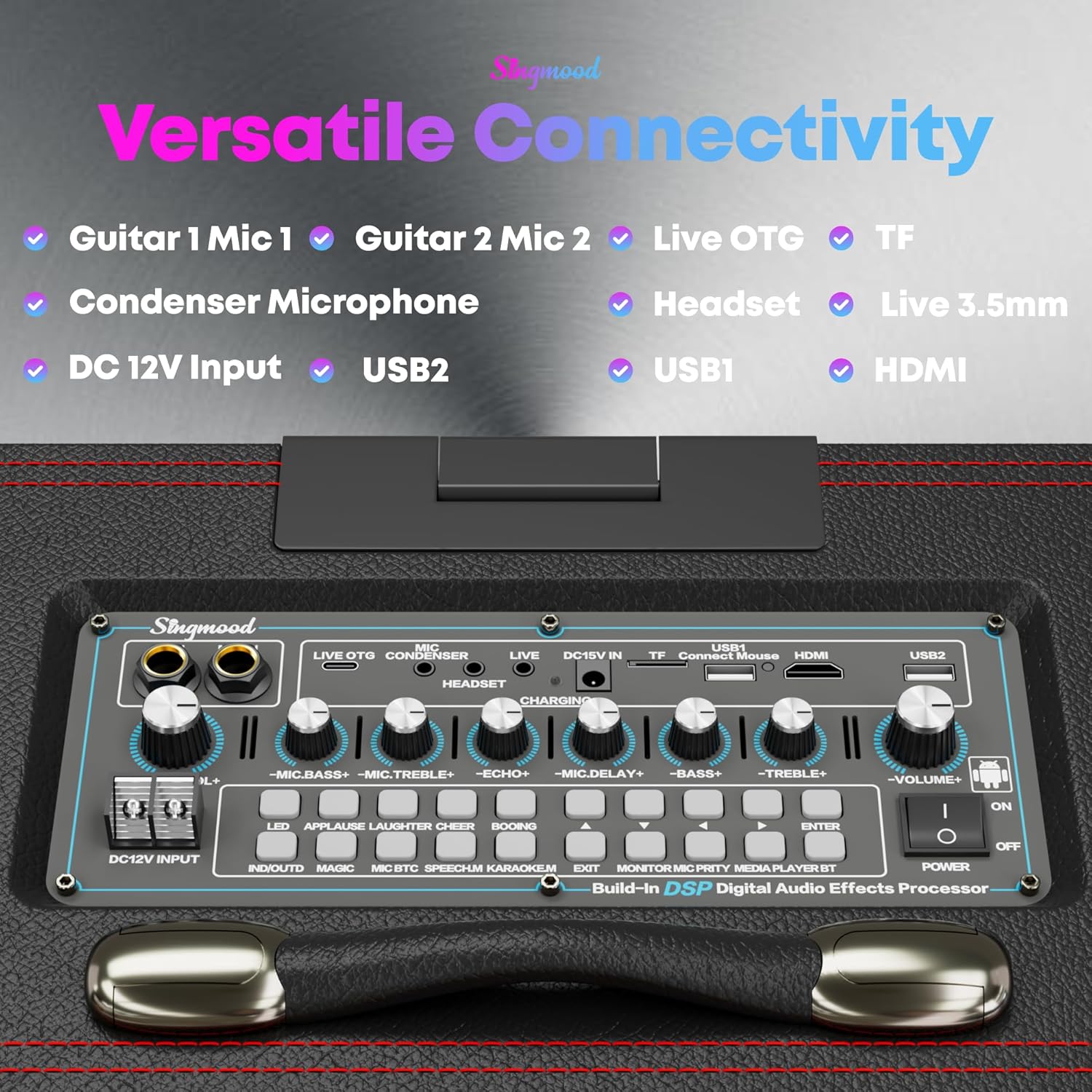
Rajah 5: Terperinci view of the control panel with various audio adjustment knobs and input ports.
4. Ketersambungan Serbaguna
The S-68 offers multiple connectivity options:
- Bluetooth: Connect your smartphone or other Bluetooth-enabled devices wirelessly to stream music.
- Output HDMI: Connect the karaoke machine to an external display (TV, projector) to mirror the screen content for a larger viewpengalaman dalam.
- USB Ports (USB1, USB2): Mainkan media files directly from USB drives.
- Slot Kad TF: Insert a TF (microSD) card to play media files.
- Guitar/Mic Inputs (Guitar 1 Mic 1, Guitar 2 Mic 2): Connect additional wired microphones or guitars.
- Headset / Live 3.5mm: For audio monitoring or connecting external audio sources.

Figure 6: Screen projection feature, allowing the display to be mirrored on an external TV via HDMI.
5. Karaoke Mode and App Usage
The dedicated "KARAOKE MODE" button on the control panel allows you to instantly lower or remove the original vocals from most songs, making them suitable for singing along. The integrated Android tablet system provides access to the Google Play Store, enabling you to download and use various apps like YouTube, Spotify, and other karaoke applications for an endless selection of songs and content.

Figure 7: The Karaoke Mode button, simplifying vocal removal for sing-alongs.

Figure 8: Access to YouTube and other streaming apps for a vast library of content.
Penyelenggaraan
- Pembersihan: Use a soft, dry cloth to wipe down the exterior of the unit and microphones. For the touchscreen, use a screen-specific cleaning solution and a microfiber cloth. Avoid abrasive cleaners or excessive moisture.
- Storan: When not in use, store the karaoke machine in a cool, dry place away from direct sunlight and extreme temperatures.
- Penjagaan Bateri: To prolong battery life, avoid fully discharging the unit and microphones frequently. If storing for an extended period, charge the batteries to approximately 50-70% before storage and recharge every few months.
Menyelesaikan masalah
| Masalah | Kemungkinan Punca | Penyelesaian |
|---|---|---|
| Unit tidak dihidupkan. | Bateri lemah; Penyesuai kuasa tidak disambungkan atau rosak. | Connect the power adapter and allow the unit to charge. Ensure the power outlet is functional. |
| Tiada bunyi dari pembesar suara. | Volume too low; Mute activated; Incorrect audio source selected. | Increase the master volume. Check if the unit is muted. Verify the correct input source is selected on the touchscreen. |
| Microphones not working. | Microphones not powered on; Low microphone battery; Microphones not paired. | Ensure microphones are charged and powered on. If issues persist, try re-pairing them according to the manual's specific instructions (if available, otherwise assume automatic pairing). |
| Lyrics/video not syncing or lagging. | Poor Wi-Fi connection; High network traffic; App performance issue. | Ensure a strong Wi-Fi signal. Try restarting the app or the karaoke machine. Close other background applications. |
| Screen unresponsive or frozen. | Software glitch; System overload. | Perform a soft reset by holding the power button until the unit shuts down, then restart. If the issue persists, a factory reset might be necessary (consult full manual for steps). |
Spesifikasi
| Ciri | Perincian |
|---|---|
| Nombor Model | S-68 |
| Jenis Pemasangan | Atas meja |
| Sumber Kuasa | Dikuasakan Bateri |
| Jenis Penyambung | HDMI |
| Output Wattage | 800 Watt (Puncak) |
| Bilangan Saluran | 2 |
| Input Audio | Wireless Microphones, Bluetooth |
| Penggunaan yang Disyorkan | Untuk Pemain Muzik |
| Dimensi Produk (L x W x H) | 17 x 13 x 15 inci |
| Berat Barang | 33.8 paun |
| Bateri | 1 bateri Lithium Ion (termasuk) |
| Teknologi Ketersambungan | Bluetooth, WiFi |
| warna | Hitam |
| Peranti Serasi | Komputer riba, telefon pintar |
| Paparan | Skrin sentuh 16 inci |
| Pemproses | RK3566 Chip |
| RAM | 4GB |
| ROM | 64GB |
| Mikrofon | 2 x Mikrofon Wayarles UHF |
| Audio Decoder Chip | 32-bit Digital Audio Decoder |
Waranti dan Sokongan
For warranty information, technical support, or service inquiries, please contact SINGMOOD customer support. Details can typically be found on the product packaging or the official SINGMOOD webtapak.
E-mel Sokongan Pelanggan: Singmood.official@gmail.com
Please have your product model number (S-68) and purchase details ready when contacting support.


