pengenalan
This manual provides detailed instructions for the safe and efficient operation of your G Keni CD Cassette Player Radio, Model 9225. Please read this manual thoroughly before using the product and retain it for future reference.

Imej: Depan view of the G Keni CD Cassette Player Radio, Model 9225, showing the CD compartment, cassette deck, control buttons, and extendable antenna.
Produk Selesaiview
Ciri-ciri Utama
- Multi-function playback: Supports CD, CD-R, CD-RW, cassette tapes, USB, SD/MMC/TF cards, and AUX input.
- AM/FM Stereo Radio: Features a high-sensitivity tuner with an extendable antenna and a backlit LCD display for clear frequency indication.
- High-Quality Stereo Speakers: Integrated dual speakers provide clear audio output.
- Headphone Jack: A 3.5mm headphone jack allows for private listening.
- Dual Power Options: Operates via AC power cord or 8 D-size batteries (not included) for portable use.
- Compact Design: Lightweight and portable.
- Recording Function: Record FM radio broadcasts directly to a blank cassette tape.

Imej: Selesaiview of the G Keni portable speaker's multi-functional capabilities, including AM/FM radio, LCD display, AUX, headphone jack, AC/battery power, USB/SD/MMC, top-loading CD, and cassette.
Dimensi

Image: The G Keni CD Cassette Player Radio displayed with its approximate dimensions: 29cm length, 22cm width, and 16.5cm height.
Komponen dan Kawalan
Familiarize yourself with the various parts and controls of your device.

Image: Diagram illustrating the main controls and components of the G Keni CD Cassette Player Radio, including the function switch, band switch, display, and power lamp.
- Suis Fungsi: Selects between CD, Radio, Tape, USB/SD, and AUX modes.
- Tombol Kelantangan: Melaraskan tahap output audio.
- Tombol Penalaan: Used to tune into radio stations.
- Paparan LCD: Shows current mode, radio frequency, and track information.
- Ruang CD: Top-loading tray for CDs.
- Dek Kaset: Front-loading slot for cassette tapes.
- Kawalan Main Semula: Play, Pause, Stop, Fast Forward, Rewind, Skip Track (for CD/USB/SD).
- AM/FM Band Switch: Memilih antara jalur radio AM dan FM.
- Antena Boleh Dipanjangkan: For improved FM radio reception.
- Port USB: Untuk pemacu kilat USB.
- SD/MMC/TF Card Slot: Untuk kad memori.
- Input AUX: Bicu 3.5mm untuk peranti audio luaran.
- Jack fon kepala: Bicu 3.5mm untuk mendengar secara peribadi.
Persediaan
Bekalan Kuasa
Unit ini boleh dikuasakan oleh kuasa AC atau bateri.
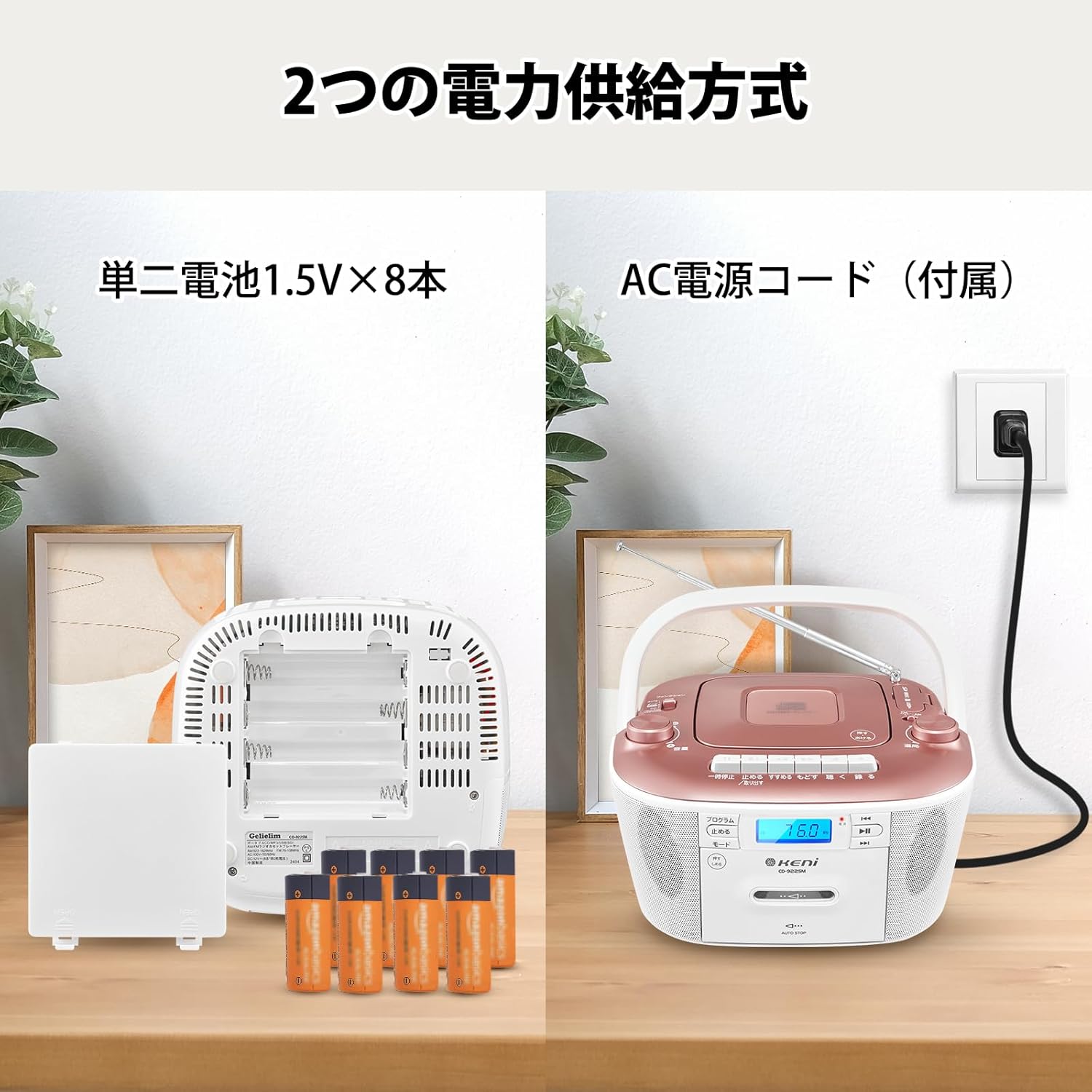
Image: Illustration showing the two power supply methods: AC power cord connection and battery compartment with 8 D-size batteries.
Operasi Kuasa AC:
- Pastikan unit dimatikan.
- Sambungkan kord kuasa AC yang dibekalkan ke bicu AC IN di bahagian belakang unit.
- Plug the other end of the power cord into a standard AC wall outlet (AC 100V, 50/60Hz).
Operasi Bateri:
- Pastikan unit dimatikan dan diputuskan sambungannya daripada kuasa AC.
- Buka penutup petak bateri yang terletak di bahagian bawah unit.
- Insert 8 D-size (UM-1) batteries (not included) according to the polarity markings (+/-) inside the compartment.
- Tutup penutup petak bateri dengan selamat.
Nota: Tanggalkan bateri jika unit tidak akan digunakan untuk tempoh yang lama untuk mengelakkan kebocoran dan kerosakan.
Arahan Operasi
Operasi Radio (AM/FM)
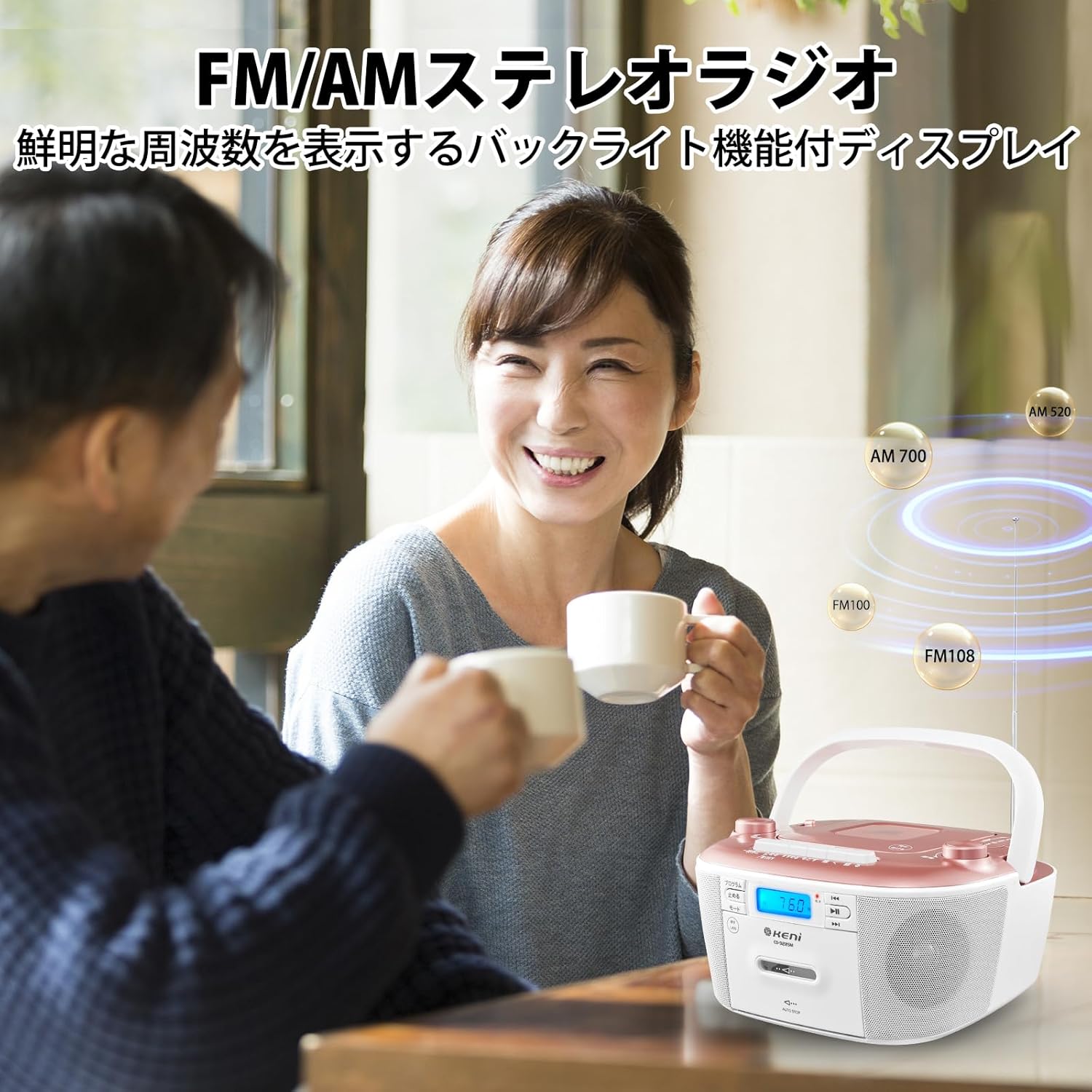
Image: A person enjoying the G Keni CD Cassette Player Radio, highlighting its FM/AM stereo radio capabilities with a backlit display.
- Tetapkan Fungsi Switch to [RADIO]. The power lamp akan menerangi.
- Gunakan AM/FM Band Switch to select either [FM STEREO] or [AM].
- Extend the telescopic antenna for FM reception. For AM reception, rotate the unit for best signal.
- Pusingkan Tombol Penalaan to select your desired radio station. The frequency will be displayed on the LCD.
- Laraskan Tombol Kelantangan to your preferred listening level.
Petua: If reception is poor, adjust the position of the antenna or the unit itself to minimize static.
Main semula CD

Imej: Jarak dekat view of the top-loading CD player compartment on the G Keni CD Cassette Player Radio, showing a CD being placed inside.
- Tetapkan Fungsi Switch to [CD].
- Buka penutup petak CD.
- Place a CD (CD, CD-R, CD-RW) onto the spindle with the label side facing up.
- Tutup penutup petak CD.
- Tekan ke Main/Jeda butang untuk memulakan main balik.
- Gunakan Lompat Ke Hadapan/Ke Belakang butang untuk menavigasi antara trek.
- Tekan ke Berhenti butang untuk menamatkan main balik.
Cassette Tape Playback and Recording

Image: A hand inserting a cassette tape into the front-loading cassette deck of the G Keni CD Cassette Player Radio.
Main balik:
- Tetapkan Fungsi Switch to [TAPE].
- Buka pintu dek kaset.
- Masukkan pita kaset dengan tepi terbuka menghadap ke atas.
- Tutup pintu dek kaset.
- Tekan ke Main butang untuk memulakan main balik.
- Gunakan Cepat Ke Hadapan dan Putar balik buttons to quickly navigate the tape.
- Tekan ke Berhenti / Keluarkan butang untuk menghentikan main balik dan mengeluarkan pita.
Recording from FM Radio to Cassette:
- Insert a blank cassette tape into the cassette deck.
- Tetapkan Fungsi Switch to [RADIO] and tune to your desired FM station.
- Tekan ke Rekod button (usually red) on the cassette deck. The Play button will also engage.
- Untuk berhenti merakam, tekan Berhenti / Keluarkan butang.
USB/SD/AUX Playback

Imej: Terperinci view of the AUX input, headphone jack, USB port, and SD/MMC card slot on the G Keni CD Cassette Player Radio.
USB/SD/MMC/TF Playback:
- Tetapkan Fungsi Switch to [USB/SD].
- Insert a USB flash drive into the USB port or an SD/MMC/TF card into the card slot.
- Unit akan secara automatik mengesan dan mula memainkan audio yang serasi files (cth, MP3).
- Use the playback controls (Play/Pause, Skip Forward/Backward) to manage your music.
Input AUX:
- Tetapkan Fungsi Switch to [AUX].
- Sambungkan peranti audio luaran (cth., telefon pintar, pemain MP3) ke bicu AUX IN 3.5mm menggunakan kabel audio (tidak disertakan).
- Start playback on your external device. The audio will be routed through the G Keni unit's speakers.
- Adjust the volume using the unit's Tombol Kelantangan and/or the external device's volume control.
Penggunaan Fon Kepala
For private listening, connect 3.5mm headphones (not included) to the headphone jack. The speakers will automatically mute when headphones are connected.
Penyelenggaraan
- Pembersihan: Gunakan kain lembut dan kering untuk membersihkan bahagian luar unit. Jangan gunakan pembersih atau pelarut yang melelas.
- Penjagaan Kanta CD: If CD playback issues occur, use a commercially available CD lens cleaner.
- Pembersihan Kepala Kaset: Regularly clean the cassette heads with a cotton swab lightly dampened with isopropyl alcohol to ensure optimal sound quality.
- Storan: When not in use for extended periods, store the unit in a cool, dry place, away from direct sunlight and extreme temperatures. Remove batteries if storing for a long time.
Menyelesaikan masalah
| Masalah | Kemungkinan Punca | Penyelesaian |
|---|---|---|
| Tiada kuasa |
|
|
| Tiada bunyi |
|
|
| Penerimaan radio yang lemah |
|
|
| CD melangkau atau tidak dimainkan |
|
|
| Cassette tape issues |
|
|
Spesifikasi
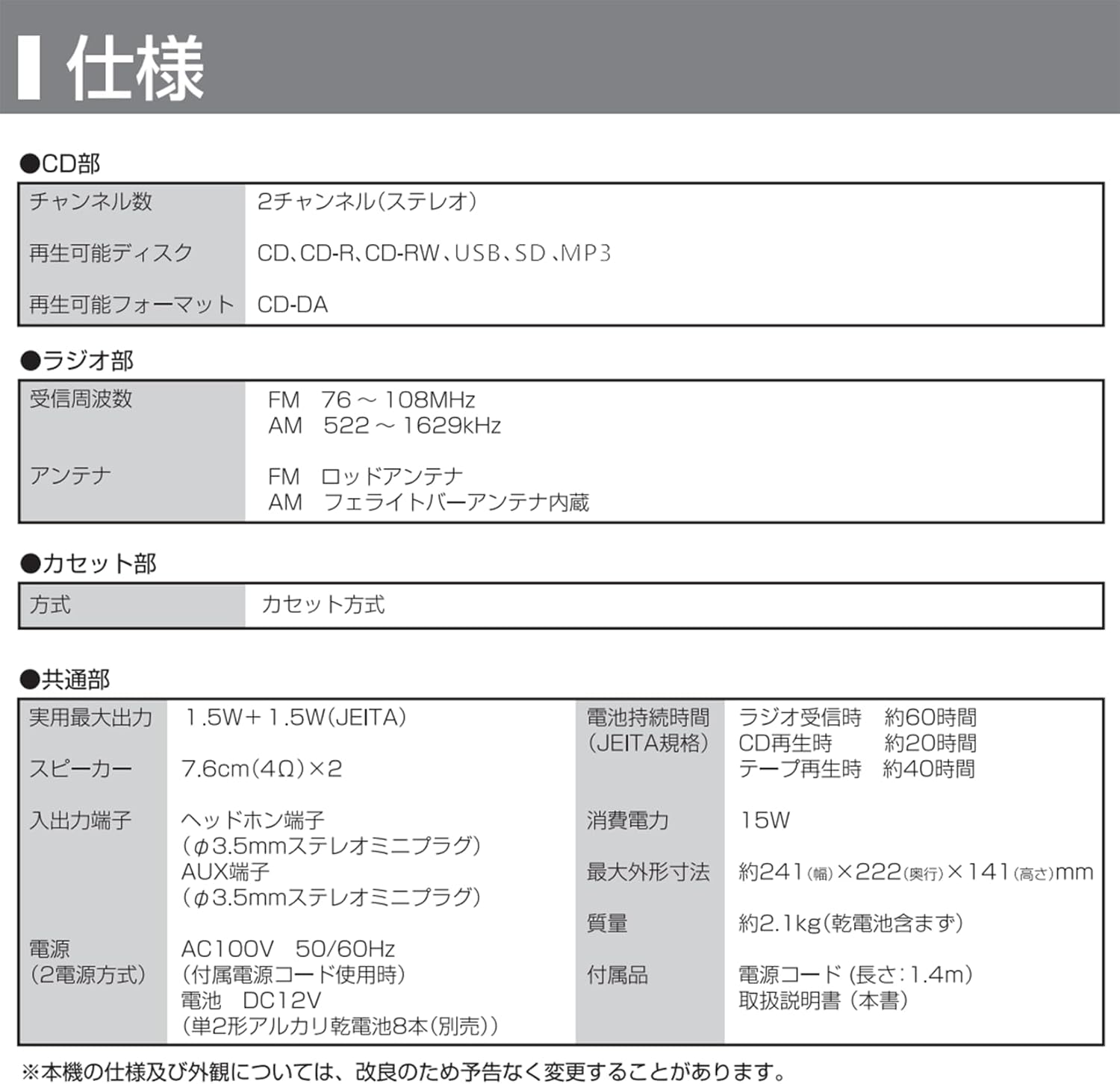
Image: A table detailing the technical specifications of the G Keni CD Cassette Player Radio, including CD, radio, cassette, and general features.
| Ciri | Perincian |
|---|---|
| Nombor Model | 9225 |
| Bahagian CD |
|
| Bahagian Radio |
|
| Cassette Section | Jenis Kaset |
| Output Audio |
|
| Terminal Input |
|
| Bekalan Kuasa |
|
| Penggunaan Kuasa | 15W |
| Hayat Bateri (Anggaran) |
|
| Dimensi (W x D x H) | lebih kurang 241 x 222 x 141 mm |
| Berat badan | Approx. 2.1 kg (excluding dry cell batteries) |
| Termasuk Aksesori | CD Radio Cassette Unit, Instruction Manual, AC Power Adapter |
Nota: Spesifikasi tertakluk kepada perubahan tanpa notis untuk penambahbaikan produk.
Waranti dan Sokongan
For warranty information and customer support, please refer to the warranty card included with your product or contact the retailer where you purchased the unit. Keep your proof of purchase for warranty claims.
Manufacturer: K&K INTERNATIONAL CO.,LIMITED