1. Pengenalan
This manual provides essential information for the safe and efficient operation of your TOPBULL 40A MPPT Solar Charge Controller. This device is designed to optimize power harvesting from your solar panels and efficiently charge various battery types in 12V or 24V systems. It features advanced Maximum Power Point Tracking (MPPT) technology, comprehensive protection functions, and a user-friendly LCD interface.

Imej 1: Depan view of the TOPBULL 40A MPPT Solar Charge Controller, showing the LCD display and control buttons.
2. Arahan Keselamatan
Please read all safety instructions carefully before installation and operation. Failure to follow these instructions may result in personal injury or damage to the controller or other components.
- Ensure all connections are correct and secure before applying power.
- Do not disassemble or attempt to repair the controller. Refer to qualified personnel for service.
- Pasang pengawal di kawasan yang mempunyai pengudaraan yang baik, jauh daripada bahan mudah terbakar dan kelembapan.
- Sentiasa sambungkan bateri ke pengawal dahulu, kemudian panel solar, dan akhirnya beban. Putuskan sambungan dalam susunan terbalik.
- Pakai peralatan pelindung diri yang sesuai, termasuk perlindungan mata, semasa bekerja dengan bateri dan sistem elektrik.
- The controller includes multiple electronic protections such as reverse polarity, overcharge, over-discharge, overload, short-circuiting, TVS lightning, overpower, reverse current, and overtemperature protection. However, proper installation is crucial for optimal safety.
3. Kandungan Pakej
Sahkan bahawa semua item terdapat dalam pakej:
- TOPBULL 40A MPPT Solar Charge Controller
- Skru Pemasangan
- Manual Pengguna (dokumen ini)

Image 2: Contents of the product package, showing the controller, user manual, and mounting hardware.
4. Produk Lebihview
The TOPBULL 40A MPPT Solar Charge Controller features a clear LCD display and intuitive buttons for monitoring and configuration. It is equipped with terminals for solar panel input, battery connection, DC load output, and dual USB ports.
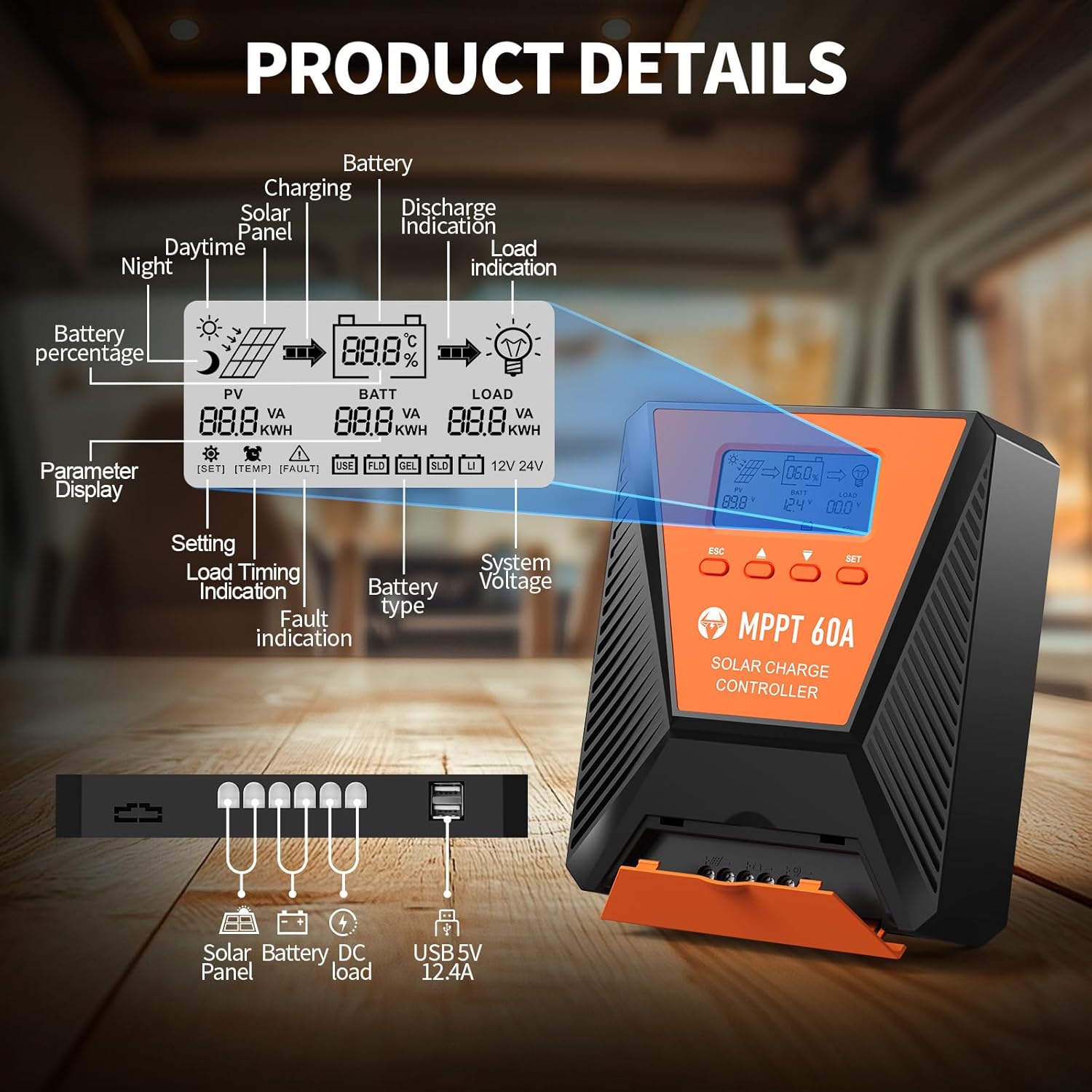
Imej 3: Terperinci view of the controller's LCD display, showing various indicators and parameters, along with the connection ports at the bottom.
LCD Display Indicators:
- Wartawan: Panel solar voltage dan kuasa.
- BATT: Bateri voltage, charge status, and type.
- PINJAMAN: Load status and power.
- Bateri Percentage: Current battery charge level.
- Charging/Discharge Indication: Arrows indicating power flow.
- Petunjuk Kerosakan: Error codes displayed if issues occur.
- Sistem Voltage: Automatically detected 12V or 24V.
Butang Kawalan:
- ESC: Exit menu or cancel setting.
- Anak Panah ATAS/BAWAH: Navigate menus or adjust values.
- SET: Enter menu or confirm setting.
5. Persediaan dan Pemasangan
Ikuti langkah-langkah ini untuk pemasangan pengawal cas solar anda dengan betul:
- Pemasangan: Choose a suitable location for the controller, ensuring adequate ventilation and protection from direct sunlight, high temperatures, and moisture. Use the provided mounting screws to secure the controller.
- Sambungan Bateri: Connect the battery to the controller's battery terminals first. Ensure correct polarity (positive to positive, negative to negative). The controller will automatically detect the 12V or 24V system voltage.
- Sambungan Panel Suria: Connect the solar panel to the controller's solar input terminals. Ensure correct polarity. The controller will begin charging the battery.
- DC Load Connection (Optional): Connect your DC loads to the load terminals. Ensure correct polarity.

Image 4: Connection diagram illustrating how to connect the solar panel, battery bank, inverter (for AC load), and DC load to the MPPT controller.
The controller supports various deep cycle battery types, including FLD, LiFePO4, SLD, GEL, and AGM. It also supports 0V lithium battery charging (lithium battery activation function).

Image 5: The controller is compatible with various 12V/24V battery types, automatically identifying voltage and supporting custom parameters and 0V lithium battery charging.
6. Arahan Operasi
LCD Display and Parameter Settings:
The LCD display provides real-time information about your solar charging system. Use the four buttons (ESC, UP, DOWN, SET) to navigate menus and adjust parameters.
- Tekan SET untuk masuk ke menu utama.
- guna ATAS/BAWAH to scroll through options such as battery type, load timer settings, and other customizable parameters.
- Tekan SET again to select an option and then use ATAS/BAWAH untuk menukar nilai.
- Tekan SET to confirm changes, or ESC untuk keluar tanpa menyimpan.
Proses Pengecasan:
The controller utilizes a smart 4-stage charging process to optimize battery health and longevity:
- Caj Pukal: Rapid charging to bring the battery to approximately 80% capacity.
- Caj Penyerapan: Charging at a constant voltage to bring the battery to 100% capacity.
- Caj Terapung: Maintaining the battery at full charge with a lower voltage.
- Equalization Charge (for specific battery types): Periodically overcharging to balance cell voltages.
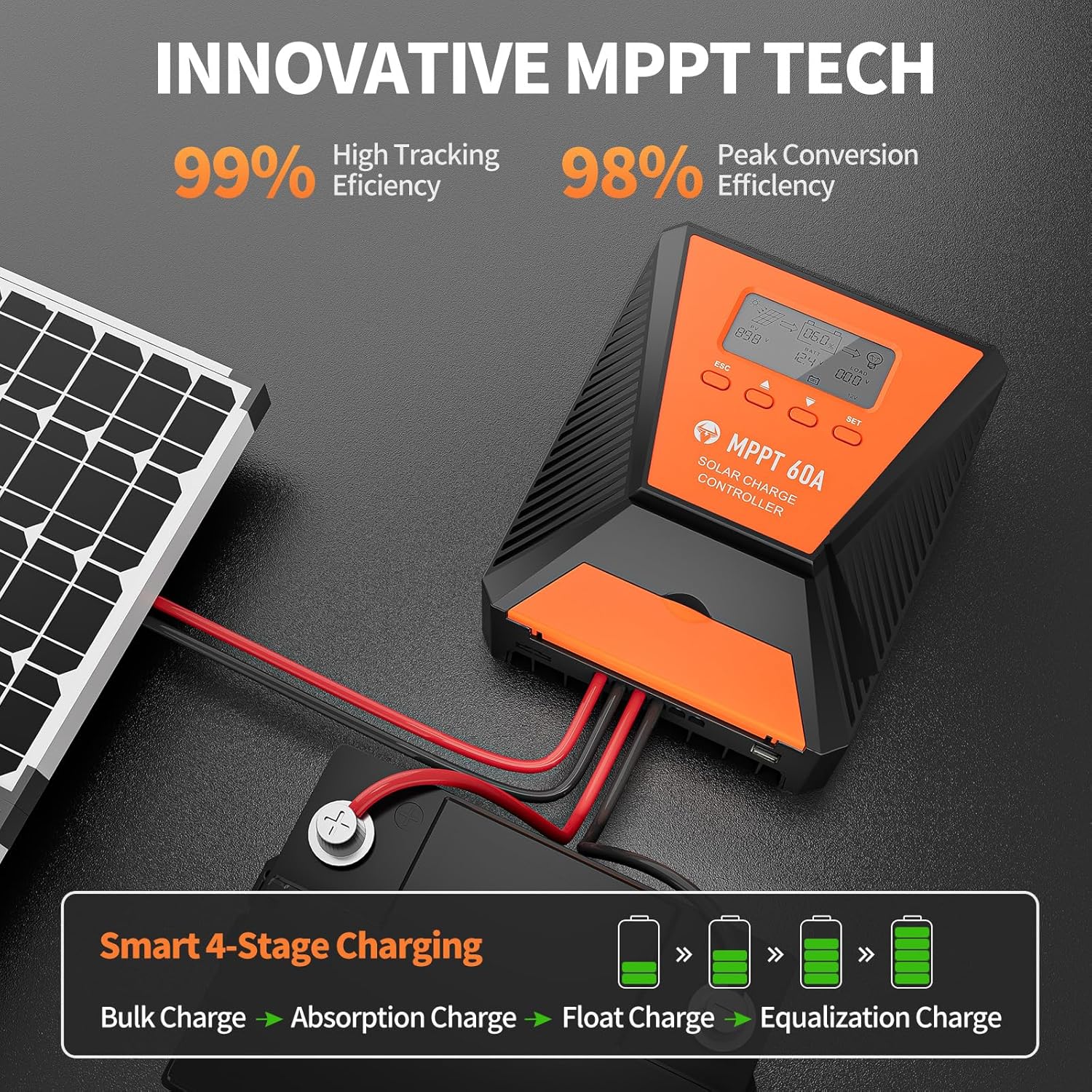
Image 6: The controller features 99% high tracking efficiency and 98% peak conversion efficiency, along with a smart 4-stage proses pengecasan.
Pengecasan USB:
The controller includes dual USB ports for charging electronic devices. These ports provide 5V DC output.
7. Penyelenggaraan
Regular maintenance ensures optimal performance and extends the lifespan of your solar charge controller and battery system.
- Semak Sambungan: Periksa secara berkala semua sambungan pendawaian untuk kesesakan dan kakisan.
- Pengawal Bersih: Pastikan pengawal bersih dan bebas daripada habuk dan serpihan. Gunakan kain kering untuk pembersihan.
- Pengudaraan: Ensure the installation area remains well-ventilated to prevent overheating. The controller is designed with a metal case and dual high-speed intelligent fans for enhanced heat dissipation.
- Pemeriksaan Bateri: Follow the manufacturer's maintenance guidelines for your specific battery type.
- Pampasan Suhu: The controller features a temperature compensation function that automatically adjusts charging and discharging parameters to prolong battery life.
8. Penyelesaian masalah
If you encounter issues with your controller, refer to the LCD display for error codes and consult the following common troubleshooting steps:
- Tiada Paparan: Check battery connections and ensure the battery has sufficient voltage.
- Tiada Pengecasan: Verify solar panel connections and ensure adequate sunlight. Check for any fault indications on the LCD.
- Beban Tidak Berfungsi: Check load connections and ensure the load is within the controller's rated capacity. Verify load timer settings.
- Kod Ralat: The LCD display will show specific error codes for various issues (e.g., overvoltage, undervoltage, overtemperature, short circuit). Refer to the controller's internal error code list (if provided in a separate document) for detailed explanations and solutions.
The controller incorporates 9 intelligent protection features to safeguard your system:
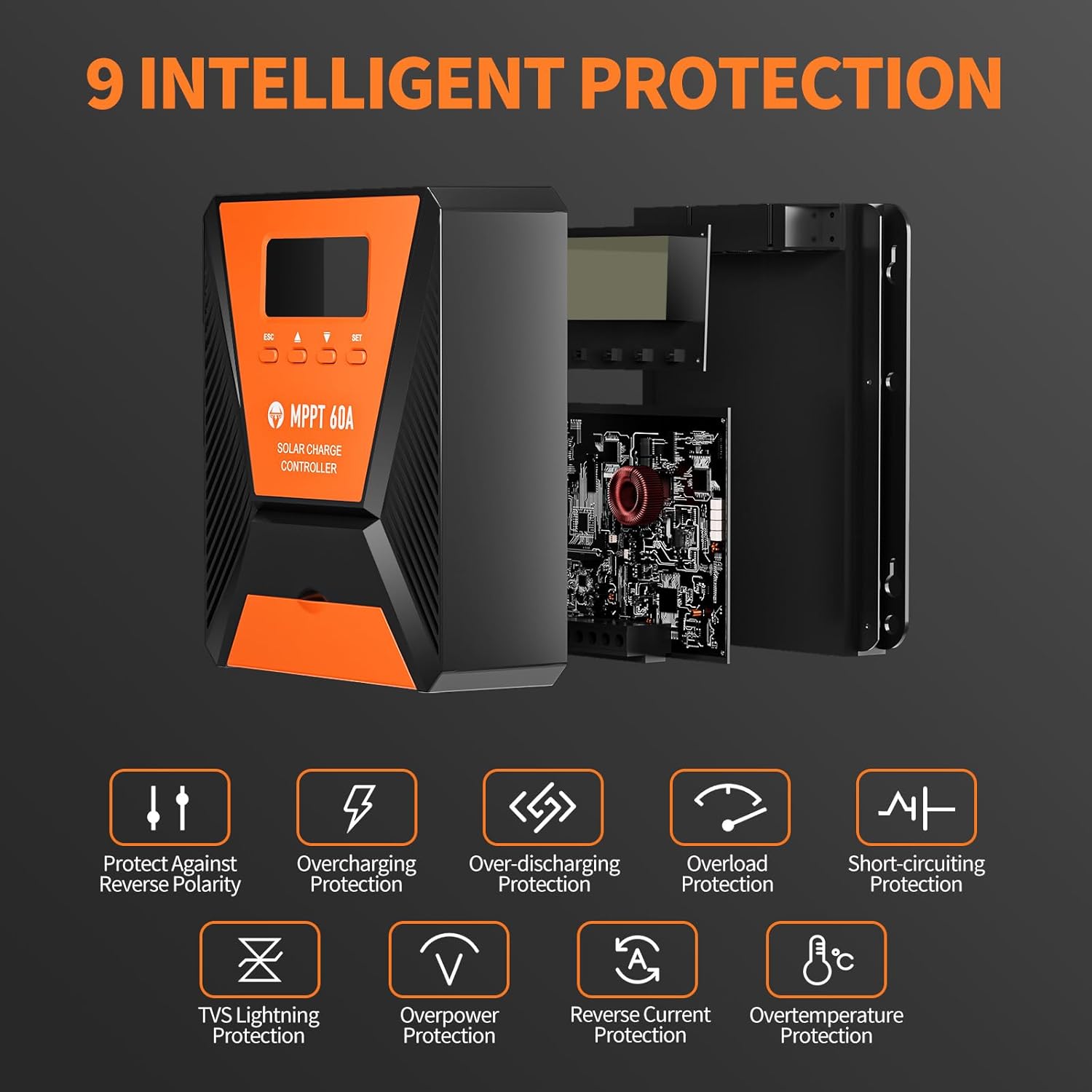
Image 7: The controller provides 9 intelligent protection features, including protection against reverse polarity, overcharging, over-discharging, overload, short-circuiting, TVS lightning, overpower, reverse current, and overtemperature.
9. Spesifikasi
| Ciri | Spesifikasi |
|---|---|
| Model | 40A |
| Jenama | TOPBULL |
| Sistem Voltage | 12V/24V Automatic Recognition |
| Kecekapan Penjejakan | >99% |
| Kecekapan Penukaran Puncak | Maks 98% |
| Jenis Bateri yang Serasi | FLD, LiFePO4, SLD, GEL, AGM |
| Vol. Input PV Makstage | 100V DC |
| Max Solar Input Power (12V System) | 720W |
| Max Solar Input Power (24V System) | 1440W |
| Output USB | Dual USB Ports, 5V DC |
| Jenis Paparan | LCD |
| Dimensi (Pakej) | 23.6 x 22.1 x 10.59 cm |
| Berat (Pakej) | 1.25 kg |
| Termasuk Aksesori | Skru Pemasangan |
10. Waranti dan Sokongan
TOPBULL is committed to providing professional technical support. If you have any questions or require assistance with your MPPT solar charge controller, please contact our customer service. We strive to meet your needs and provide the best possible support.


