1. Pengenalan
Terima kasih kerana membeliasing the Memorex MX-BCCD50 Portable AM/FM Cassette CD Player. This versatile audio system combines a top-loading CD player, an auto-stop cassette deck, and an AM/FM stereo radio, offering multiple ways to enjoy your music. This manual provides essential information for setting up, operating, and maintaining your device to ensure optimal performance and longevity.
2. Maklumat Keselamatan
Sila baca semua arahan keselamatan dengan teliti sebelum menggunakan produk ini. Simpan manual ini untuk rujukan masa hadapan.
- Sumber Kuasa: Gunakan hanya penyesuai kuasa atau bateri yang dinyatakan. Pastikan volumtage matches the requirements of the unit.
- Air dan Kelembapan: Do not expose the unit to rain, moisture, or excessive humidity. Avoid placing objects filled with liquids, such as vases, on or near the unit.
- Pengudaraan: Pastikan pengudaraan yang betul. Jangan sekat sebarang bukaan pengudaraan.
- haba: Jauhkan unit daripada sumber haba seperti radiator, daftar haba, dapur, atau radas lain (termasuk amppenghidup) yang menghasilkan haba.
- Pembersihan: Bersihkan hanya dengan kain kering. Jangan gunakan pembersih cecair atau pembersih aerosol.
- Servis: Jangan cuba servis produk ini sendiri. Rujuk semua perkhidmatan kepada pegawai perkhidmatan yang berkelayakan.
- Bateri: When using batteries, ensure they are inserted with correct polarity. Do not mix old and new batteries, or different types of batteries. Remove batteries if the unit will not be used for an extended period.
3. Produk Lebihview
Familiarize yourself with the components and controls of your Memorex MX-BCCD50.

Rajah 3.1: Depan view of the Memorex MX-BCCD50 Portable AM/FM Cassette CD Player, showcasing its compact design, integrated speakers, and control layout.
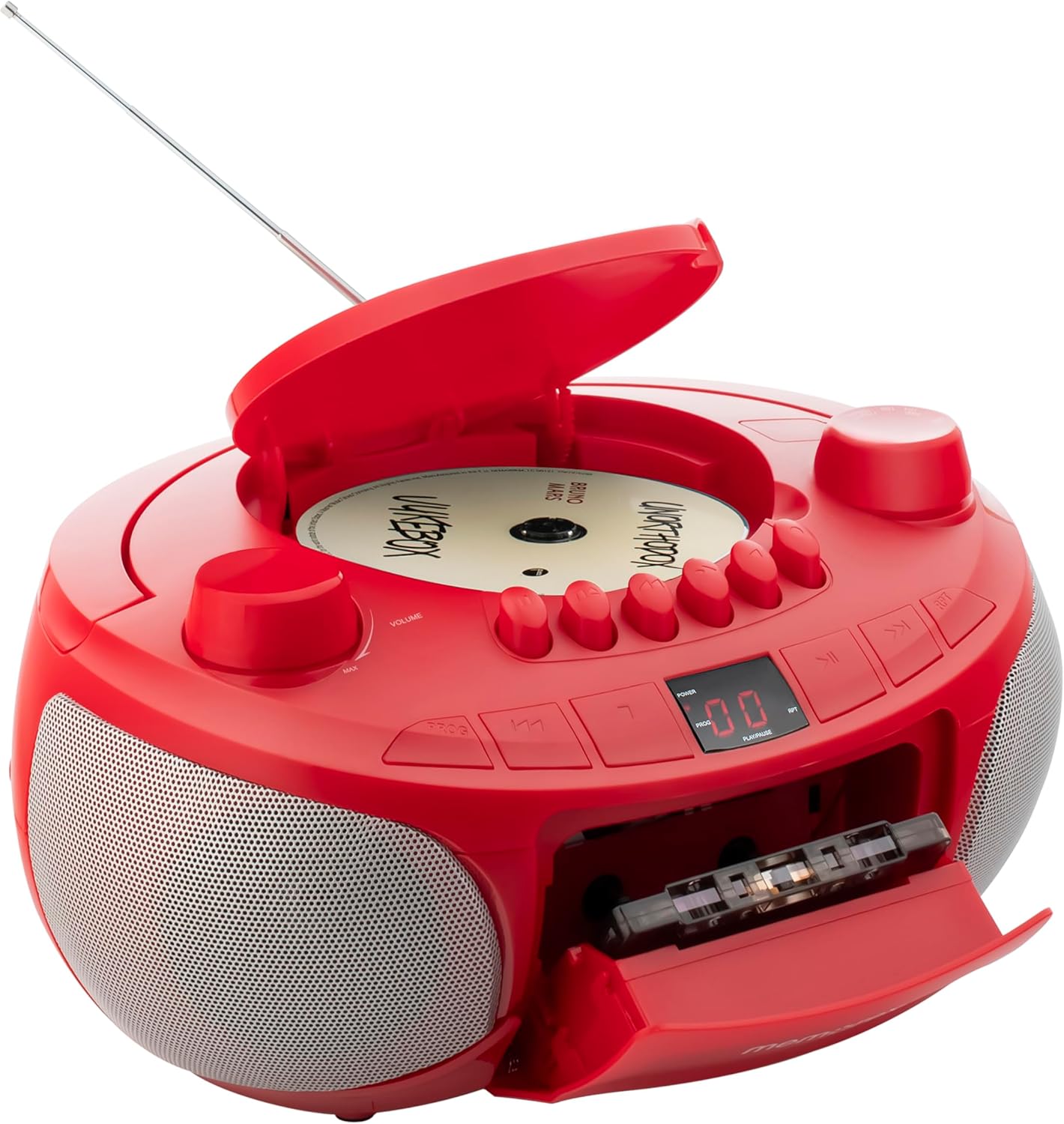
Rajah 3.2: This image illustrates the open top-loading CD compartment and the front-loading cassette deck, ready for media insertion. Key controls for playback are visible.
Komponen Utama:
- Ruang CD: Top-loading for compact discs.
- Dek Kaset: Front-loading with auto-stop function.
- Penala AM/FM: Untuk penerimaan radio.
- Antena Teleskopik: For improved FM radio reception.
- Kawalan Kelantangan: Rotary knob to adjust audio output.
- Pemilih Fungsi: Switch to select CD, TAPE (Cassette), RADIO, or AUX mode.
- Kawalan Main Semula: Buttons for Play, Pause, Stop, Fast Forward, Rewind, Skip/Search.
- Paparan led: Shows CD track number or radio frequency.
- Input Tambahan (AUX IN): Bicu 3.5mm untuk menyambungkan peranti audio luaran.
- Input Kuasa: For AC adapter.
- Petak Bateri: For 6 'C' batteries (not included).
4. Persediaan
4.1 Mengkuasakan Unit
Your Memorex MX-BCCD50 can be powered by either AC power or batteries.

Rajah 4.1: Bahagian belakang view of the unit, detailing the AC power input and the battery compartment for portable use. The image also shows the telescopic antenna and the auxiliary input jack.
Kuasa AC:
- Pastikan unit dimatikan.
- Connect the supplied AC power cord to the AC input jack on the back of the unit.
- Palamkan hujung kord kuasa AC yang lain ke dalam salur keluar dinding standard.
Kuasa Bateri:
- Pastikan unit dimatikan dan diputuskan sambungannya daripada kuasa AC.
- Buka penutup petak bateri di bahagian bawah unit.
- Insert 6 'C' size batteries (not included), observing the correct polarity (+/-) as indicated inside the compartment.
- Tutup penutup petak bateri dengan selamat.
Nota: When the unit is connected to AC power, battery power is automatically disconnected.
5. Arahan Operasi
5.1 Operasi Am
- Pusingkan JILID knob to the MIN position before turning on the unit.
- Gunakan PEMILIH FUNGSI switch to choose between CD, TAPE (Cassette), RADIO, or AUX mode.
- Laraskan JILID tombol ke tahap pendengaran yang anda inginkan.
5.2 Main Semula CD
- Tetapkan PEMILIH FUNGSI kepada mod CD.
- Open the CD compartment cover by gently lifting it.
- Place a CD (or CD-R/RW) onto the spindle with the label side facing up.
- Tutup penutup petak CD dengan kemas.
- Tekan ke MAIN/JEDA button to start playback. The LED display will show the track number.
- Untuk menjeda, tekan MAIN/JEDA sekali lagi. Tekan sekali lagi untuk menyambung semula.
- Untuk melangkau ke trek seterusnya, tekan butang LANGKAP/CARIAN KE HADAPAN butang (>> |).
- To go back to the beginning of the current track or previous track, press the SKIP/SEARCH BACKWARD butang (|<).
- Untuk mara laju atau undur dalam trek, tekan dan tahan LANGKAP/CARIAN KE HADAPAN or SKIP/SEARCH BACKWARD butang.
- Untuk menghentikan main balik, tekan BERHENTI butang.
Programmable CD Playback:
You can program up to 20 tracks to play in a specific order.
- Dalam mod Henti CD, tekan butang PROG button. The LED display will show '01'.
- Gunakan LANGKAP/CARIAN KE HADAPAN or SKIP/SEARCH BACKWARD buttons to select your desired first track.
- Tekan PROG again to confirm the selection. The display will show '02'.
- Ulang langkah 2 dan 3 untuk memprogram sehingga 20 trek.
- Selepas pengaturcaraan, tekan butang MAIN/JEDA butang untuk mula memainkan trek yang diprogramkan.
- Untuk mengosongkan program, tekan butang BERHENTI butang dua kali.
5.3 Main Semula Kaset
- Tetapkan PEMILIH FUNGSI to TAPE mode.
- Tekan ke BERHENTI/EJECT button to open the cassette deck door.
- Insert a cassette tape with the open edge facing upwards and the desired side facing you.
- Close the cassette deck door firmly.
- Tekan ke BERMAIN butang untuk memulakan main balik.
- Untuk ke hadapan pantas, tekan butang CEPAT KE HADAPAN butang.
- Untuk gulung semula, tekan butang REWIND butang.
- Untuk menghentikan main balik, tekan BERHENTI/EJECT button. The auto-stop feature will automatically stop the tape at the end of a side.
5.4 AM/FM Operasi Radio
- Tetapkan PEMILIH FUNGSI to RADIO mode.
- Panjangkan ANTENNA TELESCOPIK for optimal FM reception. For AM reception, the unit has a built-in antenna, so adjust the unit's position for best signal.
- Putar MENALA knob to select your desired AM or FM station.
- Laraskan JILID tombol ke tahap pendengaran pilihan anda.
5.5 Input Bantu (AUX IN)
Connect an external audio device (e.g., smartphone, MP3 player) to the unit.
- Tetapkan PEMILIH FUNGSI kepada mod AUX.
- Sambungkan satu hujung kabel audio 3.5mm (tidak disertakan) ke bicu AUX IN pada unit.
- Connect the other end of the audio cable to the headphone jack or line-out jack of your external audio device.
- Mulakan main balik pada peranti luaran anda.
- Adjust the volume on both the external device and the Memorex MX-BCCD50 for optimal sound.
6. Penyelenggaraan
6.1 Membersihkan Unit
- Sentiasa cabut plag unit daripada sumber kuasa sebelum membersihkan.
- Gunakan kain lembut dan kering untuk membersihkan permukaan luar. Jangan gunakan pembersih, lilin atau pelarut yang kasar.
- Untuk kanta CD, gunakan cakera pembersih kanta CD khusus.
- Untuk dek kaset, bersihkan kepala pita dan penggelek picit secara berkala dengan kapas yang dilap perlahan-lahan.ampditambah dengan isopropil alkohol.
6.2 Penyimpanan
If the unit will not be used for an extended period, remove the batteries and store the unit in a cool, dry place away from direct sunlight and extreme temperatures.
7. Penyelesaian masalah
Review the following common issues and solutions before seeking professional service.
| Masalah | Kemungkinan Punca | Penyelesaian |
|---|---|---|
| Tiada kuasa | Kord AC tidak disambungkan; Bateri habis atau salah dimasukkan. | Pastikan kord AC dipasang dengan selamat. Gantikan bateri atau periksa kekutuban. |
| Tiada bunyi | Kelantangan terlalu rendah; Mod fungsi yang salah dipilih; Fon kepala disambungkan (jika berkenaan). | Increase volume. Select correct function (CD, TAPE, RADIO, AUX). Ensure no headphones are connected to the AUX IN jack if using speakers. |
| CD tidak dimainkan | CD inserted incorrectly; CD dirty or scratched; CD compartment not closed; Unit in wrong mode. | Insert CD with label side up. Clean or replace CD. Close CD compartment firmly. Select CD mode. |
| Kaset tidak dimainkan | Cassette inserted incorrectly; Tape tangled; Unit in wrong mode. | Insert cassette correctly. Check tape condition. Select TAPE mode. |
| Penerimaan radio yang lemah | Antenna not extended; Unit position; Local interference. | Fully extend FM telescopic antenna. Adjust unit's position for AM. Move away from electronic devices causing interference. |
| Buttons are hard to read/locate | Design characteristic. | Familiarize yourself with button layout. Use in well-lit conditions. |
8. Spesifikasi
- model: MX-BCCD50
- Sumber Kuasa: Bateri bersaiz 'C' AC 120V ~ 60Hz atau 6 x (DC 9V)
- Keserasian CD: CD, CD-R / RW
- Frekuensi Radio: Stereo AM/FM
- Input Bantu: Bicu stereo 3.5mm
- Dimensi (L x W x H): 10 x 10 x 6 inci (anggaran)
- Berat: 2.14 paun (anggaran)
- Jenis pembesar suara: Stereo
Spesifikasi tertakluk kepada perubahan tanpa notis.
9. Waranti dan Sokongan
For warranty information or technical support, please refer to the warranty card included with your product or contact Memorex customer service directly. Contact details can typically be found on the manufacturer's official webtapak atau pada pembungkusan produk.
Pengeluar: Memorex


