
pengenalan
This manual provides essential information for the safe and efficient operation of your Intex 4.1 Channel Roar 4701 Bluetooth Home Theater System. Please read this manual thoroughly before using the product and retain it for future reference.
Maklumat Keselamatan
- Ensure the power supply matches the requirements specified on the product label.
- Jangan dedahkan unit kepada hujan, kelembapan atau suhu yang melampau.
- Elakkan meletakkan unit berhampiran sumber haba atau di bawah cahaya matahari langsung.
- Jangan menyekat bukaan pengudaraan.
- Jauhkan unit daripada medan magnet yang kuat.
- Putuskan sambungan kord kuasa semasa ribut petir atau apabila tidak digunakan untuk tempoh yang lama.
- Rujuk semua servis kepada kakitangan yang berkelayakan.
Kandungan Pakej
Sahkan bahawa semua item yang disenaraikan di bawah disertakan dalam pakej anda:
- 1N Woofer (Subwoofer Unit)
- 4N Satellite Speakers
- Kabel Audio 1N
- Kawalan Jauh 1N
- 1N QR Code Manual Card (for digital manual access)
Produk Selesaiview
The Intex 4.1 Channel Roar 4701 system consists of a main subwoofer unit and four satellite speakers, designed to deliver immersive audio. The main unit houses the controls and various input ports.

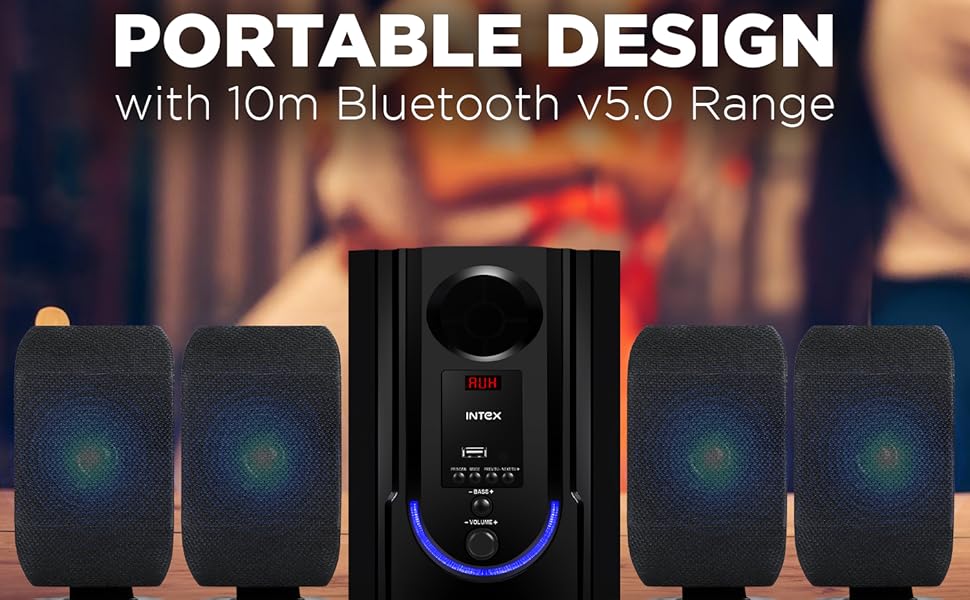
Depan view of the Intex 4.1 Channel Roar 4701 system, showcasing the subwoofer and four satellite speakers.

belakang view of the subwoofer unit, illustrating the various audio input and speaker output ports.
Persediaan
1. Membongkar
Keluarkan semua komponen daripada pembungkusan dengan berhati-hati. Simpan bahan pembungkusan untuk pengangkutan atau penyimpanan pada masa hadapan.
2. penempatan
- Place the subwoofer on a stable, flat surface, preferably on the floor for optimal bass response.
- Position the four satellite speakers around your listening area for a surround sound experience. Ensure they are equidistant from the listener for balanced audio.
- Avoid placing speakers directly against walls or in corners, which can distort sound.
3. Sambungan
Before making any connections, ensure the system is powered off and unplugged from the main power outlet.
- Sambungan Pembesar Suara Satelit: Connect the four satellite speakers to the corresponding output ports on the rear of the subwoofer unit. Ensure correct polarity (positive to positive, negative to negative) if applicable.
- Sambungan Input Audio:
- AUX: Use the provided audio cable to connect your device (e.g., smartphone, PC) to the AUX input port on the subwoofer.
- USB: Masukkan pemacu USB ke dalam port USB untuk main balik media.
- HDMI: Connect an HDMI cable from your TV or compatible device to the HDMI input port on the subwoofer.
- Antena FM: Connect the FM antenna (if included) to the FM antenna port for radio reception.
- Sambungan Kuasa: Once all audio connections are made, plug the power cord into a suitable AC power outlet.

Terperinci view of the main unit's control panel, highlighting the multiple connectivity options including Bluetooth, USB, AUX, and FM radio.
Arahan Operasi
1. Hidupkan/Mati Kuasa
Tekan butang Kuasa pada panel hadapan subwoofer atau pada alat kawalan jauh untuk menghidupkan atau mematikan sistem.
2. Pemilihan Mod
Press the 'MODE' button on the front panel or remote control to cycle through available input modes: Bluetooth (BT), USB, AUX, HDMI, and FM.
3. Berpasangan Bluetooth
- Switch the system to Bluetooth mode. The LED display will show 'BT' and an audible prompt may indicate pairing mode.
- Pada peranti mudah alih anda, dayakan Bluetooth dan cari peranti yang tersedia.
- Select 'Intex Roar 4701' (or similar name) from the list.
- Once paired, the system will indicate a successful connection, and you can begin playing audio from your device.
4. Main semula USB
Masukkan pemacu kilat USB yang mengandungi audio MP3/WMA files into the USB port. The system will automatically switch to USB mode and begin playback. Use the remote or front panel controls to navigate tracks.
5. AUX/HDMI Input
Connect your audio source via the AUX or HDMI port. Switch the system to the corresponding input mode. Audio from your connected device will now play through the speakers.
6. Radio FM
- Switch the system to FM mode.
- Press the 'SCAN' button on the remote or front panel to automatically scan and save available FM stations.
- Use the 'PREV' and 'NEXT' buttons to navigate between saved stations.
7. Fungsi Alat Kawalan Jauh
The included remote control provides convenient access to all system functions.

The remote control for the Intex 4.1 Channel Roar 4701 system, showing various buttons for power, mode, volume, track control, and bass/treble adjustments.
- Kuasa: Menghidupkan/mematikan sistem.
- Mod: Switches between input sources (BT, USB, AUX, HDMI, FM).
- Jilid +/-: Melaraskan kelantangan induk.
- Bes +/-: Melaraskan tahap bes.
- Tiga kali ganda +/-: Melaraskan tahap treble.
- Main/Jeda: Mengawal main balik media.
- Sebelumnya/Seterusnya: Skips tracks or navigates FM stations.
- Redam: Redam/nyahredamkan audio.
Penyelenggaraan
Pembersihan
Wipe the unit with a soft, dry cloth. Do not use abrasive cleaners, waxes, or solvents. Ensure the unit is unplugged before cleaning.
Penyimpanan
If storing the system for an extended period, unplug it from the power outlet and store it in a cool, dry place, away from direct sunlight and extreme temperatures.
Menyelesaikan masalah
| Masalah | Kemungkinan Punca | Penyelesaian |
|---|---|---|
| Tiada kuasa | Power cord not connected; Power outlet faulty; System off. | Check power cord connection; Test outlet with another device; Press power button. |
| Tiada bunyi | Volume too low; Mute activated; Incorrect input mode; Loose audio cables. | Increase volume; Deactivate mute; Select correct input mode; Reconnect audio cables securely. |
| Bluetooth tidak bersambung | System not in BT mode; Device too far; Device already connected to another speaker. | Switch to BT mode; Move device closer; Disconnect from other devices and try again. |
| Alat kawalan jauh tidak berfungsi | Batteries depleted; Obstruction between remote and unit; Remote not pointed correctly. | Replace batteries; Remove obstructions; Point remote directly at the main unit's sensor. |
| Bunyi herot | Volume too high; Poor audio source quality; Loose speaker connections. | Reduce volume; Use a higher quality audio source; Check all speaker connections. |
Spesifikasi
Visual representation of key technical specifications for the Intex 4.1 Channel Roar 4701 system.
| Ciri | Perincian |
|---|---|
| Nama Model | 4.1 ROAR 4701 (301 PRO) |
| Konfigurasi Saluran Bunyi Sekeliling | 4.1 |
| Jenis Pembesar Suara | Multimedia |
| Kuasa Output Maksimum Pembesar Suara | 70 Watt |
| Diameter Subwoofer | 4.5 Inci |
| Saiz Pembesar Suara Satelit | 3 Inci (x4) |
| Teknologi Ketersambungan | Tambahan, Bluetooth, HDMI, USB |
| Teknologi Komunikasi Tanpa Wayar | Bluetooth |
| Julat Bluetooth | 10 Meter |
| Kaedah Kawalan | Sentuh, Kawalan Jauh |
| Dimensi Produk | 44.2D x 18.2W x 27H Sentimeter |
| Berat Barang | 3.2 kg |
| Bekalan Kuasa | AC 110V - 265V / 50Hz |
| Pengeluar | Intex Technologies India Limited |
| Negara Asal | India |
Waranti dan Sokongan
For warranty information and customer support, please refer to the documentation provided with your purchase or visit the official Intex webtapak. Simpan resit pembelian anda sebagai bukti pembelian untuk tuntutan waranti.


