Tengsen Portable MP3/MP4 Player
Manual Pengguna
pengenalan
Thank you for choosing the Tengsen Portable MP3/MP4 Player. This device is designed to provide a versatile multimedia experience, offering HiFi lossless audio playback, video capabilities, FM radio, voice recording, e-book reading, photo viewing, and more. This manual will guide you through the setup, operation, and maintenance of your new player to ensure optimal performance and enjoyment.
Apa yang Termasuk
- 1 x MP3 Player with Bluetooth
- 1 x Kabel Mikro USB
- 1 x Fon Telinga
- 1 x Manual Pengguna
Bermula (Persediaan)
Mengecas Peranti
Before first use, fully charge the MP3 player. Connect the included USB micro cable to the player's charging port and the other end to a USB power adapter (not included) or a computer's USB port. The device provides up to 50 hours of continuous music playback and approximately 8 hours of video playback on a full charge.
Adding Music and Files
Untuk memindahkan files, connect the MP3 player to your computer using the provided USB cable. The device will appear as a removable disk. You can then drag and drop music, video, photo, and e-book files directly into the appropriate folders on the player.
Meluaskan Storan
The MP3 player comes with 64GB of internal storage. If more space is needed, you can expand the storage capacity by inserting a Micro SD card (not included) into the dedicated slot. The device supports Micro SD cards up to 128GB.

The MP3 player supports up to 128GB Micro SD card expansion for extensive storage.
Arahan Operasi
Navigasi Asas
The player features a 1.8-inch HD color screen and classic button design for easy navigation. Use the central button and surrounding directional buttons to browse menus, select options, and control playback.
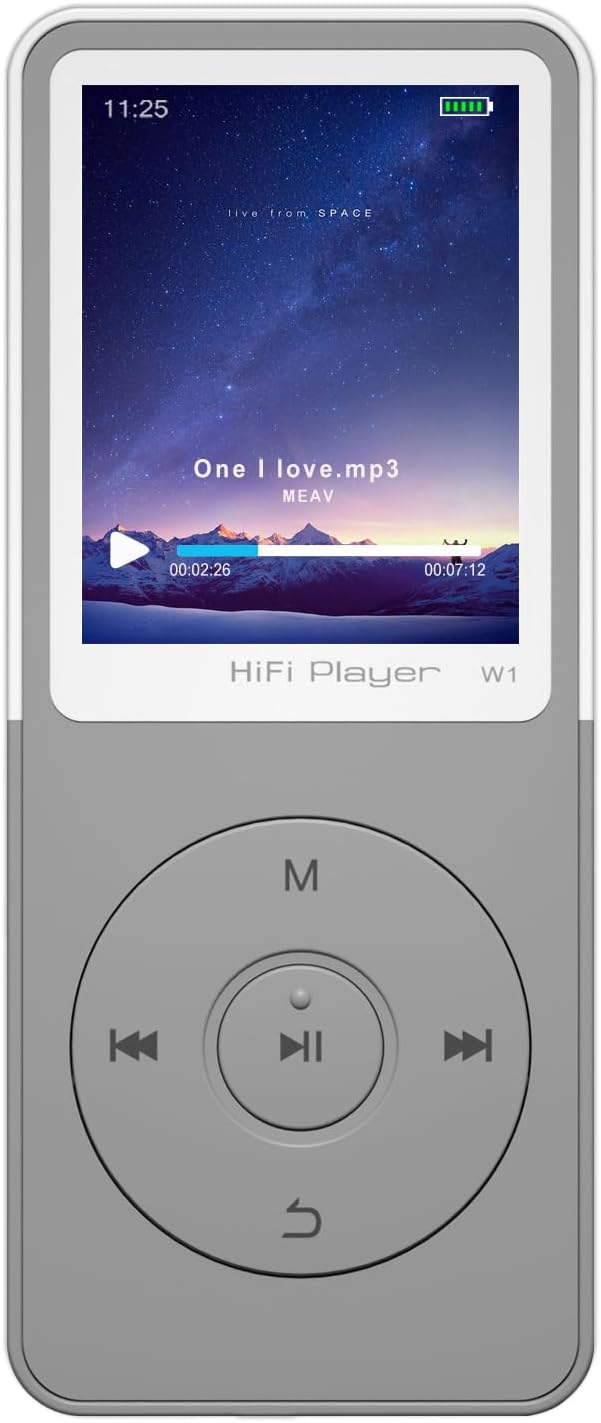
Depan view of the MP3 player, highlighting the screen and intuitive button layout.
Main balik Muzik
The device delivers HiFi lossless sound quality and supports a wide range of music formats including MP3, WMA, OGG, APE, FLAC, and WAV. Navigate to the 'Music' section to browse your audio library and select tracks for playback.

The player supports various music formats and features a built-in DAC audio chip for high-fidelity sound.
Kesambungan Bluetooth
The MP3 player features upgraded Bluetooth technology for stable and efficient wireless connections. To connect to Bluetooth headphones or speakers, go to the Bluetooth settings, enable Bluetooth, and pair with your desired device. Note: This player does not support connection with phones or tablets.

Connect your MP3 player wirelessly to Bluetooth headphones, earbuds, or speakers for enhanced audio experience.
Radio FM
Enjoy your favorite radio stations with the built-in FM radio function. To use the FM radio, you must plug in wired headphones, as they serve as the antenna. The radio supports a normal range of 87.5-108.0 MHz.

Wired headphones are required to use the FM radio function, acting as the antenna.
Video Playback and Other Functions
The MP3/MP4 player supports video playback in AMV and AVI formats (note: conversion tools may be required for some AVI files). Beyond music and video, the device offers a suite of useful features including:
- Pembaca e-buku: Supports TXT format.
- Foto Viewer: Supports JPEG, BMP, GIF formats.
- Perakam Suara: Records in WAV and MP3 formats.
- Jam loceng: Set alarms for daily reminders.
- Kalendar: Keep track of dates.
- Folder Management: Susun anda files dengan cekap.
- Penyelamat Skrin: Customize your display.

The MP3 player offers a variety of functions beyond music, including video, FM radio, recording, and e-books.
Produk Selesaiview Video
Tonton video ini untuk visual seterusnyaview of the MP3 player's design and key features.
Tayangan video produk rasmicasing the Tengsen MP3 Player's design and features.
Penjagaan dan Penyelenggaraan
To ensure the longevity of your MP3 player, follow these guidelines:
- Pastikan peranti kering. Kelembapan boleh merosakkan litar dalaman.
- Avoid extreme temperatures. Do not expose to direct sunlight or very cold environments.
- Bersihkan peranti dengan kain lembut dan kering. Jangan gunakan bahan kimia yang keras atau pembersih yang kasar.
- Handle with care to prevent drops or impacts.
- Simpan di persekitaran yang bersih dan bebas habuk apabila tidak digunakan.
Panduan Penyelesaian Masalah
If you encounter issues with your MP3 player, please refer to the following common solutions:
| Masalah | Penyelesaian yang Mungkin |
|---|---|
| Peranti tidak dihidupkan | Pastikan bateri dicas. Sambungkan ke sumber kuasa dan cuba lagi. |
| Tidak boleh memindahkan files | Periksa sambungan kabel USB. Pastikan peranti dikenali oleh komputer anda. Cuba port atau kabel USB yang lain. |
| Tiada bunyi semasa main balik | Check volume level. Ensure headphones are properly connected or Bluetooth device is paired and connected. Verify audio file format disokong. |
| Radio FM tidak berfungsi | Ensure wired headphones are plugged in, as they act as the antenna. Check for strong signal in your area. |
| Sambungan Bluetooth tidak stabil | Ensure the player and Bluetooth device are within range. Disconnect and re-pair the devices. Avoid interference from other electronic devices. |
Untuk bantuan lanjut, sila hubungi khidmat pelanggan.
Spesifikasi Produk
| Ciri | Perincian |
|---|---|
| Nama Model | W1 |
| Dimensi Produk | 0.3 x 1.6 x 3.7 inci |
| Berat Barang | 1.11 auns |
| Saiz Skrin | 1.8 Inci |
| Kapasiti Penyimpanan Memori | 64 GB (expandable up to 128GB via Micro SD card) |
| Teknologi Ketersambungan | Aux, Bluetooth, USB |
| Format Muzik yang Disokong | MP3, WMA, OGG, APE, FLAC, WAV (does not support audiobooks/iTunes) |
| Format Video yang Disokong | AMV, AVI (conversion tool required) |
| Format E-buku yang Disokong | TXT |
| Format Rakaman yang Disokong | WAV, MP3 |
| Format Gambar yang disokong | JPEG, BMP, GIF |
| Hayat Bateri (Muzik) | Sehingga 50 jam |
| Hayat Bateri (Video) | Lebih kurang 8 jam |
| Ciri Khas | Equalizer, FM Radio, Hi-Res Audio, Voice Recorder |
Waranti dan Sokongan Pelanggan
Your Tengsen MP3/MP4 Player comes with a 12-month after-sales warranty. For any technical support or assistance, please feel free to communicate with our professional after-sales team. We are committed to ensuring your satisfaction with our product.


