1. Pengenalan
Thank you for choosing the Kaidi KD-G1 Wireless Gaming Earbuds. This manual provides essential information for the safe and efficient use of your new device. Please read these instructions carefully before use and retain them for future reference. The KD-G1 earbuds offer a true wireless experience with Bluetooth 5.3 connectivity, designed for gaming, music, and calls, featuring an in-ear design for comfort and water resistance for active lifestyles.
2. Kandungan Pakej
Pastikan semua item yang disenaraikan di bawah terdapat dalam pakej anda:
- Kaidi KD-G1 Wireless Gaming Earbuds (Left and Right)
- Sarung Pengecas Tanpa Wayar
- Kabel Pengecas USB
- Petua Telinga (pelbagai saiz)
- Manual Pengguna
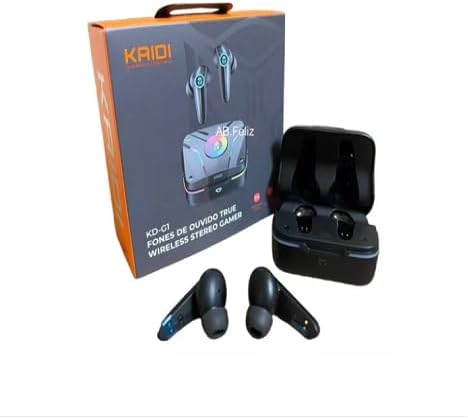
Image: Kaidi KD-G1 Wireless Gaming Earbuds, charging case, and retail packaging. The image shows the earbuds, their charging case, and the product box, illustrating the complete package contents.
3. Produk Lebihview
Familiarize yourself with the components of your Kaidi KD-G1 earbuds and charging case.
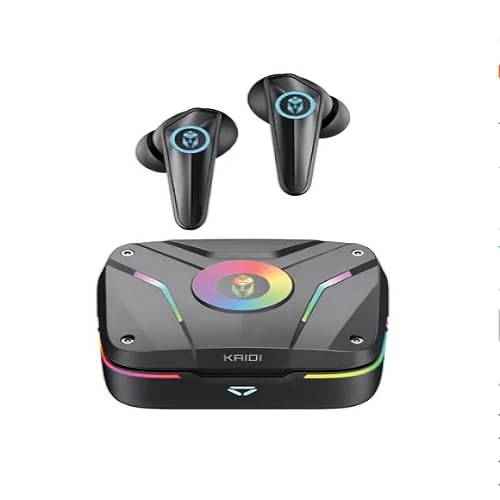
Image: Kaidi KD-G1 Wireless Gaming Earbuds and Charging Case. The image displays the two earbuds removed from their open charging case, highlighting their design and the case's indicator lights.
- Earbud: In-ear design with integrated microphone and touch controls.
- Sarung Pengecasan: Stores and charges the earbuds, features a USB-C charging port and LED indicators.
- Petua Telinga: Replaceable silicone tips for a secure and comfortable fit.
4. Persediaan
4.1 Mengecas Fon telinga dan Sarung
- Letakkan fon telinga ke dalam bekas pengecas, pastikan ia diletakkan dengan betul.
- Connect the USB charging cable to the charging port on the case and to a compatible USB power source (e.g., computer, wall adapter).
- The LED indicators on the case will show the charging status. A full charge for the case takes approximately 1.5 hours.
- Setelah dicas sepenuhnya, cabut kabel pengecasan.
The earbuds have a battery capacity of 35mAh each, and the charging case has a capacity of 320mAh.
4.2 Berpasangan Bluetooth
- Pastikan fon telinga dicas.
- Open the charging case. The earbuds will automatically enter pairing mode, indicated by flashing LED lights (refer to product for specific light patterns).
- Pada peranti berdaya Bluetooth anda (telefon pintar, tablet, komputer), pergi ke tetapan Bluetooth.
- Cari untuk available devices and select "KD-G1" from the list.
- Once connected, the earbuds will indicate successful pairing (e.g., a voice prompt or steady LED light).
- Fon telinga akan menyambung semula secara automatik ke peranti gandingan terakhir apabila dialih keluar daripada sarung, jika Bluetooth didayakan pada peranti.
5. Arahan Operasi
The Kaidi KD-G1 earbuds feature touch controls for various functions. Specific touch gestures may vary; please refer to the quick start guide included with your product for precise controls.
5.1 Hidupkan/Mati Kuasa
- Hidupkan kuasa: Buka bekas pengecasan dan fon telinga akan dihidupkan secara automatik.
- Matikan: Letakkan fon telinga kembali ke dalam bekas pengecasan dan tutup penutupnya. Mereka akan dimatikan secara automatik.
5.2 Main balik Muzik
- Main/Jeda: Ketik sekali pada salah satu fon telinga.
- Lagu Seterusnya: Ketik dua kali pada fon telinga kanan.
- Trek Sebelumnya: Ketik dua kali pada fon telinga kiri.
- Kawalan Kelantangan: (If supported) Triple tap on left/right earbud for volume down/up.
5.3 Pengurusan Panggilan
- Jawab/Tamatkan Panggilan: Ketik sekali pada salah satu fon telinga.
- Tolak Panggilan: Tekan dan tahan salah satu fon telinga selama 2 saat.
5.4 Pembantu Suara
- Aktifkan Pembantu Suara: Tekan dan tahan salah satu fon telinga selama 2 saat (apabila tidak dalam panggilan).
6. Penyelenggaraan
6.1 Pembersihan
- Bersihkan fon telinga dan bekas pengecas dengan kerap menggunakan kain yang lembut, kering dan tidak berbulu.
- Tanggalkan hujung telinga dan bersihkannya dengan sabun lembut dan air, kemudian keringkan dengan teliti sebelum disambungkan semula.
- Jangan gunakan pembersih atau pelarut yang melelas.
6.2 Tahan Air
The Kaidi KD-G1 earbuds are water resistant, making them suitable for workouts and light rain. However, they are not waterproof. Do not submerge the earbuds in water or expose them to strong jets of water. The charging case is not water resistant.
6.3 Penyimpanan
When not in use, store the earbuds in their charging case to protect them and keep them charged. Store in a cool, dry place away from extreme temperatures and direct sunlight.
7. Penyelesaian masalah
If you encounter issues with your Kaidi KD-G1 earbuds, try the following solutions:
- Fon telinga tidak berpasangan: Ensure both earbuds are charged. Place them back in the case, close the lid, then open it again to re-enter pairing mode. Forget "KD-G1" from your device's Bluetooth list and try pairing again.
- Tiada bunyi dari satu fon telinga: Ensure both earbuds are charged and connected. Try resetting the earbuds (refer to specific product instructions if a reset function is available).
- Isu pengecasan: Check the charging cable and power adapter. Ensure the charging contacts on the earbuds and case are clean and free of debris.
- Kualiti bunyi yang lemah: Ensure the earbuds are properly seated in your ears. Try different sized ear tips for a better seal. Ensure your device is within the Bluetooth transmission range (>12m).
8. Spesifikasi
| Nama Model | KD-G1 |
| Teknologi Ketersambungan | Wayarles (Bluetooth) |
| Versi Bluetooth | 5.3 |
| Protokol yang Disokong | HFP, HSP, A2DP, AVRCP |
| Unit Pemandu | 13mm |
| Sensitiviti | 110 ± 3 dB |
| Impedans | 32 Ohm |
| Respons Kekerapan | 20 - 20000Hz |
| Kapasiti Bateri Earbud | 3.7V/35mAh |
| Kapasiti Bateri Kes Pengecasan | 3.7V/320mAh |
| Masa Mengecas | <1.5 jam |
| Music Playback Time (80% volume) | Sehingga 6 jam |
| Masa Bercakap (80% isipadu) | Sehingga 4 jam |
| Standby Time (Earbuds) | 30 jam |
| Standby Time (Case) | >3 months (in hibernation) |
| Julat Kekerapan | 2.400 - 2.485 GHz |
| Jarak Penghantaran | > 12 meter |
| Tahap Ketahanan Air | Tahan Air |
| Ciri Khas | Rechargeable battery, Fast charging, Noise isolation, Lightweight, Microphone included |
| Peranti Serasi | Peranti berdaya Bluetooth |
9. Waranti dan Sokongan
9.1 Waranti Pengilang
Produk ini disertakan dengan a 3-month seller warranty dari tarikh pembelian. Waranti ini meliputi kecacatan pembuatan di bawah penggunaan biasa. Ia tidak meliputi kerosakan yang disebabkan oleh salah guna, kemalangan, pengubahsuaian tanpa kebenaran atau haus dan lusuh biasa. Sila simpan bukti pembelian anda untuk tuntutan waranti.
9.2 Sokongan Pelanggan
For any questions, technical support, or warranty claims, please contact the seller or retailer from whom you purchased the product. They will be able to assist you with further instructions and service.


