1. Pengenalan
Thank you for choosing the COOLGEEK Record Player Model CS-01. This manual provides essential information for the safe and optimal use of your new record player. Please read it thoroughly before operation and retain it for future reference.
The COOLGEEK CS-01 combines classic vinyl playback with modern Bluetooth connectivity, offering a rich audio experience through its integrated 4-speaker system and advanced suspension technology.
2. Apa yang ada di dalam Kotak
- Vintage Pemain Rekod Vinil
- Manual Arahan
- Penyesuai Kuasa
3. Produk Lebihview
The COOLGEEK CS-01 is designed for both aesthetic appeal and superior sound performance. Key features include:
- Reka bentuk yang unik: Metal frame and one-piece body construction with anti-vibration silicone base.
- Bunyi Gred Profesional: Equipped with 4 high-quality speakers (2x 15W track-shape speakers for bass, 2x 10W treble units) and circular inverted tubes for enhanced low-frequency volume.
- Cushioning Shock Absorption System: Features a unique 4-spring suspension cushion system and core disk rotating shaft to minimize resonance and optimize shock resistance.
- Dual Rotation Speed: Supports 33 1/3 and 45 RPM vinyl records.
- AT-3600L Stylus Head: Comes with a high-quality Audio-Technica AT-3600L cartridge for accurate tracking and sound reproduction.
- Kesambungan Bluetooth 5.0: Seamlessly connect your PC, tablet, or smartphone for wireless audio streaming.
- Adjustable Counterweight & Anti-Skate Control: For precise tonearm balance and optimal tracking.
- Phono-Line Output: Allows connection to external stereo systems.

Figure 1: COOLGEEK Record Player Model CS-01

Gambar 2: Lebihview of key features including Bluetooth 5.0, Vinyl Mode, Line Out, Audio-Technica Cartridge, Carbon Fiber Tonearm, Spring Suspension, High Fidelity, Dual Speed, and Shock-Absorbing Foot Pad.

Rajah 3: Terperinci view of the internal speaker configuration, showing 2x 15W track-shape speakers, 2x 10W treble units, and circular inverted tubes for enhanced bass.
4. Arahan Persediaan
Follow these steps to set up your COOLGEEK Record Player:
- Membongkar: Keluarkan semua komponen daripada pembungkusan dengan berhati-hati. Simpan pembungkusan untuk pengangkutan atau penyimpanan pada masa hadapan.
- penempatan: Place the record player on a stable, level surface away from direct sunlight, heat sources, and excessive vibration.
- Sambungan Kuasa: Connect the power adapter to the DC 24V/2A port on the back of the record player and then plug it into a wall outlet.
- Pemasangan Platter dan Tali Pinggang:
- Letakkan pinggan pada gelendong.
- Locate the drive belt (usually pre-installed or found in packaging). Carefully stretch the belt around the motor pulley and the inner rim of the platter.
- Dust Cover Installation: Attach the dust cover hinges to the designated slots on the back of the record player.
- Cartridge and Stylus: The AT-3600L cartridge and stylus are typically pre-installed. Ensure the stylus protector is removed before playing a record.
- Imbangan Tonearm dan Daya Penjejakan:
- Unlock the tonearm.
- Slide the counterweight onto the rear of the tonearm. Adjust it until the tonearm floats horizontally and is balanced.
- Once balanced, turn the numbered ring on the counterweight to set the tracking force. Refer to the cartridge specifications (AT-3600L typically requires 3.5g).
- Adjust the anti-skating dial to match the tracking force setting.
Video 1: Official setup and overview of the COOLGEEK Record Player. This video demonstrates the product's features and basic operation.

Figure 4: Illustration of the 4-spring suspension cushion system and anti-vibration silicone base, designed to reduce resonance and optimize shock resistance.

Rajah 5: Jarak dekat view of the Audio-Technica AT-3600L stylus head, highlighting its precision for optimal sound quality.
5. Arahan Operasi
5.1 Memainkan Rekod Vinyl
- Hidupkan kuasa: Turn the power knob to the 'LP' (Album Mode) position.
- Pilih Kelajuan: Choose the appropriate speed (33 1/3 or 45 RPM) using the speed selector switch.
- Rekod Tempat: Letakkan rekod vinil di atas pinggan dengan berhati-hati.
- Tonearm Kedudukan: Unlock the tonearm. Gently lift the tonearm using the cueing lever and position it over the desired track on the record.
- Tonearm Bawah: Slowly lower the cueing lever to allow the stylus to gently descend onto the record. The platter will automatically start rotating.
- Laraskan Kelantangan: Use the anodized alloy metal knob to adjust the volume to your preference.
- Tamat Main Semula: At the end of the record, the tonearm will automatically lift and return to its rest position. Alternatively, manually lift the tonearm using the cueing lever and return it to the rest.

Figure 6: Demonstrates how to unlock the tonearm and place it on the record's outermost segment. The disk automatically starts rotating, and the machine lowers the arm for playback.

Figure 7: Close-up of the 33/45 dual rotation speed selector, allowing compatibility with various vinyl record types.
5.2 Mod Bluetooth
- Aktifkan Bluetooth: Turn the power knob to the 'BT' (Bluetooth Mode) position. The Bluetooth indicator light will begin to flash, indicating it's in pairing mode.
- Pasangkan Peranti: On your smartphone, tablet, or PC, enable Bluetooth and search for 'COOLGEEK CS-01' (or similar name). Select it to pair.
- Pengesahan: Once successfully paired, the Bluetooth indicator light will stop flashing and remain solid.
- Mainkan Audio: Start playing audio from your paired device. The sound will be output through the record player's speakers.
- Laraskan Kelantangan: Control the volume using the record player's volume knob and/or your paired device's volume controls.

Figure 8: Visual comparison of the record player in vinyl playback mode and Bluetooth streaming mode, illustrating its dual functionality.
5.3 Connecting to External Speakers (Line Out)
For enhanced sound, you can connect your COOLGEEK CS-01 to an external stereo system or powered speakers using the Line Out ports.
- Locate Ports: Identify the 'LINE OUT L' and 'LINE OUT R' RCA ports on the back of the record player.
- Sambungkan Kabel: Connect RCA cables (not included) from these ports to the corresponding audio input ports on your external amppembesar atau pembesar suara berkuasa.
- Pilih Input: On your external audio system, select the input source corresponding to where you connected the record player.
- Laraskan Kelantangan: Control the volume primarily through your external audio system.
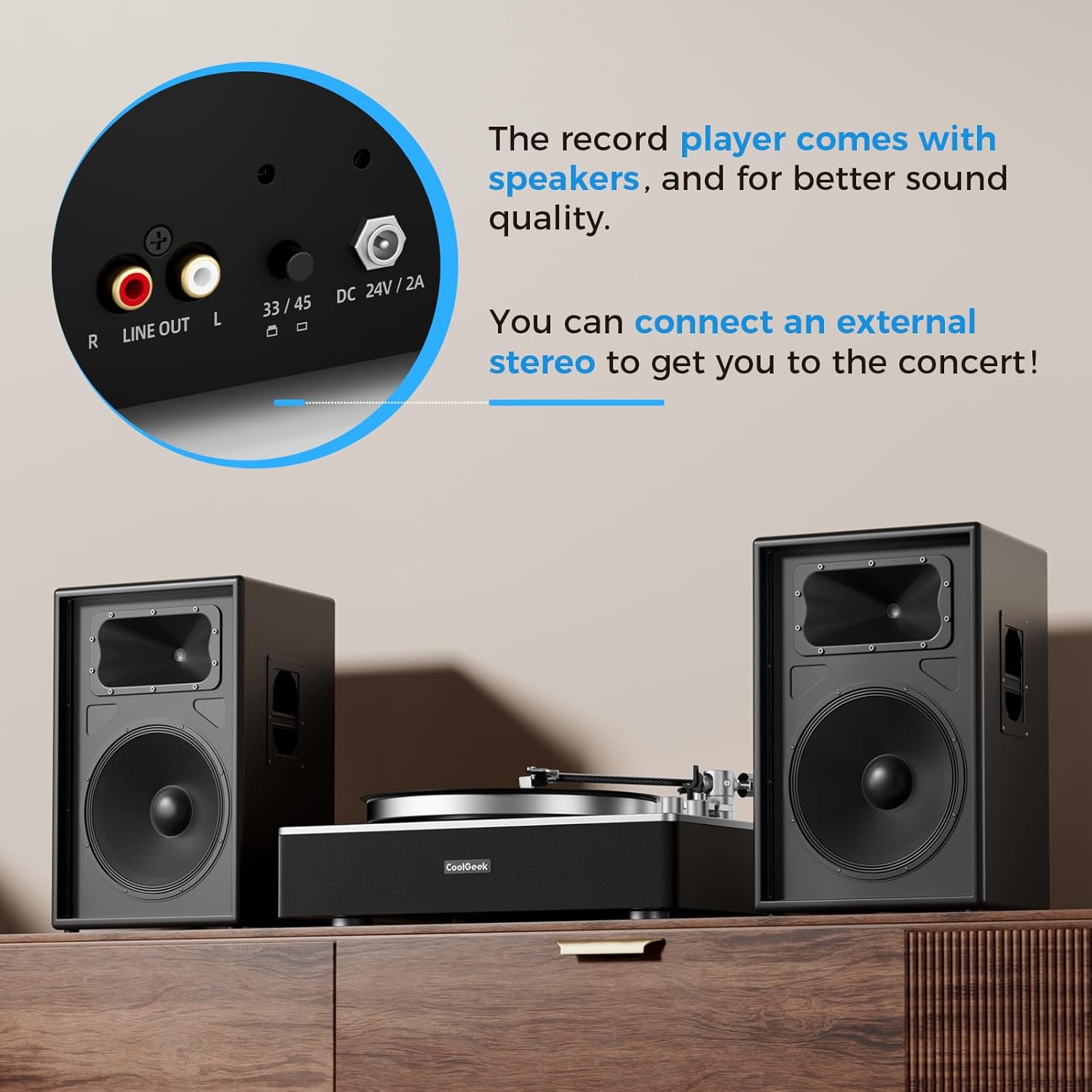
Rajah 9: Jarak dekat view of the rear panel, showing the Line Out (RCA) ports and the 33/45 speed selector, allowing connection to external audio systems.
6. Penyelenggaraan
- Pembersihan: Use a soft, dry cloth to clean the record player's surface. For the stylus, use a soft brush designed for stylus cleaning, brushing gently from back to front.
- Penutup habuk: Pastikan penutup habuk ditutup apabila tidak digunakan untuk melindungi platter dan tonearm daripada habuk dan serpihan.
- Penggantian Stilus: The stylus has a limited lifespan. Replace it when you notice a degradation in sound quality or visible wear. Refer to the manufacturer's guidelines for compatible replacement styli (e.g., Audio-Technica AT-3600L replacement stylus).
- Penyelenggaraan Tali Pinggang: Periodically check the drive belt for wear or stretching. Replace if necessary to maintain consistent platter speed.
7. Penyelesaian masalah
| Masalah | Kemungkinan Punca | Penyelesaian |
|---|---|---|
| Tiada kuasa | Penyesuai kuasa tidak disambungkan; Soket kuasa rosak | Ensure adapter is securely connected; Try a different outlet |
| Tiada suara dari pembesar suara | Kelantangan terlalu rendah; Mod salah dipilih; Pembesar suara luaran tidak disambungkan/dikuasakan | Increase volume; Ensure correct mode (LP/BT); Check external speaker connections and power |
| Melangkau atau bunyi herot | Dust/debris on record/stylus; Incorrect tracking force/anti-skate; Record player not level; Damaged stylus | Clean record/stylus; Re-balance tonearm and adjust tracking force/anti-skate; Ensure player is on a level surface; Replace stylus if damaged |
| Bluetooth tidak berpasangan | Player not in BT mode; Device too far; Interference | Ensure player is in BT mode; Move device closer; Restart player and device |
| Kelajuan main balik yang salah | Wrong speed selected; Drive belt issue | Select correct speed (33/45 RPM); Check drive belt for proper placement or wear |
8. Spesifikasi
| Ciri | Perincian |
|---|---|
| Jenama | COOLGEEK |
| Nombor Model | CS-01 |
| warna | Hitam |
| bahan | Acrylic, Ceramic, Metal |
| Berat Barang | 21 paun |
| Dimensi Pakej | 21 x 16 x 9.35 inci |
| Kelajuan Putaran Maksimum | 45 RPM |
| Komponen yang Disertakan | Instruction Manual, Power Adapter, Vintage Pemain Rekod Vinil |
| Ciri Khas | Adjustable Anti Skate Control, Shock-Resistant Silicone, 4-Spring Suspension Cushion System, Stereo Speakers, Bluetooth Input, Cartridge AT-3600L Stylus Head, Adjustable Counterweight, Phono-Line Output, Built-in Preamp, Arm auto pause |
| Peranti Serasi | Penceramah |
9. Waranti & Sokongan
For warranty information and customer support, please refer to the documentation included with your product or visit the official COOLGEEK webtapak. Simpan resit pembelian anda sebagai bukti pembelian untuk sebarang tuntutan waranti.


