1. Pengenalan
This manual provides detailed instructions for the installation, operation, and maintenance of your darkFlash DS900 ATX Mid-Tower PC Case. The DS900 is designed to accommodate ATX, M-ATX, and ITX motherboards, featuring a panoramic dual tempered glass design for an unobstructed view of internal components. It includes advanced cooling support and convenient I/O options.
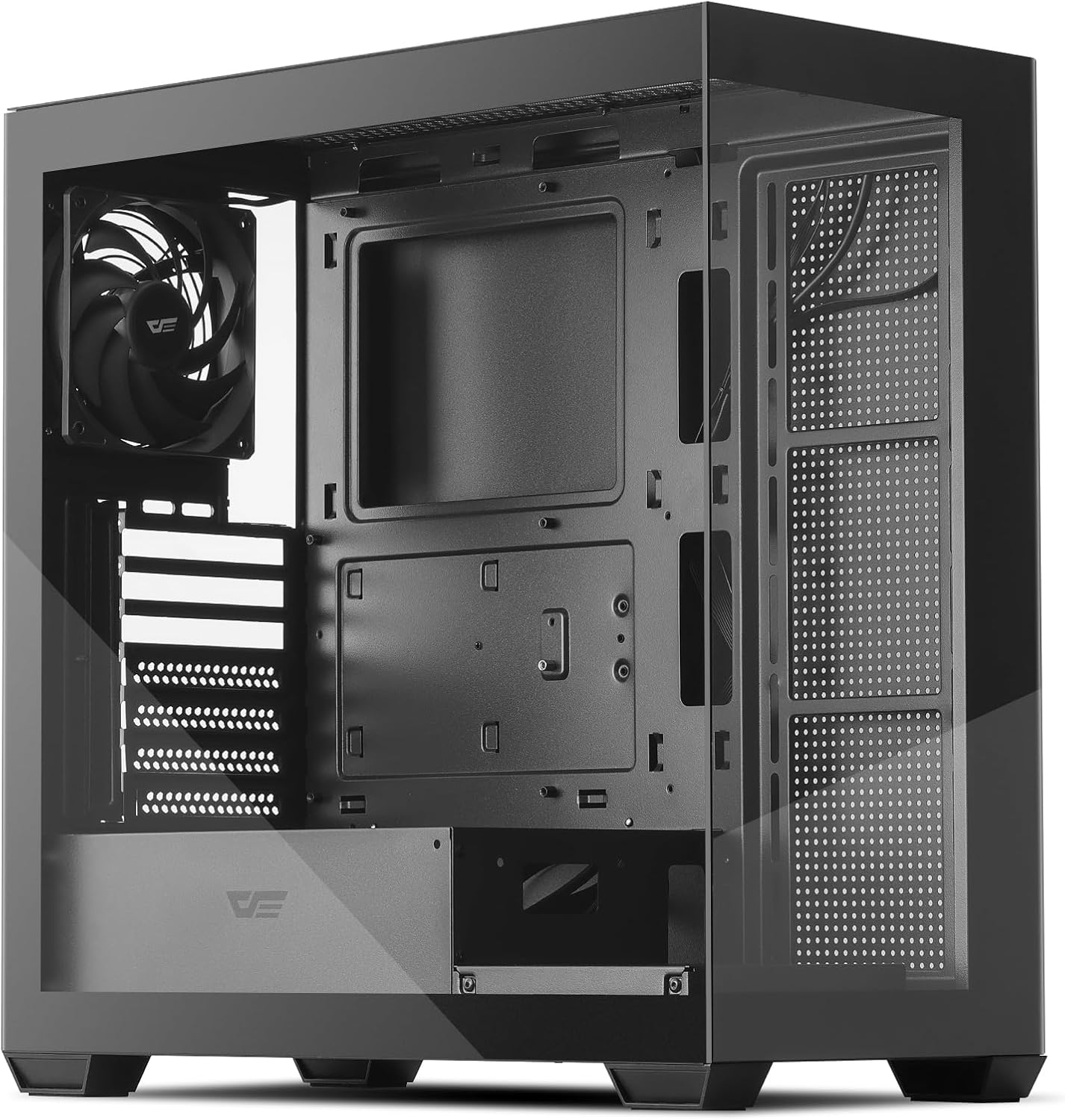
Figure 1: darkFlash DS900 ATX Mid-Tower PC Case
2. Ciri-ciri Utama
- Panoramic Dual Tempered Glass: Offers a 270° unobstructed view of your PC hardware and lighting.
- High-Speed I/O Panel: Equipped with USB 3.0, USB 2.0, and Type-C ports for versatile connectivity.
- Advanced Cooling Support: Supports up to 10 fans and a 360mm water cooling radiator for efficient heat dissipation. Includes one pre-installed non-LED PWM fan.
- Aliran Udara Dioptimumkan: Designed with multiple airflow channels to maintain optimal component temperatures.
- Penapis Habuk Magnetik: Features magnetic dust filters on the top and bottom for easy cleaning and component protection.
- Reka Bentuk Mesra Pengguna: Facilitates easy installation and cable management with tool-free access to panels.
- Keserasian Papan Induk: Supports ATX, M-ATX, and ITX motherboard form factors.
3. Spesifikasi
| Ciri | Spesifikasi |
|---|---|
| Jenis Kes | Mid Tower |
| Keserasian Papan Induk | ATX, M-ATX, ITX |
| bahan | Logam, Kaca Tempered |
| Dimensi (LxWxH) | 8.6 x 17.8 x 17 inci (218 x 452 x 432 mm) |
| Berat Barang | 14 paun (6.35 kg) |
| Panjang GPU Maks | 425mm |
| Ketinggian Penyejuk CPU Maks | 170mm |
| Sokongan Radiator | Sehingga 360mm |
| Sokongan Peminat | Up to 10 fans (1x 120mm PWM fan pre-installed) |
| Drive Bays | 2x 3.5" HDD, 2x 2.5" SSD |
| Slot Pengembangan | 7 |
| Pelabuhan I / O Depan | 1x USB 3.0, 1x USB 2.0, 1x Type-C, HD Audio, Mic, Power, Reset, LED Control |
4. Persediaan dan Pemasangan
4.1 Membongkar
Carefully remove the PC case from its packaging. Inspect for any damage during transit. Keep all packaging materials for future transport or warranty claims.
4.2 Pembuangan Panel
The darkFlash DS900 features tool-free disassembly on three sides for easy access to components. The tempered glass side panel and the metal side panel are secured with thumb screws at the rear. The top panel can also be removed for fan or radiator installation.

Figure 2: Panel Removal and Upgraded Design
4.3 Pemasangan Motherboard
- Ensure the correct standoffs are installed for your motherboard form factor (ATX, M-ATX, ITX).
- Align your motherboard with the standoffs and gently place it into position.
- Selamatkan papan induk dengan skru yang disediakan.
4.4 Pemasangan Drive
The case supports 2x 3.5" HDDs and 2x 2.5" SSDs. Refer to the included manual for specific mounting locations and procedures for each drive type.
4.5 Cooling System Installation
The DS900 supports extensive cooling configurations, including up to a 360mm radiator and up to 10 fans. One 120mm non-LED PWM fan is pre-installed at the rear.

Figure 3: Cooling Support Layout
Radiators can be mounted at the top or side. Fans can be installed at the front, top, rear, and bottom. Ensure proper airflow direction for optimal cooling performance.

Figure 4: High-Airflow Performance
4.6 Pengurusan Kabel
The case is designed with ample space behind the motherboard tray and cable routing cutouts to facilitate clean cable management. Utilize the included zip ties to secure cables and maintain an organized interior.
4.7 Sambungan I/O Hadapan
Connect the front I/O panel cables to the corresponding headers on your motherboard. The I/O panel includes:
- Butang Kuasa
- Butang Tetapkan Semula
- Butang Kawalan LED
- Port USB 3.0
- Port USB 2.0
- Pelabuhan Jenis-C
- HD Audio Jack
- Mikrofon Jack
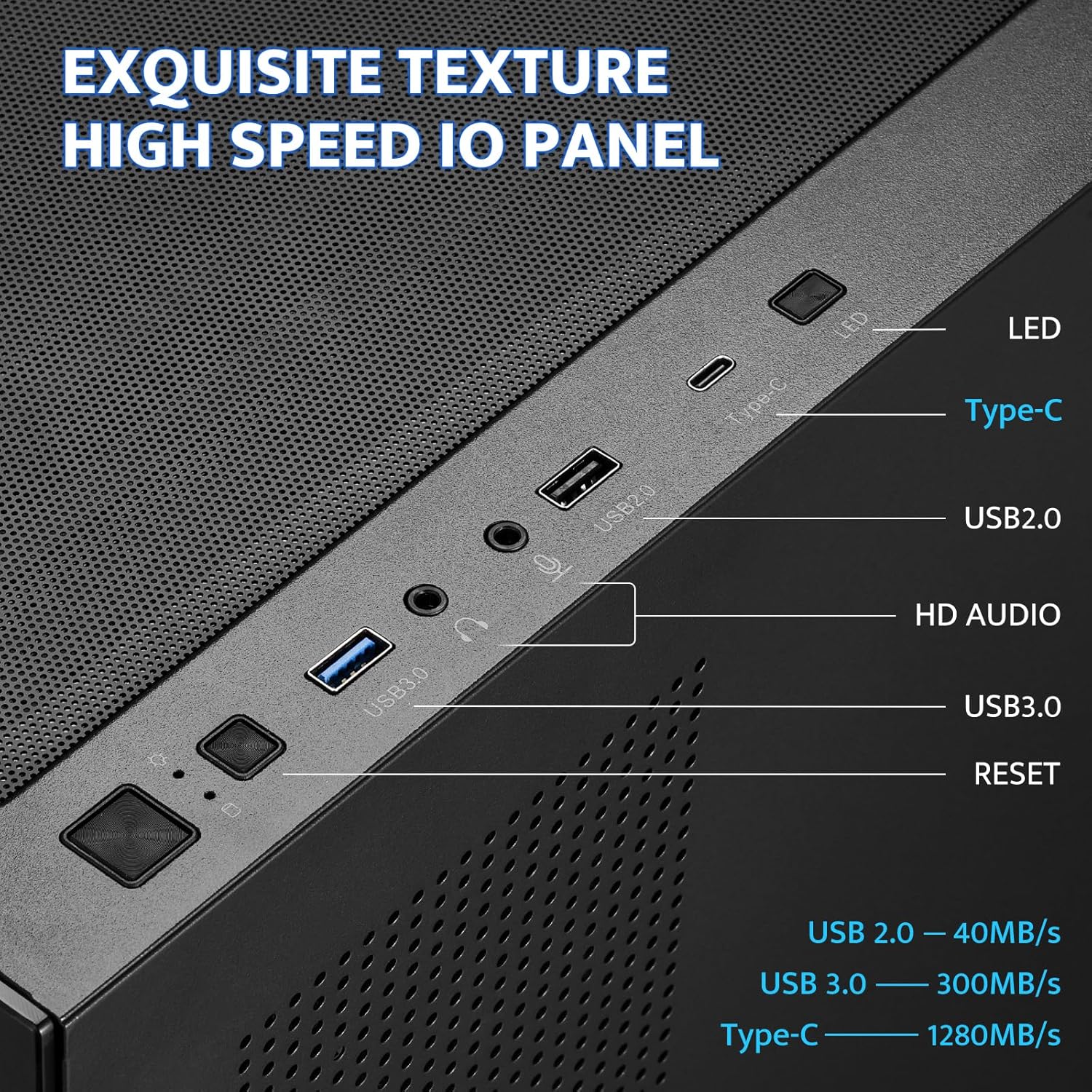
Figure 5: Front I/O Panel
5. Arahan Operasi
Once all components are installed and connected, ensure all panels are securely reattached. Connect your power supply to a wall outlet and turn on the PC using the power button on the front I/O panel. Use the LED control button to cycle through any available lighting modes for compatible fans or accessories.
6. Penyelenggaraan
Regular maintenance helps ensure optimal performance and longevity of your PC components. The darkFlash DS900 features magnetic dust filters for easy cleaning.
6.1 Membersihkan Penapis Habuk
- Gently pull the magnetic dust filters located on the top and bottom of the case to remove them.
- Clean the filters using compressed air, a soft brush, or by rinsing with water (ensure they are completely dry before reattaching).
- Reattach the magnetic filters to their respective positions.

Figure 6: Magnetic Dust Filter
6.2 Membersihkan Panel Kaca Tempered
Use a microfiber cloth and a non-abrasive glass cleaner to clean the tempered glass panels. Avoid harsh chemicals that may damage the glass or coatings.
7. Penyelesaian masalah
Jika anda menghadapi masalah dengan binaan PC anda, pertimbangkan langkah penyelesaian masalah umum berikut:
- Tiada Kuasa: Double-check all power connections from the power supply to the motherboard, CPU, and graphics card. Ensure the power button cable is correctly connected to the motherboard header.
- Fans Not Spinning/Lights Off: Verify fan and LED connections to the motherboard or fan controller. Check motherboard BIOS settings for fan control.
- Isu Paparan: Ensure your graphics card is properly seated in its PCIe slot and all power cables are connected. Verify monitor cables are securely attached to the graphics card.
- Terlalu panas: Confirm all fans are spinning in the correct direction for optimal airflow. Ensure CPU cooler and GPU fans are functioning. Check for proper thermal paste application on the CPU.
- Sambungan longgar: Re-seat all components (RAM, GPU, storage drives) and re-check all cable connections.
For specific component-related issues, refer to the instruction manuals provided with those components.
8. Waranti dan Sokongan
For warranty information and technical support, please refer to the official darkFlash webtapak atau hubungi perkhidmatan pelanggan mereka. Simpan bukti pembelian anda untuk sebarang tuntutan waranti.


