1. Pengenalan
This manual provides detailed instructions for the installation, operation, and maintenance of your Leadfan 10.1-inch Android Car Radio. Please read this manual thoroughly before using the product to ensure proper function and safety. Keep this manual for future reference.
2. Produk Lebihview
2.1 Ciri-ciri Utama
- 10.1-inch IPS Touch Screen (1080*600 resolution)
- Sistem Operasi Android 12
- 2GB RAM + 32GB ROM
- CPU 4-Teras
- Apple CarPlay & Android Auto Tanpa Wayar
- Built-in GPS Navigation (Online & Offline)
- Kesambungan WiFi
- Bluetooth for Hands-Free Calling & Music Streaming
- Radio FM
- MirrorLink Functionality
- Steering Wheel Control Support
- Built-in EQ Settings
- Backup Camera Support (AHD Camera included)
2.2 Komponen yang Disertakan
Pakej termasuk item berikut:
- Leadfan 10.1-inch Android Car Radio Unit
- belakang View Kamera
- RCA kabel
- Kabel Kuasa
- CanBus Decoder
- Antena GPS
- Kabel USB
- Penceramah
- Manual Pengguna
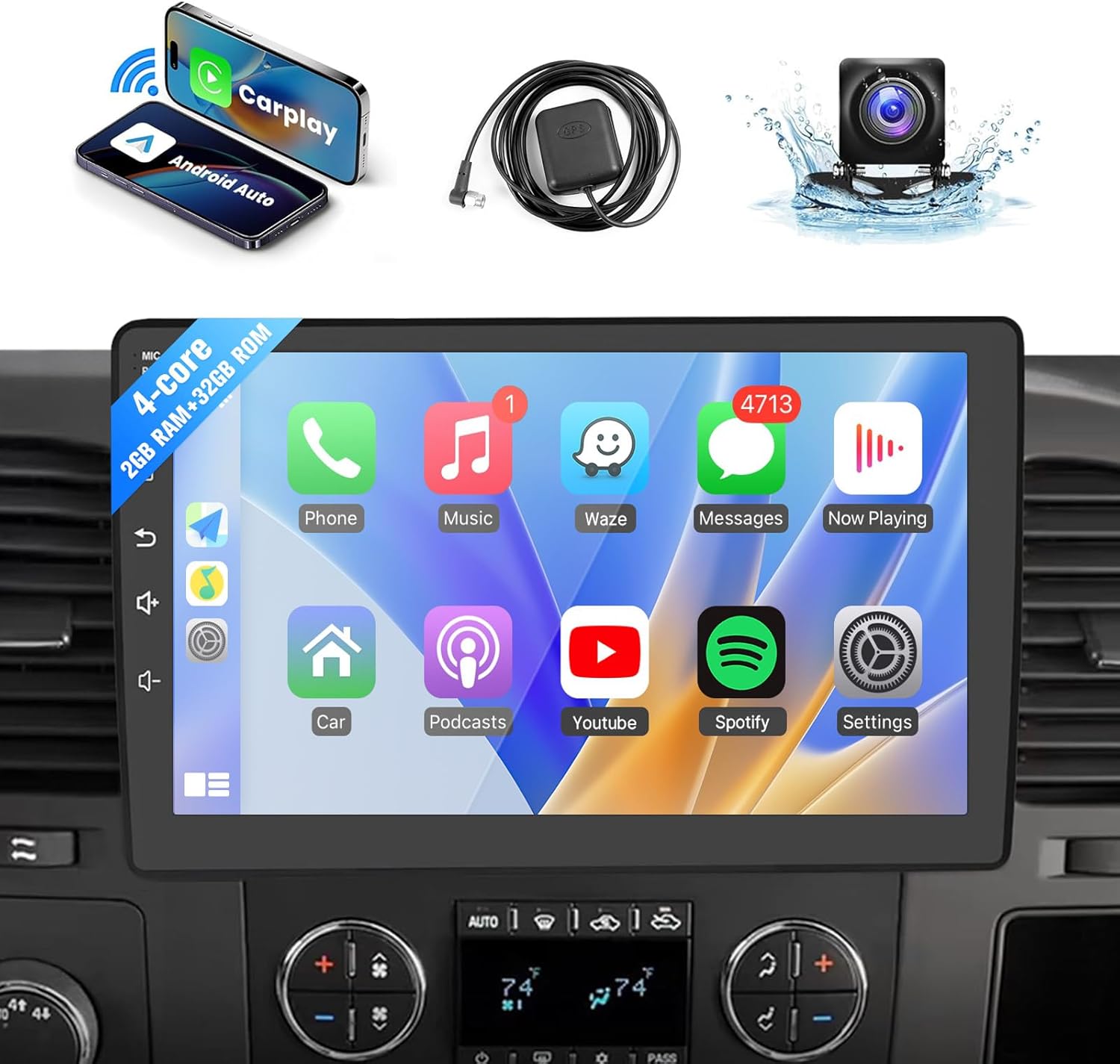
Image: Leadfan 10.1-inch Android Car Radio unit and its primary accessories.

Image: Detailed diagram of the head unit's dimensions, rear connections, and a comprehensive list of all components included in the package.
3. Keserasian
This Leadfan Android Car Radio is designed for specific Chevrolet, GMC, and Buick models. Please confirm your vehicle's compatibility before installation.
3.1 Model Berkenaan
- Chevrolet: Tahoe (2007-2014), Silverado 1500 (2007-2013), Silverado 2500HD (2007-2013), Silverado 3500HD (2007-2013), Avalanche (2007-2013), Express Van (2008-2019), Impala (2006-2013), Traverse (2008-2012), Suburban (2007-2012)
- GMC: Acadia (2007-2012), Yukon (2007-2014), Sierra (2007-2013), Savana (2008-2019)
- Buick: Enclave (2008-2012)
The unit is designed for a direct fit without requiring additional accessories for these models. It is not SiriusXM compatible.

Image: Visual guide for confirming vehicle compatibility based on the original car radio's appearance and plug type.
4. Persediaan & Pemasangan
Installation should ideally be performed by a qualified professional. If you choose to install it yourself, ensure the vehicle's battery is disconnected before starting. Refer to the wiring diagram provided in Section 2.2 and the included user manual for specific wiring instructions.
4.1 Langkah Pemasangan Umum
- Penyediaan: Putuskan sambungan terminal negatif bateri kereta anda.
- Keluarkan Unit Lama: Carefully remove your existing car radio and trim.
- Sambungan Pendawaian: Connect the provided power cable, RCA cable, GPS antenna, and CanBus decoder to the new head unit and your vehicle's harness. Ensure all connections are secure.
- Kamera Sandaran: Install the backup camera at the rear of your vehicle and route its cable to the head unit's reverse input.
- Sambungan Ujian: Before fully mounting, reconnect the battery and perform a basic test of the unit's functions (power, audio, touch screen, camera).
- Unit Gunung: Securely mount the new head unit into the dashboard.
- Perhimpunan Akhir: Pasang semula sebarang kepingan trim yang telah ditanggalkan.
5. Arahan Operasi
5.1 CarPlay Wayarles & Android Auto
The unit supports wireless Apple CarPlay and Android Auto for seamless smartphone integration.
- Pastikan Bluetooth dan Wi-Fi telefon anda didayakan.
- On the head unit, navigate to the CarPlay or Android Auto application.
- Ikut arahan pada skrin untuk memasangkan telefon pintar anda melalui Bluetooth.
- Once paired, the system will automatically connect via Wi-Fi for wireless CarPlay/Android Auto functionality.
This allows access to navigation, calls, messages, and music directly from your phone's interface on the car radio screen.

Image: Wireless Apple CarPlay and Android Auto interfaces with voice control examples.
5.2 GPS Navigation & WiFi Connectivity
The unit features a built-in GPS receiver and supports both online and offline navigation.
- Navigasi Dalam Talian: Connect the unit to a Wi-Fi network (e.g., via mobile hotspot) to use online mapping applications like Google Maps or Waze.
- Navigasi Luar Talian: Pre-loaded offline map files are available. You can also download additional offline maps as needed.
- WiFi: Connect to a Wi-Fi network to download apps, browse the internet, and access online services.
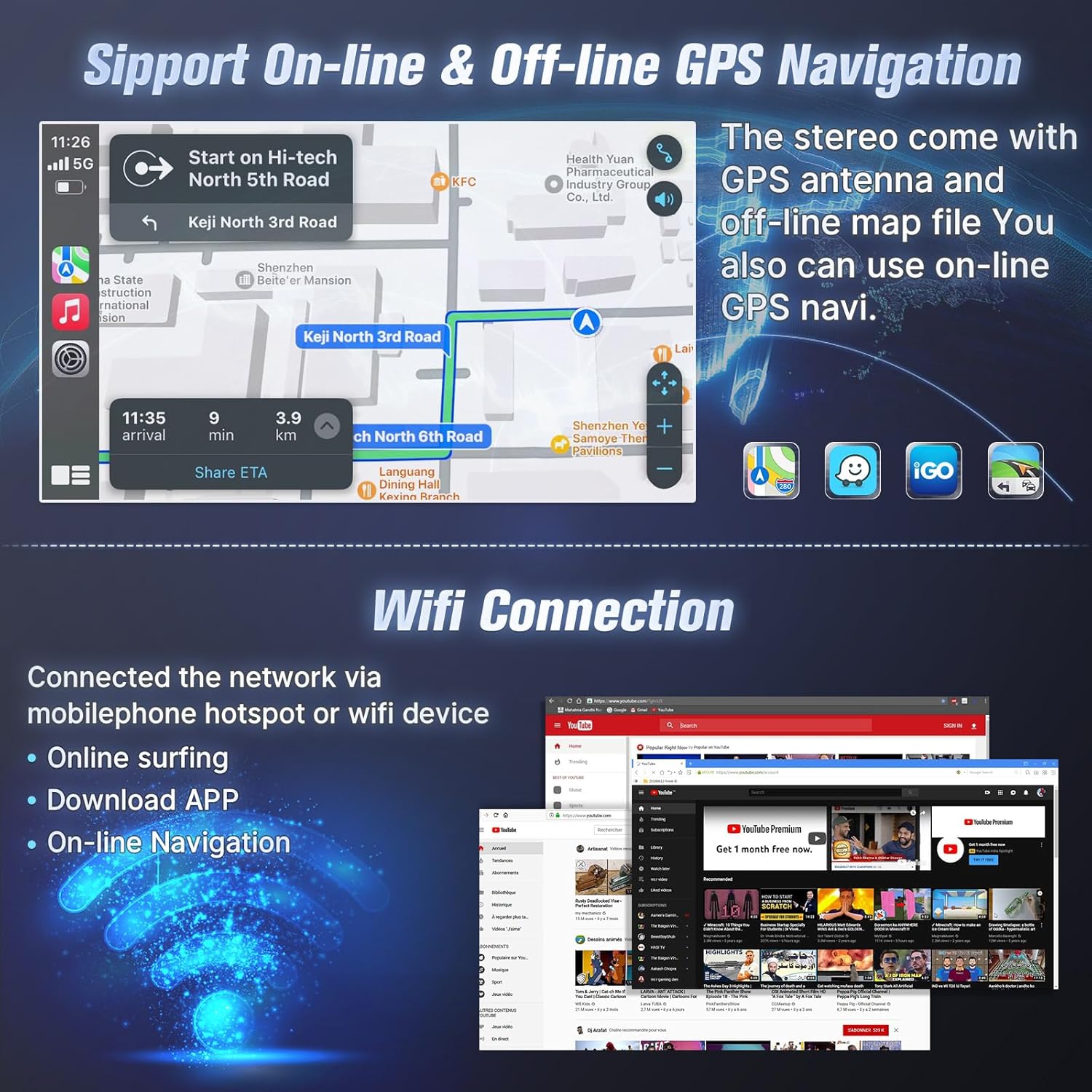
Image: GPS navigation interface and WiFi connectivity options.
5.3 Fungsi Bluetooth
Connect your smartphone via Bluetooth for hands-free calling and music playback.
- Panggilan Bebas Tangan: Pair your phone to make and receive calls directly from the head unit. The address book can be synchronized.
- Main Balik Muzik: Strim audio daripada telefon anda ke stereo kereta.

Image: Bluetooth calling and music streaming features.
5.4 Pautan Cermin
MirrorLink allows you to display your smartphone's screen on the head unit.
- Peranti iOS: Supports wireless connection.
- Peranti Android: Supports wireless or wired (USB) connection.
This feature enables access to your phone's apps, music, and videos on the larger display.

Image: MirrorLink functionality for iOS and Android devices.
5.5 Kawalan Roda Stereng
The unit supports existing steering wheel controls for convenient operation.
- Program the steering wheel buttons to control functions such as volume adjustment, track changes, and answering/ending calls.
- This enhances driving safety by keeping your hands on the wheel.

Image: Steering wheel control integration for safer operation.
5.6 EQ Settings & FM Radio
- Tetapan EQ: Customize your audio experience with the built-in equalizer, supporting various sound effects.
- Radio FM: Enjoy your favorite radio stations with clear FM reception.

Image: EQ sound adjustment and FM radio interface.
5.7 Mod Skrin Terpisah
The split-screen feature allows you to run two applications simultaneously on the display.
- Untuk example, you can use navigation on one side while playing music or browsing on the other.
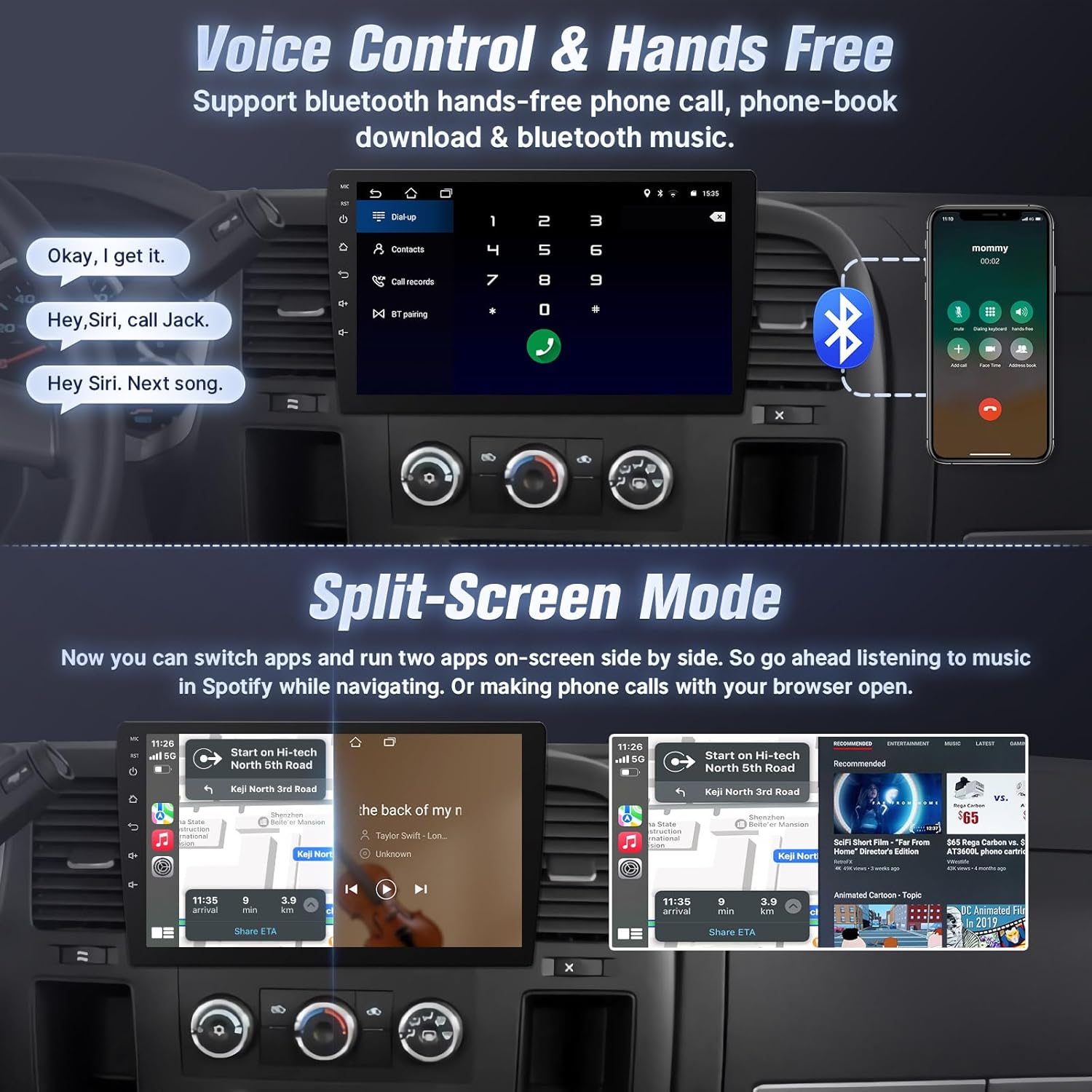
Image: Split-screen mode in action, showing two applications running concurrently.
5.8 Kamera Sandaran
A waterproof AHD rear view camera with night vision is included to assist with parking.
- When the vehicle is shifted into reverse, the display will automatically switch to the camera view.
6. Penyelenggaraan
- Pembersihan Skrin: Use a soft, lint-free cloth to clean the touchscreen. Avoid abrasive cleaners or solvents.
- Kemas Kini Perisian: Periodically check for software updates to ensure optimal performance and access to new features. Updates can typically be downloaded via Wi-Fi.
- Penjagaan Am: Elakkan daripada mendedahkan unit kepada suhu yang melampau atau cahaya matahari langsung untuk tempoh yang lama.
7. Penyelesaian masalah
| Masalah | Kemungkinan Punca | Penyelesaian |
|---|---|---|
| Unit tidak dihidupkan | Pendawaian salah, fius putus, masalah bateri kenderaan | Periksa sambungan kuasa, periksa fius kenderaan, pastikan bateri dicas. |
| Tiada bunyi | Kelantangan terlalu rendah, tetapan audio yang salah, masalah pendawaian pembesar suara | Increase volume, check EQ settings, verify speaker connections. |
| Skrin sentuh tidak bertindak balas | Software glitch, screen protector interference | Restart the unit. If a screen protector is installed, ensure it is properly applied. |
| CarPlay/Android Auto tidak bersambung | Bluetooth/Wi-Fi dimatikan, keserasian telefon, isu aplikasi | Ensure phone's Bluetooth/Wi-Fi is on. Restart phone and head unit. Check phone's compatibility with CarPlay/Android Auto. |
| Kamera sandaran tidak dipaparkan | Incorrect wiring, camera malfunction | Verify camera power and video signal connections. Ensure reverse trigger wire is correctly connected. |
Untuk bantuan lanjut, sila rujuk bahagian sokongan.
8. Spesifikasi
| Ciri | Perincian |
|---|---|
| Saiz Paparan | 10.1 Inci |
| Resolusi | 1080*600 |
| Sistem Operasi | Android 12 |
| RAM | 2GB |
| ROM | 32GB |
| CPU | 4-Teras |
| Ketersambungan | Bluetooth, WiFi |
| Ciri Khas | Bluetooth, Touchscreen, Waterproof (Camera) |
| Jenis Peta | North America (Pre-loaded) |
| Jenis Pemasangan | Pemasangan Papan Pemuka |
| Berat Barang | 3.31 paun |
| Dimensi Produk | 11.8 x 2.9 x 3.7 inci |
9. Waranti & Sokongan
Leadfan provides the following support for this product:
- Waranti: Waranti 1 tahun.
- Perkhidmatan Pulangan Wang: 30 days money back service.
- Sokongan Teknikal: 24-hour after-sales technical support.
- Penggantian: Penggantian 12 bulan tersedia.
- Sokongan Sepanjang Hayat: Rundingan selepas jualan dan sokongan teknikal seumur hidup.
9.1 How to Contact Support
If you encounter any issues or require technical assistance, please contact Leadfan customer service through the Amazon platform. You can typically find the 'Ask a question' option on the seller's page.

Image: Instructions on how to contact Leadfan customer support.