1. Produk Lebihview
The ErGear Height Adjustable Desk is an electric standing desk designed for computer workplaces, offering excellent stability and ergonomic flexibility. It features a sturdy steel frame with aviation lifting column connections, ensuring a firm foundation even at full height. The desk includes a memory function for convenient height adjustments and comes with a practical storage bag.

Image 1.1: The ErGear Height Adjustable Desk in a typical office setup, showcasinreka bentuknya yang anggun dan ample workspace for multiple monitors and accessories.
2. Maklumat Keselamatan
Amaran Keselamatan Penting: Untuk memastikan operasi yang selamat dan mencegah kerosakan, sila patuhi garis panduan berikut:
- Jangan melebihi kapasiti berat maksimum bagi 80 kg (176 lbs) on the desk surface. Overloading can lead to instability and potential damage to the lifting mechanism.
- Jauhkan kanak-kanak dan haiwan peliharaan daripada meja semasa operasi untuk mengelakkan kemalangan.
- Ensure there are no obstructions in the desk's path when adjusting height. Check for cables, chairs, or other objects that could be pinched or damaged.
- Jangan duduk atau berdiri di atas meja.
- Cabut plag meja daripada soket kuasa sebelum membersihkan atau melakukan sebarang penyelenggaraan.
- If the desk malfunctions or makes unusual noises, discontinue use immediately and consult the troubleshooting section or contact customer support.

Image 2.1: Illustration demonstrating the desk's robust 80KG load capacity, emphasizing the importance of not exceeding this limit for safe and reliable performance.
3. Kandungan Pakej
Before assembly, please verify that all components listed below are present and undamaged. If any parts are missing or damaged, contact customer support.
- Desktop Surface (1)
- Lifting Columns/Legs (2)
- Feet/Bases (2)
- Panel Kawalan (1)
- Kotak Kawalan (1)
- Power Adapter & Cable (1)
- Beg Penyimpanan (1)
- Hardware Kit (Screws, Allen wrenches, Cable ties)
- Manual Arahan (Dokumen ini)
4. Persediaan dan Pemasangan
Assembly typically requires two people. Follow these general steps. Refer to the included assembly diagram for detailed instructions specific to your model.
- Sediakan Ruang Kerja: Clear a large, flat area for assembly. Lay down a blanket or cardboard to protect the desktop surface from scratches.
- Attach Lifting Columns to Desktop: Carefully place the desktop upside down. Attach the lifting columns to the pre-drilled holes on the underside of the desktop using the provided screws.
- Attach Feet to Lifting Columns: Secure the feet/bases to the bottom of the lifting columns.
- Pasang Kotak Kawalan dan Panel Kawalan: Mount the control box to the designated area under the desktop. Connect the control panel to the control box, and then connect the lifting columns to the control box. Ensure all cables are securely connected and routed neatly.
- Pasang Beg Penyimpanan: Attach the storage bag to the side of the desk as desired, typically using hooks or clips provided.
- Sambungkan Kuasa: Plug the power adapter into the control box and then into a wall outlet.
- Penentukuran Awal (jika diperlukan): Some models may require an initial calibration. Refer to the specific assembly diagram for your model for details on how to perform this. Typically, this involves pressing and holding the "Down" button until the desk reaches its lowest point and slightly retracts.

Imej 4.1: Jarak dekat view of the desk's side storage pockets, demonstrating their capacity for organizing various office supplies and documents. These pockets are typically attached during assembly.
5. Arahan Operasi
5.1. Pelarasan Ketinggian
The ErGear Height Adjustable Desk features an electric lifting system for smooth and precise height adjustments.
- Untuk Menaikkan Meja: Tekan dan tahan butang "Naik" arrow button (▲) on the control panel. The desk will move upwards. Release the button when the desired height is reached.
- Untuk Menurunkan Meja: Tekan dan tahan butang "Turun" arrow button (▼) on the control panel. The desk will move downwards. Release the button when the desired height is reached.
5.2. Fungsi Memori
The desk's memory function allows you to save and recall preferred sitting and standing heights.
- To Save a Height Setting:
- Laraskan meja pada ketinggian yang diingini menggunakan butang Atas/Bawah.
- Tekan ke "M" (Memory) button. The display may flash or show "S-".
- Within a few seconds, press one of the numbered preset buttons (1, 2, 3, atau 4) to save the current height to that position. The display will confirm the save (e.g., "S-1").
- To Recall a Saved Height:
- Hanya tekan butang pratetap bernombor yang sepadan (1, 2, 3, atau 4Meja akan bergerak secara automatik ke ketinggian yang disimpan.

Image 5.1: Visual representation of the desk's adjustable height range, illustrating movement from a minimum of 71cm to a maximum of 119cm, allowing users to set ideal sit or stand positions.
6. Penyelenggaraan
Regular maintenance helps ensure the longevity and smooth operation of your ErGear desk.
- Pembersihan: Lap permukaan dan kaki meja dengan kain lembut,amp kain. Elakkan bahan kimia yang keras atau pembersih kasar yang boleh merosakkan kemasan.
- Pengurusan Kabel: Periodically check and organize cables to prevent tangling or interference with the lifting mechanism. Use the provided cable ties if necessary.
- Pemeriksaan: Regularly inspect all screws and connections to ensure they are tight. Retighten if necessary.
- Pengagihan Berat: Distribute weight evenly on the desktop to prevent strain on the lifting mechanism.
7. Penyelesaian masalah
If you encounter issues with your ErGear desk, refer to the following common troubleshooting steps:
| Masalah | Kemungkinan Punca | Penyelesaian |
|---|---|---|
| Meja tidak bergerak. | Power cable disconnected; Overload; Motor protection activated. | Check power connections. Reduce weight on desk. Unplug for 20 minutes, then plug back in. |
| Meja bergerak tidak sekata atau mengeluarkan bunyi yang luar biasa. | Sambungan longgar; Halangan; Pengagihan berat tidak sekata. | Check all screws and connections. Remove any obstructions. Redistribute weight evenly. |
| Error code displayed (e.g., E01, E02). | Kerosakan tertentu atau masalah sensor. | Refer to the specific error code in your detailed assembly manual or contact customer support. Often, a power cycle (unplug, wait 20s, plug in) can resolve temporary errors. |
| Fungsi ingatan tidak berfungsi. | Prosedur menyimpan yang salah. | Ensure you press "M" then the preset number within the specified time. Repeat the saving process. |
If the problem persists after trying these solutions, please contact ErGear customer support.
8. Spesifikasi
| Ciri | Perincian |
|---|---|
| Jenama | ErGear |
| Nombor Model | 7B-N1-UK |
| Dimensi Produk | 120 cm (Width) x 60 cm (Depth) x 70-119 cm (Height) |
| Berat badan | 17.86 kg |
| bahan | Kaca Tempered, Keluli Aloi |
| warna | Hitam |
| Kapasiti Beban Maks | 80 kg (176 lbs) |
| Ciri Khas | Adjustable height, Memory function |
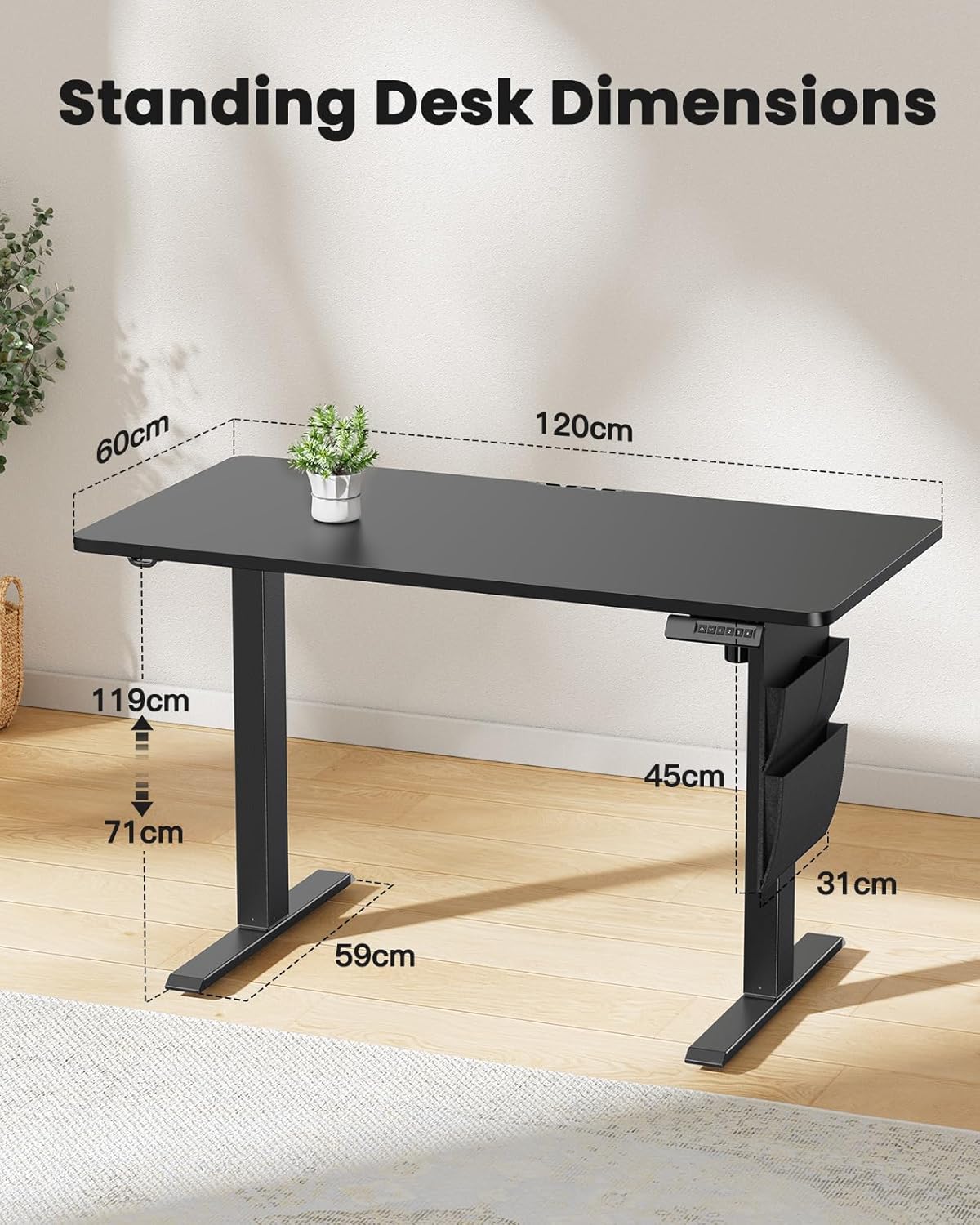
Image 8.1: Detailed diagram illustrating the key dimensions of the ErGear standing desk, including desktop width (120cm), depth (60cm), and height range (71cm to 119cm).
9. Waranti dan Sokongan
ErGear products are designed for durability and performance. For any questions, technical assistance, or warranty claims, please contact ErGear customer support.
- Polisi Pemulangan: This product is eligible for a refund or replacement within 30 days of purchase, as per standard policy.
- Maklumat Hubungan: Please refer to the contact details provided on the ErGear official webtapak atau dokumentasi pembelian anda untuk saluran sokongan yang paling terkini.


