1. Pengenalan
This manual provides essential information for the installation, operation, and maintenance of your ZOTAC GAMING GeForce RTX 4070 Ti SUPER SOLID OC 16GB graphics card. Please read this manual thoroughly before installation to ensure proper functionality and to prevent damage.

Image 1.1: ZOTAC GAMING GeForce RTX 4070 Ti SUPER SOLID OC 16GB Graphics Card and its retail packaging.
2. Kandungan Pakej
Sahkan bahawa semua item terdapat dalam pakej:
- ZOTAC GAMING GeForce RTX 4070 Ti SUPER SOLID OC 16GB Graphics Card
- Stand Sokongan GPU
- Panduan Pengguna (dokumen ini)
- Power Adapter Cable (if applicable, check your specific model)
3. Keperluan Sistem
- Papan induk yang mematuhi PCI Express dengan satu slot grafik dwi-lebar x16
- Minimum 750W power supply with three available 8-pin PCIe power connectors (or equivalent 12VHPWR connector)
- Minimum 16GB system memory
- Microsoft Windows 10/11 64-bit or Linux 64-bit operating system
- Internet connection for driver installation
4. Panduan Pemasangan
4.1. Persediaan
- Matikan komputer anda dan cabut kabel kuasa.
- Buka bekas komputer anda.
- Letakkan diri anda di bumi untuk melepaskan sebarang elektrik statik.
4.2. Installing the Graphics Card
- Cari slot PCI Express x16 yang tersedia pada papan induk anda.
- Remove the necessary expansion slot covers from your computer case.
- Carefully insert the graphics card into the PCIe x16 slot until it is fully seated. Ensure the retention clip locks into place.
- Lindungi kad grafik pada bekas dengan skru.
- Connect the required power cables from your power supply to the graphics card. This model typically requires three 8-pin PCIe power connectors or a single 12VHPWR connector. Ensure all connections are secure.
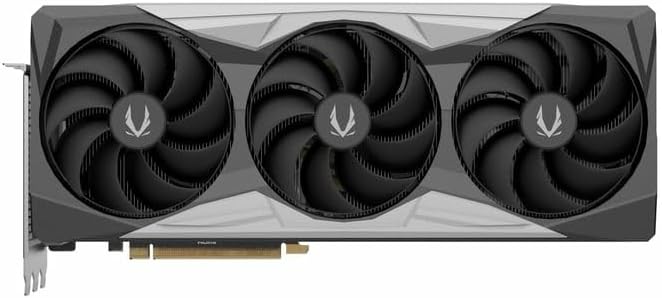
Imej 4.1: Depan view daripada kad grafik, menunjukkan reka bentuk kipas tiga kali ganda.
4.3. Installing the GPU Support Stand
The included GPU support stand helps prevent sag and provides additional stability for the graphics card. Follow the instructions provided with the stand for proper installation within your PC case.
4.4. Closing the Case and Connecting Peripherals
- Tutup casing komputer anda.
- Connect your monitor(s) to the display outputs on the graphics card (DisplayPort or HDMI).
- Reconnect the power cable and other peripherals to your computer.

Imej 4.2: Belakang view of the graphics card, showing three DisplayPort outputs and one HDMI output.
5. Arahan Operasi
5.1. Pemasangan Pemandu
- Hidupkan komputer anda.
- Once the operating system loads, download the latest graphics drivers from the official NVIDIA webtapak (www.nvidia.com/drivers) or the ZOTAC webtapak (www.zotac.com/support).
- Ikut arahan pada skrin untuk menyelesaikan pemasangan pemacu. Mula semula sistem mungkin diperlukan.
5.2. Utiliti Perisian
ZOTAC provides utilities such as FireStorm for monitoring and adjusting graphics card settings, including fan speed control (Active Fan Control, FREEZE Fan Stop) and performance profiles. These can be downloaded from the ZOTAC webtapak.
6. Penyelenggaraan
- Penyingkiran habuk: Bersihkan habuk daripada kipas kad grafik dan heatsink secara berkala menggunakan udara termampat. Pastikan komputer dimatikan dan dicabut daripada soket sebelum membersihkannya.
- Kemas Kini Pemandu: Keep your graphics drivers updated to ensure optimal performance and compatibility.
- Pemantauan Suhu: Use monitoring software to keep track of the graphics card's temperature during operation. Excessive temperatures can indicate poor airflow or dust buildup.

Imej 6.1: Bersudut view of the graphics card, highlighting its robust cooling solution.
7. Penyelesaian masalah
- Tiada Output Paparan:
- Pastikan kabel monitor disambungkan dengan selamat ke kad grafik dan monitor.
- Sahkan bahawa kad grafik dipasang sepenuhnya dalam slot PCIe.
- Check that all power cables are properly connected to the graphics card.
- Uji dengan monitor atau kabel yang berbeza jika boleh.
- Ketidakstabilan atau Ranap Sistem:
- Ensure graphics drivers are correctly installed and up to date.
- Check for adequate power supply capacity.
- Pantau suhu untuk mengelakkan terlalu panas.
- Verify system memory (RAM) stability.
- Bunyi Kipas atau Kerosakan:
- Bersihkan habuk dari kipas dan heatsink.
- Ensure no cables are obstructing fan rotation.
- Use ZOTAC FireStorm utility to check fan speed settings.
8. Spesifikasi
| Ciri | Perincian |
|---|---|
| Nombor Model | ZT-D40730R-10P |
| Pemproses Grafik | NVIDIA GeForce RTX 4070 Ti SUPER |
| Memori Video | 16GB GDDR6X |
| Antara Muka Memori | 256-bit |
| Jam Memori | 21000 MHz (Effective) |
| Jam enjin | Peningkatan: 2640 MHz |
| Paparan Output | 3 x DisplayPort 1.4a, 1 x HDMI 2.1a |
| Sokongan HDCP | ya |
| Resolusi Digital Maks | Up to 4K (7680x4320 @60Hz) |
| PCI Express | PCI Express 4.0 x16 |
| Bekalan Kuasa yang Disyorkan | 750W |
| Penyambung Kuasa | 1 x 12VHPWR (or 3 x 8-pin PCIe via adapter) |
| Dimensi (LxWxH) | 16.73 x 11.54 x 3.94 inci (lebih kurang) |
| Berat badan | 2.2 paun (lebih kurang) |
| Sistem Penyejukan | IceStorm 2.0 Advanced Cooling, Triple 100mm Fans, FREEZE Fan Stop, Active Fan Control |
| Ciri-ciri | NVIDIA DLSS 3.5, Ray Tracing, Metal Backplate, GPU Support Stand |
9. Waranti dan Sokongan
For detailed warranty information, please refer to the warranty card included with your product or visit the official ZOTAC website's support section. ZOTAC provides technical support and resources for their products.
- ZOTAC Support Webtapak: www.zotac.com/support
- Pendaftaran Produk: Register your product on the ZOTAC website to activate your warranty and receive product updates.


