1. Pengenalan
Thank you for choosing the himaly IF1010AR Digital Bluetooth Body Weight Scale. This scale is designed to provide accurate measurements of your body weight and various body composition metrics, including BMI, body fat, muscle mass, and more, through its integrated mobile application. Please read this manual carefully before use to ensure proper operation and to maximize the benefits of your new scale.
Maklumat Keselamatan Penting
- Consult your physician before beginning any diet or exercise program.
- Do not use if you are pregnant, have a pacemaker, or other internal medical devices.
- Letakkan skala pada permukaan yang keras dan rata untuk pengukuran yang tepat. Elakkan permaidani atau lantai tidak rata.
- The scale surface can be slippery when wet. Ensure the surface is dry before stepping on it.
- Jangan melompat pada skala.
- Jauhkan daripada kanak-kanak.
- This scale is for household use only and not for medical diagnosis or treatment.
2. Kandungan Pakej
Sahkan bahawa semua item terdapat dalam pakej anda:
- himaly IF1010AR Digital Bluetooth Body Weight Scale
- Kabel Pengecas USB
- Manual Pengguna (dokumen ini)
3. Produk Lebihview
The himaly IF1010AR scale features a sleek design with a tempered glass surface and four high-precision sensors for accurate measurements. It includes a digital display and Bluetooth connectivity for app integration.

Rajah 3.1: Depan view of the himaly IF1010AR Digital Bluetooth Body Weight Scale, showing the display and electrode pads, alongside a smartphone displaying the companion app interface.

Rajah 3.2: Bahagian bawah view of the himaly IF1010AR scale, highlighting the four non-slip mats, the 'UNIT' button for changing measurement units, and the USB charging port.
Komponen:
- Platform Kaca Terbaja: The main weighing surface.
- Pad Elektrod: Four metallic pads for body composition analysis.
- Paparan LCD Digital: Shows weight and other basic readings.
- Butang UNIT: Located on the underside, used to switch between weight units (kg/lb/st).
- Port Pengecasan USB: Untuk mengecas semula bateri dalaman.
- Non-Slip Mats: Four rubber feet on the bottom for stability.
4. Persediaan
4.1 Mengecas Penimbang
The himaly IF1010AR scale is equipped with a built-in rechargeable battery. Before first use, ensure the scale is fully charged.
- Locate the USB charging port on the underside of the scale (refer to Figure 3.2).
- Connect the provided USB charging cable to the scale and to a standard USB power adapter (not included) or a computer's USB port.
- The display will indicate charging status. Charge until the battery indicator shows full.

Rajah 4.1: Jarak dekat view illustrating the USB charging port on the side of the scale and the included USB cable for power.
4.2 Muat Turun Apl dan Berpasangan
To access full body composition analysis and track your progress, download the companion app and pair it with your scale.
- Muat turun Apl: Cari untuk "Moving Life" in the Apple App Store (for iOS devices) or Google Play Store (for Android devices) and install it.
- Dayakan Bluetooth: Pastikan Bluetooth didayakan pada telefon pintar anda.
- Buka Apl: Launch the "Moving Life" app and follow the on-screen instructions to create your user profile.
- Pasangkan Skala: Step onto the scale barefoot to activate it. The app should automatically detect and connect to the scale via Bluetooth. If not, follow the app's instructions for manual pairing.

Figure 4.2: Image showing the scale's Bluetooth connectivity and icons for downloading the "Moving Life" app from Google Play and the App Store.
4.3 Penentukuran Awal
For the most accurate first measurement, it is recommended to calibrate the scale:
- Letakkan penimbang pada permukaan yang keras dan rata.
- Lightly step on the scale until the display lights up, then step off immediately.
- The display will show "0.0" or "CAL" indicating successful calibration.
5. Arahan Operasi
5.1 Mengambil Pengukuran
Follow these steps for an accurate body composition measurement:
- Pastikan kaki anda bersih dan kering.
- Open the "Moving Life" app on your smartphone and ensure Bluetooth is active.
- Step onto the scale barefoot, placing your feet on the electrode pads. Stand still until the measurement is complete.
- Your weight will be displayed on the scale's LCD. Detailed body composition data will be sent to the app.
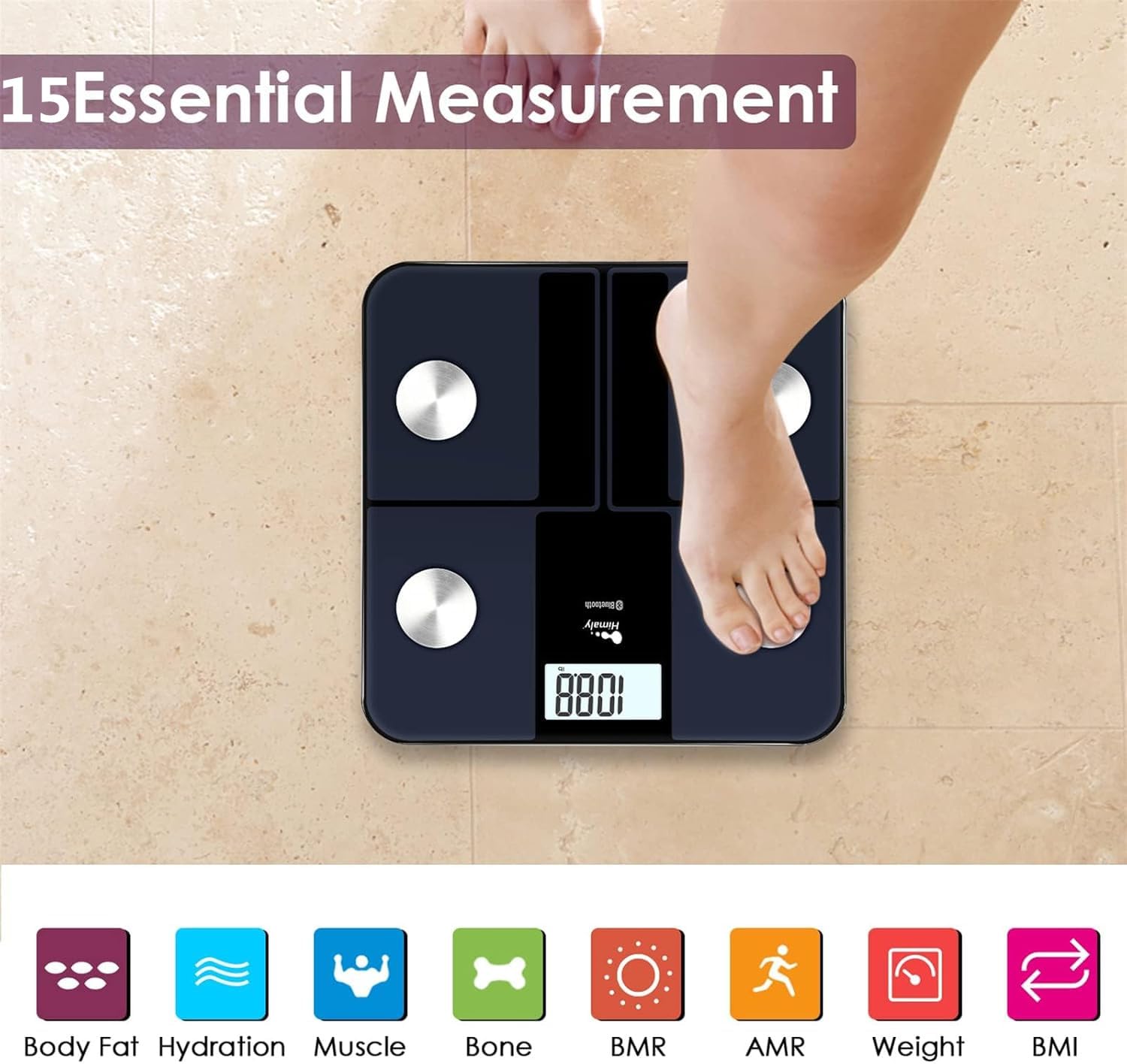
Figure 5.1: A person standing barefoot on the himaly scale, demonstrating the correct posture for obtaining 15 essential body composition measurements.
5.2 Memahami Paparan
The scale's LCD displays your weight. The app provides a more comprehensive breakdown of your body composition.

Figure 5.2: The scale's LCD display illustrating how different weight ranges (Thin, Slim, Normal, Heavy, Overweight) are visually represented, providing a quick reference for body type.
5.3 Pelbagai Pengguna Profiles
The "Moving Life" app supports multiple user profiles, allowing each family member to track their individual health data.
- Within the app, navigate to the user management section.
- Add new users by entering their details (age, height, gender).
- Pastikan profesional pengguna yang betulfile is selected in the app before taking a measurement to ensure data is assigned correctly.
6. Memahami Pengukuran Anda
The "Moving Life" app provides detailed insights into various body composition metrics. Here's a brief explanation of some key indicators:
- Berat Badan: Your total body mass.
- BMI (Indeks Jisim Badan): Ukuran lemak badan berdasarkan ketinggian dan berat badan.
- Peratus Lemak Badantage: Nisbah lemak kepada jumlah berat badan.
- Jisim otot: Jumlah berat otot dalam badan anda.
- Hydration (Water Percentage): The amount of water in your body.
- Jisim Tulang: Jumlah berat tulang dalam badan anda.
- BMR (Kadar Metabolik Basal): The number of calories your body burns at rest.
- AMR (Kadar Metabolik Aktif): The total calories your body burns in a day, including activity.

Figure 6.1: An illustrative graph from the app demonstrating how weight and body fat trends can be tracked over time, providing visual progress monitoring.
7. Penyelenggaraan
7.1 Pembersihan
- Lap permukaan skala dengan damp kain dan detergen lembut.
- Jangan gunakan pembersih yang kasar atau rendam kerak di dalam air.
- Pastikan penimbang kering sepenuhnya sebelum penyimpanan atau penggunaan seterusnya.
7.2 Penyimpanan
- Simpan skala di tempat yang sejuk dan kering.
- Elakkan cahaya matahari langsung atau suhu yang melampau.
8. Penyelesaian masalah
| Masalah | Kemungkinan Punca | Penyelesaian |
|---|---|---|
| "Lo" dipaparkan | Bateri lemah. | Recharge the scale using the provided USB cable. |
| "Err" displayed | Beban berlebihan atau ralat pengukuran. | Step off the scale. Ensure weight is within the 400 lbs (181 kg) limit. Recalibrate if necessary. |
| Bacaan tidak tepat | Scale on uneven surface, not calibrated, or feet not properly placed. | Place scale on a hard, flat surface. Perform initial calibration. Ensure bare feet are centered on electrode pads. |
| Tiada sambungan Bluetooth | Bluetooth off, app not open, or scale not activated. | Ensure Bluetooth is enabled on your phone. Open the "Moving Life" app. Step on the scale to activate it. Try restarting both the app and your phone. |
| Body composition data not showing in app | Not standing barefoot, or feet not making proper contact with electrodes. | Ensure you are standing barefoot with clean, dry feet making full contact with all four electrode pads. |
9. Spesifikasi
| Ciri | Perincian |
|---|---|
| Nombor Model | IF1010AR |
| Jenama | himaly |
| Kapasiti Berat | 400 paun (181 kg) |
| Unit Pengukuran | kg / lb / st |
| Jenis Paparan | LCD Digital |
| Ketersambungan | Bluetooth 4.0 |
| Sumber Kuasa | Built-in Rechargeable Battery (USB charged) |
| bahan | Kaca Terbaja, Plastik |
| Dimensi | Lebih kurang 33.7 x 32.8 x 4.3 cm |
| Berat Barang | lebih kurang 1.77 kg |
| Keserasian Aplikasi | iOS and Android (Moving Life App) |
10. Waranti dan Sokongan
10.1 Maklumat Waranti
The himaly IF1010AR Digital Bluetooth Body Weight Scale comes with a standard manufacturer's warranty. Please refer to the warranty card included in your package or contact himaly customer support for specific warranty terms and conditions. This warranty typically covers defects in materials and workmanship under normal use.
10.2 Sokongan Pelanggan
If you encounter any issues or have questions regarding your himaly scale, please contact our customer support team. For the most up-to-date contact information, please visit the official himaly webtapak atau rujuk kepada pembungkusan produk anda.
Note: Specific contact details are not provided in this manual. Please check the product packaging or manufacturer's webtapak untuk maklumat hubungan sokongan.