1. Pengenalan
This manual provides detailed instructions for the installation, operation, and maintenance of the Aigo B760L D4 Motherboard. Please read this manual thoroughly before installing or using the product to ensure proper functionality and to prevent damage.
2. Maklumat Keselamatan
Sentiasa patuhi langkah keselamatan berikut:
- Disconnect power before installing or removing any components.
- Kendalikan papan induk di tepinya untuk mengelak daripada menyentuh komponen sensitif.
- Use an anti-static wrist strap to prevent electrostatic discharge (ESD) damage.
- Ensure proper ventilation within the computer case to prevent overheating.
- Jangan dedahkan papan induk kepada kelembapan atau suhu yang melampau.
3. Kandungan Pakej
Sahkan bahawa semua item terdapat dalam pakej:
- Aigo B760L D4 Motherboard
- Manual Pengguna (dokumen ini)
- SATA Cables (quantity may vary)
- I / O Shield
- CD/USB pemacu (jika disertakan)
4. Produk Lebihview
The Aigo B760L D4 is an M-ATX motherboard designed for Intel LGA 1700 processors, featuring the Intel B760 chipset. It supports DDR4 memory and offers a range of connectivity options.
4.1 Susun atur Motherboard
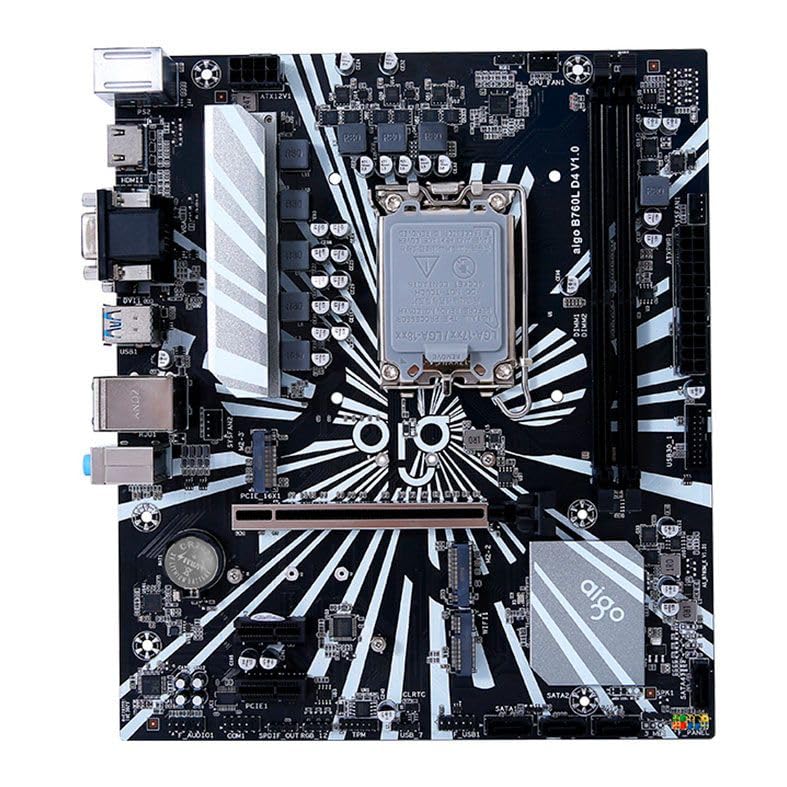
Gambar 1: Lebihview of the Aigo B760L D4 Motherboard alongside its retail packaging.

Rajah 2: Atas-bawah view of the Aigo B760L D4 Motherboard, highlighting component placement.

Rajah 3: Bersudut view of the Aigo B760L D4 Motherboard, showing the CPU socket and memory slots.
4.2 Panel I/O Belakang

Figure 4: Rear I/O panel of the Aigo B760L D4 Motherboard, displaying various connectivity ports.
The rear I/O panel includes:
- 1 x PS/2 Keyboard and Mouse port
- 2 x USB 2.0 port
- 4 x USB 3.0 port
- 1 x port HDMI
- 2 x DVI ports
- 1 x port VGA
- 1 x RJ45 LAN port
- Audio jacks (Line In, Line Out, Mic In)
5. Persediaan
5.1 Memasang CPU
- Cari soket CPU LGA 1700 pada papan induk.
- Buka tuil soket CPU dan angkat plat beban.
- Selaraskan CPU dengan soket dengan berhati-hati, pastikan tanda segi tiga pada CPU sepadan dengan tanda pada soket.
- Perlahan-lahan letakkan CPU ke dalam soket tanpa memaksanya.
- Tutup plat beban dan selamatkannya dengan tuil.
5.2 Memasang Memori DDR4
The motherboard supports up to 64GB of DDR4 memory across two slots, with speeds from 2133 MHz to 3200 MHz in dual-channel configuration.
- Buka klip di kedua-dua hujung slot DIMM.
- Jajarkan modul memori dengan slot, pastikan takuk pada modul sepadan dengan kunci dalam slot.
- Tekan ke bawah dengan kuat pada kedua-dua hujung modul memori sehingga klip terpasang pada tempatnya.
5.3 Memasang Peranti Storan
The motherboard features 4 x SATA 3.0 ports and 2 x M.2 NVME Dual-Protocol slots.
5.3.1 SATA Drives
- Sambungkan satu hujung kabel data SATA ke port SATA pada papan induk.
- Sambungkan hujung kabel data SATA yang satu lagi ke pemacu keras SATA atau SSD anda.
- Sambungkan kabel kuasa SATA daripada bekalan kuasa anda ke pemacu.
5.3.2 M.2 NVME Drives
- Locate an M.2 slot on the motherboard.
- Tanggalkan skru pemutus M.2.
- Insert the M.2 NVME drive into the slot at a 30-degree angle.
- Gently push the drive down and secure it with the standoff screw.
5.4 Kuasa Penyambung
Connect the 24-pin ATX power connector and the 8-pin ATX 12V power connector from your power supply to the corresponding ports on the motherboard.
5.5 Installing Expansion Cards
The motherboard includes 1 x PCIe x16 slot and 1 x PCIe x1 slot.
- Align your expansion card (e.g., graphics card) with the appropriate PCIe slot.
- Tekan dengan kuat sehingga kad diletakkan dengan betul di dalam slot.
- Pasangkan kad dengan skru pada bekas komputer.
6. Beroperasi
6.1 But Pertama dan Persediaan BIOS
After assembling your system, connect a monitor, keyboard, and mouse. Power on the system. During startup, press the designated key (usually DEL or F2) to enter the BIOS/UEFI setup utility. Here you can configure boot order, system time, and other advanced settings.
6.2 Pemasangan Sistem Operasi
The Aigo B760L D4 Motherboard supports Windows 10 and Windows 11 operating systems. Insert your OS installation media (USB drive or DVD) and follow the on-screen instructions to install the operating system.
6.3 Pemasangan Pemandu
After OS installation, install the necessary drivers for the chipset, audio, LAN, and other integrated components. These drivers are typically provided on a CD/USB with the motherboard or can be downloaded from the manufacturer's webtapak.
7. Penyelenggaraan
- Pastikan ia bersih: Regularly clean dust from inside your computer case using compressed air. Dust accumulation can lead to overheating.
- Kemas Kini BIOS: Periksa pengeluar secara berkala website for BIOS/UEFI updates. Updates can improve stability, compatibility, and performance. Follow update instructions carefully.
- Kemas Kini Pemandu: Pastikan pemacu anda dikemas kini untuk memastikan prestasi optimum dan keserasian dengan perisian dan perkakasan baharu.
- Kawalan Alam Sekitar: Operate the system in a cool, dry, and well-ventilated environment.
8. Penyelesaian masalah
8.1 Tiada Kuasa
- Ensure the power supply is connected correctly to the motherboard (24-pin and 8-pin ATX 12V).
- Check if the power supply switch is in the "ON" position.
- Verify that the power button on the case is correctly connected to the motherboard's front panel header.
8.2 Tiada Paparan
- Ensure the monitor is connected to the correct video output (either integrated graphics or a dedicated graphics card).
- Letakkan semula kad grafik dan modul memori.
- Try booting with only one memory module installed.
8.3 Ketidakstabilan Sistem / Ranap
- Check CPU and GPU temperatures to ensure they are not overheating.
- Verify that all power connectors are securely attached.
- Jalankan alat diagnostik memori untuk memeriksa RAM yang rosak.
- Ensure BIOS is updated to the latest stable version.
9. Spesifikasi
| Ciri | Spesifikasi |
|---|---|
| Jenama | Aigo |
| Model | AIGO-B760L-D4 |
| Chipset | Intel B760 |
| Soket CPU | LGA 1700 |
| Slot memori | 2 x DDR4 DIMM slot |
| Kapasiti Memori Maks | 64GB |
| Sokongan Kelajuan Memori | 2133 ~ 3200 MHz (Dual Channel) |
| Antara Muka Audio | 1 x HDMI, 2 x DVI, 1 x VGA |
| SATA Slots | 4 x SATA 3.0 |
| Slot M.2 | 2 x M.2 NVME Dual-Protocol |
| Port USB (Belakang) | 2 x USB 2.0, 4 x USB 3.0 |
| Slot Pengembangan | 1 x PCIe x1, 1 x PCIe x16 |
| Sokongan Sistem Pengendalian | Windows 10/11 |
| Pelabuhan PS/2 | 1 x PS/2 Keyboard and Mouse |
| Fasa Kuasa | 8-fasa |
| Penyambung Kuasa | 1 x 24-pin ATX, 1 x 8-pin ATX 12V |
| Antaramuka WiFi | 1 x WiFi interface (PCIe compatible) |
| Pelabuhan LAN | 1 x RJ45 |
| Dimensi | 24.4 x 21 cm (M-ATX) |
10. Waranti dan Sokongan
For warranty information and technical support, please refer to the documentation provided with your purchase or visit the official Aigo webtapak. Simpan bukti pembelian anda untuk tuntutan waranti.


