1. Pengenalan
This manual provides essential information for the installation, operation, and maintenance of the Cisco Catalyst 9300X-24Y-A Network Advantage Switch. The Cisco Catalyst 9300X Series is designed for high-density enterprise access and aggregation, offering advanced networking capabilities and high-speed connectivity.
The C9300X-24Y-A model features 24 ports capable of 25 Gigabit Ethernet (25G) SFP28 connectivity, making it suitable for demanding network environments requiring high bandwidth and performance.
2. Maklumat Keselamatan
Patuhi langkah berjaga-jaga keselamatan berikut untuk mencegah kecederaan dan kerosakan pada peralatan:
- Keselamatan Elektrik: Ensure proper grounding. Do not operate the switch with damaged power cords. Disconnect power before servicing.
- Pengudaraan: Maintain adequate airflow around the switch. Do not block ventilation openings.
- Pengendalian: The switch is heavy (approximately 23.1 pounds or 10.49 kg). Use proper lifting techniques or assistance to prevent injury.
- Persekitaran: Operate the switch within specified temperature and humidity ranges. Avoid exposure to moisture or extreme temperatures.
3. Kandungan Pakej
Sahkan bahawa pakej anda mengandungi item berikut:
- Cisco Catalyst 9300X-24Y-A Switch
- Kabel kuasa
- Rack-mount kit (likely included for standard installation)
- Dokumentasi (Panduan Mula Pantas, Maklumat Keselamatan)
Note: Contents may vary slightly based on region or specific order. Contact your vendor if any items are missing or damaged.
4. Penerangan Fizikal
4.1 Panel Depan
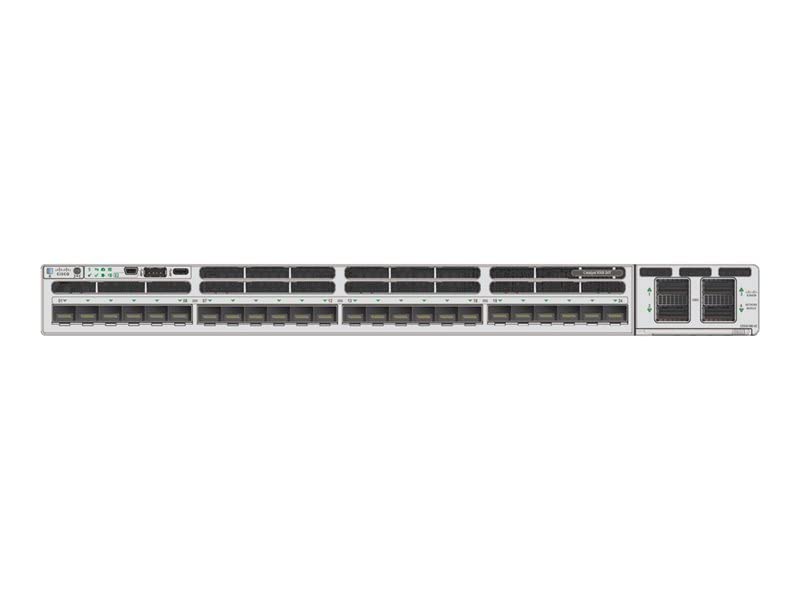
Rajah 4.1: Front Panel of Cisco Catalyst 9300X-24Y-A Switch
The front panel of the Cisco Catalyst 9300X-24Y-A switch provides access to all network ports, console ports, and status indicators. Key components include:
- 24 x SFP28 Ports: These ports support 25 Gigabit Ethernet connectivity, compatible with SFP, SFP+, and SFP28 transceivers. They are numbered for easy identification.
- Uplink Module Slots: Located on the right side, these slots accommodate optional uplink modules for additional high-speed connectivity options.
- Pelabuhan Konsol: Typically an RJ-45 or USB-C port for out-of-band management and initial configuration.
- Port USB: USB Type-A and/or USB Type-C ports for external storage or console access.
- Penunjuk LED: Various LEDs (e.g., System, Status, Port Status) provide visual feedback on the switch's operational state and port activity.
4.2 Panel Belakang
The rear panel typically houses power supply modules, fan modules, and grounding points. Specific configurations may vary.
5. Persediaan dan Pemasangan
5.1 Pemasangan Rak
- Attach the provided rack-mount brackets to the sides of the switch using the supplied screws.
- Secure the switch into a standard 19-inch equipment rack using appropriate rack screws. Ensure the switch is level and securely fastened.
5.2 Sambungan Kuasa
- Connect the power cable to the power supply module(s) at the rear of the switch.
- Plug the other end of the power cable into a grounded AC power outlet (100 Volts nominal).
- Ensure the power supply LEDs illuminate, indicating proper power input.
5.3 Sambungan Rangkaian
- Insert compatible SFP28 transceivers into the desired 25G SFP28 ports on the front panel.
- Connect fiber optic or direct attach copper (DAC) cables from your network devices to the installed transceivers.
- Observe the port status LEDs to confirm link establishment.
5.4 Tatarajah Awal
For initial configuration, connect a console cable (RJ-45 to serial or USB-C to USB-A) from your management workstation to the console port on the switch. Use a terminal emulation program (e.g., PuTTY, Tera Term) with appropriate settings (typically 9600 baud, 8 data bits, no parity, 1 stop bit, no flow control) to access the command-line interface (CLI).
6. Mengendalikan Suis
6.1 Hidupkan
Once all connections are secure, power on the switch. The system will perform a power-on self-test (POST). During this process, various LEDs will flash. The System LED will typically turn solid green upon successful boot-up.
6.2 Penunjuk LED
- LED sistem: Indicates overall system status (e.g., green for normal operation, amber for warning, red for fault).
- LED Status: Provides additional system status information.
- LED Status Pelabuhan: Located next to each SFP28 port, these LEDs indicate link status and activity (e.g., solid green for link, flashing green for activity, off for no link).
Refer to the Cisco documentation for a detailed explanation of all LED behaviors.
7. Penyelenggaraan
7.1 Pertimbangan Alam Sekitar
Ensure the operating environment remains within the specified temperature and humidity ranges to ensure optimal performance and longevity of the switch. Avoid dusty environments.
7.2 Pembersihan
Periodically clean the exterior of the switch with a soft, dry, lint-free cloth. Do not use liquid or aerosol cleaners directly on the device. Ensure ventilation openings are free from dust accumulation.
7.3 Kemas Kini Perisian Tegar
Semak sokongan Cisco secara berkala website for the latest firmware updates. Applying updates can improve performance, add new features, and address security vulnerabilities. Follow Cisco's official procedures for firmware upgrades to prevent system disruption.
8. Penyelesaian masalah
If you encounter issues with your Cisco Catalyst 9300X-24Y-A switch, consider the following basic troubleshooting steps:
- Tiada Kuasa: Verify the power cable is securely connected to both the switch and the power outlet. Check the power supply LEDs.
- Tiada Pautan di Pelabuhan: Ensure the SFP28 transceiver is correctly seated and the network cable is properly connected. Verify the connected device is powered on and configured correctly. Check the port status LED.
- System LED Indicates Fault: Consult the Cisco documentation for specific LED error codes or patterns. This usually indicates a hardware issue or critical system error.
- Cannot Access CLI: Verify console cable connection and terminal emulation settings. Ensure the switch has completed its boot sequence.
For more advanced troubleshooting, refer to the comprehensive documentation available on the official Cisco support website or contact Cisco Technical Assistance Center (TAC).
9. Spesifikasi
| Ciri | Perincian |
|---|---|
| Jenama | Cisco |
| Model | C9300X-24Y-A |
| Bilangan Pelabuhan | 24 |
| Jenis Antaramuka | SFP28 (supports SFP, SFP+, 25G SFP28) |
| Kadar Pemindahan Data | 25 Gigabit Sesaat |
| Voltage | 100 Volt (AC) |
| Berat Barang | 10.49 Kilogram (23.1 paun) |
| Dimensi Produk (L x W x H) | 22.05 x 21.65 x 8.66 inci |
| Bahan Kes | Plastic (chassis is typically metal, but some components may be plastic) |
| warna | Kelabu |
| Peranti Serasi | Desktop, Gaming Console, Laptop, Server (referring to devices that can connect to the network) |
| UPC | 703670607547 |
10. Waranti dan Sokongan
Cisco products typically come with a limited hardware warranty and access to Cisco's extensive support resources. For detailed warranty information, including terms and conditions, please refer to the warranty statement provided with your product or visit the official Cisco webtapak.
For technical assistance, documentation, software downloads, and service requests, visit the Cisco Support Community or contact the Cisco Technical Assistance Center (TAC). Having your product serial number readily available will expedite support requests.
Sokongan Cisco Webtapak: www.cisco.com/go/support


