pengenalan
This manual provides detailed instructions for the setup, operation, and maintenance of your Nulea KM75 Advanced Ergonomic Wireless Keyboard and Mouse Combo. Please read this manual thoroughly before using the product to ensure optimal performance and longevity.
Kandungan Pakej
- Nulea KM75 Ergonomic Wireless Keyboard
- Nulea Ergonomic Wireless Mouse
- 2.4G USB Receiver (shared for keyboard and mouse)
- Kabel Pengecas USB-C
- Manual Pengguna (dokumen ini)
Produk Selesaiview
Ciri Papan Kekunci
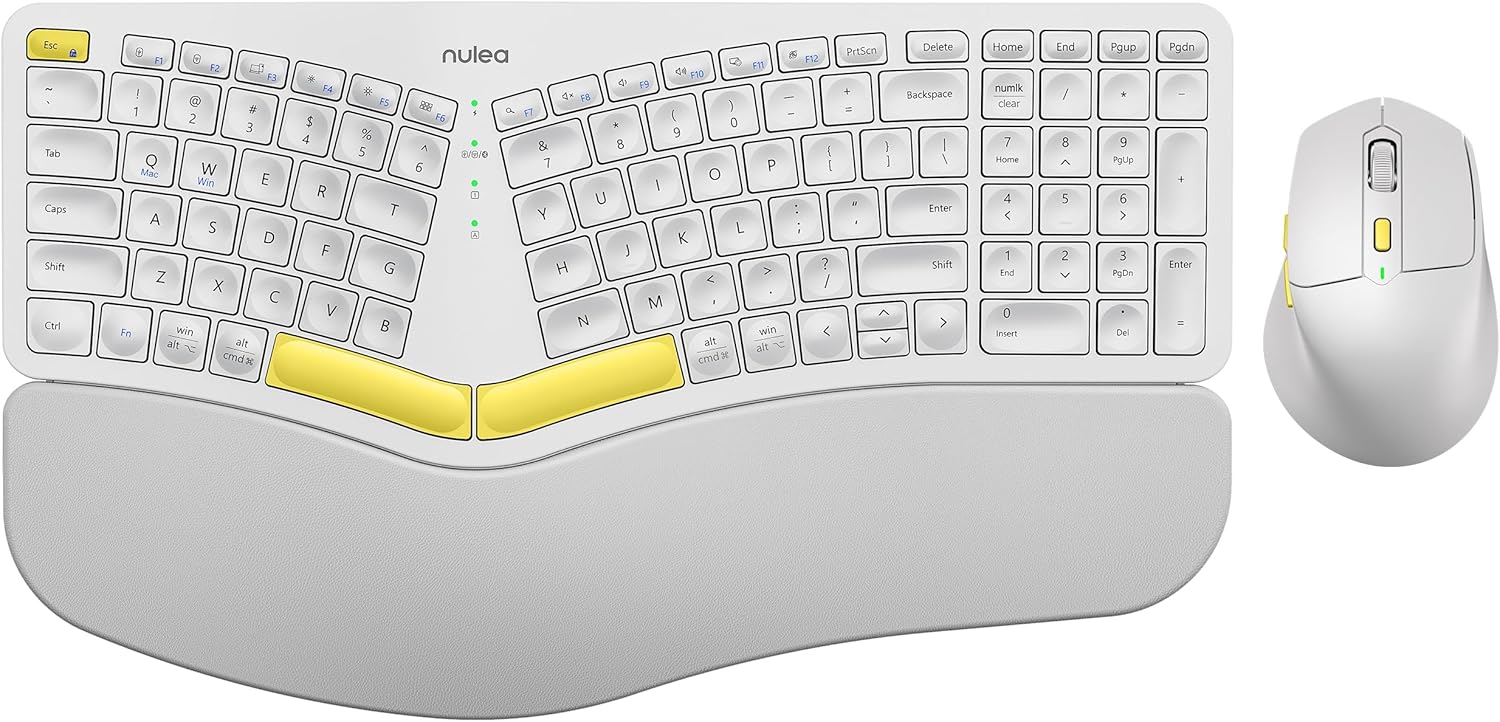
Image: The Nulea KM75 ergonomic keyboard and mouse combo. The keyboard features a curved and split layout with an integrated palm rest, and the mouse is sculpted for comfort. Both are white with yellow accents.
- Ergonomic Curved and Split Key-frame: Designed to position wrists and forearms naturally.
- Rehat Sawit Bersepadu: Features a soft memory foam layer for wrist support.
- Adjustable Tilt Design: Allows for optimal keyboard positioning.
- Kesambungan Berbilang Peranti: Supports USB cable, 2.4G USB receiver, and Bluetooth.
- Bateri boleh dicas semula: 500mAh capacity with USB-C charging.
- Mod Auto Tidur: Conserves power after 30 minutes of inactivity.
Ciri Tetikus

Image: A close-up of the Nulea ergonomic mouse, showing its sculpted design for a natural hand posture with integrated palm and thumb rests. The mouse is white with yellow accents.
- Ergonomic Sculpted Design: Integrated palm and thumb rests for natural hand position.
- Tetapan DPI boleh laras: For precise cursor control.
- Butang Maju/Mundur: Untuk memudahkan web navigasi.
- Kesambungan Berbilang Peranti: Supports 2.4G USB receiver and Bluetooth.
- Bateri boleh dicas semula: 300mAh capacity with USB-C charging.
- Mod Auto Tidur: Conserves power after 30 minutes of inactivity.
Persediaan
1. Mengecas Peranti
Before initial use, fully charge both the keyboard and mouse using the provided USB-C cable. Connect the USB-C end to the device and the USB-A end to a power source (e.g., computer USB port, USB wall adapter).

Image: Illustration showing the keyboard and mouse connected via USB-C cables for charging. The keyboard has a 500mAh battery and the mouse has a 300mAh battery.
The indicator lights will show charging status and turn off when fully charged. A full charge provides approximately two months of operation.
2. Menyambung melalui Penerima USB 2.4G
- Locate the 2.4G USB receiver. It is typically stored in a compartment on the underside of the mouse.
- Insert the USB receiver into an available USB-A port on your computer.
- Hidupkan papan kekunci dan tetikus menggunakan suis kuasa masing-masing.
- Untuk papan kekunci, tekan Fn + F2 to select 2.4G mode.
- For the mouse, switch the mode selector on the bottom to 2.4G.
- The devices should connect automatically.

Image: A close-up of the underside of the mouse, showing the storage compartment for the 2.4G USB receiver.
3. Menyambung melalui Bluetooth
- Hidupkan papan kekunci dan tetikus.
- Untuk papan kekunci, tekan Fn + F3 to select Bluetooth mode. The indicator light will blink, indicating pairing mode.
- For the mouse, switch the mode selector on the bottom to Bluetooth. The indicator light will blink.
- Pada peranti anda (komputer, tablet, telefon pintar), dayakan Bluetooth dan cari peranti baharu.
- Select "Nulea Keyboard" and "Nulea Mouse" from the list of available devices to pair.
- Ikuti mana-mana gesaan pada skrin untuk melengkapkan proses berpasangan.
4. Menyambung melalui Mod Berwayar
- Connect the USB-C charging cable to the keyboard or mouse and the USB-A end to your computer.
- Untuk papan kekunci, tekan Fn + F1 to select wired mode.
- For the mouse, switch the mode selector on the bottom to wired mode.
- The devices will function as wired peripherals.

Image: Diagram illustrating the simple connectivity options for the Nulea KM75. Pressing Fn+F1 connects via wired, Fn+F2 via 2.4G, and Fn+F3 via Bluetooth, allowing connection to multiple devices like PCs, laptops, and mobile devices.
5. Bertukar Antara Peranti
The Nulea KM75 combo supports multi-device connectivity. You can switch between up to three connected devices (one wired, one 2.4G, one Bluetooth) by pressing the corresponding function keys on the keyboard (Fn + F1/F2/F3) and adjusting the mode selector on the mouse.
Arahan Operasi
Penggunaan Papan Kekunci
- Reka bentuk ergonomik: The curved and split key-frame is designed for natural hand and wrist positioning. Allow some time to adapt to this layout for optimal comfort.
- Kaki Tilt Boleh Laras: Located on the underside of the keyboard, these legs allow you to adjust the typing angle for personalized comfort.

Image: A user demonstrating the adjustable tilt legs of the Nulea KM75 keyboard, showing how to customize the typing angle for ergonomic comfort.
- Kekunci Fungsi (Fn): Banyak kekunci mempunyai fungsi sekunder yang boleh diakses dengan menekan dan menahan butang Fn key and pressing the desired function key (e.g., media controls, volume). Refer to the keycap legends for specific functions.
Penggunaan Tetikus
- Pelarasan DPI: Use the DPI switch button, usually located near the scroll wheel, to cycle through different sensitivity levels (DPI). This allows for precise control or faster cursor movement.

Image: A close-up of the Nulea ergonomic mouse, highlighting the DPI switch key and indicator light for adjusting cursor sensitivity.
- Butang Sisi: The side buttons (typically on the left for right-handed users) are often pre-programmed for forward and backward navigation in web pelayar atau file penjelajah.
Penyelenggaraan
- Pembersihan: Gunakan kain lembut dan kering untuk membersihkan permukaan papan kekunci dan tetikus. Untuk kotoran degil, sedikit damp Kain dengan sabun lembut boleh digunakan, memastikan tiada cecair memasuki peranti. Elakkan bahan kimia yang keras atau bahan yang melelas.
- Penjagaan Bateri: To prolong battery life, avoid fully discharging the devices frequently. Recharge when the low battery indicator appears. Store in a cool, dry place if not used for extended periods.
- Storan: When not in use, store the USB receiver in its designated compartment on the mouse to prevent loss.
Menyelesaikan masalah
- Peranti tidak bersambung:
- Pastikan kedua-dua papan kekunci dan tetikus dihidupkan.
- Verify the correct connection mode (2.4G, Bluetooth, Wired) is selected on both devices and your computer.
- Untuk 2.4G, pastikan penerima USB dipasang dengan selamat ke port USB yang berfungsi.
- For Bluetooth, ensure Bluetooth is enabled on your device and the devices are in pairing mode. Try re-pairing if necessary.
- Ensure the devices are charged.
- Try restarting your computer and the devices.
- Sambungan ketinggalan atau terputus-putus:
- Move the devices closer to the USB receiver or your computer to reduce interference.
- Avoid placing the receiver near other wireless devices or large metal objects.
- Ensure batteries are sufficiently charged.
- Keys not responding or mouse not moving:
- Periksa tahap bateri dan cas semula jika perlu.
- Ensure the devices are properly connected (see "Device not connecting" above).
- Clean any debris from around the keys or mouse sensor.
Spesifikasi
| Ciri | Perincian |
|---|---|
| Jenama | Nulea |
| Model | KM75 |
| Ketersambungan | Bluetooth, 2.4G USB, Wired (USB-C) |
| Bateri Papan Kekunci | Lithium 500mAh |
| Bateri tetikus | Lithium 300mAh |
| OS yang serasi | Windows, Mac OS, Android |
| Ciri Khas | Ergonomic design, Curved/Split key-frame, Integrated palm rest, Adjustable tilt, Adjustable mouse DPI |
| Berat Barang | 4.2 paun (gabungan) |
| Dimensi Pakej | 16.97 x 11.69 x 2.05 inci |
Waranti dan Sokongan
Nulea products are designed for reliability and performance. For warranty information, technical support, or customer service inquiries, please refer to the contact details provided on the Nulea official website or your purchase documentation. Please retain your proof of purchase for warranty claims.


