1. Pengenalan
The Y&H MPPT 20A Solar Charge Controller is designed to efficiently manage power flow from your solar panels to your battery bank. Utilizing advanced Maximum Power Point Tracking (MPPT) technology, it optimizes charging for 12V, 24V, 36V, and 48V battery systems, ensuring maximum energy harvest from your solar array. This controller is compatible with various battery types, including flooded, gel, and lithium batteries (excluding ternary lithium). It features a smart three-stage charging mode to prolong battery life and includes multiple protection functions for reliable operation.
2. Arahan Keselamatan
- Ensure all connections are correct and secure before operation. Incorrect wiring can cause damage to the controller or batteries.
- Jangan cuba membuka atau membaiki alat kawalan sendiri. Hubungi kakitangan yang berkelayakan untuk servis.
- Pasang pengawal di kawasan yang mempunyai pengudaraan yang baik, jauh daripada bahan mudah terbakar dan cahaya matahari langsung.
- Wear appropriate personal protective equipment (PPE) when working with batteries and solar panels.
- Keep children away from the solar power system components.
- Pastikan voltage sepadan dengan sistem voltagtetapan pengawal.
3. Produk Lebihview
3.1 Ciri-ciri Utama
- Advanced MPPT Technology: Up to 99% tracking accuracy and 97% conversion efficiency.
- Sistem Automatik Voltage Identification: Supports 12V, 24V, 36V, and 48V battery systems.
- Smart Three-Stage Charging: Optimizes battery performance and extends lifespan for flooded, gel, and lithium batteries.
- Comprehensive Protection: Includes PV overcurrent, PV short circuit, PV reverse polarity, battery over-discharge, load overcurrent, load short circuit, battery overvoltage, dan perlindungan suhu berlebihan.
- Efficient Heat Dissipation Design.
- Multiple Load Control Modes: 24-hour working mode, light control mode, and light and time control mode.
- LCD Display: Provides real-time system information.
3.2 Komponen
The Y&H MPPT 20A Solar Charge Controller includes the main control unit with an LCD display and connection terminals for solar panels, batteries, and loads.
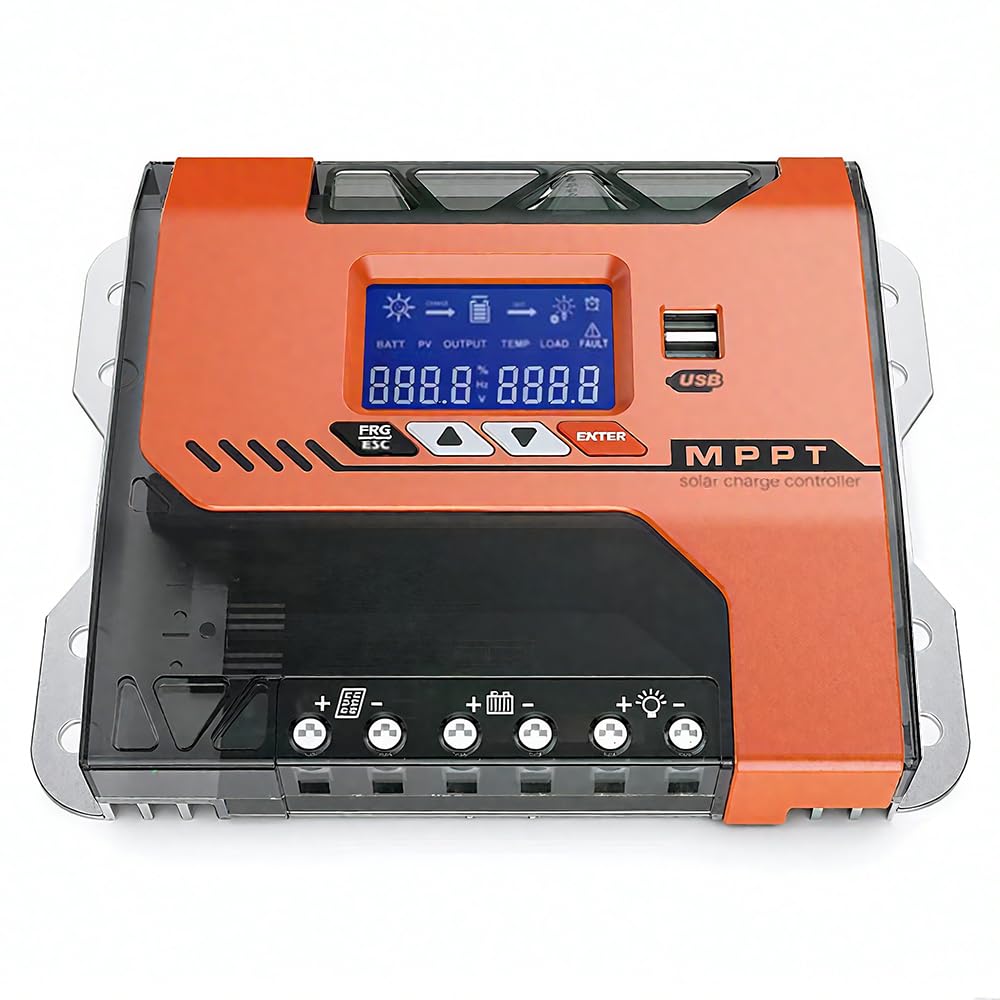
Rajah 1: Depan view of the Y&H MPPT 20A Solar Charge Controller.

Gambar 2: Lebihview of the 8 all-around protection features, including PV overcurrent, PV short circuit, PV reverse polarity, battery over-discharge, load overcurrent, load short circuit, battery overvoltage, dan perlindungan suhu berlebihan.

Figure 3: Advanced MPPT Technology with high tracking and conversion efficiency, compatible with FLD, SLD, GEL, LI, AGM, and USER defined battery types.
4. Persediaan dan Pemasangan
Follow these steps for proper installation of your Y&H MPPT 20A Solar Charge Controller:
- Sambungkan bateri: Ensure the battery bank is connected to the controller first.
- Connect the solar panel: After connecting the batteries, connect the solar panels to the controller.
- Connect loads: Finally, connect your DC loads to the controller.
- Semakan Akhir: Verify all connections are tight and secure. Remove any debris around the controller, leaving a space of approximately 5.91 inches for proper ventilation.
Refer to the wiring diagram below for visual guidance:

Figure 4: Easy Connections diagram showing the solar panel, battery bank (12/24/36/48V), inverter, and DC load connected to the MPPT solar charge controller. Max PV Input 150VDC. Max Solar Input Power: 12V system: 240W (20V-80V DC), 24V system: 480W (37-105V DC), 36V system: 720W (50-160V DC), 48V system: 960W (72-160V DC).
4.1 Cable and Breaker Recommendations

Figure 5: Dimensions of the controller (22cm x 16cm x 7.5cm) and a table with cable specifications. For MPPT-20A, recommended copper wire is 6mm² (10AWG) and air circuit breaker is 43A. For MPPT-30A and MPPT-40A, connect one wire to PV+ and another wire to PV-.
5. Arahan Operasi
The controller features an LCD screen and three buttons for operation: RESET (Up/Increase), MENU (Select/Confirm), and ON/OFF (Down/Decrease).
5.1 Screen Interface Cycle
The LCD screen cycles through various parameters. You can manually cycle through them by pressing the MENU button briefly.

Figure 6: Screen interface cycle displaying battery voltage, solar current, temperature, and various settings like battery type, discharge cut-off voltage, charging cut-off voltage, apungan voltage, and load operating mode.
5.2 Menetapkan Parameter
To adjust settings such as high voltage disconnection protection or low voltage:
- Press and hold the "RESET" (Up) button for 5 seconds to enter the high voltage disconnection protection setting.
- Briefly press "RESET" (Up) or "ON/OFF" (Down) to adjust the value.
- Press and hold the "ON/OFF" (Down) button for 5 seconds to enter the low voltage disconnection protection setting.
- Briefly press "RESET" (Up) or "ON/OFF" (Down) to adjust the value.
To change the load control mode (e.g., 24-hour, light control, light and time control):
- Press the "MENU" button. The current control mode will flash.
- Press "RESET" (Up) or "ON/OFF" (Down) to select the desired control mode.
- Press "MENU" to confirm your selection.
For a visual guide on setting parameters, please watch the following video:
Video 1: Demonstration of setting parameters on a Y&H MPPT Solar Charge Controller, including high voltage disconnection, low voltage disconnection, and load control modes.
6. Penyelenggaraan
Penyelenggaraan berkala memastikan prestasi optimum dan jangka hayat pengawal cas solar anda:
- Periksa Sambungan: Periodically check all wiring connections for tightness and corrosion. Loose connections can lead to power loss or overheating.
- Bersihkan Pengawal: Keep the controller clean and free from dust and debris. Use a dry cloth to wipe the exterior. Ensure ventilation openings are not blocked.
- Pantau Prestasi: Regularly check the LCD display for normal operation and parameter readings. Note any unusual readings or error messages.
- Kesihatan Bateri: Ensure your batteries are well-maintained according to their manufacturer's guidelines. The controller's smart charging helps, but battery health is crucial for overall system performance.
- Keadaan Persekitaran: Pastikan persekitaran pemasangan kekal dalam julat suhu dan kelembapan yang disyorkan.
7. Penyelesaian masalah
If you encounter issues with your solar charge controller, consider the following:
- Fluctuating PV or Battery Readings: If the reading data of the PV or Battery is constantly changing, this is normal. The controller is actively finding the Maximum Power Point (MPP). However, if the PV input power or voltage is consistently insufficient, this can also cause fluctuations. Ensure your solar panels are receiving adequate sunlight and are correctly sized for your system.
- Tiada Kuasa untuk Memuatkan: Check the load connections and ensure the load control mode is set correctly (e.g., 24-hour mode if continuous power is needed). Verify the battery has sufficient charge.
- Bateri Tidak Dicas: Check solar panel connections and ensure they are producing voltage. Verify battery connections are secure. Check for any error codes on the LCD display.
- Over-temperature Warning: Ensure the controller is installed in a well-ventilated area and its heat sinks are not obstructed. Reduce load if necessary.
For persistent issues or if you require further assistance, please contact our technical support team.
8. Spesifikasi
| Parameter | Nilai |
|---|---|
| Model | TM-20A-SA |
| Jenama | Y&H |
| Nilai Semasa | 20 Amp |
| Sistem Voltage | Automatik 12V/24V/36V/48V |
| Vol. Input PV Makstage | 150V DC |
| Max Solar Input Power (12V) | 240W |
| Max Solar Input Power (24V) | 480W |
| Max Solar Input Power (36V) | 720W |
| Max Solar Input Power (48V) | 960W |
| Jenis Paparan | LCD |
| Dimensi (L x W x H) | 22cm x 16cm x 7cm |
| Komponen yang Disertakan | Pengawal Caj Suria |
| Negara Asal | China |
| UPC | 704334854949 |
| warna | Jingga |
9. Waranti dan Sokongan
For warranty information or technical support, please refer to the documentation provided with your purchase or contact the seller directly. Ensure you have your model number (TM-20A-SA) and purchase details available when seeking support.


