pengenalan
This manual provides detailed instructions for the assembly, operation, and maintenance of your TaoHFE Modern Black Wooden Hidden Shoe Cabinet, model CT-SC006. Please read this manual thoroughly before assembly and use to ensure proper installation and safe operation. Keep this manual for future reference.
Maklumat Keselamatan Penting
- Always assemble the cabinet according to the provided instructions.
- Secure the cabinet to the wall using the anti-tipping kit to prevent tipping, especially in households with children or pets.
- Be cautious of pinch points and sharp edges during assembly and use.
- Pastikan semua skru dan pengikat diketatkan dengan kukuh sebelum digunakan. Periksa secara berkala untuk sambungan yang longgar.
- Do not overload the cabinet shelves or drawers, as this may compromise stability.
Kandungan Pakej
Sebelum memulakan pemasangan, pastikan semua bahagian ada dan tidak rosak. Jika mana-mana bahagian hilang atau rosak, sila hubungi khidmat pelanggan.
- Cabinet panels (various sizes)
- Hardware kit (screws, dowels, hinges, handles, anti-tipping kit)
- Assembly tools (basic tools may be included, but a screwdriver and hammer are generally recommended)
- Manual arahan
Arahan Pemasangan (Persediaan)
Assembly is required for this shoe cabinet. Please follow the step-by-step instructions provided in the included assembly guide. It is recommended to assemble the unit on a soft, clean surface to prevent scratches.
- Buka bungkus dan Kenalpasti Bahagian: Carefully unpack all components and lay them out. Refer to the parts list in your assembly guide to identify each piece. Note: Some hardware pieces may not be clearly labeled. Refer to the diagrams for identification.
- Pasang Bingkai: Connect the main side panels and base using the designated screws and dowels. Ensure all connections are snug.
- Install Drawers and Flip-Down Compartments: Attach the drawer slides and hinges for the flip-down compartments according to the instructions. The cabinet features one top pull-out drawer and two flip-down compartments, each with two layers of storage space and a removable divider.
- Lampirkan Panel Belakang: Kencangkan panel belakang. Note: Some holes for the back panel screws may not be pre-drilled. A power drill may be helpful for this step.
- Install Handles and Legs: Attach the handles to the drawers and flip-down compartments. Secure the cabinet legs to the base.
- Secure to Wall (Anti-Tipping Kit): For safety and stability, especially in homes with children or pets, attach the anti-tipping kit to the back of the cabinet and secure it to a wall stud.

Image: The fully assembled TaoHFE Black Shoe Cabinet, showcasing its modern design and functionality in an entryway setting.

Image: Detailed dimensions of the TaoHFE Shoe Cabinet: 31.5" W x 9.5" D x 47.8" H. The top drawer is 8" high, and the flip drawers are 15.8" high.
Arahan Operasi
The TaoHFE shoe cabinet is designed for efficient shoe storage and organization.
- Laci Atas: The uppermost drawer is a multi-functional pull-out drawer, ideal for storing small daily essentials such as keys, wallets, umbrellas, or other accessories.
- Flip-Down Shoe Compartments: The two lower compartments feature a flip-down design. Gently pull the handle to open. Each compartment contains two layers of storage space.
- Pembahagi boleh laras: The dividers within the flip-down compartments are removable. This allows for customization to accommodate various shoe types and sizes, including sandals, slippers, sneakers, and high heels.
- Penempatan Kasut: Place shoes into the compartments. Ensure shoes are positioned correctly to allow the compartments to close fully without obstruction.

Image: The shoe cabinet demonstrating its capacity to store different types of footwear, including sandals, slippers, sneakers, and high heels.

Imej: Dari dekat view of the top shelf, used for decorative items or small belongings, and an open flip-down shoe compartment with shoes stored inside.
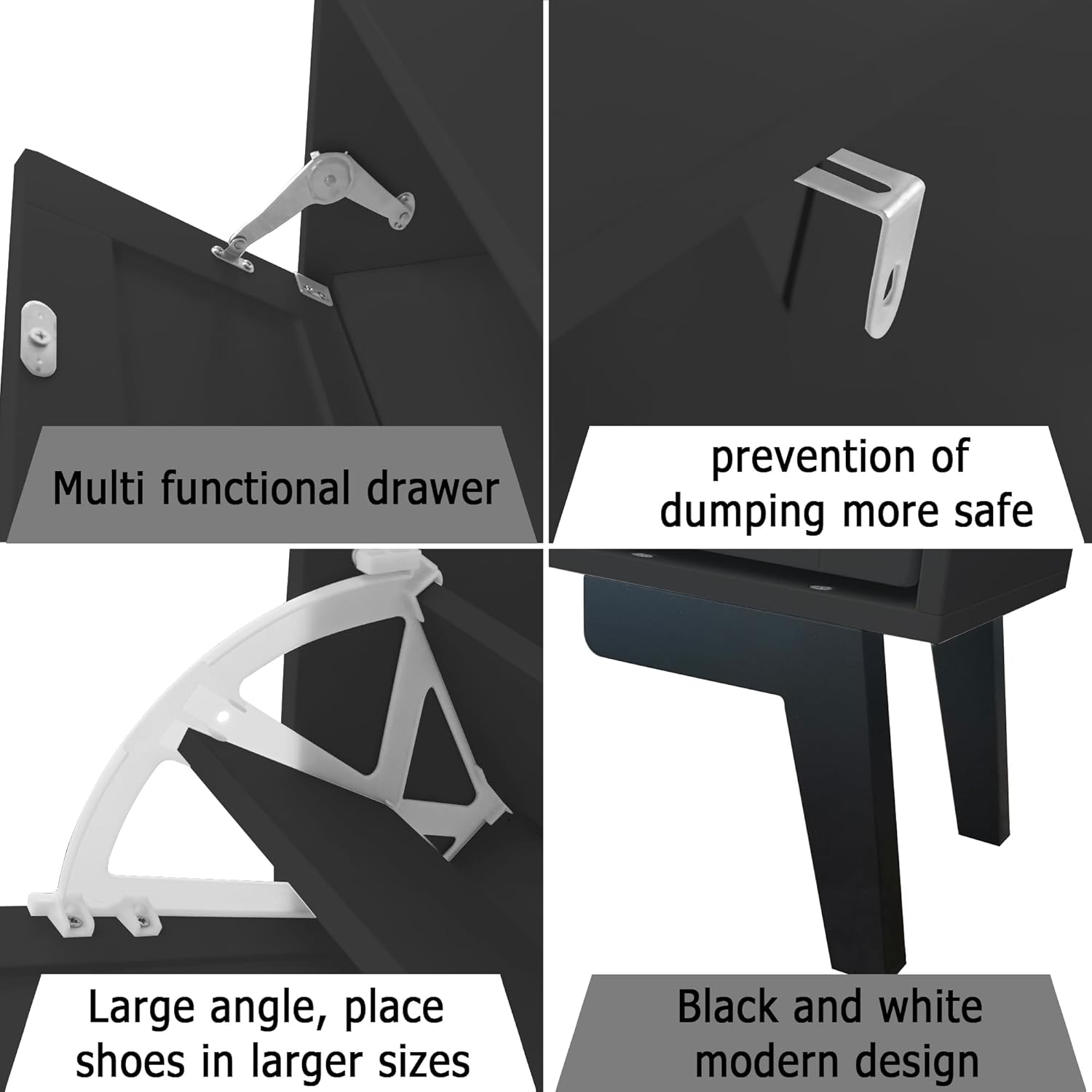
Image: A collage highlighting key features: a multi-functional top drawer, the anti-tipping bracket for safety, large angle opening for shoes, and the black and white modern design.
Penyelenggaraan dan Penjagaan
- Pembersihan: The cabinet is made of high-quality MDF wood with a smooth, wear-resistant, and waterproof surface. To clean, simply wipe with a damp kain. Elakkan pembersih yang melelas atau bahan kimia keras yang boleh merosakkan kemasan.
- Kawalan Bau: Unlike open shoe racks, this cabinet helps contain shoe odors. For best results, ensure shoes are dry before storing. Consider using shoe deodorizers if needed.
- Pemeriksaan biasa: Periodically inspect all hardware and connections to ensure they remain tight. Retighten any loose screws to maintain stability.
Menyelesaikan masalah
| Masalah | Kemungkinan Punca | Penyelesaian |
|---|---|---|
| Kabinet goyah atau tidak stabil. | Skru longgar; lantai tidak rata; kit anti-jungkir tidak dipasang. | Ensure all assembly screws are tightened. Place on a level surface. Install the anti-tipping kit securely to the wall. |
| Flip-down compartments do not close properly. | Shoes are too large or improperly placed; hinges are misaligned. | Adjust shoe placement or remove dividers for larger shoes. Check hinge alignment and re-adjust if necessary. |
| Shoes do not stay in place when compartments are closed. | Improper shoe placement; compartment design. | Ensure shoes are placed firmly against the back of the compartment. For certain shoe types, additional inserts or careful arrangement may be required to prevent movement. |
| Bahagian yang hilang semasa pemasangan. | Ralat pembungkusan. | Contact TaoHFE customer support with your purchase details and the specific missing parts. |
| Difficulty with screw holes for back panel. | Holes may not be pre-drilled. | Use a power drill with an appropriate drill bit to create pilot holes before inserting screws. |
Spesifikasi Produk
- Jenama: TaoHFE
- Nama Model: CT-SC006 (Shoe Cabinet Storage For Entryway)
- warna: Hitam
- Dimensi Produk: 31.5" W x 9.5" D x 47.8" H
- Berat Barang: 47.3 paun
- Bahan: Kayu Kejuruteraan (MDF)
- Jenis Pemasangan: Floor Mount (Freestanding with anti-tipping kit)
- Bilangan Tahap: 3 (1 top drawer, 2 flip-down compartments)
- Ciri Khas: Adjustable Shelf (removable dividers in flip-down compartments)
- Perhimpunan Diperlukan: ya
Waranti dan Sokongan Pelanggan
For warranty information, missing parts, or any questions regarding your TaoHFE shoe cabinet, please contact TaoHFE customer support directly through the retailer where the product was purchased or visit the official TaoHFE brand store online.
Kedai atas talian: TaoHFE Store on Amazon


