pengenalan
Welcome to the user manual for your LTC Nimbleback NB981 95% Wireless Mechanical Keyboard. This manual provides detailed instructions for setting up, operating, maintaining, and troubleshooting your new keyboard.
The NB981 keyboard offers versatile connectivity options (2.4GHz, Bluetooth, USB-C wired), a comfortable typing experience with its 3-layer silicone dampening, and extensive customization through hot-swappable switches and dynamic RGB lighting.
Kandungan Pakej
Sila sahkan bahawa semua item terdapat dalam pakej anda:
- LTC Nimbleback NB981 Wireless Mechanical Keyboard
- Kabel USB-C ke USB-A
- Penarik Kekunci
- Switch Puller (often combined with keycap puller)
- Suis Ganti
- Manual Pengguna
Video Nyah Tinju
This video demonstrates the unboxing process and shows the contents typically included with the LTC Nimbleback NB981 keyboard.
Produk Selesaiview
The LTC Nimbleback NB981 is a high-performance mechanical keyboard designed for both gaming and everyday use. It features a 95% layout, combining functionality with a compact design.
Ciri-ciri Utama
- Flexible Tri-Mode Connectivity: Bluetooth, wired, and 2.4GHz options.
- Excellent Silicone Sound Dampening: Triple-layer silicone structure for reduced hollow sounds and quiet typing.
- Customizable Hot-Swap Design: Supports most 3-pin and 5-pin MX-style switches without soldering.
- Powerful Software Support: Key remapping, macro assignments, and personalized lighting effects for Windows, Android, iOS, and macOS.
- Dynamic RGB Illumination: 18 vibrant backlight modes with adjustable speed and brightness.
- Long-lasting 4000mAh Battery: Extended usage with battery status monitoring (FN+backspace).
Keyboard Layout and Components
Refer to the images below for a visual guide to the keyboard's layout and internal structure.
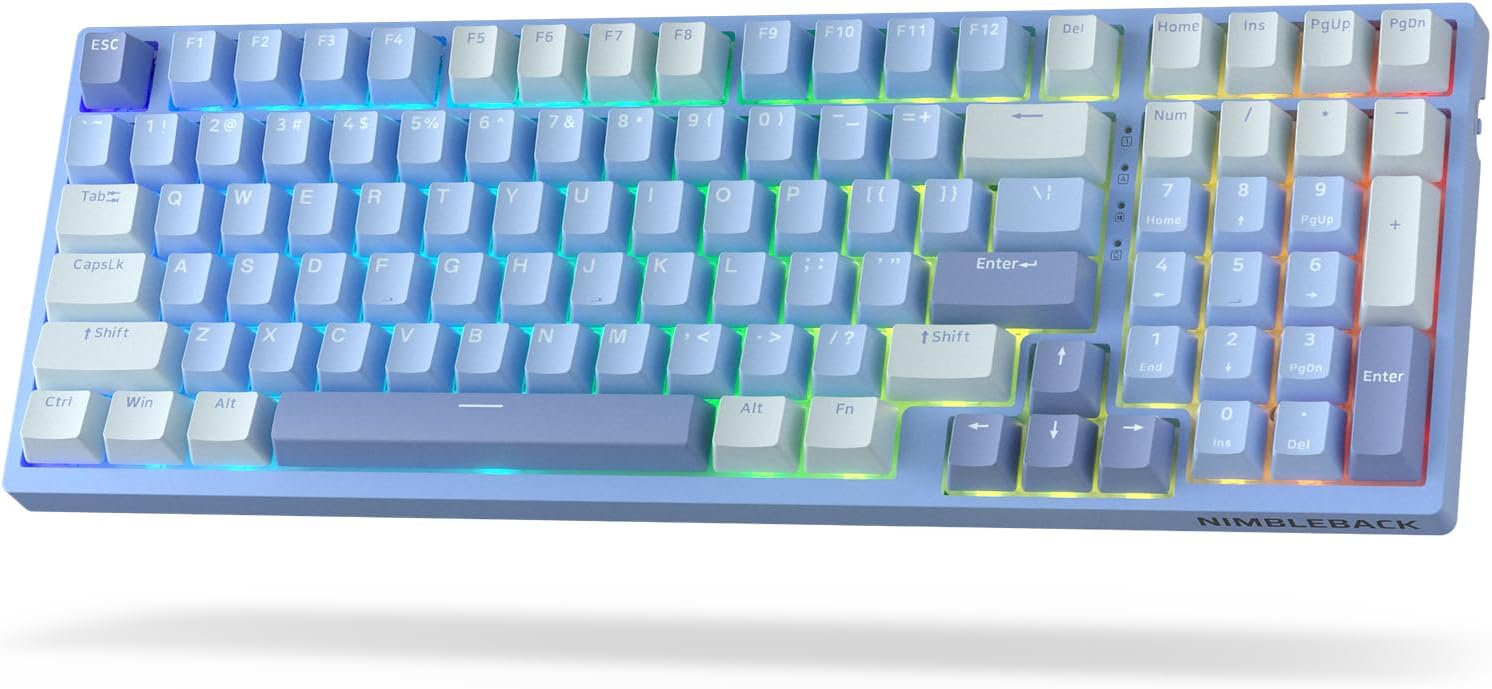
Imej: Atas ke bawah view of the LTC Nimbleback NB981 keyboard in Sky Blue, showcasing its 95% layout with RGB backlighting.

Image: Diagram highlighting key features of the NB981 keyboard, including 3-layer silicone padding, 98-key layout, tri-mode connection, 4000mAh battery, hot-swap PCB, PBT keycaps, dynamic RGB, and software support.
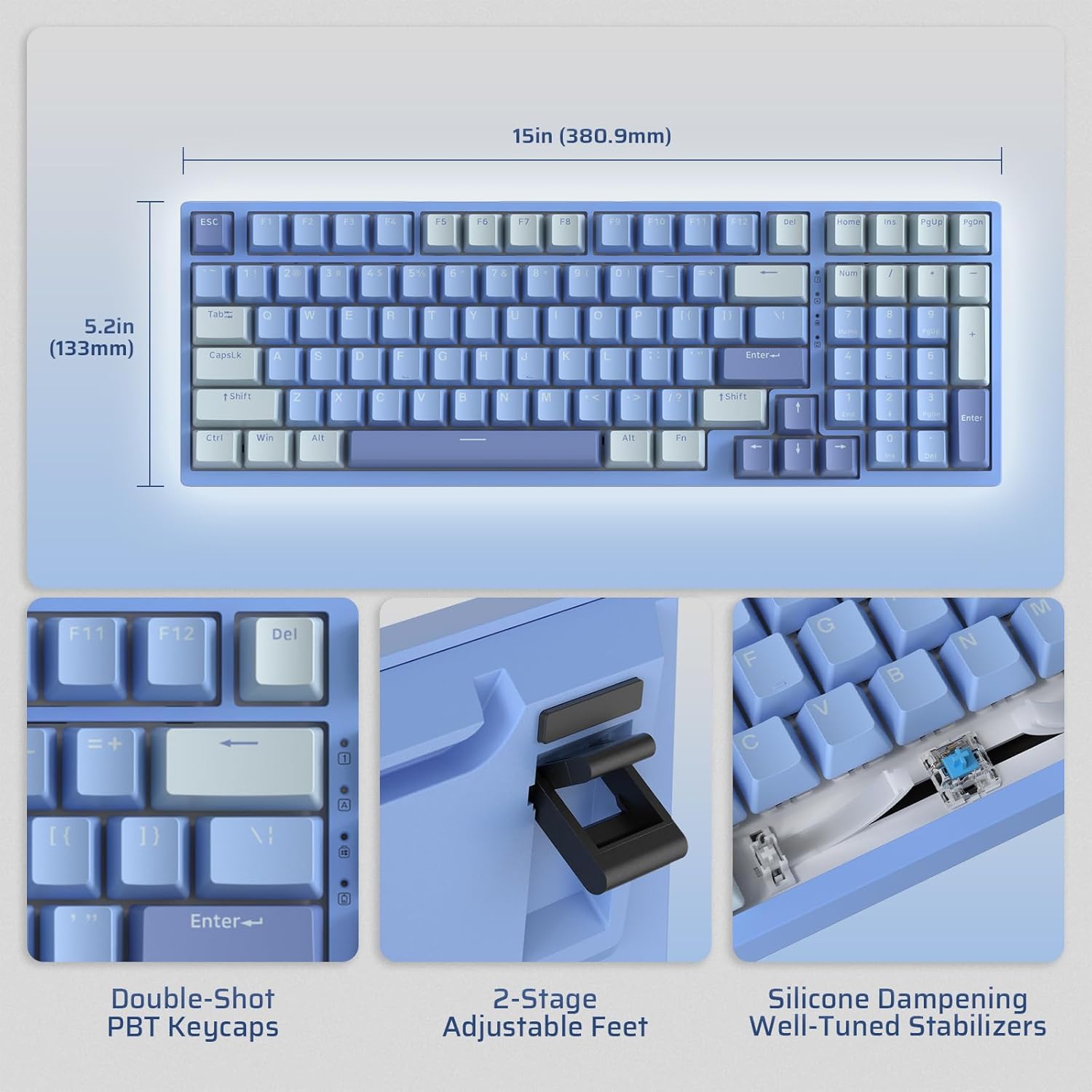
Image: Illustrates the dimensions of the keyboard (15 inches / 380.9mm length, 5.2 inches / 133mm width), double-shot PBT keycaps, 2-stage adjustable feet, and silicone dampening with well-tuned stabilizers.
Persediaan
Before first use, it is recommended to fully charge the keyboard using the provided USB-C cable.
Sambungan Awal
The keyboard supports three connection modes: 2.4GHz wireless, Bluetooth, and USB-C wired.

Image: Visual representation of the tri-mode connectivity options: Bluetooth 5.0 (up to 3 devices), 2.4GHz fast-response wireless, and USB-C stable wired mode.
Mod Kesambungan
Mod Wayarles 2.4GHz
- Locate the 2.4GHz USB dongle, typically stored in a compartment on the back of the keyboard.
- Palamkan dongle ke port USB-A yang tersedia pada komputer anda.
- Hidupkan papan kekunci menggunakan suis ON/OFF yang terletak di sisi.
- Papan kekunci sepatutnya bersambung secara automatik. Jika tidak, tekan fn+4 selama 3 saat untuk memulakan gandingan.
Mod Bluetooth
- Hidupkan papan kekunci menggunakan suis ON/OFF.
- Tekan fn+1, fn+2, atau fn+3 to select a Bluetooth channel. The corresponding key will flash rapidly, indicating pairing mode.
- On your device (computer, tablet, smartphone), enable Bluetooth and search for "LTC NB981".
- Select the keyboard to pair. The key will stop flashing once connected.
- You can store up to three Bluetooth devices.
USB-C Wired Mode
- Sambungkan kabel USB-C yang disediakan ke port USB-C papan kekunci.
- Connect the other end of the cable (USB-A) to your computer's USB port.
- Papan kekunci secara automatik akan bertukar kepada mod berwayar dan mula mengecas.
Arahan Operasi
Kawalan Lampu Latar
The NB981 features dynamic RGB illumination with 18 modes.
- Fn + |: Backlight On/Off
- Fn + ↑: Backlight Modes Switch (Cycle through 18 modes)
- Fn + ↓: Backlight Colors Switch (Change color in static modes)
- Fn + ←: Backlight Speed -
- Fn + →: Kelajuan Lampu Belakang +
- Fn + F5: Backlight Brightness -
- Fn + F6: Backlight Brightness +
To restore factory settings for backlight, long press Fn + Ruang.
Multimedia Keys (Windows System)
Gunakan Fn kekunci digabungkan dengan kekunci-F untuk fungsi multimedia:
- Fn + F1: Display Brightness -
- Fn + F2: Display Brightness +
- Fn + F3: Back to Desktop
- Fn + F4: Mission Control
- Fn + F7: Last Song
- Fn + F8: Main/Jeda
- Fn + F9: Lagu Seterusnya
- Fn + F10: Bisu
- Fn + F11: Volume -
- Fn + F12: Jilid +
Sokongan Perisian
The keyboard supports powerful software for full customization. This software allows for key remapping, macro assignments, and advanced lighting effects.
The software is compatible with Windows (7, 8, 10, 11), Android, iOS, and macOS. Please visit the official LTC webtapak untuk muat turun perisian dan arahan terperinci.

Image: Screenshot of the LTC keyboard customization software, showing options for key remapping, macro creation, and RGB lighting control.
Hot-Swap Switch Replacement
The NB981 features a hot-swappable PCB, allowing you to change switches without soldering.
- Use the provided switch puller tool to gently remove the desired switch.
- Align the pins of the new 3-pin or 5-pin MX-style switch with the holes on the PCB.
- Press the new switch firmly into place until it clicks. Ensure the pins are straight to avoid bending.

Imej: Terperinci view of the hot-swap PCB, illustrating pre-lubed linear switches, hot-swap sockets, and well-lubed stabilizers.
Sound Profile
The keyboard's 3-layer silicone dampening structure significantly minimizes hollow sounds and cavity noise, providing a smooth and quiet typing experience.
This video provides a sound test of the LTC Nimbleback NB981 keyboard, demonstrating its typing acoustics with the integrated sound dampening.
Penyelenggaraan
- Pembersihan: Use a soft, dry cloth to wipe the keyboard surface. For deeper cleaning, use the keycap puller to remove keycaps and clean dust or debris with compressed air or a small brush.
- Penjagaan Bateri: To prolong battery life, avoid fully discharging the keyboard frequently. Charge it when the battery indicator (FN+backspace) shows low power.
- Storan: Simpan papan kekunci di tempat yang sejuk dan kering jauh dari cahaya matahari langsung dan suhu yang melampau.
Menyelesaikan masalah
Papan kekunci tidak bertindak balas:
- Pastikan papan kekunci dihidupkan.
- Check the battery level (FN+backspace). Recharge if low.
- For wired mode, ensure the USB-C cable is securely connected to both the keyboard and the computer. Try a different USB port.
- For 2.4GHz mode, ensure the dongle is properly inserted and try re-pairing (fn+4 selama 3 saat).
- For Bluetooth mode, ensure Bluetooth is enabled on your device and try re-pairing (Fn + 1/2/3 selama 3 saat).
- Cuba mulakan semula komputer anda.
Kunci tidak mendaftar atau menaip dua kali:
- This could indicate a faulty switch. Use the switch puller to replace the affected switch with a spare one.
- Pastikan suis dipasang sepenuhnya di dalam PCB.
Isu lampu latar:
- Ensure backlight is turned on (Fn + |).
- Laraskan kecerahan (Fn + F5/F6).
- Cycle through modes (Fn + ↑) or colors (Fn + ↓).
- Reset backlight to factory settings (Long press Fn + Ruang).
Sambungan Bluetooth tidak stabil:
- Ensure no other devices are causing interference.
- Gerakkan papan kekunci lebih dekat dengan peranti anda.
- Try forgetting the device on your computer's Bluetooth settings and re-pairing.
Spesifikasi
| Ciri | Perincian |
|---|---|
| Jenama | LTC |
| Model | NB981 |
| Ketersambungan | Bluetooth, RF (2.4GHz), USB-C |
| Jenis Papan Kekunci | mekanikal |
| Bilangan Kunci | 98 |
| Pencahayaan latar | RGB |
| Kapasiti Bateri | 4000mAh |
| Berat Barang | 3.3 paun |
| Dimensi Pakej | 16.45 x 6.93 x 2.01 inci |
| Peranti Serasi | PC (Windows, Android, iOS, macOS via software) |
| Ciri Khas | Backlit, Hotkeys and Media Keys, Programmable Keys, Hot-Swappable |
| Negara Asal | China |
Apa yang ada dalam Kotak
- Penarik Kekunci
- Kabel USB
Waranti dan Sokongan
For warranty information and technical support, please refer to the official LTC webtapak atau hubungi perkhidmatan pelanggan mereka. Simpan resit pembelian anda untuk tuntutan waranti.
Lawati LTC Official Store untuk lebih banyak produk dan sokongan.