Produk Selesaiview
The ACEBEAM P20 is a high-performance tactical flashlight designed for long-range illumination and robust use. It features a powerful SBT-90.2 LED, dual switches for versatile operation, and a durable, waterproof construction.
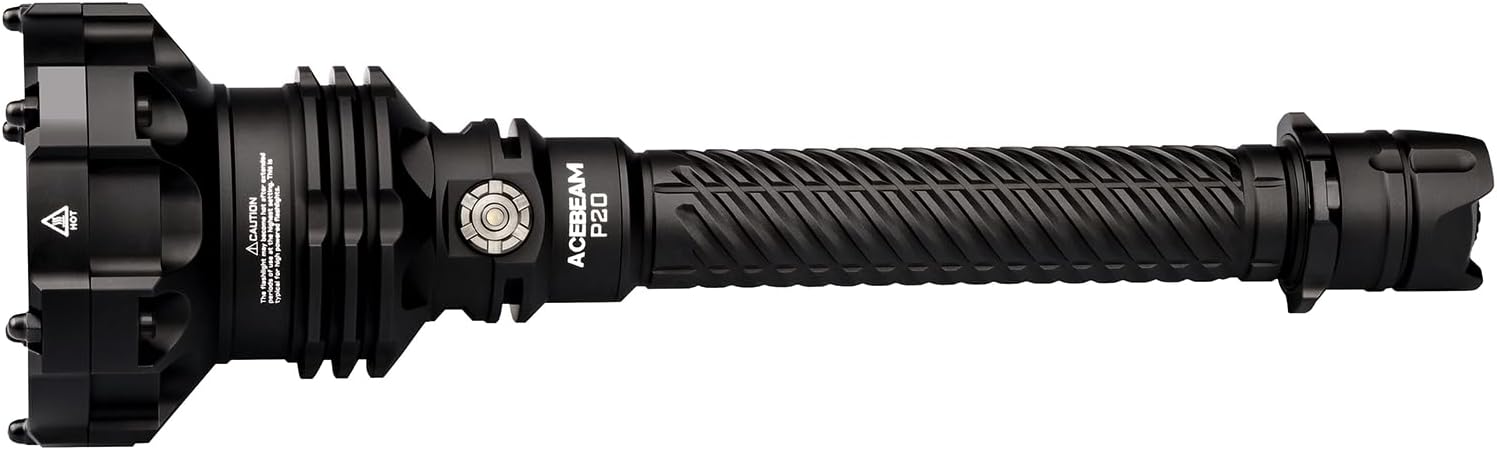
Image: The ACEBEAM P20 flashlight, showcasing its robust design and long barrel.
Ciri-ciri Utama
- The perfect fusion of CNC precision manufacturing and industrial design.
- Utilizes an SBT-90.2 LED, boasting 5500 lumens output and a throw distance of 1280 meters.
- Dual switches, allowing you to swiftly ON/OFF, or cycle through various modes.
- Long and slim barrel makes it cozily in your hands.
- Quick access to Turbo makes it more reliable at critical moments.
- 3mm thickened tempered glass brings greater durability, shock resistance, and better heat tolerance.
- High strength and impact-resistant HAIII hard-anodized anti-abrasive and corrosion-resistant finish.
- All metal body (A6061-T6 high-quality aluminum alloy) can withstand 1.5-meter drop test; IP68 Dust-proof and Waterproof Rating: Fully submersible to 2 meters / 6.5 feet.

Imej: Selesaiview of ACEBEAM P20 features, highlighting its output, throw, and design.
Persediaan
Pemasangan Bateri
The ACEBEAM P20 uses a 21700 Lithium Ion battery (included). To install or replace the battery, unscrew the tail cap of the flashlight. Insert the 5000mAh battery with the positive (+) end facing towards the head of the flashlight. Screw the tail cap back on tightly to ensure proper contact and maintain the IP68 waterproof rating.

Image: Illustration of the 5000mAh battery being inserted into the flashlight body.
Caj Permulaan
The included 21700 battery is rechargeable via a USB-C port located directly on the battery itself. Remove the battery from the flashlight and connect it to a USB power source using the provided charging cable. The battery's indicator light will show charging status.
Arahan Operasi
Dual Switch Operation
The ACEBEAM P20 features both a tactical tail switch and a side switch for versatile control.
Suis Ekor Taktikal
- Hidup seketika: Half-press the tail switch for momentary illumination. Release to turn off.
- Malar Hidup/Mati: Fully press the tail switch until it clicks to turn the flashlight on or off.
- Instant Turbo: From off, fully press and hold the tail switch for instant Turbo mode.
Suis Sisi
The side switch controls the various lighting modes and provides a battery power indicator.
- Mode Cycling: With the flashlight on, press the side switch to cycle through the modes: Ultra-low → Low → Med 1 → Med 2 → High → Turbo.
- Strob: Double-press the side switch to activate Strobe mode. Press again to return to the previous mode.
- Penunjuk Bateri: The light around the side button indicates remaining battery power.

Image: Diagram illustrating the functionality of the side switch and tactical tail switch.
Light Modes and Output
The P20 offers 6 regular lighting modes plus a Strobe for emergencies.

Image: Visual representation of the different lighting modes and their approximate lumen outputs.
Video: Official product video demonstrating the ACEBEAM P20's powerful beam and various lighting modes, including its impressive throw distance and strobe function.
Penyelenggaraan
Pembersihan dan Penjagaan
Regularly clean the flashlight body with a soft cloth. For optimal performance, keep the threads and O-rings clean and lubricated with silicone grease. This helps maintain the waterproof seal.
Pengecasan Bateri
As mentioned in the Setup section, the battery is charged directly via its integrated USB-C port. Ensure the battery is fully charged before extended use to maximize runtime.
Menyelesaikan masalah
Side Button Unresponsiveness or Accidental Turbo
Some users have reported the side button being unresponsive with light presses or accidentally activating Turbo mode with firmer presses. This can be due to the tactile feedback of the button requiring a deliberate press. Ensure a firm, direct press on the center of the button. If the issue persists, ensure the tail cap is fully tightened, as a loose connection can sometimes affect switch functionality.
Video: A user demonstrating a potential side button issue on the ACEBEAM P20, showing how light presses might not register or lead to accidental turbo activation.
Lampu Suluh Tidak Dihidupkan
- Periksa cas bateri: Ensure the battery is fully charged.
- Orientasi bateri: Verify the battery is inserted with the correct polarity (positive end towards the head).
- Tail cap tightness: Make sure the tail cap is screwed on tightly. A loose tail cap can prevent electrical contact.
- Mod kunci keluar: The flashlight may be in lockout mode. Hold the side button for 3 seconds to exit lockout.
Video: Penggunaview discussing the ACEBEAM P20, which may provide insights into common operational queries or issues.
Spesifikasi
| Ciri | Perincian |
|---|---|
| LED | SBT-90.2 |
| Output Maks | 5500 Lumen |
| Lemparan Maks | 1280 Meters (1400 Yards) |
| Sumber Kuasa | 1 x 21700 Lithium Ion Battery (included) |
| bahan | Anodized Aluminum (A6061-T6) |
| Penilaian Kalis Air | IP68 (Submersible to 2 meters / 6.5 feet) |
| Rintangan Kesan | 1.5 Meter |
| Dimensi | 10.53"D x 3.11"W x 3.11"H |
| Berat Barang | 1.11 paun |
| Komponen yang Disertakan | Kabel Pengecasan |

Image: Detailed technical parameters table for the ACEBEAM P20, including lumen output, throw distance, and runtime for each mode.
Waranti & Sokongan
The ACEBEAM P20 is covered by a manufacturer's warranty. For detailed warranty information, product support, or service inquiries, please refer to the official ACEBEAM webtapak atau hubungi perkhidmatan pelanggan mereka secara langsung.
Untuk sumber tambahan dan maklumat produk, sila layari laman web rasmi Kedai ACEBEAM di Amazon.