1. Pengenalan
This manual provides essential information for the safe and efficient operation of your Phomemo M834 Portable Thermal Printer. Please read it thoroughly before using the device and retain it for future reference. The Phomemo M834 is an inkless thermal printer designed for portable use, offering high-resolution printing for various documents and notes.

Image: The Phomemo M834 printer highlights its key advantages such as Bluetooth wireless connectivity, inkless printing, portability, ease of setup, lightweight design, and multi-size thermal paper support, contrasting with common limitations of other printers like wired connections, ink requirements, and bulkiness.
2. Maklumat Keselamatan
Observe the following safety precautions to prevent damage to the printer or personal injury:
- Jangan buka, baiki atau ubah suai pencetak sendiri.
- Jauhkan pencetak daripada air, kelembapan dan cahaya matahari langsung.
- Use only Phomemo-approved thermal paper. Using other paper types may damage the print head.
- Ensure the printer is placed on a stable surface during operation.
- Jauhkan daripada kanak-kanak.
- Do not touch the print head immediately after printing, as it may be hot.
- Gunakan kabel USB-C yang disediakan untuk pengecasan.
3. Kandungan Pakej
Sahkan bahawa semua item terdapat dalam pakej anda:
- Phomemo M834 Portable Printer
- Printer Carry Case
- Kabel USB-C
- USB-C ke Penyesuai USB
- Panduan Pengguna
- Thermal Paper Roll (8.5" width)
- Additional Thermal Paper Rolls (4.33", 3.14", 2.08" widths)

Image: The package contents include the Phomemo M834 portable printer, a printer case, a USB-C cable, a USB-C to USB adapter, a user guide, and multiple rolls of thermal paper in various widths (8.5", 4.33", 3.14", 2.08").
4. Produk Lebihview
The Phomemo M834 is a compact and versatile thermal printer. It features a 300 dpi print resolution for clear output and supports various thermal paper sizes and types. Its inkless technology eliminates the need for cartridges, reducing operational costs.
Ciri-ciri Utama:
- High Print Clarity: 300 dpi resolution for sharp text and images.
- Sokongan Kertas Serbaguna: Compatible with US Letter, A4, 4.33'', 3.14'', 2.08'' paper sizes, and roll, fold, or ordinary thermal paper types.
- Jangka Hayat Bateri: 2600mAh rechargeable battery supports over 160 pages of continuous printing.
- Keserasian Peranti Luas: Connects via Bluetooth to smartphones (Android, iOS) and USB to PCs (Windows 10/11, Linux, ChromeOS, macOS).
- Teknologi tanpa dakwat: Uses thermal printing, requiring no ink, toner, or ribbons.

Image: The Phomemo M834 portable thermal printer is shown with its carrying case, various sizes of thermal paper rolls, and a smartphone displaying the Phomemo app, illustrating its wireless connectivity and portability.

Image: A visual comparison demonstrates the superior clarity of 300 DPI printouts from the Phomemo M834 compared to standard 203 DPI prints, highlighting the enhanced detail and readability.

Image: This graphic illustrates the Phomemo M834's 2600mAh large capacity battery, emphasizing its USB-C fast charging capability and the ability to print over 160 sheets on a full charge.
5. Arahan Persediaan
5.1 Mengecas Pencetak
- Sambungkan kabel USB-C yang disediakan ke port pengecasan pencetak.
- Plug the other end into a USB power adapter (not included) or a computer's USB port.
- The indicator light will show charging status. A full charge typically takes a few hours.
5.2 Memuatkan Kertas Terma
- Open the printer's paper cover.
- Insert the thermal paper roll or folded paper, ensuring the printable side faces the print head.
- Laraskan panduan kertas agar muat dengan kemas pada lebar kertas.
- Tutup penutup kertas dengan selamat.

Image: The Phomemo M834 printer is depicted with its paper compartment open, showcasing support for five paper sizes (US Letter, A4, 4.33'', 3.14'', 2.08'') and four types: single sheet, continuous folding, inner roll, and stickers.
6. Arahan Operasi
6.1 Hidupkan/Mati Kuasa
Press and hold the power button for 3 seconds to turn the printer on or off.
6.2 Menyambung ke Peranti
6.2.1 Bluetooth Connection (Smartphones/Tablets)
- Download the Phomemo app from your device's app store.
- Pastikan Bluetooth didayakan pada telefon pintar atau tablet anda.
- Open the Phomemo app and follow the on-screen instructions to search for and connect to your M834 printer.
6.2.2 USB Connection (PC/Laptop)
- Sambungkan pencetak ke komputer anda menggunakan kabel USB-C yang disediakan.
- Install the appropriate printer driver from the official Phomemo webtapak.
- Once the driver is installed, the printer will be recognized by your operating system.
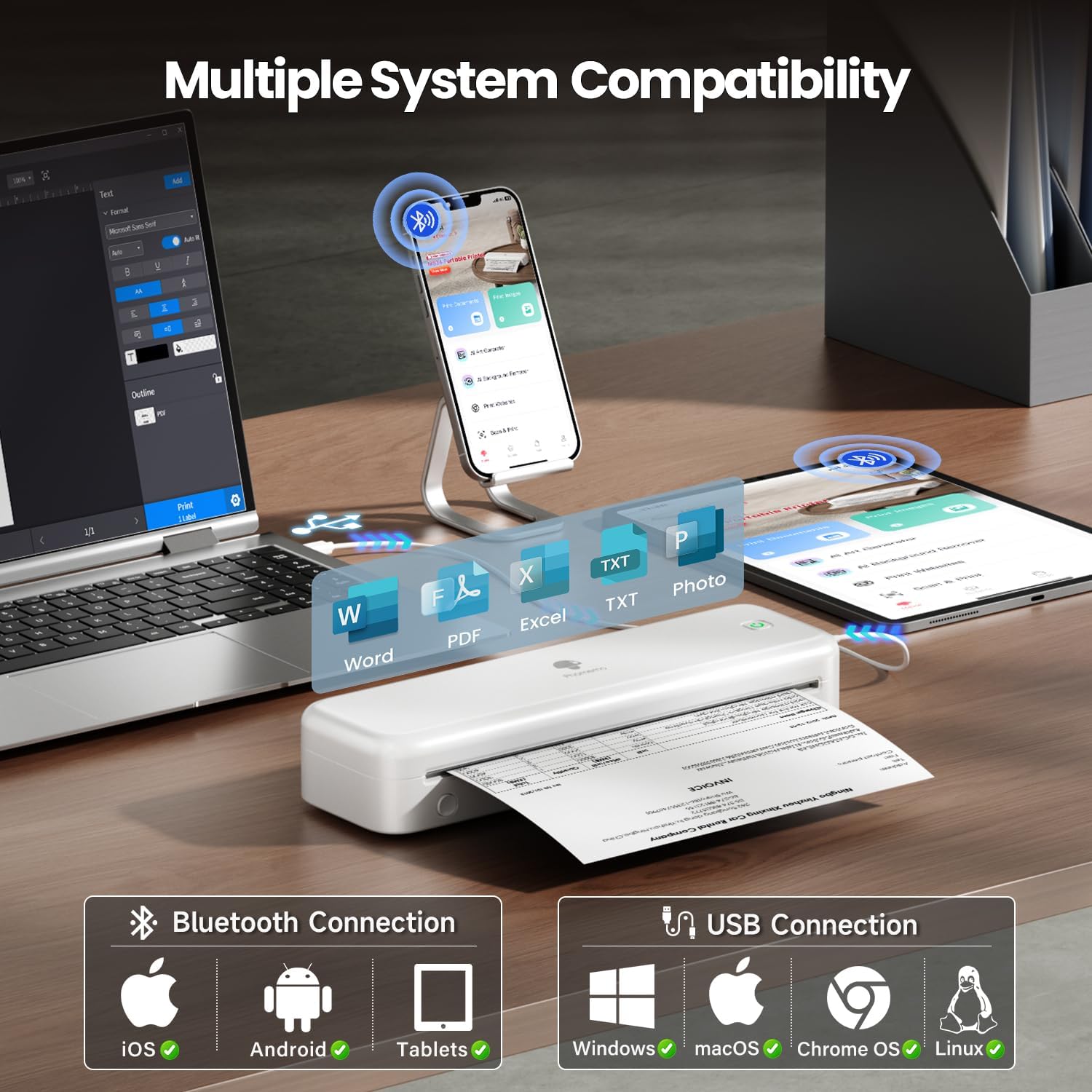
Image: The Phomemo M834 printer demonstrates its broad compatibility, connecting via Bluetooth to iOS, Android, and Tablets, and via USB to Windows, macOS, Chrome OS, and Linux systems, supporting various document formats like Word, PDF, Excel, and text files.
6.3 Mencetak
- Buka dokumen atau imej yang ingin anda cetak pada peranti anda yang disambungkan.
- Select the print option within the application.
- Choose the Phomemo M834 as your printer.
- Adjust print settings (e.g., paper size, density) as needed.
- Mulakan kerja cetak.
7. Penyelenggaraan
7.1 Membersihkan Kepala Cetak
Pembersihan kepala cetak secara berkala memastikan kualiti cetakan yang optimum.
- Turn off the printer and disconnect it from power.
- Buka penutup kertas.
- Lap kepala cetak dengan lembut menggunakan kapasampditambah dengan isopropil alkohol.
- Biarkan kepala cetak kering sepenuhnya sebelum menutup penutup dan menghidupkan pencetak.
7.2 Penyimpanan
Simpan pencetak di tempat yang sejuk dan kering, jauh daripada cahaya matahari langsung dan suhu yang melampau. Jika menyimpan untuk tempoh yang lama, pastikan bateri dicas separa (sekitar 50%) untuk memanjangkan jangka hayatnya.
8. Penyelesaian masalah
| Masalah | Kemungkinan Punca | Penyelesaian |
|---|---|---|
| Pencetak tidak dihidupkan | Bateri lemah; Butang kuasa tidak ditekan dengan betul | Charge the printer; Press and hold the power button for 3 seconds |
| Kualiti cetakan buruk | Print head dirty; Incorrect paper type; Low battery | Clean the print head; Use Phomemo thermal paper; Charge the printer |
| Tidak dapat menyambung melalui Bluetooth | Bluetooth dimatikan; Pencetak tidak dapat ditemui; Isu aplikasi | Ensure Bluetooth is on; Restart printer and app; Re-pair device |
| Kesesakan kertas | Paper loaded incorrectly; Damaged paper | Open cover, remove jammed paper, reload correctly; Use undamaged paper |
| Pencetak tidak dikenali oleh PC | Driver not installed; Loose USB connection | Install latest driver from Phomemo website; Check USB cable connection |
9. Spesifikasi
| Ciri | Perincian |
|---|---|
| Model | M834 |
| Teknologi Percetakan | terma |
| Resolusi Cetakan | 300 x 300 DPI |
| Ketersambungan | Bluetooth, USB |
| Sistem Operasi yang Serasi | Android, iOS, Windows 10/11, Linux, ChromeOS, macOS |
| Kapasiti Bateri | Polimer Lithium 2600mAh |
| Kapasiti Helaian Input Maks | 160 pages (continuous printing) |
| Max Monochrome Printing Speed | 6 ppm |
| Saiz Kertas yang Disokong | US Letter, A4, 4.33'', 3.14'', 2.08'' |
| Dimensi Produk | 29 x 11.2 x 9.8 cm |
| Berat Barang | 1.23 kg |
10. Waranti dan Sokongan
For warranty information and customer support, please refer to the official Phomemo webtapak atau hubungi perkhidmatan pelanggan mereka secara langsung. Simpan resit pembelian anda sebagai bukti pembelian untuk tuntutan waranti.
Phomemo Official Webtapak: www.phomemo.com


