1. Pengenalan
Thank you for choosing the FLEXISPOT Mobile Standing Desk with Wheels (Model: 32x18 Maple). This pneumatic laptop desk is designed to provide a versatile and ergonomic workstation for various environments, including home offices, bedrooms, and living areas. Its height-adjustable feature and mobile design offer flexibility for both sitting and standing use. This manual provides essential information for assembly, operation, maintenance, and safety to ensure optimal performance and longevity of your desk.

Image: The FLEXISPOT Mobile Standing Desk in a home environment, showcasing its compact and versatile design.
2. Maklumat Keselamatan Penting
Sila baca dan fahami semua arahan keselamatan sebelum memasang atau menggunakan produk ini. Kegagalan mematuhi arahan ini boleh mengakibatkan kecederaan atau kerosakan pada produk.
- Sentiasa ikut arahan pemasangan dengan teliti.
- Ensure the desk is placed on a stable, level surface.
- Do not exceed the maximum weight limit of the desk. (Refer to specifications for details).
- Keep fingers and other body parts clear of moving parts during height adjustment.
- Use caution when moving the desk, especially on uneven surfaces or around obstacles, to prevent tipping.
- Do not allow children to play on or around the desk, especially during height adjustments.
- Pastikan semua skru dan pengikat diketatkan dengan kukuh sebelum digunakan dan periksa secara berkala sama ada ia longgar.
3. Senarai Bahagian
Sebelum memulakan pemasangan, sila sahkan bahawa semua bahagian yang disenaraikan di bawah ada dan tidak rosak. Jika mana-mana bahagian hilang atau rosak, sila hubungi khidmat pelanggan.
Imej: Meletup view of the FLEXISPOT Mobile Standing Desk components. This image shows the base, tabletop, lifting column, crossbeam, wrench spring, Phillips screwdriver, and cup holder, all labeled for easy identification.
- Atas meja (1)
- Lifting Column (1)
- Crossbeam (1)
- Pangkalan (1)
- Pemegang Piala (1)
- Wrench Spring (1)
- Pemutar Skru Phillips (1)
- Assembly Screws/Hardware (various, typically labeled A, B, C)
4. Persediaan & Pemasangan
Assembly is designed to be straightforward and typically takes about 10 minutes. All necessary tools are included.
- Install the Lifting Column Spring: Insert the wrench spring into the top of the lifting column. Ensure proper alignment of the spring and handle protrusion with the handle notch.
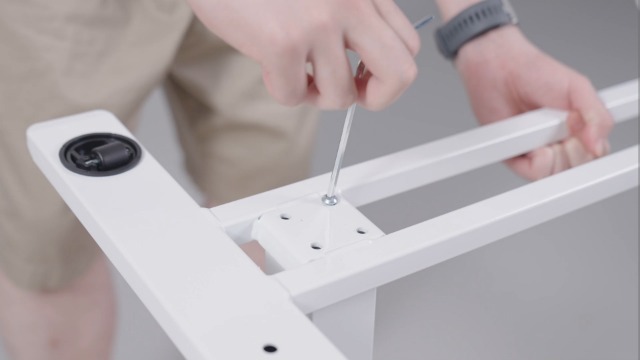
- Pasang Palang Silang: Attach the crossbeam to the lifting column using the provided screws. Note that the notch on the crossbeam needs to be installed facing up. Secure tightly with the Phillips screwdriver.
- Pasang Atas Meja: Carefully align the tabletop with the assembled lifting column and crossbeam. Secure the tabletop to the crossbeam using the appropriate screws.
- Pasang Pangkalan: Attach the base to the bottom of the lifting column. Ensure all screws are tightened for stability.
- Pasang Pemegang Cawan: Assemble the cup holder components and attach it to the side of the tabletop using the provided screws and Phillips screwdriver.
- Turn Over the Desk: With assistance if needed, carefully turn the desk upright.
Video: FLEXISPOT H7 Overbed Bedside Table Installation Guide. This video provides a step-by-step visual guide for assembling the desk, demonstrating how to install each component and adjust the height.
5. Arahan Operasi
Pelarasan Ketinggian
The desk features a gas spring pneumatic lift system for smooth and easy height adjustments.
- Untuk meningkatkan: Gently pull the lever located under the tabletop and apply slight upward pressure to the tabletop. The desk will smoothly rise. Release the lever at the desired height.
- Untuk menurunkan: Gently pull the lever located under the tabletop and apply slight downward pressure to the tabletop. The desk will smoothly lower. Release the lever at the desired height.
- The height can be adjusted from 26 inches to 41.7 inches.

Image: Easy Height Adjustment. This image illustrates the simple one-hand operation for adjusting the desk's height using the pneumatic lift system.
mobiliti
The desk is equipped with hidden casters for easy movement.
- To move the desk, simply push or pull it to your desired location. The hidden casters allow for smooth 360-degree rotation.
- Yang rendah-profile base (1.2 inches high) is designed to easily tuck beneath furniture like beds and sofas, saving space.

Image: C-Shape & Hidden Casters. This image highlights the desk's design, which allows it to fit under low furniture, and shows the hidden wheels for easy movement.
Penggunaan Serbaguna
This desk is designed for multi-functional use:
- Use as a standing desk for improved posture and energy.
- Position over a bed or sofa for comfortable laptop use, reading, or dining.
- Ideal for small craft projects or as a portable workstation in any room.

Image: Multi-functional Use. This collage demonstrates various applications of the desk, including as a yoga side table, pet grooming station, small craft desk, and solo dining table.
6. Penyelenggaraan
Regular maintenance will help prolong the life and appearance of your FLEXISPOT Mobile Standing Desk.
- Pembersihan: Lap permukaan meja dan bingkai dengan kain lembut,amp kain. Elakkan bahan kimia yang keras atau pembersih kasar yang boleh merosakkan kemasan.
- Pemeriksaan perkakasan: Periksa semua skru dan pengikat secara berkala untuk memastikan ia kekal ketat. Ketatkan semula jika perlu.
- Bahagian bergerak: Ensure the gas spring mechanism operates smoothly. Do not apply lubricants unless specifically recommended by the manufacturer.
- Storan: When not in use, store the desk in a dry, temperate environment away from direct sunlight or extreme temperatures.
7. Penyelesaian masalah
If you encounter any issues with your desk, please refer to the following common troubleshooting tips:
| Masalah | Kemungkinan Punca | Penyelesaian |
|---|---|---|
| Desk does not adjust height smoothly. | Lever not fully engaged or gas spring issue. | Ensure the lever is fully pulled. If the issue persists, contact customer support. |
| Meja bergoyang atau tidak stabil. | Pengikat longgar atau permukaan tidak rata. | Check and tighten all assembly screws. Ensure the desk is on a flat, stable surface. |
| Roda tidak bergolek dengan bebas. | Obstruction or debris in casters. | Inspect casters for any obstructions and remove them. Clean casters if necessary. |
If these solutions do not resolve the issue, please contact FLEXISPOT customer support for further assistance.
8. Spesifikasi Produk
| Ciri | Perincian |
|---|---|
| Jenama | FLEXISPOT |
| Model | 32x18 |
| bentuk | segi empat tepat |
| Reka Bentuk Meja | Meja Berdiri |
| Dimensi Produk | 18"D x 32"W x 37"H |
| warna | Maple |
| Gaya | moden |
| Bahan Asas | Logam dan Kayu |
| Jenis Bahan Atas | Kayu (Disahkan FSC) |
| Jenis Selesai | Dilukis |
| Ciri Khas | Portable, Wheel |
| Ketinggian Minimum | 26 Inci |
| Ketinggian Maksimum | 41.7 Inci |
| Perhimpunan yang Diperlukan | ya |
| Termasuk Semua Alat Perhimpunan | ya |
9. Waranti & Sokongan
This FLEXISPOT product comes with a Limited Warranty. For specific details regarding warranty coverage, terms, and conditions, please refer to the documentation included with your purchase or visit the official FLEXISPOT webtapak.
Sokongan Pelanggan: If you have any questions, require assistance with assembly, or need troubleshooting support, please contact FLEXISPOT customer service. Our team is available to help you within 24 hours.
- Sokongan dalam talian: Lawati Kedai FLEXISPOT di Amazon untuk Soalan Lazim dan sumber tambahan.
- E-mel/Telefon: Refer to your product packaging or the official FLEXISPOT website for direct contact information.


