1. Produk Lebihview
The Elitech LogEt 260-TH-5Pack is a 4G real-time temperature and humidity data logger designed for comprehensive environmental monitoring. It features built-in sensors for temperature, humidity, light, shock, and location (LBS), with optional external sensors available. Data is uploaded to a cloud platform via a built-in 4G SIM card, enabling real-time monitoring and alerts through various channels.
1.1. Ciri-ciri Utama
- Double Data Security: Features offline storage of 100,000 record points to prevent data loss and supports "Shadow Data" for continuous recording even if the device is not explicitly started or is mistakenly stopped.
- Multi-Source Sensing: Standard internal sensors include Temperature (-30~60℃), Humidity (0~100%RH), Light (0~52000Lux), Shock (0g~16g), and Location (LBS). Optional external sensors for Humidity, PH value, and CO2 are also supported.
- Pemantauan Jauh: Real-time data is uploaded to the Elitech iCold Cloud platform via a built-in 4G SIM card. Upload intervals are user-settable from 1 minute to 24 hours.
- Cloud-Based Alarms: Receive alerts via Elitech iCold APP, SMS, Email, or the web platform. The device also provides local sound, screen, and indicator light alarms for offline events.
- Automatic Flight Mode & Electronic Fence: Complies with Do160 for aviation safety. Flight mode can be activated manually, scheduled, or automatically via an electronic fence (custom area activation).
- Platform iCold Elitech: A cloud-based platform compatible with RCW series products for real-time monitoring, automatic alerts, online data analysis, and management. It complies with FDA CFR 21 Part 11 requirements and supports iOS and Android apps.
1.2. Kandungan Pakej
Pakej standard termasuk:
- Elitech LogEt260 Reusable Data Logger
- Kad SIM terbina dalam
- Manual Pengguna
- Kabel Jenis-C USB
1.3. Penampilan Produk

Penerangan Imej: A detailed diagram of the Elitech LogEt 260 data logger, highlighting its various components with numbered labels. These include the LCD display screen, LED indicator light, Activate/Airplane mode button, Internal sensor, Back hanging hole, Start/Stop button, Serial number, Light sensor, and Data transmission port.
- Skrin paparan LCD
- Lampu penunjuk LED
- Activate/airplane mode button
- Sensor dalaman
- Back hanging hole
- Butang mula/berhenti
- Nombor siri
- Sensor cahaya
- Port penghantaran data
2. Panduan Persediaan
2.1. Pengaktifan Awal
Before first use, ensure the device is charged using the provided USB Type-C cable. The built-in SIM card is pre-activated for data transmission. To begin monitoring, you will need to register your device on the Elitech iCold Cloud platform.
- Visit the Elitech iCold platform at http://new.i-elitech.com or download the Elitech iCold APP.
- Create an account and add your LogEt260 device using its serial number. The serial number is located on the device itself (refer to Product Appearance, item 7).
- Configure your desired logging parameters, such as upload interval and alarm thresholds, through the iCold platform or APP.
2.2. Mengecas Peranti
Connect the provided USB Type-C cable to the data transmission port (refer to Product Appearance, item 9) on the LogEt260 and to a standard USB power adapter or computer USB port. The device will indicate charging status on its LCD screen.
3. Arahan Operasi
3.1. Starting and Stopping Logging
Tekan ke MULA/BERHENTI button (refer to Product Appearance, item 6) to initiate or cease data logging. The LCD screen will display relevant indicators (e.g., "OK" for logging, "Alarm" for alerts).

Penerangan Imej: The Elitech LogEt 260 data logger showing a temperature reading of 36.8°F on its LCD screen, alongside a smartphone displaying the Elitech iCold app interface with temperature data graphs over time.
3.2. Understanding Shadow Data
The LogEt260 incorporates a "Shadow Data" feature. This means that even if the device is not explicitly started or is mistakenly stopped, it continues to record data passively. This ensures data integrity and prevents loss during unexpected situations. Once the device is properly activated or re-activated, this shadow data can be retrieved and uploaded to the cloud.

Penerangan Imej: The Elitech LogEt 260 data logger displayed next to a printed data report and a smartphone screen, illustrating the concept of "Shadow Data" which passively records data to ensure integrity.
3.3. Multi-Source Sensing
The LogEt260 monitors multiple environmental parameters simultaneously:
- Suhu: Internal sensor range -30~60℃ (-22~140°F).
- Kelembapan: Internal sensor range 0~100%RH.
- Cahaya: Sensor range 0~52000Lux.
- Kejutan: Sensor range 0~16g.
- lokasi: Utilizes LBS (Location Based Service) for tracking.
- Sensor Pilihan: External sensors for Humidity, PH value, and CO2 can be connected for expanded monitoring capabilities.

Penerangan Imej: The Elitech LogEt 260 data logger displaying a humidity reading, with an infographic listing its multi-source sensing capabilities: Temperature, Humidity, Light, Shock, and Location (LBS).
3.4. Mod Penerbangan
To comply with aviation safety regulations (Do160), the LogEt260 features a flight mode. This mode can be activated in three ways:
- Pengaktifan Manual: Press the Activate/Airplane mode button (refer to Product Appearance, item 3).
- Pengaktifan Bermasa: Configure a schedule for flight mode activation via the iCold platform.
- Pagar Elektronik: Set up a custom geographical area (electronic fence) that automatically activates flight mode when the device enters it.

Penerangan Imej: The Elitech LogEt 260 data logger showing a temperature reading, next to a screen displaying the Elitech iCold map interface with location tracking, and text detailing the three methods for activating flight mode.
3.5. Cloud Data Management (Elitech iCold)
The Elitech iCold platform provides comprehensive tools for managing your data logger:
- Pemantauan masa nyata: View live temperature, humidity, and other sensor data from your devices.
- Konfigurasi Penggera: Set custom alarm thresholds and receive notifications via APP, SMS, or Email.
- Analisis Data: Access historical data, generate graphs, and perform analysis.
- Report Export: Export data reports in PDF and CSV formats directly from the platform.
- Pematuhan: The platform is designed to comply with FDA CFR 21 Part 11 requirements.

Penerangan Imej: The Elitech LogEt 260 data logger displaying a temperature reading, positioned next to digital representations of PDF and CSV data reports, illustrating the ability to upload data to the cloud and export reports.
For detailed information on iCold services and plans, refer to the table below:
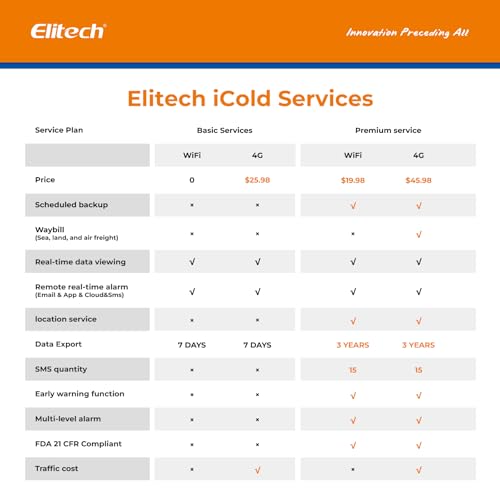
Penerangan Imej: A comparison table outlining the features and costs of Elitech iCold Basic and Premium services, differentiating between WiFi and 4G options for scheduled backup, real-time data viewing, remote alarms, location service, data export, SMS quantity, early warning, multi-level alarm, FDA 21 CFR compliance, and traffic cost.
4. Penyelenggaraan
4.1. Pengurusan Bateri
The LogEt260 is powered by a built-in Lithium Ion battery. Ensure the device is regularly charged using the provided USB Type-C cable to maintain optimal performance. Battery life will vary based on usage, upload interval settings, and environmental conditions.
4.2. Pembersihan dan Penjagaan
The device has an IP65 rating, indicating it is protected against dust ingress and low-pressure water jets from any direction. To clean, wipe the device with a soft, damp cloth. Do not use harsh chemicals or abrasive cleaners. Ensure the USB port cover is securely closed to maintain water resistance.
5. Penyelesaian masalah
- Device not logging: Ensure the device is charged and the START/STOP button has been pressed to initiate logging. Check the LCD screen for logging indicators.
- No data on iCold platform: Verify that the device has network connectivity (4G signal strength indicator on LCD). Check the upload interval settings on the iCold platform. If the device was offline, data should upload once connectivity is restored (Shadow Data feature).
- Alarms not received: Confirm alarm thresholds are correctly set on the iCold platform. Check your APP notification settings, SMS inbox, and email spam folders. Ensure the device has sufficient battery and network connectivity.
- Bacaan tidak tepat: Ensure sensors are clean and unobstructed. For temperature and humidity, allow the device to stabilize in the environment for a period before taking critical readings.
6. Spesifikasi
| Spesifikasi | Perincian |
|---|---|
| Nombor Model | US-LogEt260-TH-5PACK |
| Julat Sensor Suhu Dalaman | -30℃ hingga 60℃ (-22°F hingga 140°F) |
| Internal Humidity Sensor Range | 0% hingga 100% RH |
| Julat Sensor Cahaya | 0 hingga 52000 Lux |
| Shock Sensor Range | 0 hingga 16g |
| Penjejakan Lokasi | LBS (Location Based Service) |
| Kapasiti Penyimpanan Data | 100,000 points (offline) |
| Ketersambungan | Built-in 4G SIM Card |
| Sumber Kuasa | 1 Lithium Ion battery (included), USB Type-C for charging |
| Peringkat Perlindungan Ingress (IP). | IP65 |
| Pengeluar | Elitech |
| Tarikh Tersedia Pertama | 13 Ogos 2024 |
7. Waranti dan Sokongan
For warranty information and technical support, please refer to the official Elitech website or contact Elitech customer service. You can find more information and support resources at the Elitech Store on Amazon or through the Elitech iCold platform.
Elitech iCold is a cloud-based remote accessible platform. It is compatible with RCW series products to realize real-time monitoring of cold chain data, automatic alerts and notifications, online data analysis and management. iCold helps users to achieve effective management of every step of cold chain and immediate assessment compliance. It complies with FDA CFR 21 Part 11 requirements and supports iOS and Android apps.


