pengenalan
Terima kasih kerana membeliasing the WIITHINK WTB-777 Portable Cassette Player and Recorder. This versatile device combines the classic charm of a cassette player and recorder with modern features such as Bluetooth connectivity, USB playback, and AM/FM radio. Designed for ease of use and portability, it allows you to enjoy your favorite audio content wherever you go. Please read this manual thoroughly before operating the device to ensure proper use and to maximize its lifespan.

Figure 1: WIITHINK WTB-777 Portable Cassette Player and Recorder
Produk Selesaiview
The WIITHINK WTB-777 is an all-in-one audio solution, offering multiple playback and recording options. Its compact design and dual power capabilities make it ideal for both home and portable use.
- Classical Tape Radio Player: Enjoy music, radio, and cassette tapes with this all-in-one portable player featuring AM/FM radio, Bluetooth connectivity, USB port, and recording from radio to cassette.
- Retro Nostalgia: Relive the nostalgia of cassette tapes while enjoying modern features like Bluetooth. Built-in cassette player and recorder to record radio to blank tapes.
- AM/FM Radio Stereo: Equipped with a long antenna and upgraded chip for great reception of AM/FM stations. Features a big speaker for clear stereo sound. Frequency range: FM 87 - 108 MHz, AM 520 - 1710 kHz.
- Penstriman Bluetooth: Stream your favorite music wirelessly from your smartphone, tablet, or other Bluetooth-enabled devices.
- Reka Bentuk Mudah Alih: Compact and lightweight for easy portability, perfect for on-the-go listening or use at home. Includes an earphone jack and DC/AC power options.

Figure 2: Key Features of the WTB-777
Apa yang ada dalam Kotak
Selepas membongkar, sila pastikan semua item yang disenaraikan di bawah ada dan dalam keadaan baik:
- WTB-777 Cassette Player Boombox
- Kord Kuasa
- Manual Pengguna (dokumen ini)
Persediaan
Mengkuasakan Peranti
The WIITHINK WTB-777 can be powered by either AC power or batteries.
- Kuasa AC: Connect the included power cord to the AC input jack on the back of the unit and plug the other end into a standard wall outlet (AC 120V/60Hz).
- Kuasa Bateri: For portable use, open the battery compartment on the bottom of the unit and insert 4 x 'C' size batteries (not included), ensuring correct polarity (+/-). Close the battery compartment securely.
Nota: Apabila menggunakan kuasa AC, bateri akan diputuskan sambungannya secara automatik. Tanggalkan bateri jika unit tidak akan digunakan untuk tempoh yang lama bagi mengelakkan kebocoran.
Arahan Operasi
Familiarize yourself with the control panel before operation. Refer to Figure 3 for a detailed diagram of the controls.
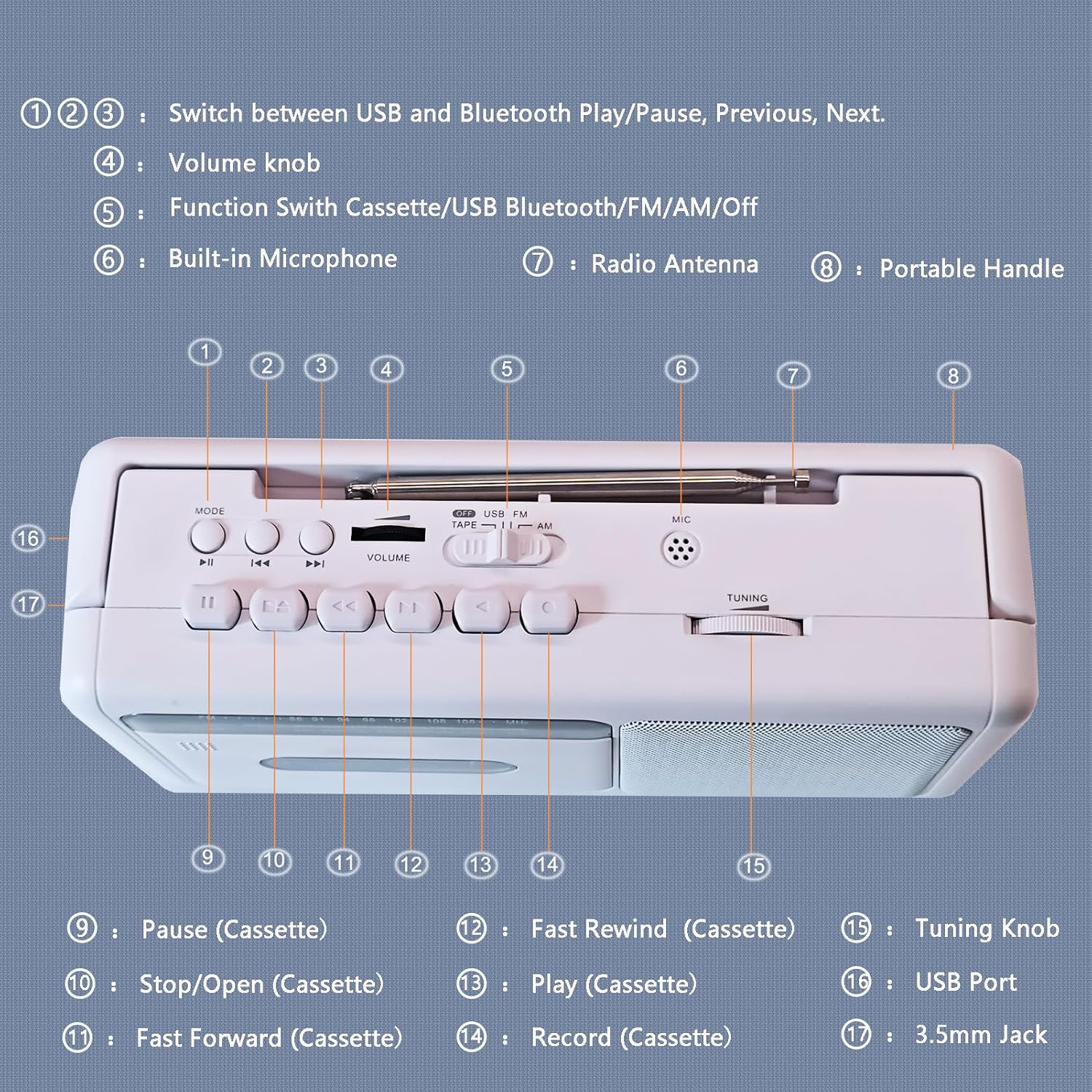
Figure 3: Control Panel Diagram
- 1, 2, 3: Mode/Playback Control Buttons (USB/Bluetooth Play/Pause, Previous, Next)
- 4: Tombol Kelantangan
- 5: Function Switch (Cassette/USB/Bluetooth/FM/AM/Off)
- 6: Mikrofon Terbina dalam
- 7: Antena Radio
- 8: Pemegang Portable
- 9: Pause (Cassette)
- 10: Stop/Open (Cassette)
- 11: Fast Forward (Cassette)
- 12: Fast Rewind (Cassette)
- 13: Play (Cassette)
- 14: Record (Cassette)
- 15: Tombol Penalaan
- 16: Port USB
- 17: 3.5mm Jack (Earphone/Aux-in)
Operasi Pemain Kaset
- Set the Function Switch (5) to "TAPE".
- Press the Stop/Open button (10) to open the cassette compartment door.
- Insert a cassette tape with the open edge facing upwards. Close the compartment door firmly.
- Press the Play button (13) to begin playback.
- Adjust the Volume Knob (4) to your desired listening level.
- To pause playback, press the Pause button (9). Press again to resume.
- To fast forward, press the Fast Forward button (11). To fast rewind, press the Fast Rewind button (12). Press Play (13) or Stop/Open (10) to stop winding.
- To stop playback and eject the tape, press the Stop/Open button (10).

Figure 4: Inserting a Cassette Tape
Operasi Radio AM/FM
- Set the Function Switch (5) to "FM" or "AM".
- Extend the telescopic antenna (7) for optimal FM reception. For AM reception, rotate the unit for best signal.
- Rotate the Tuning Knob (15) to select your desired radio station.
- Adjust the Volume Knob (4) to your desired listening level.

Figure 5: Enjoying AM/FM Radio
Penstriman Bluetooth
- Set the Function Switch (5) to "BT" (Bluetooth). The unit will enter pairing mode, indicated by an audible prompt.
- Pada peranti anda yang didayakan Bluetooth (cth., telefon pintar, tablet), dayakan Bluetooth dan cari peranti yang tersedia.
- Select "WTB-777" from the list of devices to pair. Once paired, you will hear a confirmation sound.
- Begin playing audio on your connected device. The sound will be streamed wirelessly to the WTB-777.
- Use the Volume Knob (4) on the unit or the volume controls on your connected device to adjust the volume.
- Use buttons (1, 2, 3) to control playback (Play/Pause, Previous/Next track) directly from the unit.

Rajah 6: Kesambungan Bluetooth
Main Balik USB
- Set the Function Switch (5) to "USB".
- Masukkan pemacu kilat USB yang mengandungi audio MP3 files into the USB Port (16).
- The unit will automatically begin playing the audio files daripada pemacu USB.
- Use buttons (1, 2, 3) to control playback (Play/Pause, Previous/Next track).
- Adjust the Volume Knob (4) to your desired listening level.
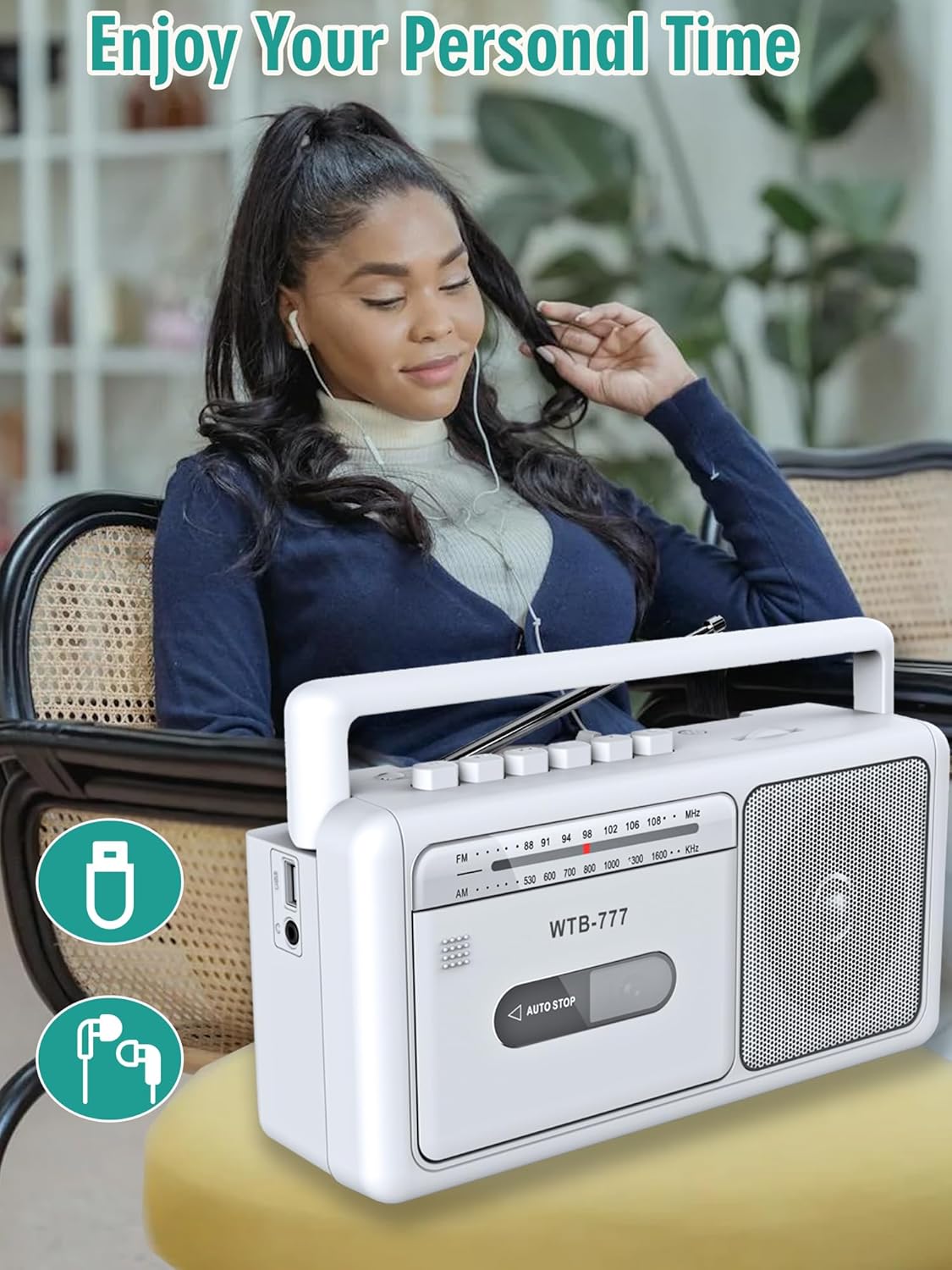
Figure 7: USB Playback and Earphone Jack
Rakaman ke Kaset
The WTB-777 allows you to record audio from the radio onto a blank cassette tape.
- Insert a blank cassette tape into the cassette compartment (refer to Cassette Player Operation).
- Set the Function Switch (5) to "FM" or "AM" and tune to your desired radio station.
- Press the Record button (14) and the Play button (13) simultaneously to begin recording. The unit will automatically start recording the radio broadcast onto the tape.
- To stop recording, press the Stop/Open button (10).
Nota: The built-in microphone (6) can also be used for voice recording directly to tape when the function switch is set to "TAPE" and the Record button (14) is pressed.
Penyelenggaraan
- Pembersihan: Use a soft, dry cloth to clean the exterior of the unit. Do not use abrasive cleaners or solvents. For the cassette head and pinch roller, use a specialized cassette head cleaner periodically to ensure optimal sound quality and prevent tape damage.
- Storan: Apabila tidak digunakan untuk tempoh yang lama, simpan unit ini di tempat yang sejuk dan kering, jauh daripada cahaya matahari langsung dan suhu yang melampau. Tanggalkan bateri jika disimpan untuk jangka masa yang lama.
- Penjagaan Pita: Simpan pita kaset di dalam bekasnya untuk melindunginya daripada habuk dan kerosakan. Elakkan mendedahkan pita kepada medan magnet yang kuat.
Menyelesaikan masalah
If you experience issues with your WIITHINK WTB-777, please consult the following table before seeking professional service.
| Masalah | Kemungkinan Punca | Penyelesaian |
|---|---|---|
| Unit tidak dihidupkan. |
|
|
| Tiada bunyi dari pembesar suara. |
|
|
| Pita kaset tidak dimainkan atau kedengaran herot. |
|
|
| Penerimaan radio yang lemah. |
|
|
| Peranti Bluetooth tidak akan berpasangan. |
|
|
Spesifikasi
Detailed technical specifications for the WIITHINK WTB-777.
| Jenama | WIITHINK |
| Model | WTB-777 |
| Dimensi Produk (L x W x H) | 9.8 x 3 x 5.1 inci (24.9 x 7.6 x 13 cm) |
| Berat Barang | 2.75 paun (1.25 kg) |
| warna | putih |
| Teknologi Ketersambungan | Bluetooth, Built-in Microphone, Earphone Jack, USB |
| Jenis Pembesar Suara | Mudah alih |
| Julat Frekuensi AM | 520 - 1710 kHz |
| Julat Frekuensi FM | 87 - 108 MHz |
| Sumber Kuasa | AC (Power Cord included), 4 x 'C' Batteries (not included) |
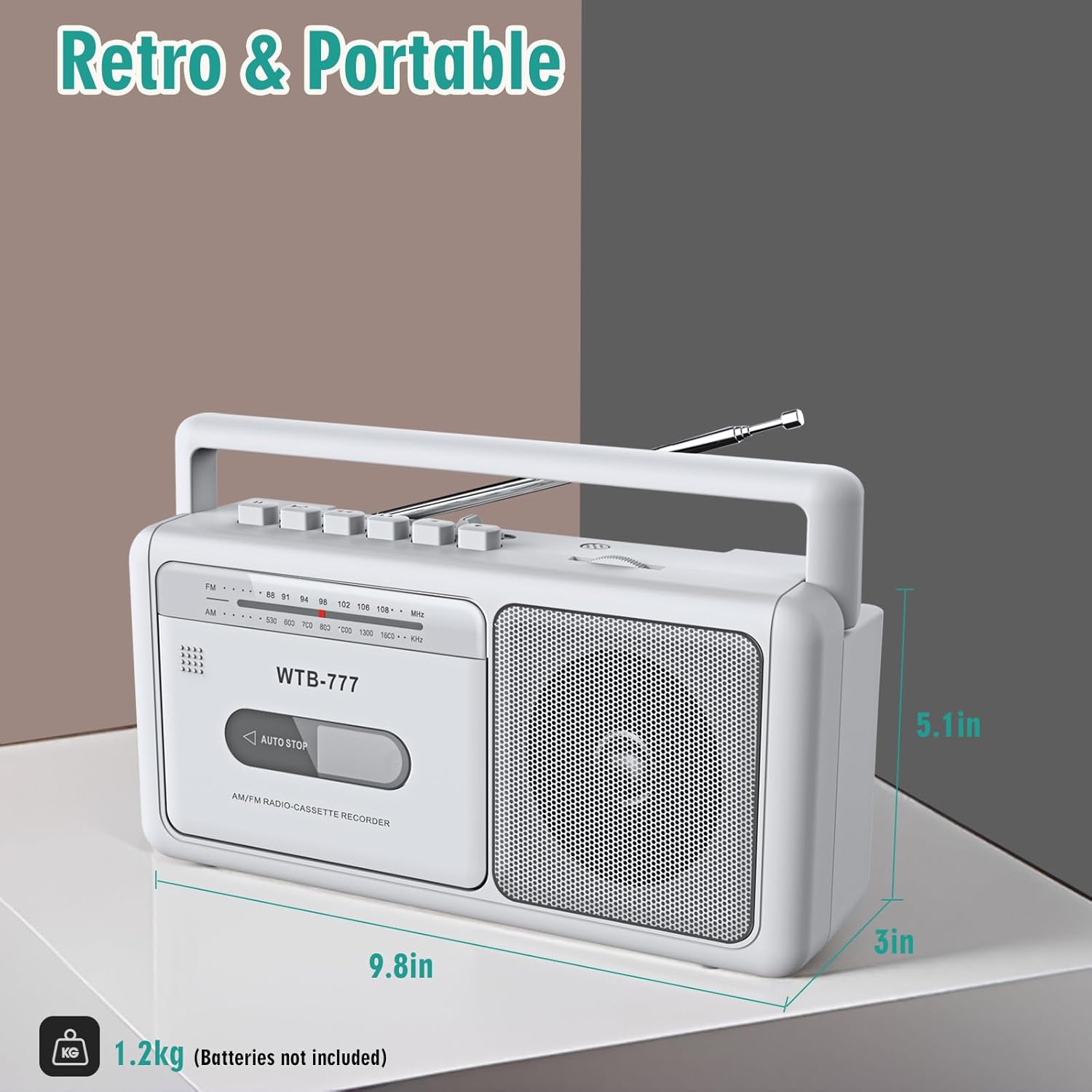
Rajah 8: Dimensi Produk
Waranti dan Sokongan
Specific warranty information for the WIITHINK WTB-777 is typically provided with the product packaging or on the manufacturer's official weblaman web. Sila rujuk dokumentasi yang disertakan dengan pembelian anda untuk terma dan syarat jaminan terperinci.
For technical support, troubleshooting assistance beyond this manual, or inquiries regarding parts and service, please contact WIITHINK customer support through their official channels. Contact information can usually be found on the product packaging, the manufacturer's website, or the retailer's product page.


