1. Pengenalan
This manual provides detailed instructions for the Glorious GMMK 3 PRO TKL Wired Mechanical Keyboard. It covers initial setup, operational guidance, customization options, maintenance, and troubleshooting to ensure optimal performance and user experience.
Ciri-ciri Utama:
- Full Aluminum Body: Features CNC-machined top and bottom cases for durability and a premium aesthetic.
- 9 Points of Modularity: Designed for easy swapping of components to tailor appearance, sound, and feel.
- Modular Gasket System (MGS): Allows customization of internal gaskets for a firmer or more flexible typing experience.
- 5-pin MX Hotswap Support: Compatible with a wide range of Glorious MX switch styles for personalized typing, without requiring soldering.
- Bunyi-Dampening Buih: Includes two layers of dense foam to absorb unwanted resonance and enhance acoustic profile.
2. Kandungan Pakej
Verify that all items listed below are included in your GMMK 3 PRO TKL package:
- 1 x GMMK 3 PRO Keyboard
- 1 x Kabel USB-C Jalinan
- 4 x macOS Alternate Keycaps
- 3 x Sample Switches
- 6 x Extra Screws and O-Rings
- 1 x Penarik Suis
- 1 x Penarik Papan Kekunci
- 1 x Pemutar skru
- 1 x Quick Start Booklet
3. Persediaan Awal
Follow these steps to set up your Glorious GMMK 3 PRO TKL keyboard:
- Unpack the keyboard and all accessories from the box.
- Connect the braided USB-C cable to the USB-C port on the keyboard and to an available USB port on your computer.
- Papan kekunci akan secara automatik dikenali oleh sistem pengendalian anda.
- For advanced customization and firmware updates, download and install the Glorious CORE 2.1 software from the official Glorious webtapak.

The Glorious GMMK 3 PRO TKL Wired Mechanical Keyboard, featuring customizable RGB backlighting and a durable black aluminum body.
4. Pilihan Penyesuaian
The GMMK 3 PRO TKL is designed for extensive customization, allowing users to modify its components to suit individual preferences.
4.1 Reka Bentuk Modular
The keyboard features a highly modular design, enabling easy replacement of keycaps, switches, and other components.

An illustration detailing the modular components of the GMMK 3 PRO, including keycaps, badge, rotary knob, top case, bottom case, and coiled cable, highlighting its customizable nature.
4.2 Hotswappable Switches
The GMMK 3 PRO supports 5-pin MX hotswappable mechanical switches, allowing users to change switches without soldering. Use the included switch puller to carefully remove and insert switches.

An illustration demonstrating the GMMK 3 PRO's compatibility with both 5-pin and 3-pin mechanical switches, allowing for easy customization without soldering.

A terperinci view of the Glorious Fox Linear Switches, preloaded in the GMMK 3 PRO for smooth and precise keystrokes.
4.3 Modular Gasket System (MGS)
The MGS allows for adjustment of the keyboard's internal gaskets to achieve a desired typing feel, ranging from firmer to more flexible. Refer to the Quick Start Booklet for detailed instructions on adjusting the gaskets.

A diagram illustrating the internal structure of the GMMK 3 PRO, showing the swappable switch plate, sound-dampening foam, and modular gaskets designed to adjust typing sound and flexibility.
4.4 Kap kekunci
The GMMK 3 PRO comes with standard ANSI layout keycaps. Users can replace these with custom keycaps using the included keycap puller to personalize the keyboard's appearance.
5. Arahan Operasi
Once connected, the GMMK 3 PRO TKL functions as a standard mechanical keyboard. Key functions are as labeled. For advanced features and customization, utilize the Glorious CORE 2.1 software.
- Pencahayaan RGB: Customize lighting effects, colors, and brightness through the Glorious CORE 2.1 software.
- Pemetaan Semula Kunci: Assign custom functions or macros to keys using the Glorious CORE 2.1 software.
- Profile Pengurusan: Cipta dan tukar antara berbilang profiles for different applications or games via the software.
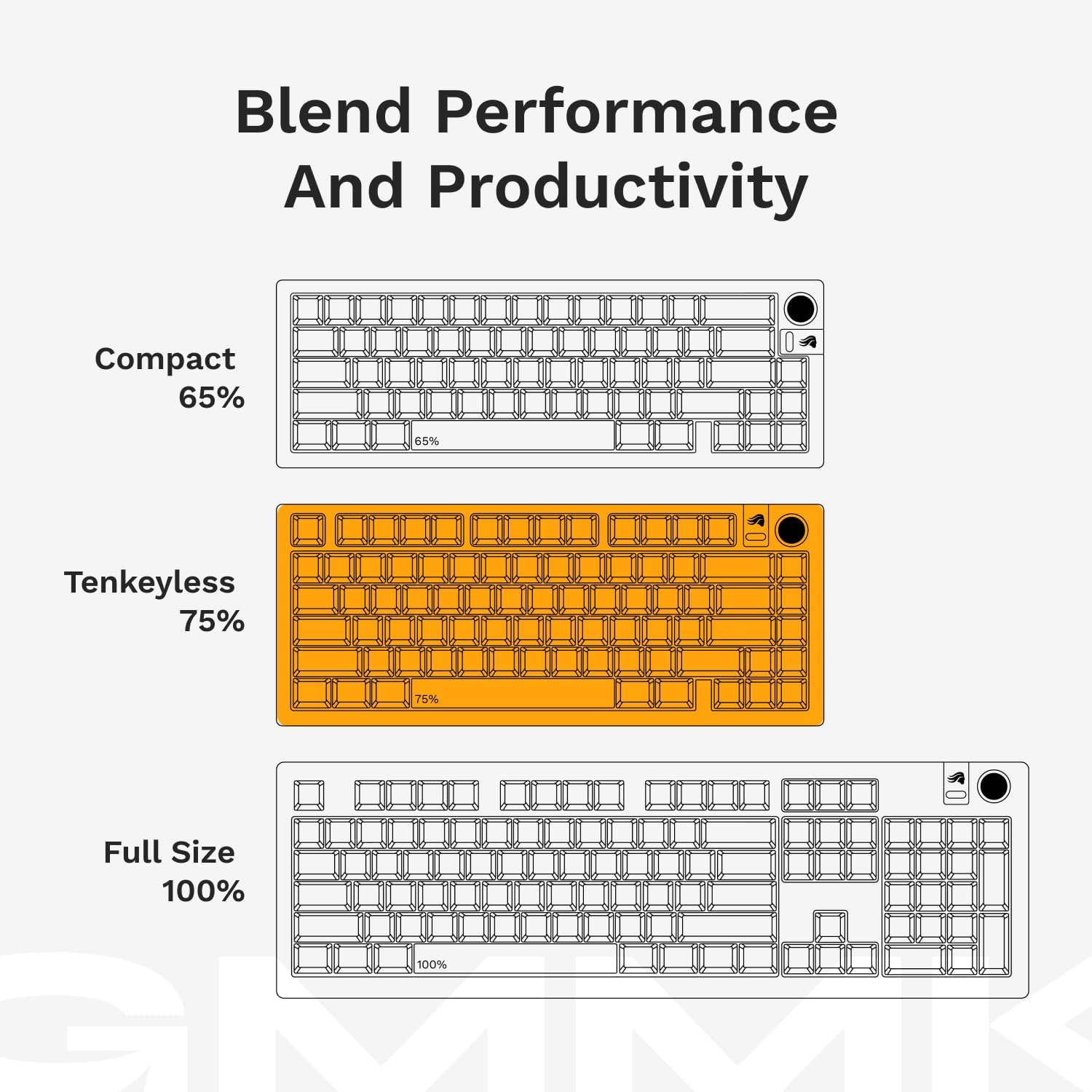
Visual representations of different keyboard layouts: Compact (65%), Tenkeyless (75%), and Full Size (100%), demonstrating the GMMK 3 PRO's 75% Tenkeyless form factor.
6. Penjagaan dan Penyelenggaraan
To ensure the longevity and optimal performance of your GMMK 3 PRO TKL keyboard, follow these maintenance guidelines:
- Pembersihan: Regularly clean the keyboard with a soft, dry cloth. For deeper cleaning, remove keycaps using the keycap puller and use compressed air to clear debris from between switches.
- Elakkan Cecair: Keep liquids away from the keyboard to prevent damage to electronic components.
- Pengurusan Kabel: Avoid sharp bends or excessive pulling on the USB-C cable to prevent internal wire damage.
- Storan: Simpan papan kekunci di persekitaran yang bersih dan kering apabila tidak digunakan.
7. Penyelesaian masalah
If you encounter issues with your GMMK 3 PRO TKL, refer to the following common troubleshooting steps:
- Papan Kekunci Tidak Membalas:
- Pastikan kabel USB-C disambungkan dengan selamat pada papan kekunci dan komputer.
- Cuba sambungkan papan kekunci ke port USB lain pada komputer anda.
- Uji papan kekunci pada komputer lain untuk menolak isu khusus sistem.
- Kunci Tidak Mendaftar:
- Carefully remove the keycap and switch for the affected key. Inspect for any debris or damage.
- Re-insert the switch firmly. If the issue persists, try swapping it with a known working switch.
- Isu Pencahayaan RGB:
- Ensure the Glorious CORE 2.1 software is installed and updated.
- Check lighting settings within the software.
- Update the keyboard firmware via the Glorious CORE 2.1 software.
- Perisian Tidak Mengesan Papan Kekunci:
- Restart your computer and the Glorious CORE 2.1 software.
- Ensure the software is the latest version.
- Temporarily disable any antivirus or firewall software that might interfere.
For persistent issues or further assistance, please contact Glorious customer support.
8. Spesifikasi Produk
| Ciri | Perincian |
|---|---|
| Jenama | mulia |
| Nombor Model | GLO-KB-GMMK3-PRO-75-PB-FOX-W-BLK-US |
| Platform Perkakasan | Komputer riba, PC |
| Berat Barang | 3.9 paun |
| Dimensi Produk | 13.3 x 6 x 1.8 inci |
| warna | Hitam |
| Sumber Kuasa | USB Powered |
| Teknologi Ketersambungan | USB-C |
| Penerangan Papan Kekunci | USB C Fox Switch Mechanical Keyboard |
| Penggunaan yang Disyorkan | Everyday Use, Gaming, Programming, Student, Video Editing |
| Ciri Khas | Fox Switches, Hot-Swappable, Mechanical Keyboard, Tenkeyless 75% Layout, Wired |
| Backlighting papan kekunci | RGB |
| Gaya | GMMK 3 Pro |
9. Waranti dan Sokongan Pelanggan
9.1 Maklumat Waranti
The Glorious GMMK 3 PRO TKL Mechanical Keyboard is covered by a Waranti 2 Tahun. This warranty covers manufacturing defects and ensures hassle-free return and replacement for eligible Glorious electronic devices. Please retain your proof of purchase for warranty claims.
9.2 Sokongan Pelanggan
For technical support, warranty claims, or any questions regarding your Glorious GMMK 3 PRO TKL keyboard, please visit the official Glorious website or contact their customer service department. Detailed contact information can be found on the Glorious webtapak.


