1. Arahan Keselamatan
Please read and understand all safety instructions before operating the Moukey MTs10-2 Karaoke Machine. Retain this manual for future reference.
- Jangan dedahkan peranti kepada hujan, lembapan atau suhu yang melampau.
- Elakkan meletakkan unit berhampiran sumber haba atau di bawah cahaya matahari langsung.
- Jangan buka casing; merujuk semua perkhidmatan kepada kakitangan yang berkelayakan.
- Pastikan pengudaraan yang betul untuk mengelakkan terlalu panas.
- Gunakan hanya penyesuai kuasa yang disediakan.
- Jauhkan daripada kanak-kanak.
- Buang bateri secara bertanggungjawab mengikut peraturan tempatan.
2. Kandungan Pakej
Sahkan bahawa semua item yang disenaraikan di bawah disertakan dalam pakej anda:
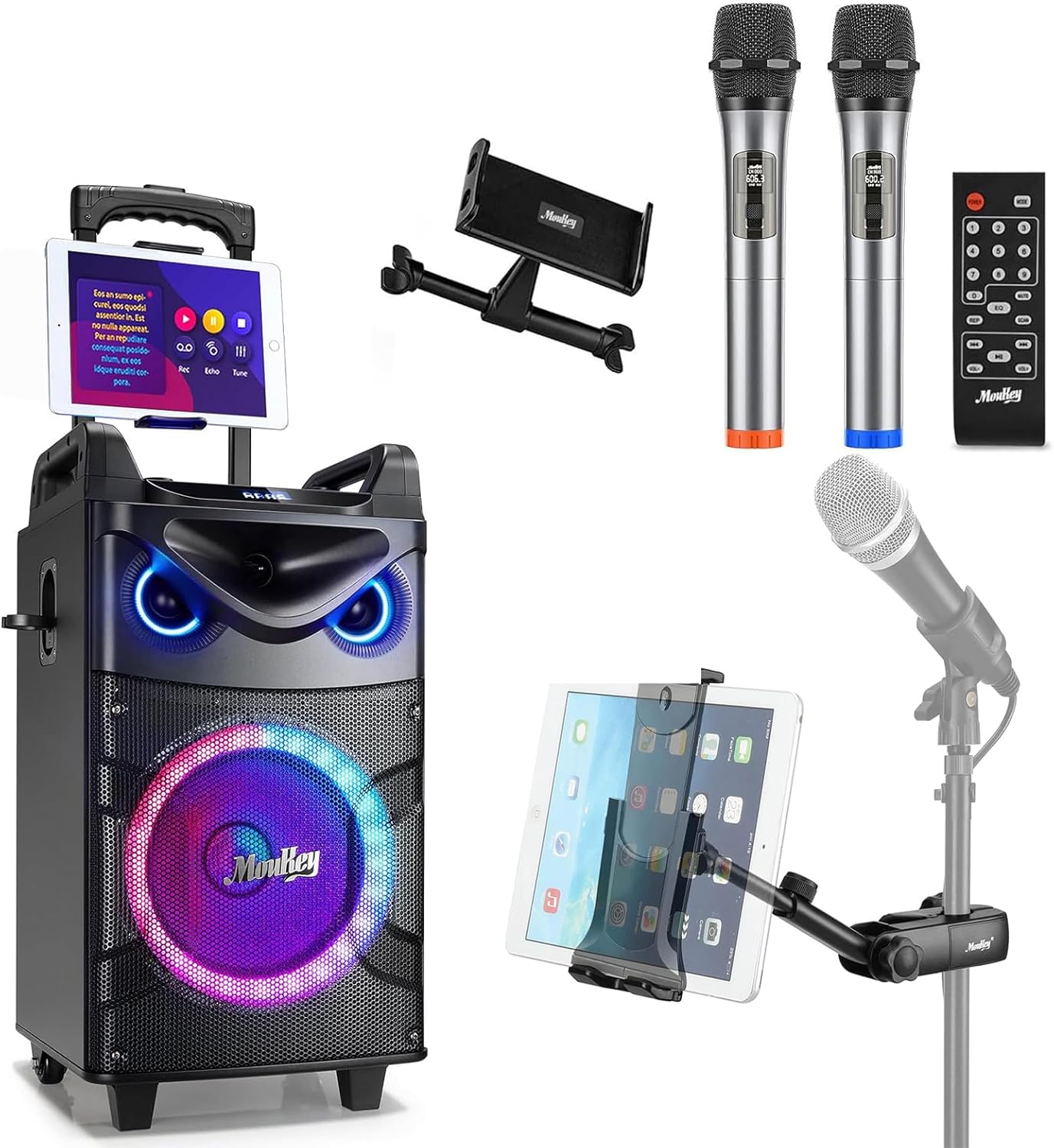
- Moukey MTs10-2 Karaoke Machine
- Wireless Microphone (x2)
- Adjustable Tablet Holder
- Alat Kawalan Jauh
- Penyesuai Kuasa
- Kabel AUX 3.5mm
- TV Cable (RCA to 3.5mm)
- Manual Pengguna (dokumen ini)

3. Produk Lebihview
3.1 Komponen Utama
The Moukey MTs10-2 Karaoke Machine features a robust design with integrated audio components and versatile connectivity options.
- Woofer 10 inci: Provides powerful bass and full-range sound reproduction.
- Tweeter 3 inci: Delivers clear high-frequency audio.
- UHF Wireless Microphones: Two high-fidelity microphones for vocal performance.
- Adjustable Tablet Holder: Securely holds smartphones and tablets for lyric display or video playback.
- Lampu LED Bersepadu: Dynamic colorful lights that synchronize with music.

3.2 Panel Kawalan
The control panel located on the top of the unit provides access to all functions and adjustments.
- Tombol Kelantangan: Melaraskan kelantangan induk.
- Pelarasan Bes: Controls the low-frequency output.
- Pelarasan Treble: Controls the high-frequency output.
- Butang Mod: Switches between input sources (Bluetooth, AUX, USB, TF Card, FM Radio).
- Light FX Button: Cycles through LED light modes.
- Port USB: Untuk main balik pemacu USB.
- Slot Kad TF: For TF card playback.
- AUX In: Input 3.5mm untuk peranti audio luaran.
- 6.35mm Mic Jacks: Two additional inputs for wired microphones.
- INST/TWS Button: Initiates True Wireless System pairing or instrument input.

4. Persediaan
4.1 Charging the Karaoke Machine
- Connect the provided power adapter to the DC IN port on the back of the karaoke machine.
- Pasangkan penyesuai ke soket dinding standard.
- Lampu penunjuk pengecasan akan menyala. Pengecasan penuh biasanya mengambil masa kira-kira 6 jam.
- The machine offers up to 14 hours of playing time on a full charge, depending on usage.

4.2 Memasang Bateri Mikrofon
Each wireless microphone requires two AA batteries (not included).
- Unscrew the bottom cap of each microphone.
- Masukkan dua bateri AA, pastikan kekutuban (+/-) betul.
- Skrukan penutup bawah kembali dengan kukuh.

4.3 Attaching the Tablet Holder
The adjustable tablet holder can be attached to the karaoke machine or a separate microphone stand.
- To the Karaoke Machine: Slide the tablet holder's base into the designated slot on top of the MTs10-2 unit until it clicks into place.
- To a Mic Stand: Gunakan clamp mechanism on the tablet holder to secure it to a standard microphone stand pole.
- Adjust the flexible ball joint and the 360° rotatable clamp untuk mencapai yang diinginkan viewing angle for your device.


5. Arahan Operasi
5.1 Hidupkan/Mati Kuasa
Press and hold the Power button on the control panel to turn the karaoke machine on or off.
5.2 Sambungan Bluetooth
- Turn on the karaoke machine. It will automatically enter Bluetooth pairing mode, indicated by a flashing 'BLUE' on the display.
- Pada telefon pintar atau tablet anda, dayakan Bluetooth dan cari peranti yang tersedia.
- Select 'Moukey MTs10-2' from the list to pair. A confirmation tone will sound upon successful connection.
5.3 Penggunaan Mikrofon
- Turn on the wireless microphones using their respective power switches. They will automatically connect to the karaoke machine.
- Adjust the microphone volume using the dedicated controls on the machine.
- For wired microphones, plug them into the 6.35mm Mic Jacks on the control panel.
5.4 Penggandingan Sistem Tanpa Wayar Sejati (TWS)
The TWS function allows you to connect two MTs10-2 units for a stereo sound experience (second unit sold separately).
- Ensure both MTs10-2 units are powered on and not connected to any Bluetooth device.
- On one unit (the master), press and hold the 'INST/TWS' button until you hear a pairing tone.
- The two units will automatically connect. Once paired, connect your Bluetooth device to the master unit as described in Section 5.2.

5.5 Mod Lampu LED
Press the 'Light FX' button on the control panel or remote control to cycle through various colorful LED light modes. The lights can change color with the beat of the music, creating a dynamic atmosphere.

5.6 Audio Input Options
The MTs10-2 supports multiple audio input methods:
- Bluetooth: Wireless connection to smartphones, tablets, and other Bluetooth-enabled devices.
- AUX In: Connect external audio players using the provided 3.5mm AUX cable.
- Kad USB/TF: Insert a USB drive or TF card into the respective slots for direct audio playback.
- Radio FM: Switch to FM radio mode to listen to local stations.

5.7 Melaraskan Bunyi
Use the dedicated knobs on the control panel to fine-tune your audio output:
- Tombol Kelantangan: Putar mengikut arah jam untuk meningkatkan kelantangan, lawan arah jam untuk mengurangkan.
- Pelarasan Bes: Adjust to enhance or reduce low frequencies.
- Pelarasan Treble: Adjust to enhance or reduce high frequencies.
6. Penyelenggaraan
Proper maintenance ensures the longevity and optimal performance of your karaoke machine.
- Pembersihan: Gunakan kain lembut dan kering untuk membersihkan bahagian luar unit. Jangan gunakan pembersih cecair atau bahan kasar.
- Storan: Store the machine in a cool, dry place away from direct sunlight and extreme temperatures when not in use.
- Penjagaan Bateri: If storing for an extended period, fully charge the internal battery every 3-6 months to maintain its health. Remove AA batteries from microphones if not used for a long time.
- Pengudaraan: Ensure the speaker grilles and vents are free from dust and obstructions.
7. Penyelesaian masalah
Rujuk jadual di bawah untuk isu biasa dan penyelesaiannya.
| Masalah | Kemungkinan Punca | Penyelesaian |
|---|---|---|
| Tiada kuasa | Battery depleted; Power adapter not connected. | Charge the machine; Ensure power adapter is securely connected to both the unit and a working outlet. |
| Tiada keluaran bunyi | Kelantangan terlalu rendah; Mod input salah; Peranti tidak disambungkan. | Increase master volume; Press 'Mode' button to select correct input; Re-pair Bluetooth device or check AUX/USB connection. |
| Mikrofon tidak berfungsi | Microphone off; Batteries depleted; Out of range. | Turn on microphone; Replace AA batteries; Ensure microphone is within operating range of the machine. |
| Sambungan Bluetooth tidak stabil | Device too far; Interference; Other Bluetooth devices connected. | Move device closer to the machine; Avoid obstacles; Disconnect other Bluetooth devices. |
| Gandingan TWS gagal | One or both units already connected to Bluetooth; Incorrect pairing procedure. | Ensure both units are disconnected from other Bluetooth devices; Follow TWS pairing steps in Section 5.4 carefully. |
8. Spesifikasi
| Ciri | Spesifikasi |
|---|---|
| Jenama | Moukey |
| Model | MTs10-2 |
| Saiz Woofer | 10 inci |
| Saiz Tweeter | 3 inci |
| Output Kuasa Maks | 160 Watt |
| Sumber Kuasa | Dikuasakan Bateri |
| Teknologi Ketersambungan | Bluetooth |
| Bilangan Saluran | 4 |
| Input Audio | Wired microphones, wireless microphones, musical instruments, audio players |
| Microphone Connector Type | 6.35mm Jack (for wired mics) |
| Keserasian Pemegang Tablet | 4.7 to 12.9 inches phones & tablets (horizontal placement) |
| Jenis Pemasangan | Lantai Berdiri |
| warna | Hitam |
9. Waranti dan Sokongan
Moukey products are designed and manufactured to the highest quality standards. For warranty information, technical support, or service inquiries, please refer to the warranty card included in your package or visit the official Moukey webtapak. Anda juga boleh melawat Moukey Store on Amazon untuk maklumat produk tambahan dan sumber sokongan.


