1. Pengenalan
This manual provides detailed instructions for the installation, setup, operation, and maintenance of your AkaGear DS10 Mini Keyless Entry Door Lock. Please read this manual thoroughly before installation and use to ensure proper function and safety.
2. Maklumat Keselamatan
- Use only 4xAA alkaline (non-rechargeable) batteries. Do not mix old and new batteries or different types of batteries.
- Ensure all components are securely installed before operating the lock.
- Keep physical keys in a secure location outside the home to prevent lockout.
- Avoid exposing the lock to extreme temperatures or direct water spray, although it features IP54 weather resistance.
- Regularly check battery levels and replace batteries promptly when indicated.
3. Kandungan Pakej
Sahkan bahawa semua item terdapat dalam pakej anda:
- Keyless Entry Keypad Assembly
- Perhimpunan Dalaman
- Selak Deadbolt
- Plat Pemasangan
- Pukulan Pukulan
- 2 Kekunci Fizikal
- Skru Pemasangan
- Manual Pengguna
4. Produk Lebihview
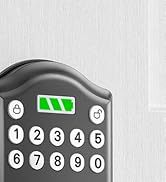
The AkaGear DS10 Mini is a smart deadbolt designed for convenient keyless entry. It features a backlit keypad, a battery power indicator, and supports up to 300 user codes.

Imej: The AkaGear DS10 Mini lock highlighting its capacity for up to 300 user codes, one-time PIN codes, and inclusion of 2 physical keys.

Imej: Features demonstrating low power consumption, including a backlit keypad, battery power indicator, and an estimated 1 year or 5000 uses battery life.
5. Pemasangan
The AkaGear DS10 Mini is designed for easy installation, typically within 10 minutes. Ensure your door meets the specified dimensions before proceeding.
5.1 Door Compatibility Check

Imej: Important door dimensions for installation: Hole Diameter: 2-1/8" (54mm), Backset: 2-3/8" or 2-3/4" (60mm or 70mm), Door Thickness: 1-3/8" to 2" (35mm to 50mm). The lock is compatible with both left-handed and right-handed doors.
5.2 Pemasangan Langkah demi Langkah
Follow these steps for a smooth installation:
- Buang Perkakasan Sedia Ada: Carefully remove your old deadbolt and any associated hardware.
- Pasang Selak: Masukkan selak deadbolt baharu ke tepi pintu. Pastikan ia berorientasikan dengan betul untuk ayunan pintu anda. Selamat dengan skru.
- Install Keypad Assembly: Pass the cable from the keypad assembly through the door hole and align the keypad with the latch.
- Pasang Plat Pemasangan: Attach the mounting plate to the interior side of the door, securing it with screws through the door hole and into the keypad assembly. Ensure the cable passes through the plate.
- Sambungkan Kabel: Connect the cable from the keypad to the interior assembly.
- Pasang Perhimpunan Dalaman: Mount the interior assembly onto the mounting plate, ensuring the thumb turn spindle engages with the latch mechanism. Secure with screws.
- Operasi Ujian: Before closing the door, manually test the deadbolt by turning the thumb turn to ensure smooth operation.

Imej: The installation process of the AkaGear DS10 Mini, demonstrating how the keypad and interior components fit together.
Video: An unboxing and installation guide for the ApeStellar Keyless Entry Door Lock, demonstrating the physical steps to install the lock on a door.
6. Persediaan dan Pengaturcaraan
After installation, you will need to program your lock with user codes and configure settings.
6.1 Arahan Pengaturcaraan
Refer to the included user manual for detailed programming steps. This typically involves entering a master code followed by specific sequences to add or delete user codes.

Imej: Illustration of using a one-time code for temporary access, ideal for guests or service providers.
6.2 Menetapkan Kod Pengguna
The lock supports up to 300 user codes. You can create permanent codes for family members and temporary one-time codes for visitors. Consult your user manual for the exact sequence to add or delete codes.
6.3 Automatic Lock Function
The automatic lock feature can be configured to lock the door after a set period (5, 10, 20, 30, or 60 seconds) once closed. This feature can be enabled or disabled as needed. Refer to your user manual for activation steps.
7. Arahan Operasi
7.1 Unlocking with a Code
To unlock the door, press any key to wake up the keypad, enter your valid user code, and then press the '#' key. The deadbolt will retract, allowing you to open the door.
7.2 Mengunci Pintu
To lock the door, simply press the '#' key. The deadbolt will extend. If the auto-lock feature is enabled, the door will lock automatically after the set delay.

Imej: Demonstrates the auto-lock feature, which can be set to engage after 5, 10, 20, 30, or 60 seconds, and the manual lock option.
7.3 Kata Laluan Anti-Pengintipan
For enhanced security, you can enter random digits before or after your actual code. This feature prevents others from guessing your code by observing your hand movements.

Imej: Illustrates the anti-peeping password feature, where random digits can be added before or after the actual code for privacy.
7.4 Using Physical Keys
In case of battery depletion or forgotten codes, the lock can always be opened using the provided physical keys.
8. Penyelenggaraan
8.1 Penggantian Bateri
The lock requires 4xAA alkaline (non-rechargeable) batteries. The battery indicator light will alert you when power is low. To replace, remove the interior cover, replace the old batteries with new ones, and reattach the cover.

Imej: The interior assembly with the battery cover removed, showing the placement of 4xAA batteries.
8.2 Backup Power
If batteries completely drain, the lock features a backup power option. Connect a 9V battery to the terminals on the bottom of the keypad to temporarily power the lock and enter your code.
Imej: The lock's backup power feature, allowing temporary power via a 9V battery in case of full battery depletion.
8.3 Penjagaan Am
Clean the keypad with a soft, dry cloth. Avoid abrasive cleaners or solvents that could damage the finish or electronic components.
9. Penyelesaian masalah
If you encounter issues with your AkaGear DS10 Mini lock, try the following:
- Kunci Tidak Membalas: Periksa tahap bateri dan gantikan jika perlu. Pastikan bateri dimasukkan dengan kekutuban yang betul.
- Code Not Working: Verify you are entering the correct code. Try resetting the lock to factory settings (refer to your user manual for instructions on 'Deleting All User Codes' and reprogramming).
- Deadbolt Tidak Memanjang/Menarik Balik: Ensure the latch is installed correctly and moves freely. Check for any obstructions in the door frame.
- Pad kekunci tidak menyala: Ini mungkin menunjukkan bateri lemah. Gantikan mereka.
10. Spesifikasi
| Ciri | Spesifikasi |
|---|---|
| Jenama | AkaGear |
| Nama Model | DS10 Mini |
| Jenis Kunci | Deadbolt |
| bahan | aluminium |
| Dimensi Item (L x W x H) | 2.83 x 0.59 x 4.84 inci |
| Berat Barang | 1.64 paun (0.75 Kilogram) |
| Ciri Khas | Auto-Lock, Easy Installation, Keyless Entry |
| Jenis Pengawal | Papan kekunci |
| Kaedah Kawalan | Sentuh |
| Protokol Ketersambungan | Wi-Fi |
| Bateri Diperlukan | Yes (4xAA, not included) |
| Rintangan Cuaca | IP54 |
11. Waranti dan Sokongan
AkaGear offers a 30-day customer commitment and a 1-year product warranty on all parts. Lifetime after-sales customer service is available, including online phone support from Monday to Friday 9 AM to 5 PM PST and 24/7 online email service. For support, please refer to the contact information provided in your product packaging or visit the official AkaGear webtapak.


