1. Pengenalan
Thank you for choosing the Bobtot Portable Bluetooth Speaker EP20. This manual provides essential information for setting up, operating, and maintaining your speaker. Please read it thoroughly to ensure optimal performance and longevity of your device.

Image 1.1: Bobtot Portable Bluetooth Speaker EP20. This image displays the white speaker with its handle and the front grille illuminated with colorful RGB lights.
2. Apa yang ada di dalam Kotak
Carefully unpack your Bobtot EP20 speaker and ensure all items are present:
- EP20 Bluetooth Speaker x1
- Mikrofon Wayarles x1
- Kabel Pengecas Jenis C x1
- Auxiliary Cable x1
- Manual Pengguna x1

Image 2.1: Package Contents. This image shows the Bobtot EP20 speaker, wireless microphone, Type C charging cable, auxiliary cable, and user manual laid out.
3. Produk Lebihview
3.1 Panel Kawalan

Image 3.1: Speaker Control Panel. This image highlights the buttons on the top of the speaker, including power, volume, play/pause, EQ mode, and RGB light controls.
3.2 Pelabuhan dan Sambungan

Image 3.2: Speaker Connection Ports. This image shows the various input ports on the speaker, including Type C charging, 3.5mm AUX, and USB.
4. Persediaan
4.1 Mengecas Speaker
- Connect the provided Type C charging cable to the speaker's Type C port.
- Sambungkan hujung kabel yang satu lagi ke penyesuai kuasa USB (tidak disertakan) atau port USB komputer.
- Lampu penunjuk pengecasan akan menunjukkan status pengecasan. Pengecasan penuh biasanya mengambil masa beberapa jam.
4.2 Charging the Wireless Microphone
- The wireless microphone is rechargeable. Use a compatible charging cable (often micro-USB, check microphone port) to charge it.
- A charging indicator on the microphone will confirm charging status.
4.3 Menghidupkan/Mematikan
- Penceramah: Press and hold the Power button on the top panel to turn the speaker on or off.
- mikrofon: Press and hold the Power button on the microphone to turn it on or off.
4.4 Berpasangan Bluetooth
- Turn on the Bobtot EP20 speaker. It will automatically enter Bluetooth pairing mode, indicated by a flashing LED light.
- Pada peranti anda (telefon pintar, tablet, komputer riba), dayakan Bluetooth dan cari peranti yang tersedia.
- Select "Bobtot EP20" from the list of devices.
- Once connected, the speaker will emit an audible confirmation, and the LED light will stop flashing.
4.5 Microphone Auto Connection
The wireless microphone is designed to automatically connect to the Bobtot EP20 speaker when both devices are powered on and within range. No manual pairing is typically required for the microphone.

Image 4.1: Microphone Auto Connection. This image shows the speaker and microphone together, highlighting the automatic connection feature and microphone controls.
5. Arahan Operasi
5.1 Main Balik Audio Asas
- Kawalan Kelantangan: Use the '+' and '-' buttons on the speaker's control panel to adjust the main speaker volume.
- Main/Jeda: Tekan butang Main/Jeda untuk memulakan atau menjeda main balik audio.
- Navigasi Trek: Use the previous/next track buttons (often integrated with volume controls or separate) to skip tracks.
5.2 EQ Mode Adjustment
The speaker features adjustable EQ modes for different listening environments.
- Short press the 'M' (Mode) button on the speaker's control panel to cycle through EQ modes.
- Mod Dalaman: Menyediakan pro bunyi yang seimbangfile.
- Mod Luaran: Enhances bass for a more powerful sound in open environments.

Image 5.1: EQ Mode Switch. This image illustrates the difference between Indoor Mode (balanced sound) and Outdoor Mode (deep bass) and indicates the button to press for adjustment.
5.3 Mod Cahaya RGB
The speaker includes dynamic RGB lighting effects.
- Short press the Light button (often indicated by a sun or star icon) on the control panel to cycle through different light modes.
- Long press the Light button to turn the RGB lights off.

Image 5.2: Controllable Dancing RGB Lights. This image shows multiple Bobtot EP20 speakers with different RGB light patterns, demonstrating the dynamic lighting feature.
5.4 Wireless Microphone Functions
- Kelantangan Mikrofon: Use the volume controls on the microphone itself to adjust its output level.
- Kesan Gema: Adjust the echo effect using the dedicated button or dial on the microphone to add or reduce reverb.
- Magic Sound Effects: The microphone offers 5 different voice-changing effects (e.g., baby, monster, female, male, original voice). Press the designated button to cycle through these effects.

Image 5.3: 5 Voice Changes for Fun. This image shows a family using the microphone with the speaker, illustrating the various voice-changing effects available.
5.5 Multiple Connection Methods
In addition to Bluetooth, the Bobtot EP20 supports several other audio input methods:
- Input AUX: Connect non-Bluetooth devices (e.g., projectors, computers) using the provided 3.5mm auxiliary cable. The speaker will automatically switch to AUX mode or require manual selection via the 'M' (Mode) button.
- Main Semula Pemacu USB: Masukkan pemacu kilat USB yang mengandungi audio files into the USB port. The speaker will automatically detect and play music from the drive.
- Radio FM: Switch to FM radio mode using the 'M' (Mode) button. The speaker can automatically search and save available stations.

Image 5.4: Multiple Connection Methods. This image demonstrates the speaker's versatility by showing it connected to various devices via Bluetooth, AUX, and USB.
6. Penyelenggaraan
- Pembersihan: Gunakan kain lembut dan kering untuk membersihkan bahagian luar pembesar suara. Jangan gunakan pembersih atau pelarut yang melelas.
- Penjagaan Bateri: To prolong battery life, fully charge the speaker before first use. Avoid completely draining the battery frequently. If storing for an extended period, charge the battery to approximately 50% every few months.
- Tahan Air: The speaker is IPX6 water-resistant, meaning it can resist gentle water spray and splashes. Do not submerge the speaker in water or expose it to heavy rain. Ensure all port covers are securely closed before exposure to moisture.
- Storan: Simpan pembesar suara di tempat yang sejuk dan kering jauh dari cahaya matahari langsung dan suhu yang melampau.

Image 6.1: IPX6 Water Resistant. This image shows the speaker in an outdoor setting near water, emphasizing its resistance to splashes.
7. Penyelesaian masalah
| Masalah | Kemungkinan Punca | Penyelesaian |
|---|---|---|
| Speaker tidak dihidupkan. | Bateri lemah; Butang kuasa tidak ditekan dengan betul. | Cas pembesar suara sepenuhnya. Tekan dan tahan butang Kuasa selama beberapa saat. |
| Tiada bunyi dari pembesar suara. | Volume too low; Device not connected; Incorrect input mode. | Increase speaker and device volume. Ensure Bluetooth is connected or AUX/USB mode is selected. |
| Sambungan Bluetooth gagal. | Pembesar suara tidak dalam mod berpasangan; Bluetooth peranti dimatikan; Terlalu jauh dari pembesar suara. | Ensure speaker is in pairing mode. Turn device Bluetooth off/on. Move device closer to speaker (within 100ft/30m). |
| Mikrofon tidak berfungsi. | Microphone off; Low battery; Out of range. | Turn on the microphone. Charge the microphone. Ensure microphone is within range of the speaker. |
| Bunyi diherotkan. | Volume too high; Audio source quality. | Reduce speaker and device volume. Try a different audio source. |
8. Spesifikasi
| Ciri | Perincian |
|---|---|
| Nombor Model | EP20 |
| Jenama | Bobtot |
| Teknologi Ketersambungan | AUX, Bluetooth 5.3, USB |
| Sumber Kuasa | Dikuasakan Bateri |
| Jenis Bateri | Litium Ion (8800mAh) |
| Masa bermain | Sehingga 16 jam (pada volum 50%) |
| Output Wattage | 20 Watts (40W Peak) |
| Tahan Air | IPX6 |
| Berat Barang | 2.33 paun (1.06 Kilogram) |
| Dimensi Produk (L x W x H) | 3.93 x 3.74 x 9.44 inci |
| bahan | Akrilonitril Butadiene Styrene (ABS), Logam |
| Respons Kekerapan | 18 KHz |
| Tahap Kebisingan | 75 Desibel |
| Impedans | 4 Ohm |
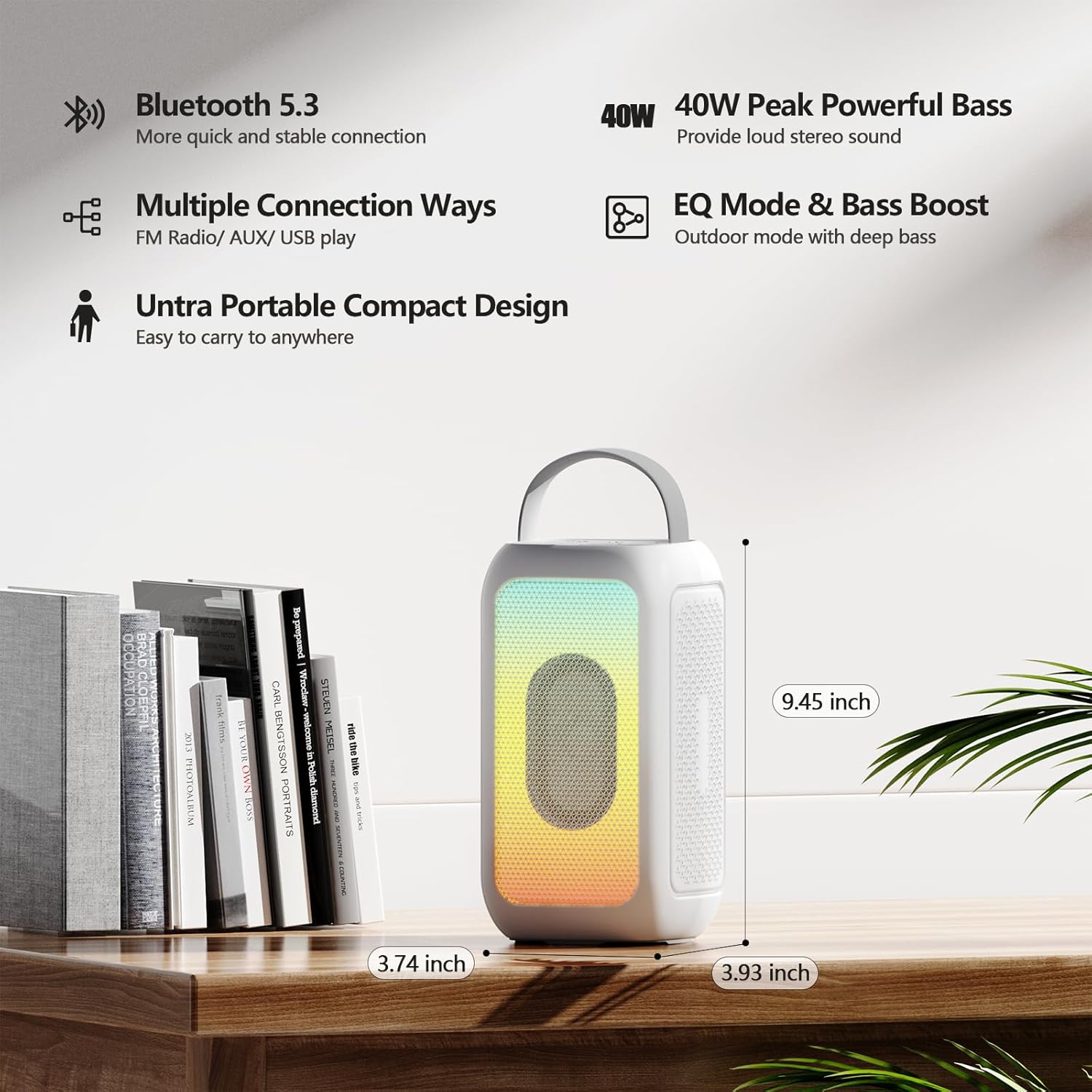
Image 8.1: Product Dimensions. This image provides a visual representation of the speaker's height, width, and depth.
9. Waranti dan Sokongan
Untuk maklumat jaminan dan sokongan pelanggan, sila rujuk dokumentasi yang disertakan dengan pembelian anda atau hubungi peruncit/pengilang secara langsung. Simpan bukti pembelian anda untuk sebarang tuntutan jaminan.
Manufacturer: MOSWS INTERNATIONAL LIMITED


