1. Pengenalan
This manual provides essential information for the proper setup, operation, and maintenance of your Azeyou 10.1-inch Android 14 Tablet, model AT1016U5. Please read this manual thoroughly before using your device to ensure optimal performance and safety.

Imej 1.1: Depan dan belakang view of the Azeyou 10.1-inch Android 14 Tablet.
2. Maklumat Keselamatan
To prevent damage to your device or injury to yourself and others, observe the following precautions:
- Jangan dedahkan tablet kepada suhu yang melampau, cahaya matahari langsung atau kelembapan yang tinggi.
- Elakkan daripada menjatuhkan atau meletakkan tablet kepada kesan yang kuat.
- Use only the charger and accessories provided or approved by Azeyou.
- Jauhkan tablet daripada air dan cecair lain.
- Jangan cuba membuka atau membaiki tablet sendiri. Hubungi khidmat pelanggan untuk mendapatkan bantuan.
- Buang tablet dan baterinya secara bertanggungjawab mengikut peraturan tempatan.
3. Kandungan Pakej
Sahkan bahawa semua item terdapat dalam pakej:
- 1x Azeyou Android 14 Tablet
- 1x TYPE C Cable
- 1x Tablet Adaptor
- 1x Manual Pengguna

Image 3.1: Contents included in the Azeyou Tablet package.
4. Produk Lebihview
Familiarize yourself with the physical components and controls of your Azeyou Tablet.
4.1. Physical Layout

Image 4.1: Diagram showing the location of ports and buttons on the Azeyou Tablet.
- Butang Kuasa/Kunci: Press to turn on/off the tablet or to lock/unlock the screen.
- Butang Kelantangan: Laraskan kelantangan audio.
- Tetapkan Semula Lubang Pin: Use a thin pin to reset the device if it becomes unresponsive.
- Port USB Jenis-C: Untuk pengecasan dan pemindahan data.
- Slot Kad Mikro SD: Insert a Micro SD card for expandable storage (up to 1TB, not included).
- kamera: Front (5MP) and Rear (8MP) cameras for photos and video calls.
- Penceramah: Dual multimedia box speakers for audio output.
4.2. Ciri-ciri Utama
- Sistem pengendalian: Android 14
- Pemproses: 2.0 GHz Octa-Core Processor (Allwinner A523)
- paparan: 10.1-inch IPS Touch Screen, 1280x800 resolution
- Ingatan: 8GB RAM (4GB physical + 4GB virtual)
- Storan: 128GB ROM, expandable up to 1TB via TF card
- Bateri: Polimer Lithium 6000mAh
- Ketersambungan: Wi-Fi 6 (802.11a/b/g/n/ac), Bluetooth 5.0
- Kamera: 5MP Depan, 8MP Belakang
- Tambahan: GMS certified, Widevine L1 support

Image 4.2: Visual representation of the tablet's core features including OS, memory, cameras, and connectivity.
5. Persediaan
5.1. Mengecas Bateri
Before first use, fully charge the tablet. Connect the provided USB Type-C cable to the tablet's charging port and the other end to the tablet adaptor. Plug the adaptor into a power outlet. The charging indicator will show the charging status. A full charge typically takes approximately 1.5 hours.
5.2. Menghidupkan/Mematikan
- Untuk Menghidupkan: Press and hold the Power/Lock button until the Azeyou logo appears on the screen.
- Untuk Mematikan: Press and hold the Power/Lock button until the power options menu appears. Select "Power off" and confirm.
- Untuk Mulakan Semula: From the power options menu, select "Restart."
5.3. Persediaan Awal
Sebaik sahaja dihidupkan buat kali pertama, ikuti arahan pada skrin untuk mengkonfigurasi tablet anda:
- Pilih bahasa anda.
- Sambung ke rangkaian Wi-Fi.
- Log masuk dengan akaun Google anda atau buat yang baharu. Ini adalah perlu untuk memuat turun apl daripada Gedung Google Play.
- Review dan terima terma dan syarat.
- Set up screen lock (PIN, pattern, or password) for security.
5.4. Memasukkan Kad SD Mikro
To expand storage, insert a Micro SD card (not included) into the Micro SD card slot. Gently push the card until it clicks into place. Ensure the tablet is powered off before inserting or removing the card.
6. Arahan Operasi
6.1. Menavigasi Android 14
Your tablet runs on Android 14, offering enhanced privacy controls and a user-friendly interface. Use touch gestures to navigate:
- Ketik: Pilih item.
- Leret: Tatal melalui skrin atau senarai.
- Cubit: Zum masuk atau keluar pada imej dan web muka surat.
- Tekan lama: Akses menu kontekstual atau alihkan ikon.
6.2. Wi-Fi dan Kesambungan Bluetooth
Access the Quick Settings panel by swiping down from the top of the screen to enable or disable Wi-Fi and Bluetooth. For detailed settings, go to Tetapan > Rangkaian & internet or Tetapan > Peranti yang disambungkan.
6.3. Memasang Aplikasi
The Google Play Store is pre-installed. Tap the Play Store icon to browse and download applications. A Google account is required for this process.
6.4. Penggunaan Kamera
Open the Camera app to take photos or record videos. The tablet features a 5MP front camera and an 8MP rear camera. Tap the screen to focus and press the shutter button to capture.

Imej 6.1: Cthamples of camera usage and dual camera setup on the Azeyou Tablet.
6.5. Display and Eye Protection
The 10.1-inch IPS display offers a 1280x800 resolution. It includes low blue light technology to reduce eye strain. Adjust display settings under Tetapan > Paparan.

Image 6.2: The 10.1-inch IPS display of the Azeyou Tablet.
6.6. Pengurusan Bateri
The 6000mAh battery provides approximately 6 hours of mixed usage. To optimize battery life, reduce screen brightness, disable Wi-Fi/Bluetooth when not in use, and close unused applications.

Image 6.3: Battery capacity and estimated usage times for the Azeyou Tablet.
7. Penyelenggaraan
7.1. Membersihkan Tablet
Use a soft, lint-free cloth to clean the screen and body of the tablet. Do not use abrasive cleaners or solvents, as they may damage the surfaces.
7.2. Kemas Kini Perisian
Periodically check for system updates to ensure your tablet has the latest features and security patches. Go to Tetapan > Sistem > Kemas kini sistem.
7.3. Pengurusan Storan
Bersihkan secara kerap yang tidak perlu files and uninstall unused apps to maintain optimal performance. You can manage storage under Tetapan > Storan.
8. Penyelesaian masalah
Jika anda menghadapi masalah dengan tablet anda, rujuk kepada penyelesaian biasa berikut:
| Masalah | Penyelesaian |
|---|---|
| Tablet tidak dihidupkan | Ensure the battery is charged. Connect the charger and wait a few minutes before attempting to power on again. If unresponsive, use a thin pin to press the Reset pinhole. |
| Skrin tidak bertindak balas | Restart the tablet by holding the Power/Lock button. If unresponsive, use the Reset pinhole. |
| Tidak dapat menyambung ke Wi-Fi | Ensure Wi-Fi is enabled in settings. Check if the router is working correctly. Try forgetting the network and reconnecting. |
| Apl ranap atau perlahan | Close background applications. Clear app cache (Settings > Apps > [App Name] > Storage & cache). Ensure sufficient storage space. Restart the tablet. |
| Bateri cepat habis | Reduce screen brightness. Disable Wi-Fi, Bluetooth, and GPS when not in use. Close unused apps. Check battery usage in Settings > Battery. |
If the problem persists, please contact Azeyou customer support for further assistance.
9. Spesifikasi
Detailed technical specifications for the Azeyou 10.1-inch Android 14 Tablet (Model AT1016U5).
| Ciri | Spesifikasi |
|---|---|
| Nombor Model | AT1016U5 |
| Sistem Operasi | Android 14 |
| Pemproses | Octa-Core (Allwinner A523), 2 GHz |
| RAM | 8 GB (4GB fizikal + 4GB maya) |
| Storan Dalaman | 128 GB |
| Storan Boleh Dikembangkan | Up to 1 TB via Micro SD card (not included) |
| Saiz Skrin | 10.1 Inci |
| Resolusi Skrin | 1280x800 IPS |
| Kamera Belakang | 8 MP |
| Kamera Depan | 5 MP |
| Kapasiti Bateri | Polimer Litium 6000 mAh |
| Purata Hayat Bateri | 6 Hours (mixed usage) |
| Kesambungan Wayarles | Wi-Fi 6 (802.11a/b/g/n/ac) |
| Bluetooth | Bluetooth 5.0 |
| Dimensi (LxWxH) | 9.5 x 6.3 x 0.32 inci |
| Berat Barang | 1.68 paun |
| warna | Kelabu |
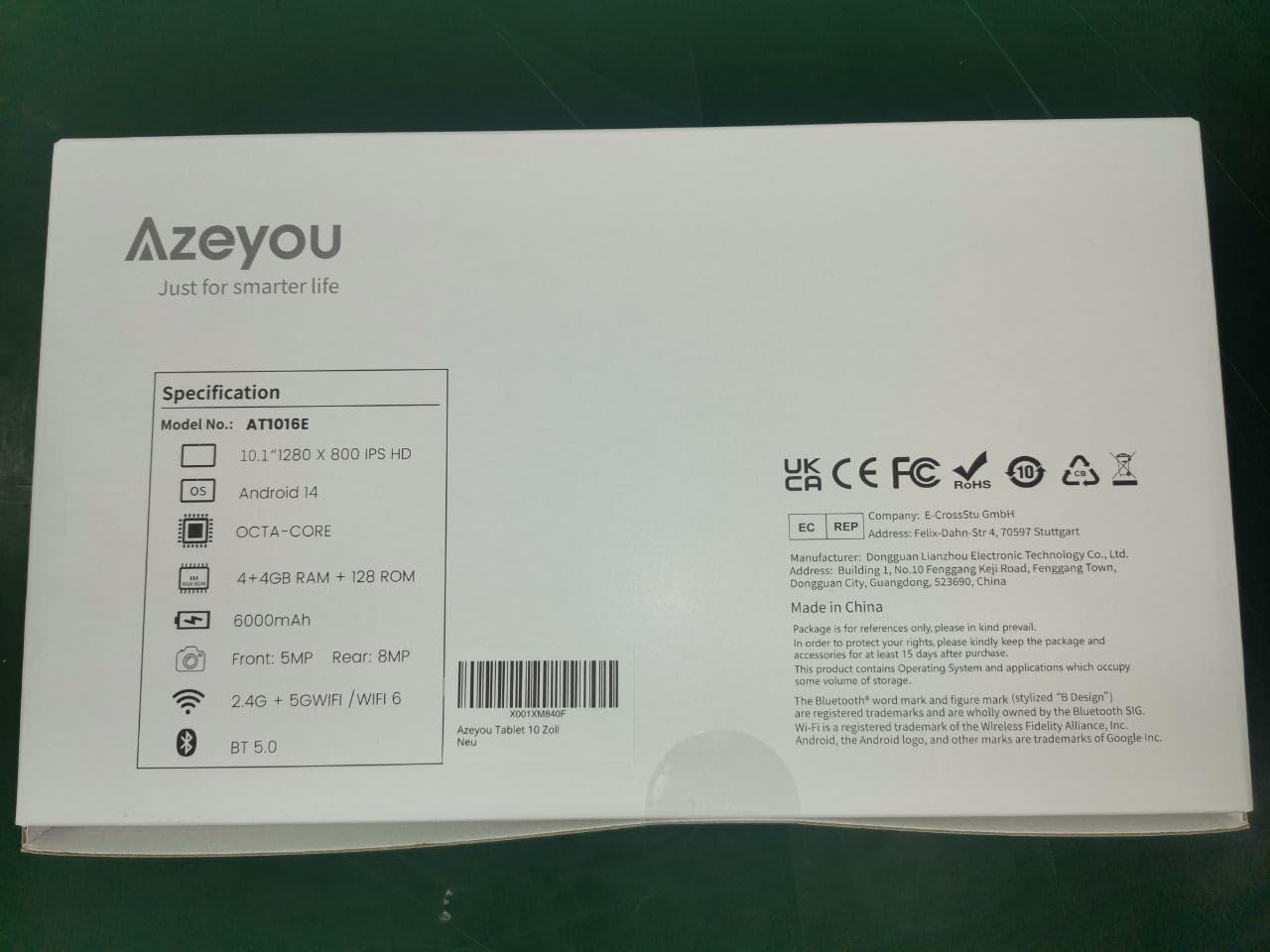
Image 9.1: Back of the product packaging displaying key specifications.
10. Waranti dan Sokongan
Your Azeyou Tablet is covered by a manufacturer's warranty. For specific warranty terms and conditions, please refer to the documentation included with your purchase or visit the official Azeyou website. For technical support, troubleshooting assistance, or warranty claims, please contact Azeyou customer service.
Anda boleh mendapatkan lebih banyak maklumat dan sokongan pada Azeyou Brand Store.


