Xtreme RGB Wireless Earbuds User Manual
Model: XBE9-0136-BLK
Brand: XTREME DIGITAL LIFESTYLE ACCESSORIES
pengenalan
The Xtreme RGB Wireless Earbuds are designed to provide a high-quality audio experience with vibrant LED RGB lighting. These true wireless Bluetooth earphones offer extended playtime, smart touch controls, and a convenient LED display on the charging case for battery status monitoring. This manual provides essential information for setup, operation, maintenance, and troubleshooting to ensure optimal performance of your earbuds.
Ciri-ciri Utama
- Vibrant LED RGB Lighting: These earbuds feature stunning LED RGB lighting effects, offering a visually appealing and customizable look.
- Jangka Hayat Bateri: Enjoy uninterrupted music and calls with up to 5 hours of playtime on a single charge. The portable charging case provides an additional 11 hours of battery life, giving you a total of 16 hours of use. The case can fully recharge the earbuds three times.
- Reliable Bluetooth Connectivity: With a robust Bluetooth connection that extends up to 33 feet, you can move freely without worrying about losing connection.
- Intuitive Smart Touch Controls: Managing your audio has never been easier with the smart touch controls. You can effortlessly play, pause, skip tracks, adjust volume, and answer or end calls with simple touch gestures.
- Convenient LED Display Charging Case: The sleek charging case features an LED display that shows the battery status of the case.
- Kawalan Bunyi: Features Hybrid Noise Cancellation for focused listening.
- Mikrofon Bersepadu: For clear call handling.
Apa yang ada dalam Kotak
The Xtreme RGB Wireless Earbuds package includes the following components:
- Xtreme RGB Wireless Earbuds (Left and Right)
- Sarung Pengecas Tanpa Wayar
- USB Charging Cable (typically included, though not explicitly listed in 'whats_in_the_box')
- Manual Pengguna (dokumen ini)

Image: Xtreme RGB Wireless Earbuds and Charging Case in retail packaging.
Persediaan
Pengecasan Awal
Before first use, fully charge the charging case and earbuds. Place the earbuds into the charging case. Connect the charging case to a power source using a USB cable. The LED display on the case will indicate the charging status and battery level.

Image: Earbuds in charging case with LED battery display.
Berpasangan Bluetooth
- Pastikan fon telinga dicas sepenuhnya.
- Buka bekas pengecas. Fon telinga akan memasuki mod berpasangan secara automatik.
- Pada peranti anda (telefon pintar, tablet, dll.), dayakan Bluetooth.
- Cari untuk "Xtreme RGB Earbuds" or similar in the list of available Bluetooth devices.
- Select the earbuds to connect. Once connected, a voice prompt will confirm successful pairing.

Image: Close-up of the Xtreme RGB Wireless Earbuds.
Arahan Operasi
Kawalan Sentuhan Pintar
The Xtreme RGB Wireless Earbuds feature intuitive touch controls on each earbud. Refer to the table below for common functions:
| Tindakan | Fungsi |
|---|---|
| Ketik Tunggal (Earbud Kiri/Kanan) | Main/Jeda Muzik, Jawab/Tamatkan Panggilan |
| Dwiketik (Earbud Kanan) | Trek Seterusnya |
| Dwiketik (Earbud Kiri) | Trek Sebelumnya |
| Tekan Lama (Earbud Kanan) | Kelantangan Naik |
| Tekan Lama (Earbud Kiri) | Kelantangan Kurang |
| Ketik Tiga Kali (Earbud Kiri/Kanan) | Aktifkan Pembantu Suara |
| Long Press (2 seconds) during incoming call | Tolak Panggilan |

Image: Earbuds in charging case, illustrating touch control areas.
Main balik Muzik
After successful pairing, open your preferred music application on your device. Use the touch controls on the earbuds to manage playback as described above.
Pengurusan Panggilan
When a call comes in, you can answer or reject it using the touch controls. During a call, use the controls to end the conversation. The integrated microphone ensures clear communication.
Pencahayaan RGB
The earbuds and charging case feature vibrant LED RGB lighting. This lighting is an aesthetic feature and typically activates when the earbuds are in use or when the case is opened/closed. Specific controls for the RGB lighting are integrated with the overall design and do not usually require separate user input for color changes, as they are color-changing LEDs.
Maklumat Bateri
The Xtreme RGB Wireless Earbuds provide up to 5 hours of continuous playtime on a single charge. The portable charging case extends this to a total of 16 hours of use, providing an additional 11 hours of power. The case can fully recharge the earbuds three times before needing its own recharge.
The LED display on the charging case shows the current battery status of the case, allowing you to monitor power levels easily.
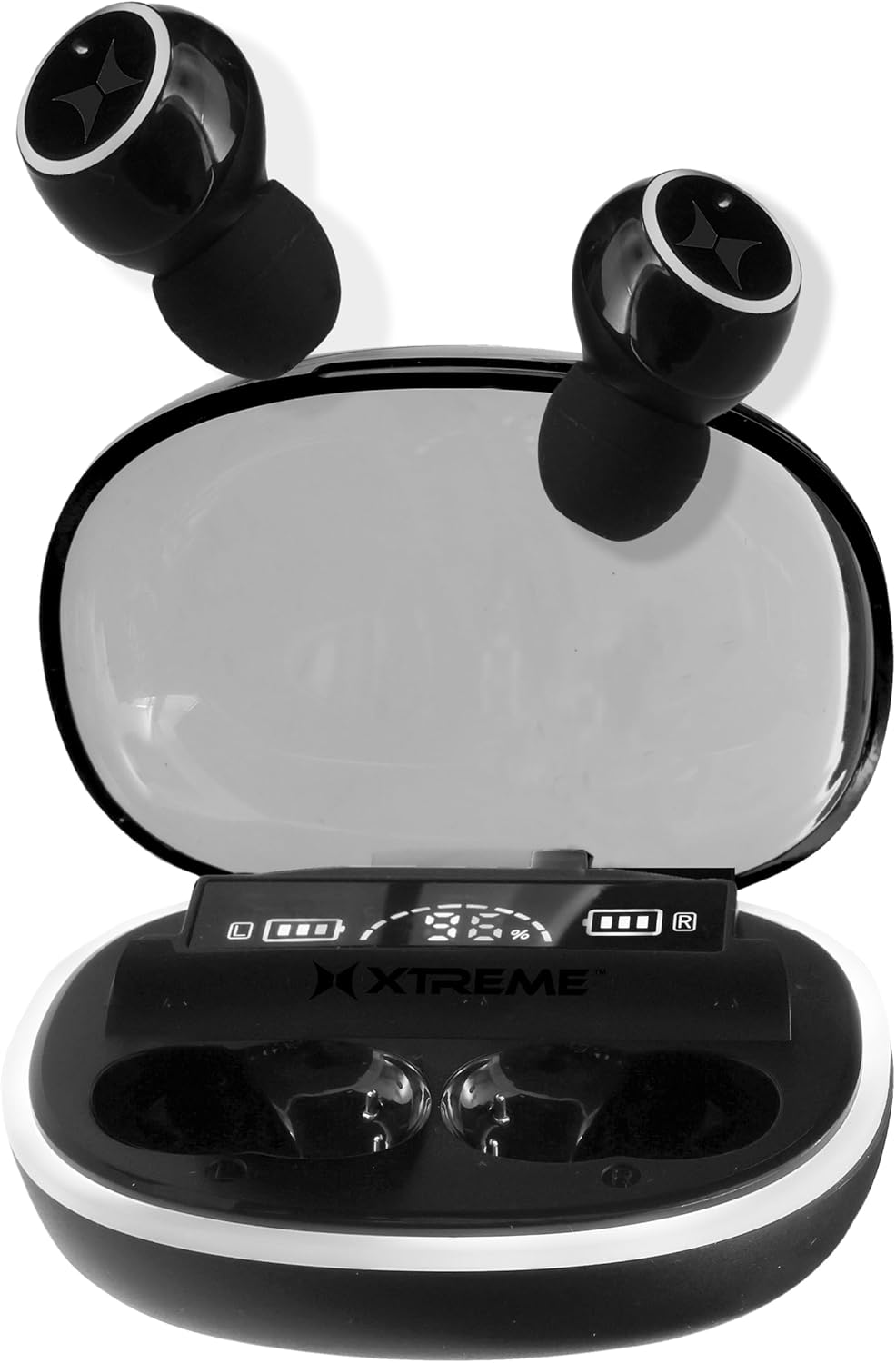
Image: Charging case with earbuds, illustrating compact design and LED display.
Penyelenggaraan
Pembersihan
Untuk mengekalkan prestasi dan kebersihan yang optimum, bersihkan fon telinga dan bekas pengecas anda secara berkala:
- Gunakan kain lembut, kering dan tidak berbulu untuk mengelap fon telinga dan bekas pengecas.
- For ear tips, gently remove them and clean with a mild soap solution if necessary, then rinse and dry thoroughly before reattaching.
- Avoid using abrasive materials, alcohol, or chemical cleaners, as these may damage the product.
- Pastikan kanta pengecas pada kedua-dua fon telinga dan sarung bersih dan bebas daripada serpihan.
Penyimpanan
When not in use, store the earbuds in their charging case to protect them from dust, damage, and to keep them charged. Store the case in a cool, dry place away from direct sunlight and extreme temperatures.
Menyelesaikan masalah
If you encounter any issues with your Xtreme RGB Wireless Earbuds, please refer to the following common solutions:
- Fon telinga tidak berpasangan: Ensure both earbuds are in the charging case, then open the lid to activate pairing mode. Check your device's Bluetooth settings and forget previous connections if necessary. Try restarting your device.
- Tiada bunyi dari satu fon telinga: Place both earbuds back into the charging case, close the lid, wait a few seconds, then open it again. This often re-syncs the earbuds. Ensure both earbuds are charged.
- Sarung pengecas tidak dicas: Verify the USB cable is securely connected to both the case and the power source. Try a different USB cable or power adapter.
- Kelantangan rendah atau kualiti bunyi yang lemah: Ensure the earbuds are properly seated in your ears. Clean any earwax or debris from the ear tips and speaker mesh. Adjust the volume on both your device and the earbuds.
- Sambungan terputus-putus: Ensure you are within the 33-foot Bluetooth range of your device. Avoid obstacles that may interfere with the signal. Reduce the number of active Bluetooth devices nearby.
Spesifikasi
| Ciri | Perincian |
|---|---|
| Nama Model | XBE9-0136-BLK |
| Teknologi Ketersambungan | Tanpa Wayar, Bluetooth |
| Teknologi Komunikasi Tanpa Wayar | Bluetooth |
| Komponen yang Disertakan | Sarung Pengecas Tanpa Wayar |
| bahan | plastik |
| Kegunaan Khusus Untuk Produk | Exercising, Music, Gaming, Travel |
| Kegunaan Disyorkan Untuk Produk | Running, Exercising, Cycling, Calling, Gaming, Music, Travel |
| Peranti Serasi | Peranti berdaya Bluetooth |
| Jenis Kawalan | Kawalan Media |
| Kaedah Kawalan | Sentuh |
| Bilangan Item | 3 |
| Hayat Bateri (Earbud) | 5 Jam |
| Jenis Pemacu Audio | Pemandu Dinamik |
| Julat Bluetooth | 33 Kaki |
| Versi Bluetooth | 5.0 |
| Purata Hayat Bateri Sarung Pembawa | 11 Hours (additional playtime) |
| Kapasiti Bateri Sarung Tangan | 11 Hours (additional playtime) |
| Warna Sarung Tangan | RGB |
| Bentuk alat dengar | Petua Bulat |
| UPC | 805106236960 |
| Pengeluar | Xtreme |
| Dimensi Pakej | 7.4 x 4.53 x 1.54 inci |
| Berat Barang | 6.7 auns |
| ASIN | B0DC85QRHS |
| Penempatan Telinga | Di Telinga |
| Faktor Bentuk | Di Telinga |
| Kawalan Bunyi | Pembatalan Bunyi Hibrid |
Video Produk Rasmi
Video: Tamatview of the Xtreme RGB Wireless Earbuds, highlighting key features and design elements.
Waranti dan Sokongan
This product comes with a standard manufacturer's warranty. For detailed warranty information, technical support, or to inquire about replacement parts, please visit the official XTREME DIGITAL LIFESTYLE ACCESSORIES store on Amazon or contact their customer service directly.
Kedai Jenama Rasmi: XTREME DIGITAL LIFESTYLE ACCESSORIES Store


