1. Pengenalan
This manual provides detailed instructions for the installation, operation, and maintenance of your EMPIRE GAMING CL-242 ARGB PC Gaming Case. Please read this manual thoroughly before beginning installation to ensure proper setup and safe use of your new PC case. Retain this manual for future reference.
2. Maklumat Keselamatan
Patuhi langkah berjaga-jaga keselamatan berikut semasa pemasangan dan pengendalian:
- Sentiasa putuskan sambungan bekalan kuasa daripada soket dinding sebelum memasang atau menanggalkan sebarang komponen.
- Pakai tali pergelangan tangan anti-statik untuk mengelakkan kerosakan nyahcas elektrostatik (ESD) pada komponen.
- Handle components carefully to avoid physical damage.
- Ensure all cables are properly routed and secured to prevent interference with fans or other moving parts.
- Do not block ventilation openings on the case.
- Jauhkan bekas daripada cecair dan kelembapan berlebihan.
3. Kandungan Pakej
Sahkan bahawa semua item terdapat dalam pakej anda:
- EMPIRE GAMING CL-242 PC Gaming Case (White)
- 7 x Kipas ARGB 120mm (prapasang)
- ARGB Controller Hub
- Accessory Box (screws, cable ties, standoffs)
- Manual Pengguna (dokumen ini)
4. Produk Lebihview
The EMPIRE GAMING CL-242 is a mid-tower PC gaming case designed for optimal cooling and aesthetic appeal. It features tempered glass panels and pre-installed ARGB fans.
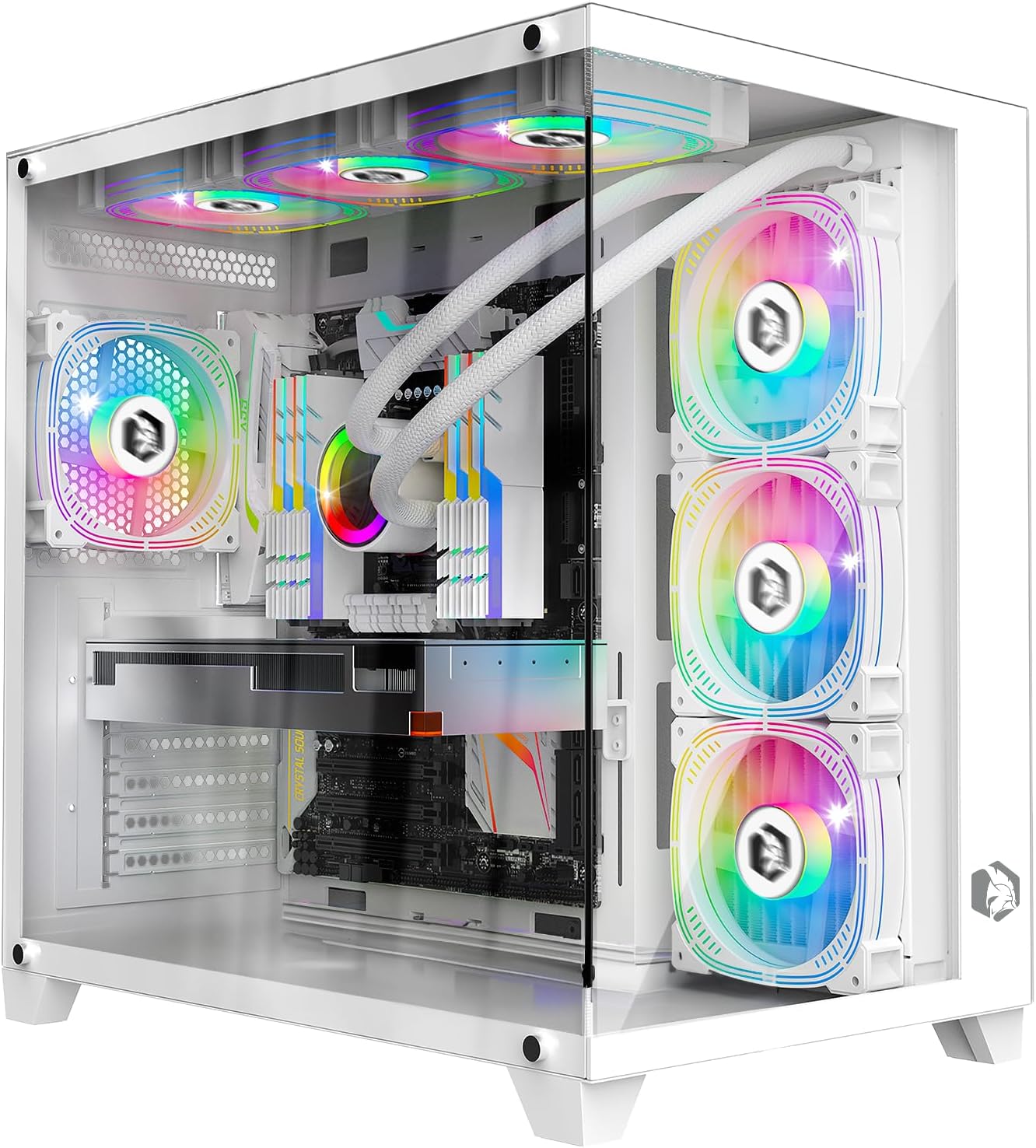
Imej: Bahagian hadapan view of the EMPIRE GAMING CL-242 PC Gaming Case, showcasing its tempered glass panels and pre-installed ARGB fans.

Imej: Selesaiview of the EMPIRE GAMING CL-242 case, highlighting key features such as fan support, RGB, storage, and compatibility with icons.
Pelabuhan I / O Depan
The top panel of the case provides convenient access to essential ports and controls:
- 1 x Port USB 3.0
- 2 x Port USB 2.0
- HD Audio Jacks (Headphone/Microphone)
- LED/Reset Button (for ARGB control or system reset)
- Butang Kuasa
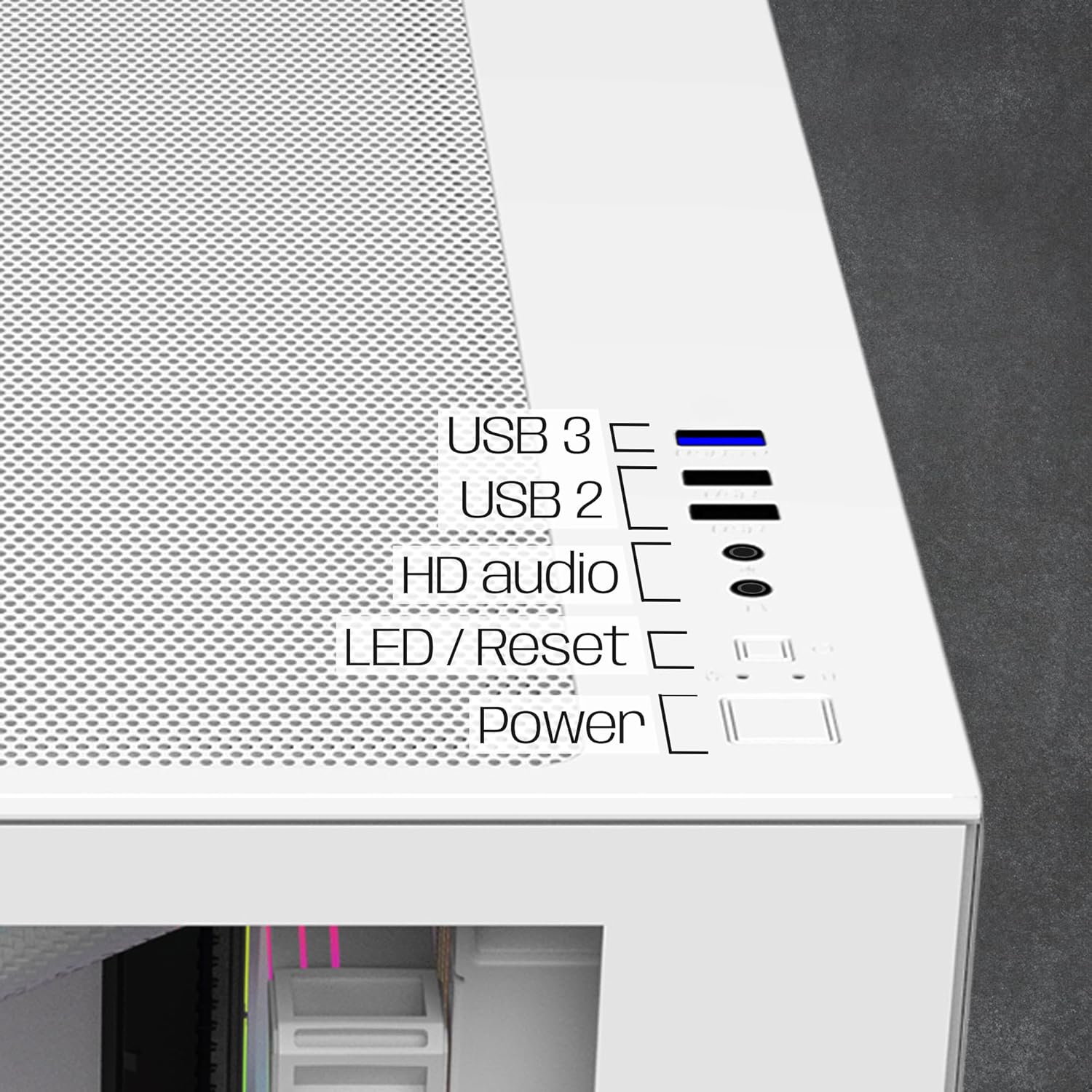
Imej: Jarak dekat view of the top I/O panel, indicating the USB 3.0, USB 2.0, HD Audio, LED/Reset, and Power buttons.
5. Arahan Persediaan
Follow these steps to install your PC components into the EMPIRE GAMING CL-242 case.
5.1. Menyediakan Kes
- Carefully remove the tempered glass side panels. Typically, these are secured with thumbscrews at the rear of the case.
- Lay the case on its side on a flat, stable surface.
5.2. Pemasangan Papan Induk
The CL-242 supports ATX, Micro-ATX, and ITX motherboards.
- Pasang pelindung I/O (jika belum dipasang pada papan induk anda) ke dalam bukaan belakang casing.
- Ensure the correct standoffs are installed for your motherboard form factor. Adjust or add standoffs as needed using the included accessories.
- Letakkan papan induk anda dengan berhati-hati pada penyangga, selaraskan lubang skru.
- Secure the motherboard with the appropriate screws. Do not overtighten.
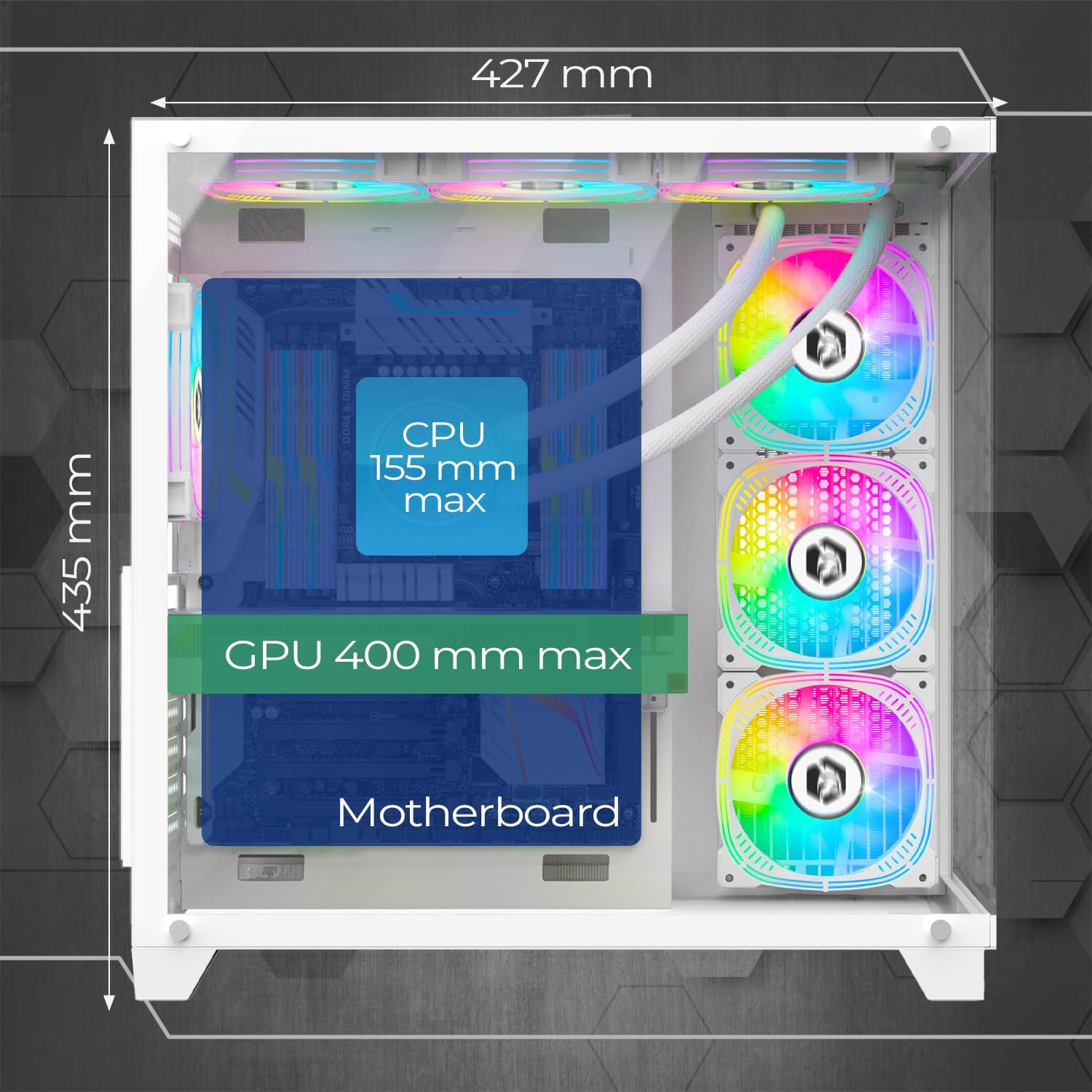
Image: Diagram illustrating the maximum CPU cooler height (155mm) and GPU length (400mm) compatibility within the case.
5.3. Pemasangan Peranti Storan
The case provides 2 dedicated slots for HDDs and 1 slot for an SSD.
- Locate the drive bays/mounts for 3.5" HDDs and 2.5" SSDs. These are typically located behind the motherboard tray or in a dedicated drive cage.
- Mount your storage devices using the provided screws.
5.4. Pemasangan Unit Bekalan Kuasa (PSU).
The CL-242 supports a bottom-mounted PSU.
- Slide your PSU into the designated compartment at the bottom rear of the case.
- Secure the PSU to the case with screws from the rear.
- Route the necessary power cables through the cable management cutouts to reach your motherboard and components.
5.5. Pemasangan Kad Grafik (GPU).
Sarung ini menyokong kad grafik sehingga 400mm panjang.
- Tanggalkan penutup slot PCIe yang diperlukan dari belakang kes itu.
- Insert your graphics card into the appropriate PCIe slot on your motherboard until it clicks into place.
- Lindungi kad grafik pada bekas dengan skru.
5.6. Fan and ARGB Controller Connection
The case comes with 7 pre-installed 120mm ARGB fans and an ARGB controller hub.

Image: Illustration of the seven 120mm ARGB fans and their 3-pin 5V connectors, highlighting the ARGB connectivity.

Image: Diagram of the ARGB controller hub, showing connection points for fans, power, reset button, and data synchronization.
- Ensure all 7 fans are connected to the ARGB controller hub. The fans use 3-pin 5V ARGB connectors.
- Connect the ARGB controller hub to your power supply via a SATA power connector.
- For motherboard synchronization (MB Sync), connect the data cable from the ARGB controller hub to a compatible 3-pin 5V ARGB header on your motherboard. Nota: Do not connect to a 4-pin 12V RGB header, as this can damage the LEDs.
- Connect the case's front panel LED/Reset button cable to the "Reset" port on the ARGB controller hub to cycle through ARGB effects.
5.7. Pengurusan Kabel
Gunakan potongan pengurusan kabel dan titik pengikat di belakang dulang papan induk untuk menghalakan dan mengikat kabel. Ini meningkatkan aliran udara dan estetika.
5.8. Watercooling Installation (Optional)
The case supports watercooling radiators up to 360mm.
- Identify suitable mounting locations for your radiator (e.g., top, front, or side).
- Mount the radiator and its fans according to the watercooling system's instructions.
6. Arahan Operasi
6.1. Menghidupkan
- Ensure all components are correctly installed and all power cables are connected.
- Sambungkan monitor, papan kekunci dan tetikus anda.
- Plug the power cable into your PSU and then into a wall outlet.
- Flip the power switch on the PSU to the "ON" position.
- Press the Power button on the top panel of the case to start your computer.
6.2. Kawalan Pencahayaan ARGB
The ARGB lighting of the pre-installed fans can be controlled in two ways:
- Via Case Button: If the LED/Reset button is connected to the ARGB controller hub, press it to cycle through various pre-programmed ARGB lighting effects.
- Via Motherboard Software (MB Sync): If the ARGB controller hub is connected to a compatible 3-pin 5V ARGB header on your motherboard, you can control the lighting effects using your motherboard's RGB software (e.g., ASUS Aura Sync, MSI Mystic Light Sync, Gigabyte RGB Fusion, ASRock Polychrome Sync). This allows for synchronized lighting across all compatible components.
7. Penyelenggaraan
Penyelenggaraan tetap membantu memastikan prestasi optimum dan jangka hayat komponen PC anda.
7.1. Pembersihan Penapis Habuk
The CL-242 case includes dust filters to prevent dust buildup inside your system. Regularly clean these filters:
- Matikan komputer anda dan putuskan sambungannya daripada salur keluar kuasa.
- Locate and remove the dust filters (e.g., top, bottom, front).
- Clean the filters using compressed air, a soft brush, or by rinsing them with water (ensure they are completely dry before reinstallation).
- Reinstall the dust filters.

Image: Diagram illustrating the airflow path within the EMPIRE GAMING CL-242 case, showing fresh air intake and hot air exhaust for efficient cooling.
7.2. Pembersihan Am
- Use a microfiber cloth to wipe down the exterior surfaces, including the tempered glass panels.
- For stubborn smudges on glass, use a mild glass cleaner applied to the cloth (not directly to the glass).
- Use compressed air to clear dust from internal components and fan blades periodically.
8. Penyelesaian masalah
If you encounter issues with your EMPIRE GAMING CL-242 case, refer to the following common problems and solutions:
| Masalah | Kemungkinan Punca | Penyelesaian |
|---|---|---|
| PC tidak dihidupkan. | Sambungan kuasa longgar, PSU rosak, isu penyambung panel hadapan. |
|
| Kipas tidak berputar atau lampu ARGB tidak berfungsi. | Loose fan/ARGB connections, incorrect ARGB header, faulty controller. |
|
| Aliran udara yang lemah atau terlalu panas. | Blocked dust filters, incorrect fan orientation, poor cable management. |
|
9. Spesifikasi Teknikal
| Nama Model | CL-242 (OE-CA-F2402W) |
| Jenama | EMPIRE GAMING |
| Jenis Kes | Mid Tower |
| warna | putih |
| bahan | Logam, Kaca Tempered |
| Dimensi (L x W x H) | 427 x 280 x 435 mm |
| Berat badan | 7 Kilogram |
| Keserasian Papan Induk | ATX, Mikro-ATX, ITX |
| Peminat prapasang | Kipas ARGB 7 x 120mm |
| Kawalan ARGB | Integrated HUB controller (3-pin 5V compatible), MB Sync |
| Sokongan Radiator | Sehingga 360mm |
| Kelegaan Penyejuk CPU | Max 155mm |
| Pembersihan Panjang GPU | Max 400mm |
| Drive Bays | 2 x 3.5" HDD, 1 x 2.5" SSD |
| Pelabuhan I / O Depan | 1 x USB 3.0, 2 x USB 2.0, HD Audio, LED/Reset Button, Power Button |
| Ciri Khas | LED control button, Dust filters, Integrated fan, RGB lighting |
10. Maklumat Waranti
The EMPIRE GAMING CL-242 PC Gaming Case comes with a Waranti pengilang selama 2 tahun. This warranty covers defects in materials and workmanship under normal use. It does not cover damage caused by improper installation, accident, abuse, misuse, natural disaster, or unauthorized modification.
Sila simpan bukti pembelian anda untuk tuntutan waranti.
11. Sokongan Pelanggan
For technical assistance, troubleshooting beyond this manual, or warranty inquiries, please contact EMPIRE GAMING customer support through their official webtapak atau peruncit tempat anda membeli produk tersebut.
When contacting support, please have your product model (CL-242 or OE-CA-F2402W) and proof of purchase readily available.