1. Maklumat Keselamatan
Sila baca semua arahan dengan teliti sebelum pemasangan dan penggunaan. Simpan manual ini untuk rujukan masa hadapan.
- Had Berat: Jangan melebihi berat maksimum yang disyorkan iaitu 264 paun (120 kg).
- Kestabilan: Ensure the chair is on a stable, level surface before use. When using the reclining or tilting features, ensure proper balance to prevent tipping.
- Komponen Elektrik: The massage and heating functions are electrical. Do not expose the remote control or power cord to water or excessive moisture. Disconnect from power when not in use or before cleaning.
- Kanak-kanak dan Haiwan Kesayangan: Keep children and pets away from the chair's moving parts and electrical components.
- Perhimpunan: Follow all assembly instructions precisely. Do not use power tools for assembly unless specifically instructed, as this may damage components.
- Pemeriksaan: Regularly inspect all bolts and screws to ensure they are tight. Re-tighten if necessary.
- Penggunaan yang Dimaksudkan: This chair is designed for indoor office use. Do not use it for purposes other than its intended design.
2. Kandungan Pakej
Sahkan bahawa semua komponen hadir sebelum memulakan pemasangan. Jika mana-mana bahagian yang hilang atau rosak, hubungi sokongan pelanggan.
- Backrest
- Kusyen Tempat Duduk
- Tempat letak tangan (2)
- Silinder Angkat Gas
- Pangkalan (5 bintang)
- Kastor (5)
- Plat Mekanisme
- Remote Control with Power Adapter
- Pek Perkakasan (skru, pencuci, sepana Allen)
- Manual Arahan
3. Arahan Perhimpunan
Refer to the included manual for detailed step-by-step assembly. The following provides a general overview.
- Pasang Kastor ke Pangkalan: Masukkan lima roda pemukul ke dalam lubang di hujung setiap kaki tapak 5 bintang. Tolak dengan kuat sehingga ia klik pada tempatnya.
- Masukkan Pengangkat Gas: Letakkan silinder pengangkat gas ke dalam lubang tengah tapak yang dipasang.
- Pasang Plat Mekanisme pada Tempat Duduk: Pasangkan plat mekanisme pada bahagian bawah kusyen tempat duduk menggunakan skru yang disediakan. Pastikan bahagian hadapan mekanisme menghadap bahagian hadapan tempat duduk.
- Pasang tempat letak tangan: Fasten the armrests to the sides of the seat cushion and the backrest using the designated screws. Ensure they are oriented correctly.
- Sambung Sandaran ke Tempat Duduk: Align the backrest with the seat and secure it using the remaining screws.
- Place Assembled Seat onto Gas Lift: Letakkan tempat duduk dan penyandar yang telah dipasang dengan berhati-hati pada silinder pengangkat gas, pastikan ia berada di tengah dan stabil.
- Sambungkan Kuasa: Plug the remote control cable into the chair's port and connect the power adapter to a suitable electrical outlet.

4. Arahan Operasi
4.1. Pelarasan Ketinggian
To adjust the seat height, locate the lever on the right side under the seat. While seated, pull the lever up to lower the seat. To raise the seat, stand up slightly and pull the lever up. Release the lever to lock the height.
4.2. Fungsi Berbaring
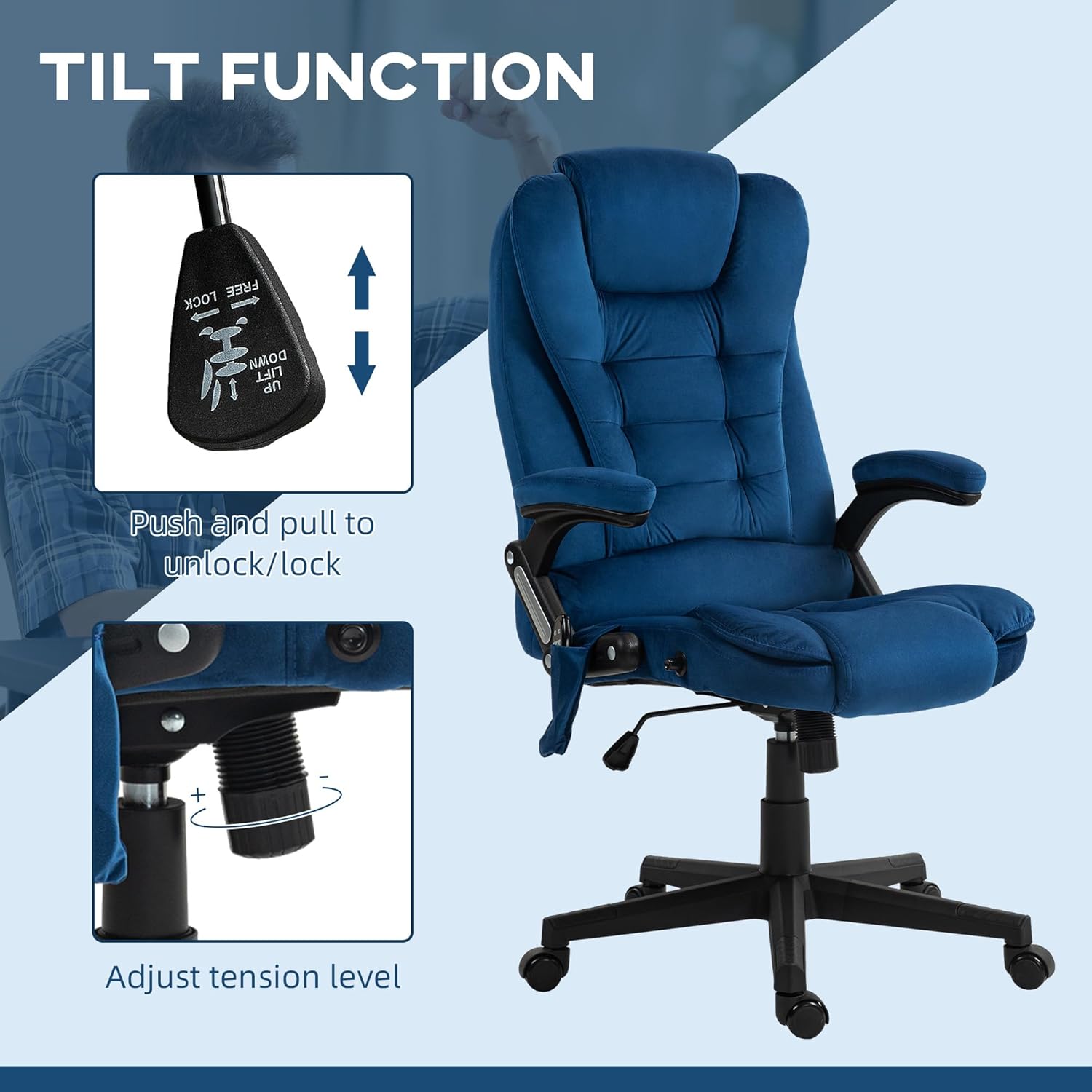
The chair features a 125° reclining backrest. To recline, pull the lever on the left side of the chair upwards and lean back to your desired angle. Release the lever to lock the backrest in position. To return to an upright position, pull the lever and lean forward.

4.3. Tilt Function
To enable the tilt function, pull the same lever used for height adjustment (on the right side) outwards. The chair will then allow for a rocking motion. Push the lever inwards to lock the chair in an upright position. The tension of the tilt can be adjusted by rotating the round knob located under the front of the seat.

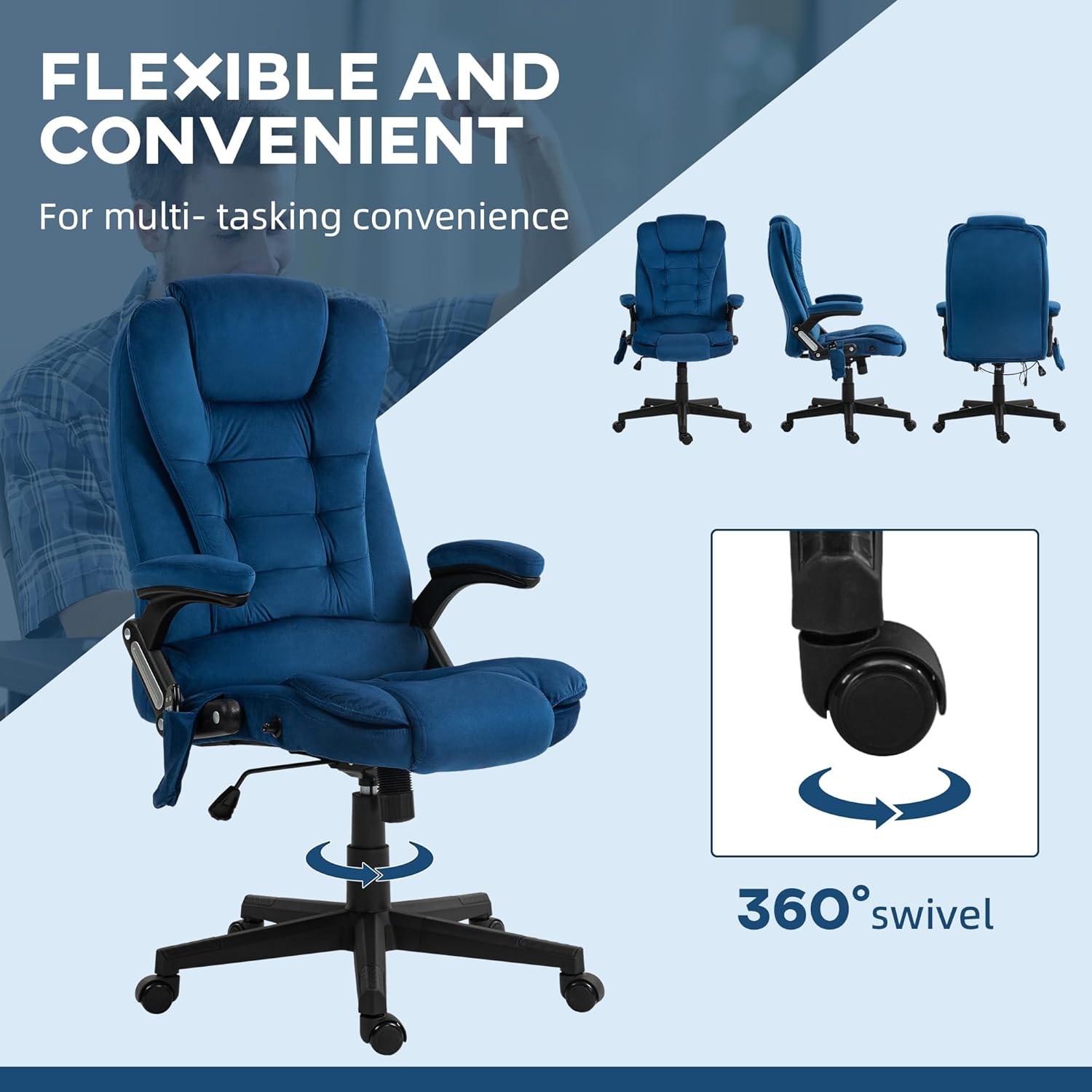
4.4. Fungsi Pusing
The chair is equipped with a 360° swivel function, allowing for easy rotation without moving the base.
4.5. Vibration Massage and Heat Function
The chair features a six-point vibration massage system and a lumbar heating element, controlled by the included remote. The remote can be stored in the side pocket of the chair.
- Hidupkan/Mati Kuasa: Tekan butang kuasa pada alat kawalan jauh untuk mengaktifkan atau menyahaktifkan fungsi urutan dan haba.
- Mod Urut: Select from various massage modes (M1, M2, M3) to customize the vibration pattern.
- Intensiti: Adjust the vibration intensity (Low, Medium, High) to your preference.
- Target Zones: Choose specific areas for massage, such as the back, lumbar, or thighs.
- Fungsi Haba: Activate the heat function for soothing warmth in the lumbar area.
- Pemasa: Set a timer for the duration of the massage session.

5. Penyelenggaraan
- Pembersihan: Lap bersih dengan iklanamp cloth. For velvet-feel fabric, use a soft brush or vacuum cleaner to remove dust and debris. Avoid harsh chemicals or abrasive cleaners.
- Pemeriksaan Berkala: Periodically check all screws and bolts to ensure they are securely tightened. Re-tighten as needed to maintain stability and safety.
- Storan: Simpan kerusi di tempat yang kering dan sejuk, jauh daripada cahaya matahari langsung dan suhu yang melampau.
6. Penyelesaian masalah
| Masalah | Kemungkinan Punca | Penyelesaian |
|---|---|---|
| Kerusi tidak boleh melaraskan ketinggian. | Gas lift lever not engaged or gas lift cylinder faulty. | Ensure the lever is fully pulled up. If the issue persists, the gas lift may need replacement. |
| Fungsi urutan/haba tidak berfungsi. | Power cord disconnected, remote control battery low (if applicable), or internal wiring issue. | Check if the power adapter is securely plugged into the chair and the wall outlet. Ensure the remote control is functioning. If problems continue, contact customer support. |
| Kerusi berasa tidak stabil atau goyah. | Skru atau roda longgar yang tidak dimasukkan sepenuhnya. | Inspect and re-tighten all assembly screws. Ensure all casters are firmly seated in the base. |
| Squeaking noise during movement. | Sambungan longgar atau geseran antara bahagian. | Tighten all screws. Apply a small amount of silicone lubricant to moving parts if necessary, avoiding contact with fabric. |
7. Spesifikasi
| Jenama | HOMCOM |
| Nama Model | Kerusi Pejabat Urut |
| Nombor Model | 921-171V86DB |
| warna | Drak Blue |
| bahan | Velvet (100% polyester), Foam fill |
| Dimensi Produk (Keseluruhan) | 28"D x 25.5"W x 43.25"-47.25"H |
| Dimensi Tempat Duduk | 20.5"W x 19.75"D x 17.75"-21.75"H (adjustable height) |
| Ketinggian Sandaran | 28 Inches (interior) |
| Ketinggian Lengan | 29.5 Inci |
| Cadangan Berat Maksimum | 264 paun (120 kg) |
| Berat Barang | 39.4 paun (17.87 kg) |
| Ciri Khas | 6-Point Vibration Massage, Lumbar Heat, Adjustable Height, Reclining Backrest (125°), Tilt Function, 360° Swivel, Padded Armrests, Remote Control |
| UPC | 196393041918 |

8. Waranti & Sokongan
Untuk maklumat jaminan, sokongan teknikal atau untuk memesan alat ganti, sila hubungi khidmat pelanggan HOMCOM. Rujuk dokumentasi pembelian anda untuk terma jaminan dan butiran perhubungan tertentu.
Pengeluar: Aosom LLC
Webtapak: www.aosom.com (Pengilang am website, specific product support may vary)


