pengenalan
The Wireless Express Sing-Along Bling Karaoke Microphone and Stereo Speaker is a versatile 2-in-1 device designed for entertainment. It combines a microphone with a Bluetooth speaker, allowing users to sing along to music from various compatible devices. This manual provides essential information for setup, operation, and maintenance of your device.
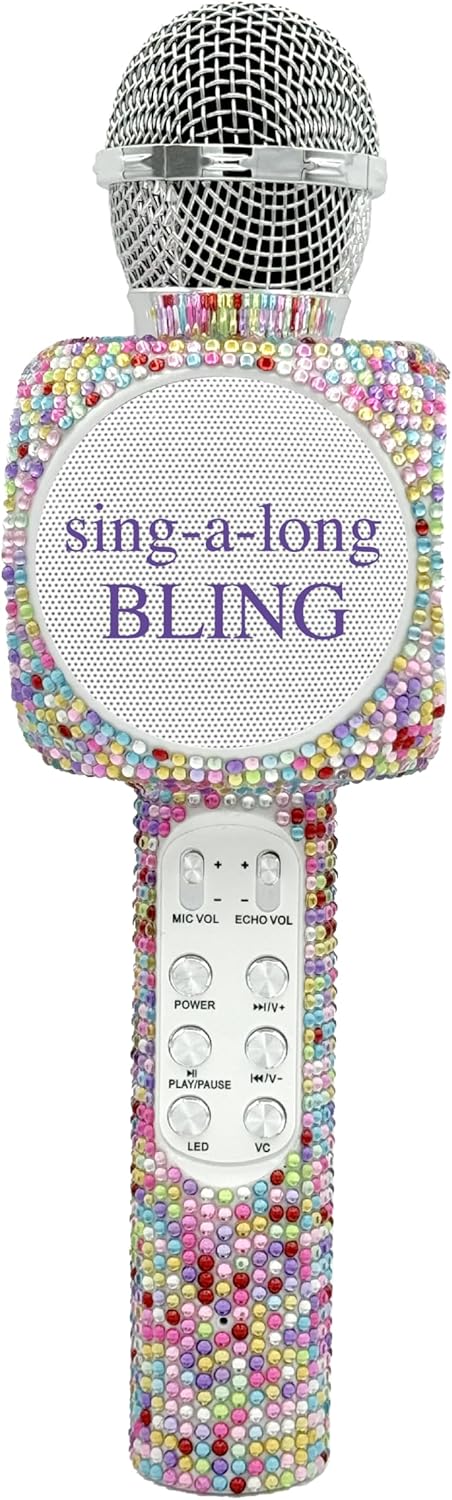
The Sing-Along Bling Karaoke Microphone, featuring its unique Confetti Bling design.
Ciri-ciri Utama
- Reka bentuk 2-dalam-1: Combines a microphone and a Bluetooth stereo speaker for integrated audio and vocal performance.
- Kesambungan Bluetooth: Easily connects wirelessly to smartphones, tablets, and computers (Android & Apple compatible) for streaming music.
- Lampu LED Dinamik: Features dazzling LED lights that enhance the karaoke experience.
- Kesan Bunyi: Includes echo effects and voice changers for varied vocal styles.
- Kawalan Bersepadu: Offers convenient buttons for volume control, track skipping (previous/next), and recording.
- Reka Bentuk Mudah Alih: Compact and lightweight, suitable for both indoor and outdoor use.
- Bateri boleh dicas semula: Powered by a battery for wireless operation.
- Slot Kad SD: Allows for playback from an SD card.
- Jack fon telinga: Provides an option for private listening or monitoring.

Berakhirview of the microphone's features, highlighting its Bluetooth capability, voice changer, LED lights, portability, and rechargeable battery.
Panduan Persediaan
1. Mengecas Mikrofon
- Locate the Micro USB charging port on the microphone.
- Connect the provided charging cable to the microphone and a compatible USB power source (e.g., computer, USB wall adapter).
- The LED indicator will show charging status (refer to product-specific LED behavior for details, usually red for charging, off/blue for full).
- Berikan masa yang mencukupi untuk cas penuh sebelum penggunaan pertama.
2. Menghidupkan/Mematikan
- To power on, press and hold the Power button (usually marked with a power symbol) until the device activates and the LED lights illuminate.
- To power off, press and hold the Power button again until the device shuts down.
3. Berpasangan Bluetooth
- Ensure the microphone is powered on and in pairing mode (indicated by a flashing LED light, often blue).
- Pada telefon pintar, tablet atau komputer anda, dayakan Bluetooth dan cari peranti yang tersedia.
- Select "WE-BLING-MIC" or a similar device name from the list.
- Once paired, the microphone will usually emit an audible confirmation and the LED light will become solid.
Arahan Operasi
1. Kawalan Asas
- Kawalan Kelantangan: Use the "VOL+" and "VOL-" buttons to adjust the overall speaker volume.
- Kelantangan Mikrofon: Use the "MIC VOL" slider or buttons to adjust your vocal volume.
- Kesan Gema: Use the "ECHO VOL" slider or buttons to add or reduce echo to your voice.
- Main Balik Muzik:
- Main/Jeda: Press the "PLAY/PAUSE" button.
- Trek Sebelumnya: Press the "PREV" button.
- Lagu Seterusnya: Press the "NEXT" button.
- Lampu LED: Press the "LED" button to cycle through different light modes or turn them off.
- Penukar Suara: Press the "VC" button to activate and cycle through various voice changing effects.
2. Singing with Music
Once connected via Bluetooth, open your preferred karaoke app or music streaming service on your device. Play a song, and the music will stream through the microphone's speaker. You can then sing into the microphone, adjusting your vocal volume and echo as desired.
3. Recording Your Performance
The microphone supports recording. Connect an audio cable from the microphone's audio output to your recording device (e.g., smartphone with a recording app). Alternatively, some karaoke apps may allow direct recording through the Bluetooth connection.
4. Using the SD Card Slot
Insert a compatible SD card loaded with MP3 files into the designated slot. The microphone will automatically detect and begin playing music from the SD card. Use the music playback controls to manage tracks.
Demonstration of a similar wireless microphone's sound quality and features in a car environment, including FM radio connectivity and various sound modes. This video is provided by a seller and offers insights into potential usage scenarios and audio performance.
Penyelenggaraan
- Pembersihan: Use a soft, dry cloth to clean the exterior of the microphone. Do not use harsh chemicals or abrasive cleaners.
- Storan: Store the microphone in a cool, dry place away from direct sunlight and extreme temperatures. If a carrying case is provided, utilize it for protection during storage and transport.
- Penjagaan Bateri: Untuk memanjangkan hayat bateri, elakkan daripada menyahcas sepenuhnya bateri dengan kerap. Cas peranti dengan kerap, walaupun tidak digunakan untuk tempoh yang lama.
Menyelesaikan masalah
| Masalah | Penyelesaian |
|---|---|
| Mikrofon tidak dihidupkan. | Pastikan bateri telah dicas. Sambungkan kabel pengecas dan cuba lagi. |
| Tidak boleh berpasangan melalui Bluetooth. | Make sure the microphone is in pairing mode (flashing LED). Ensure Bluetooth is enabled on your device and it's within range. Try restarting both devices. |
| Tiada suara dari pembesar suara. | Check the volume levels on both the microphone and your connected device. Ensure the microphone is properly paired. |
| Echo/Voice Changer not working. | Ensure the "ECHO VOL" or "VC" functions are activated and adjusted to an audible level. |
Spesifikasi
| Ciri | Perincian |
|---|---|
| Jenama | Ekspres Tanpa Wayar |
| Nombor Model | WE-BLING-MIC |
| Teknologi Ketersambungan | Bluetooth |
| Sumber Kuasa | Dikuasakan Bateri |
| bahan | Plastic And Metal |
| Platform Perkakasan | Karaoke Machine, Smartphone, Tablet |
| Berat Barang | 1.46 paun |
| Dimensi Pakej | 15.04 x 5.71 x 3.7 inci |
| Corak Kutub | Satu arah |
| Faktor Bentuk Mikrofon | pegang tangan |
| Ciri Khas | Kawalan Kelantangan |
| Jenis Penyambung | USB mikro |
Apa yang ada dalam Kotak
- Mikrofon Karaoke Bluetooth Bling-Along
- Kabel Pengecasan
Waranti dan Sokongan
For warranty information or technical support, please refer to the product packaging or contact Wireless Express customer service directly. Contact details can typically be found on the manufacturer's official webtapak atau dalam dokumentasi produk.


